USA
USA UAE
UAESmall Business
Designed for startups and growing businesses
See More


Brand: Grokability
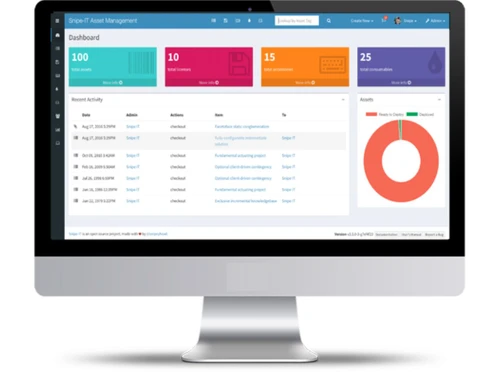
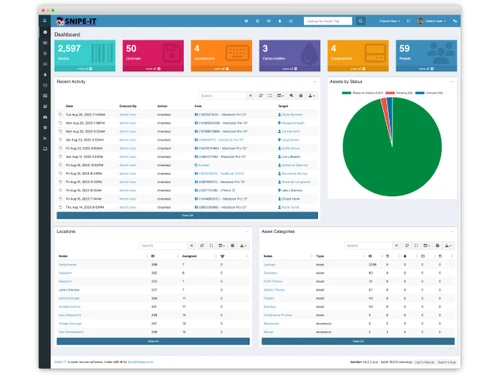
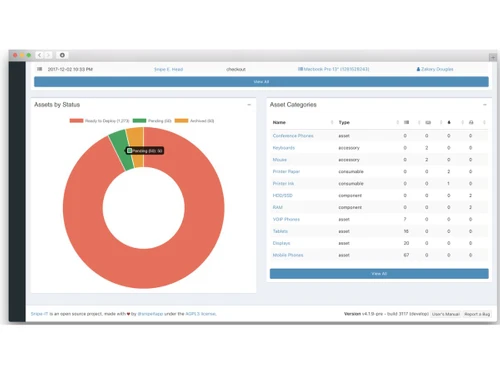
Effortlessly manage your entire IT inventory with Snipe It, the secure open-source platform providing powerful automation and real-time asset tracking.
See MoreHave you used Snipe It before?
Share your insights for better experience
 License Management Custom Asset Field Logic Audit Scheduling Barcoding and QR Support Digital Signature Pickup LDAP and AD Synchronization Granular Permission UI Comprehensive Asset History Consumables Tracking Tool Automated Email Reminders Bulk Asset Import Utility Visual Dashboards Multilingual Interface Pro Maintenance Tracking Slack and Teams Integration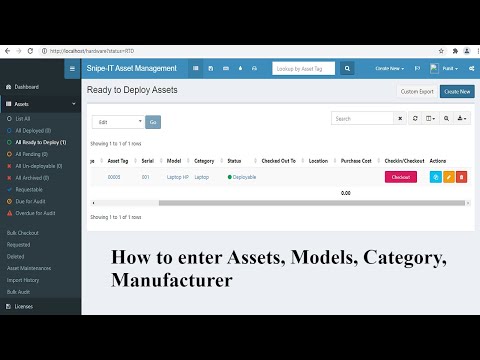

Watch the demo video to explore key features, real workflows, and how the software fits your business needs.
 Ubuntu
  Windows
  iOS
iOS  Android MacOS
  Linux
Linux  Desktop
  Mobile
  Tablet
  iPad
iPad  Cloud-Based
  Perpetual
Small Business
Designed for startups and growing businesses
Medium Business
Built for business growth and flexibility
Enterprises
Designed for complex and large-scale business needs
4
Out of 5

Overall Rating
Based on
5 Verified Ratings
Rating Breakdown
88% Recommend this Product
Add ReviewTechjockey Trusted Reviews from Verified Users
No reviews are currently available for Snipe It. Discover similar Asset Management Software reviews

ezAtlas
Whats great - I have tried several different asset management solutions in the past, but this one is by far the best. It is intuitive and e... read more

TYASuite Asset Management Software
Whats great - It was quite a good product excellent to use,gives a platform a way to manage Asset management and Ticketing to the next leve... read more
Asset Infinity
Whats great - It's extremely easy to setup and use. Didn't have to train our staff for using Asset Infinity. read more
Snipe It
Price On Request
Desktop
Mobile
Web based
On Premises
Windows
Mac OS

ezAtlas AMS
Price On Request
Desktop
Mobile
Web based
On Premises
Windows
Mac OS
TYASuite Asset Management Software
Price On Request
Desktop
Mobile
Web based
On Premises
Windows
Mac OS
Asset Infinity
Price On Request
Desktop
Mobile
Web based
On Premises
Windows
Mac OS

Pragma AI
Price On Request
Desktop
Mobile
Web based
On Premises
Windows
Mac OS
ezAtlas
Price On Request
Desktop
Mobile
Web based
On Premises
Windows
Mac OS

StallionSoft My Asset
Price On Request
Desktop
Mobile
Web based
On Premises
Windows
Mac OS

Motadata Assets Software
Price On Request
Desktop
Mobile
Web based
On Premises
Windows
Mac OS

Vivriti Asset Management
Price On Request
Desktop
Mobile
Web based
On Premises
Windows
Mac OS

Nural Assets
₹ 10000
Desktop
Mobile
Web based
On Premises
Windows
Mac OS

Paraclique
Price On Request
Desktop
Mobile
Web based
On Premises
Windows
Mac OS
(0) Product(s) selected
Available
Price on Request
Available
Price on Request
Available
Price on Request

Available
Price on Request

Available
Price on Request

Starting Price:
$40 /Month

Starting Price:
$50 /Month

Starting Price:
$99 /Month
Available
Price on Request
Available
Price on Request

Available
Price on Request
Snipe It Asset Management Software demo is available for free at Techjockey.
Snipe It Asset Management Software offers a free trial. However, the premium plan with advanced features available at Techjockey.
For Snipe It Asset Management Software installation, insert the given CD/USB flash storage in your system and open the Setup Wizard to get started.
The pricing of Snipe It is starts at USD 40 per month at techjockey.com.
Snipe-IT is an open-source IT asset management system used to track physical hardware assets, software licenses, accessories, and consumables, allowing organizations to see who has what equipment and its status.
Yes, Snipe-IT offers free plan but it comes with several pricing plans if you need to use its full features.
You can install Snipe-IT by downloading the software for free and setting it up on your own web server, or you can sign up for a paid hosted plan where the installation and server setup are managed for you.
If you use the self-hosted version, you are responsible for performing manual updates, while the paid cloud-hosted plans include automated upgrades, security patches, and server maintenance.
Snipe-IT software price starts at USD 40 at Techjockey.
Yes, Snipe-IT includes a powerful JSON REST API that allows you to develop custom automations and integrate the asset management system with other software.
No, all Snipe-IT plans, including the free self-hosted version and all paid hosting tiers, allow you to manage an unlimited number of assets and users.
Users of the free self-hosted version can get help through community support channels like Github and Discord, while paid plans offer dedicated email and phone support from the Snipe-IT team.
Snipe-IT can be deployed as a free, self-hosted application on your own infrastructure, or you can choose from various paid cloud-hosted plans where the company manages the server, security, and maintenance.
20,000+ Software Listed
Best Price Guranteed
Free Expert Consultation
2M+ Happy Customers
Terms and Condtions

Users with registered businesses can purchase goods from merchants on the platform to satisfy their business needs. Users are not permitted to utilize any products acquired through the platform for resale, advertising, business, or further distribution.
For each purchase made, users will receive a Tax Invoice (or 'GST invoice') that includes specific details such as:
the GSTIN of the user associated with their registered business, and
the specified Entity Name for their business.
It should be noted that not all products are eligible for GST Invoice. Only the products displayed by participating sellers with the 'GST-based Invoice Available' callout on the product description page would qualify.
Certain goods and services are not eligible to get a GST Invoice, including items with VAS, i.e., Value Added Services (e.g., Total Mobile Protection/Assured Buyback) and those involving an exchange offer at the time of purchase.
Users must ensure the accuracy of the GSTIN, and business entity name provided for the GST Invoice. Requests for corrections into GST Invoice would not be accommodated by Techjockey.com or any Seller, and any issues arising from user-provided information are the sole responsibility of users.
Techjockey.com is not liable for the GST Invoice or any associated input tax credit. To efficiently claim an input tax credit, users should select the registered place of business address as per the GST authority's data and follow the provisions of the GST Act and rules.
To claim an input tax credit, the delivery and billing addresses must match. Furthermore, input tax credits will not be granted if the delivery address and GSTIN on the invoice are from different states. In case of incorrect GST details provided during the order placement, the order will be canceled automatically.