 USA
USA UAE
UAESmall Business
Designed for startups and growing businesses


See More



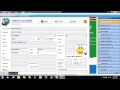

Brand: Solver Software
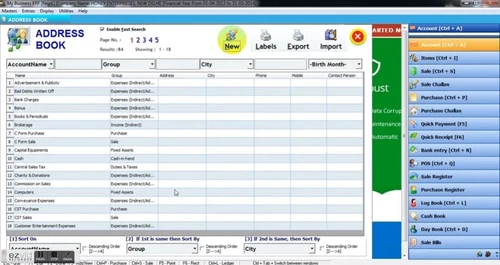
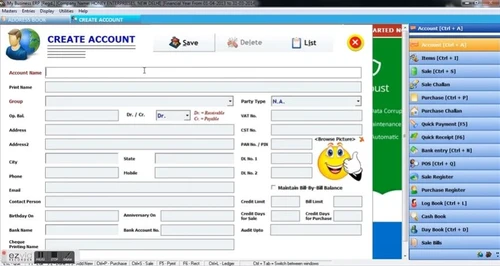
Speed Plus 8.0 is a GST compliant business ERP software. It assists in the completion of daily operations efficiently. This ERP software is developed to simplify all the complications that come with business automation. It offers well fleshed out modules for financial management and accounting. The software further assists with systematized fiscal planning of business operations. Speed Plus 8.0...
See MoreHave you used SPEED PLUS 9.0 before?
Share your insights for better experience
Brand: Solver Software
Founded Year: 1996
Solver Software
Looking for The Right Pricing?
Share your requirements and get a plan built around your business.
Price Available on Request
Get personalised SPEED PLUS 9.0 pricing that fits your needs. Our team will connect with you.
 Inventory Management Financial Management Label Printing Cheque Printing Integration Billing & Invoicing Sales Management Accounting Tax Management Purchase Orders Reporting & Analytics

Watch the demo video to explore key features, real workflows, and how the software fits your business needs.
 Windows
  Android
  MacOS
MacOS  Desktop
  Mobile
  Cloud-Based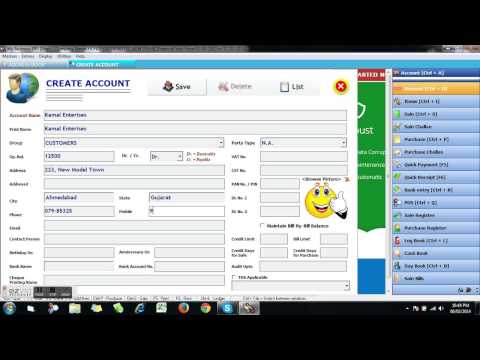
Small Business
Designed for startups and growing businesses
Medium Business
Built for business growth and flexibility
Enterprises
Designed for complex and large-scale business needs
4.0
Out of 5

Overall Rating
Based on
8 Verified Reviews
Rating Breakdown
77% Recommend this Product
Add ReviewCustomer sentiment for SPEED PLUS 9.0 is mixed, with some users praising its intuitive and efficient design, particularly for ERP needs, while others report significant issues, including poor after-sales support and numerous bugs. Users in retail find it particularly unsuitable, and several reviews express dissatisfaction with the overall experience. Despite the negative feedback, there are positive mentions of helpful customer service and quick response times, indicating that while some aspects of the product are valued, substantial improvements are needed.


Jan 22, 2021
Techjockey Verified
“Review”
Pros
Worst After Sale Support , Not Suitable for Retail Business at all , Many Bugs their . Not easy to use mainly for retail counter.
Cons
Feature good like sms and all .
Oct 19, 2020
Techjockey Verified
“very bad”
Pros
no
Cons
not
Apr 15, 2019
Techjockey Verified
“SOlver speed plus does an amazing job.”
Pros
Solver Speed Plus is anything but difficult to-utilize, instinctive, asset agreeable, and generally speaking productive at all that it does, making it a go-to program in case you're thinking about putting resources into a solid ERP programming utility.
Cons
NO CONS

SPEED PLUS 9.0
Price On Request
Desktop
Mobile
Web based
On Premises
Windows
Mac OS

Ginesys
₹ 7000
Desktop
Mobile
Web based
On Premises
Windows
Mac OS

Logic ERP - Retail Software
Price On Request
Desktop
Mobile
Web based
On Premises
Windows
Mac OS

VasyERP Software
₹ 12999
Desktop
Mobile
Web based
On Premises
Windows
Mac OS

GOFRUGAL Retail POS
₹ 8999
Desktop
Mobile
Web based
On Premises
Windows
Mac OS

Retailware
Price On Request
Desktop
Mobile
Web based
On Premises
Windows
Mac OS

RHBUS ERP
₹ 11642
Desktop
Mobile
Web based
On Premises
Windows
Mac OS

EmphoraSoft Accnu
Price On Request
Desktop
Mobile
Web based
On Premises
Windows
Mac OS

Alpha-e JSoft Retail Garments
₹ 35000
Desktop
Mobile
Web based
On Premises
Windows
Mac OS

Retail ViVA Lite
₹ 1500
Desktop
Mobile
Web based
On Premises
Windows
Mac OS

BayStore
Price On Request
Desktop
Mobile
Web based
On Premises
Windows
Mac OS
(0) Product(s) selected
Available
Price on Request
Starting Price:
₹50,000 /year

Available
Price on Request

Available
Price on Request

Available
Price on Request

Available
Price on Request

Available
Price on Request

Available
Price on Request
Available
Price on Request

Available
Price on Request
After installation, open the software and head towards the taskbar. You will see the “Company” option, and the option of “Change Financial Year.”
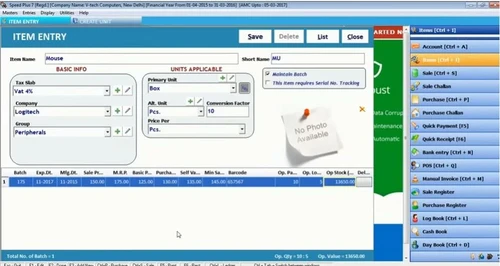
Speed Plus 8.0 can read and generate barcodes for uncomplicated checkout and inventory management services.
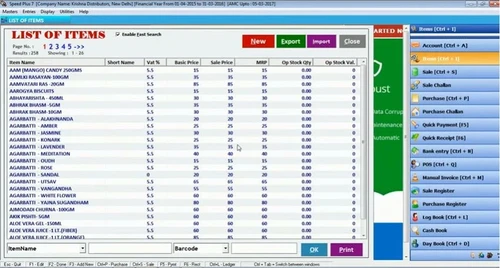
Speed Plus 8.0 allows you to import data in bulk through Microsoft Excel sheet.
Speed Plus 8.0 ERP software offers POS services. It assists in producing bills and closing the transaction.
This ERP software allows you to create multiple companies in the master sheet and work conveniently. You can track transactions, business reports, etc. of every company separately.
20,000+ Software Listed
Best Price Guranteed
Free Expert Consultation
2M+ Happy Customers
Terms and Condtions

Users with registered businesses can purchase goods from merchants on the platform to satisfy their business needs. Users are not permitted to utilize any products acquired through the platform for resale, advertising, business, or further distribution.
For each purchase made, users will receive a Tax Invoice (or 'GST invoice') that includes specific details such as:
the GSTIN of the user associated with their registered business, and
the specified Entity Name for their business.
It should be noted that not all products are eligible for GST Invoice. Only the products displayed by participating sellers with the 'GST-based Invoice Available' callout on the product description page would qualify.
Certain goods and services are not eligible to get a GST Invoice, including items with VAS, i.e., Value Added Services (e.g., Total Mobile Protection/Assured Buyback) and those involving an exchange offer at the time of purchase.
Users must ensure the accuracy of the GSTIN, and business entity name provided for the GST Invoice. Requests for corrections into GST Invoice would not be accommodated by Techjockey.com or any Seller, and any issues arising from user-provided information are the sole responsibility of users.
Techjockey.com is not liable for the GST Invoice or any associated input tax credit. To efficiently claim an input tax credit, users should select the registered place of business address as per the GST authority's data and follow the provisions of the GST Act and rules.
To claim an input tax credit, the delivery and billing addresses must match. Furthermore, input tax credits will not be granted if the delivery address and GSTIN on the invoice are from different states. In case of incorrect GST details provided during the order placement, the order will be canceled automatically.

