 USA
USA UAE
UAESmall Business
Designed for startups and growing businesses


See More


Brand: Safer Networking
Spybot is known for detecting and removing malware, spyware, and adware. It offers tools for privacy protection and system immunization against malicious threats.
See MoreHave you used Spybot before?
Share your insights for better experience
Brand: Safer Networking
Founded Year: 2000
Spybot – Search & Destroy is a set of tools for finding and removing malicious software.
Core Protection
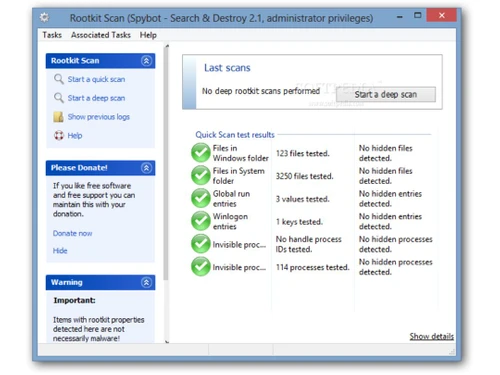
 On-Demand & Scheduled Scanning Threat Removal and Quarantine Rootkit Detection & Removal Anti-Spyware Real-Time Threat Detection Multi-Layered Malware Detection Exploit Prevention Behavioral Analysis Heuristic Analysis USB Protection
 Internet & Network Security
Ad Blocker Web Protection & URL Filtering Firewall Protection IDS / IPS Protection Wi-Fi Security Email Protection Anti-Spam Filters Advanced Threat Protection
Ransomware Protection File Rollback Application Whitelisting Behavioral Ransomware Protection Data Protection and Privacy
Privacy Control Browser Privacy Tools Data Shredder Data Encryption VPN (Virtual Private Network) Anti-Phishing & Identity Protection Dark Web Monitoring Data Leak Prevention Webcam Protection Device Performance and Optimization
System Optimization Tools Battery Saver Disk Cleanup and Junk File Removal Startup Manager Game Mode Network Performance Monitor Family and Parental Controls
Parental Control App Monitoring Geo-Fencing and Location Tracking Content Filtering Activity Reports Backup and Data Recovery
System Restore Options Automatic Backup Cloud Backup Administrative Features
User-Friendly Dashboard Remote Management Console Compliance & Reporting Alerts & Notifications
Scan Results Notifications Phishing and Malicious Website Warnings Real-Time Updates Real-Time Threat Alerts Suspicious Activity Alerts Ransomware Detection Alerts Webcam and Microphone Access Warnings Network Security Alerts Location and Geo-Fencing Alerts Customizable Notifications  Windows
  MacOS
MacOS  Desktop
  Cloud-Based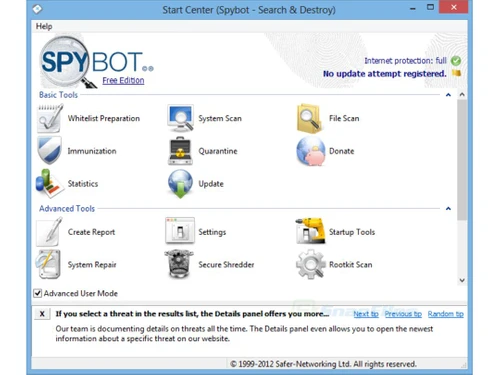
Small Business
Designed for startups and growing businesses
Medium Business
Built for business growth and flexibility
Enterprises
Designed for complex and large-scale business needs
4.5
Out of 5

Overall Rating
Based on
10 Verified Reviews
Rating Breakdown
92% Recommend this Product
Add ReviewOverall, users appreciate Spybot for its versatility, strong malware detection, and privacy features, often highlighting its effectiveness on older systems and offline functionality. Many reviewers commend the transparent communication regarding updates and the absence of intrusive ads in the free version. However, common concerns include the need for more frequent updates, the lack of a built-in firewall, and limited real-time protection in the free version. Additionally, some users find the interface complicated and experience slow scan times, particularly on older devices.
Pros
"Since I have older laptops with different versions of Windows, I find that Spybot is great since it has versatility across all different versions of Windows which is helpful."
"For people like me who love efficient free tools and solutions, Spybot is great. The free version does not spam me with ads like a lot of free antivirus software does."
"I really appreciate the fact that it has registry cleaning, it is a bonus that Spybots helps clean my registry to maintain my computer's system performance."
Cons
"The updates are not as frequent as competitors. I worry sometimes if Spybot is keeping up with potential threats or not."
"That said, the paid features are necessary if you really want full protection of the system. I felt like the free version had a lot of gaps in protection."
"It is heavy on older systems, when I am using it on my laptop of 7 years it does feel a bit resource-heavy, especially during scans."

Dec 28, 2024
Techjockey Verified
“Versatile for Older Windows but Needs More Updates”
Spybot works smoothly on my older Windows laptops even though they are all different Windows versions. It is versatile and helpful for keeping my old systems running securely. That said, the updates are not as frequent, and I sometimes think that it is actually keeping me safe from the latest threats.
Pros
Since I have older laptops with different versions of Windows, I find that Spybot is great since it has versatility across all different versions of Windows which is helpful.
Cons
The updates are not as frequent as competitors. I worry sometimes if Spybot is keeping up with potential threats or not.
Reason to switch
Acronis did not offer better compatibility with my older Windows systems and compatibility.
Sep 3, 2024
Techjockey Verified
“Open Communication but Missing Firewall”
I find it trustworthy since Spybot always keeps me informed about their changes and updates. The only downside is that it does not come with a built-in firewall. For a more comprehensive security package, I wish they included this feature.
Pros
I like how Spybot is very transparent in terms of their updates and changes, they always keep me informed and have open communication.
Cons
It is sad that it does not have a built-in firewall. I would prefer it include a firewall for a more complete security.
Reason to switch
I moved from Webroot because I wanted Spybots transparency and communication.
Dec 10, 2024
Techjockey Verified
“Free Tool but Limited Without Paid Features”
As someone who appreciates free tools, Spybot free version is fantastic – it does not spam me with ads like other antivirus products. That said, I did notice that the free version leaves a lot of gaps in system protection, which pushes you to get the paid plan.
Pros
For people like me who love efficient free tools and solutions, Spybot is great. The free version does not spam me with ads like a lot of free antivirus software does.
Cons
That said, the paid features are necessary if you really want full protection of the system. I felt like the free version had a lot of gaps in protection.
Reason to switch
ESET’s free options were basic and Spybot’s free version offered more value without ads.

Spybot
Price On Request
Desktop
Mobile
Web based
On Premises
Windows
Mac OS

Quick Heal AntiVirus Pro
₹ 311
Desktop
Mobile
Web based
On Premises
Windows
Mac OS

Quick Heal Total Security
₹ 709
Desktop
Mobile
Web based
On Premises
Windows
Mac OS

Mcafee Antivirus
₹ 271
Desktop
Mobile
Web based
On Premises
Windows
Mac OS

Quick Heal Total Security for Android
₹ 127
Desktop
Mobile
Web based
On Premises
Windows
Mac OS

Kaspersky Plus
₹ 259
Desktop
Mobile
Web based
On Premises
Windows
Mac OS

SystMade Total Security
₹ 549
Desktop
Mobile
Web based
On Premises
Windows
Mac OS

Bitdefender Premium Security
Price On Request
Desktop
Mobile
Web based
On Premises
Windows
Mac OS

Net Protector Total Security for Linux
₹ 850
Desktop
Mobile
Web based
On Premises
Windows
Mac OS

AVG Ultimate
₹ 302
Desktop
Mobile
Web based
On Premises
Windows
Mac OS

Avast Antivirus
₹ 1199
Desktop
Mobile
Web based
On Premises
Windows
Mac OS
(0) Product(s) selected
Starting Price:
₹709 /Year ₹1,909
Starting Price:
₹549 ₹1,849
Starting Price:
₹2,999
Starting Price:
₹850 /User
Starting Price:
₹302 /Month

Starting Price:
₹1,515 /Month

Starting Price:
₹799 /Year

Starting Price:
₹800 /Year

Starting Price:
₹279 /Year ₹1,299

Starting Price:
₹2,570 /PC/Year

Starting Price:
€70 /Year

Spybot price in India starts at €15 on TechJockey.com.
Spybot does not offer a mobile app.
Spybot supports Windows and MacOS.
Yes, Spybot provides a free trial for its premium versions.
Spybot works by scanning, detecting, and removing malware while providing real-time protection and system immunization.
Spybot is suitable for both individual users and businesses seeking malware protection and privacy.
Yes, Spybot offers a free demo upon request at techjockey.com.
Spybot has a free version with basic protection, along with paid plans for advanced features.
Yes, Spybot is capable of detecting and removing existing malware, spyware, and adware from your system.
Spybot is designed to run efficiently in the background with minimal impact on system performance.
No, Spybot does not support barcode scanning. It is a security tool designed to protect computers from malware and spyware. If you are evaluating barcode scanning software, check scanning accuracy, speed, supported barcode types, hardware compatibility, and system integrations. Also review ease of use, data security, platform support, and the quality of customer support and updates.
0 0
Spybot antivirus's Device Space Cleaner helps increase storage capacity by locating and eliminating junk files, transient data, and other superfluous files. This function makes the device operate more effectively by improving speed, streamlining the system, and preventing clutter from taking up important storage space.
0 0
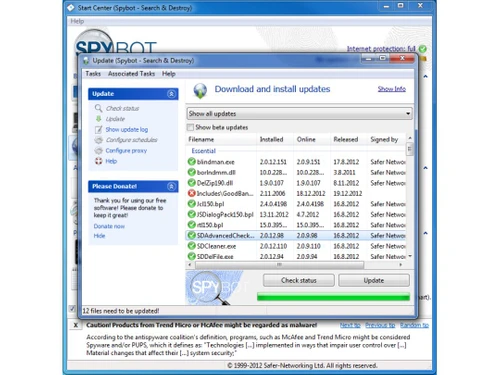
Spybot's Immunize function blocks access to harmful websites, cookies, and browser plugins, preventing malware from infecting your machine. Additionally, it can alter and prevent the installation of spyware by working with the Windows hosts file.
0 0
Spybot has the ability to remove several viruses such as:
0 0
To browser tracking cookies handled by Spybot, follow the steps given below:
0 0
20,000+ Software Listed
Best Price Guranteed
Free Expert Consultation
2M+ Happy Customers
Terms and Condtions

Users with registered businesses can purchase goods from merchants on the platform to satisfy their business needs. Users are not permitted to utilize any products acquired through the platform for resale, advertising, business, or further distribution.
For each purchase made, users will receive a Tax Invoice (or 'GST invoice') that includes specific details such as:
the GSTIN of the user associated with their registered business, and
the specified Entity Name for their business.
It should be noted that not all products are eligible for GST Invoice. Only the products displayed by participating sellers with the 'GST-based Invoice Available' callout on the product description page would qualify.
Certain goods and services are not eligible to get a GST Invoice, including items with VAS, i.e., Value Added Services (e.g., Total Mobile Protection/Assured Buyback) and those involving an exchange offer at the time of purchase.
Users must ensure the accuracy of the GSTIN, and business entity name provided for the GST Invoice. Requests for corrections into GST Invoice would not be accommodated by Techjockey.com or any Seller, and any issues arising from user-provided information are the sole responsibility of users.
Techjockey.com is not liable for the GST Invoice or any associated input tax credit. To efficiently claim an input tax credit, users should select the registered place of business address as per the GST authority's data and follow the provisions of the GST Act and rules.
To claim an input tax credit, the delivery and billing addresses must match. Furthermore, input tax credits will not be granted if the delivery address and GSTIN on the invoice are from different states. In case of incorrect GST details provided during the order placement, the order will be canceled automatically.



