linkedin
StatCrunch logo
play StatCrunch Overview
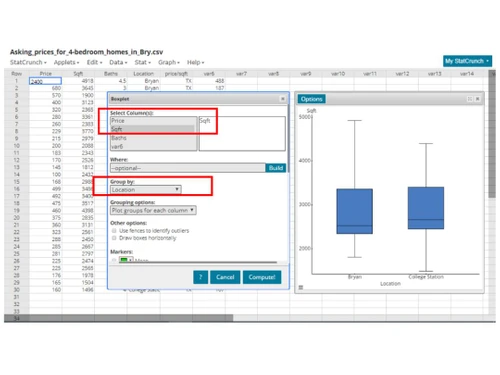
StatCrunch Bar graph
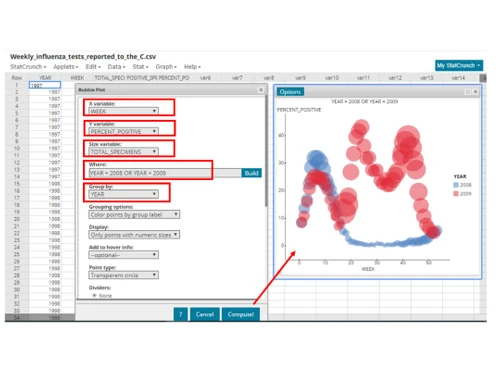
StatCrunch Bubble plot

StatCrunch

Brand: PEARSON

  • 4.2

  • 5 Ratings

StatCrunch is designed to empower users to visualize, explore, and interpret data easily and accurately.

See More

Have you used StatCrunch before?

Share your insights for better experience

Add a Review
Starting Price
$30

View plans

100% Genuine
Products
Best Price
Guaranteed
Safe & Secure
Payment
  • Description

  • Pricing

  • Features

  • Specification

  • Review

  • Compare

  • Alternatives

  • FAQ

Starting at $30

StatCrunch Software Overview

What is StatCrunch?

StatCrunch is a versatile statistical analysis software designed to empower users with intuitive data exploration and analysis tools. With its user-friendly interface, researchers, educators, and students can effortlessly navigate its features to conduct meaningful statistical investigations. From basic descriptive statistics to advanced modelling techniques, StatCrunch provides a comprehensive platform for analyzing data of any scale or complexity.

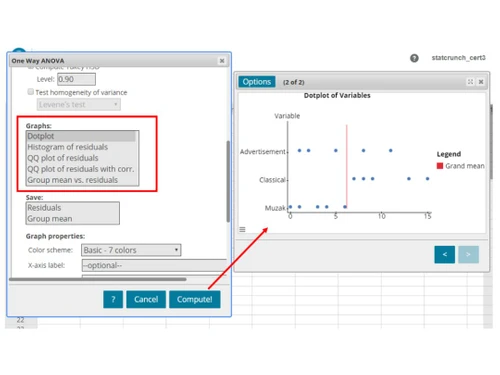
Equipped with a wide range of visualization tools, including bar plots, dot plots, and bubble plots, StatCrunch enables users to gain insights into their data through interactive and customizable graphs. Moreover, its graphical calculators facilitate real-time exploration of statistical concepts, fostering deeper understanding and engagement with statistical principles.

Why Choose StatCrunch Software?

  • Intuitive Interface: StatCrunch offers a user-friendly interface that makes statistical analysis accessible to users of all levels of expertise.
  • Powerful Analytical Tools: StatCrunch provides a comprehensive suite of tools for analyzing data effectively, from basic descriptive statistics to advanced modelling techniques.
  • Interactive Visualization: With interactive graphs and graphical calculators, it enables dynamic exploration of data, fostering deeper understanding and engagement.
  • Seamless Integration: It seamlessly integrates data visualization, analysis, and interpretation, streamlining the statistical workflow.
  • Educational Support: An invaluable tool for educators and students alike, providing hands-on experience with statistical concepts practically and engagingly.

Benefits of StatCrunch

  • Streamline Data Visualization: Easily create a variety of graphs, including bar plots and dot plots, to visualize your data and gain meaningful insights.
  • Enhanced Interactivity: Interact with your graphs in real time, allowing for dynamic exploration and a deeper understanding of your data.
  • Simplified Statistical Analysis: Perform complex statistical analyses with ease and accuracy, such as two-way ANOVA and computing Tukey intervals.
  • Efficient Session Management: Save session information to revisit and refine analyses, ensuring continuity and reproducibility in your research.
  • Comprehensive Summary Statistics: Compute summary statistics to quickly assess the characteristics and distributions of your data, facilitating informed decision-making.
  • Versatile Frequency Tables: Generate frequency tables to organize and summarize categorical data, enabling clear communication of results and insights.

StatCrunch Pricing

The pricing of StatCrunch starts from $30 per year at techjockey.com.

The pricing model is based on different parameters, including extra features, deployment type, and total users. For further queries related to StatCrunch, you can contact our StatCrunch team and learn more about the pricing and offers.

Read more

PEARSON Company Details

Founded Year:  1998

At Pearson, our purpose is simple: to add life to a lifetime of learning. We believe that every learning opportunity is a chance for a personal breakthrough. We are the world’s leading learning company, serving customers in nearly 200 countries with digital content, assessments, and qualifications.

Director/Founders Samuel Pearson
Company Size 1000+ Employees

StatCrunch Pricing & Plans

Professional
Key Features
  • Create Bar Plots
  • Interact with Graphs
  • Graphical Calculators
  • Saving Session Information
  • Bubble Plots
Starting at $30
    • Users

      Users
      Users
    • Yearly

      Yearly
      Yearly

Key Features

  • Create Bar Plots

  • Interact with Graphs

  • Graphical Calculators

  • Saving Session Information

  • Bubble Plots

StatCrunch Features

  • icon_check Create bar plots
    Easily generate engaging bar plots to visualize your data effectively.
  • icon_check Interact with graphs
    Dive deeper into your data by dynamically interacting with graphs for enhanced exploration.
  • icon_check Graphical calculators
    Utilize intuitive graphical calculators for real-time analysis and visualization of statistical concepts.
  • icon_check Saving session information
    Ensure continuity and reproducibility by conveniently saving session information for future analysis.
  • icon_check Two-way ANOVA
    Conduct comprehensive statistical comparisons with two-way ANOVA analysis.
  • icon_check Computing Tukey intervals
    Identify significant differences between group means by computing Tukey intervals with precision.
  • icon_check Creating frequency tables
    Organize and summarize categorical data effortlessly by creating frequency tables.
  • icon_check Computing summary statistics
    Gain insights into your data's characteristics and distributions through comprehensive calculations.
  • icon_check Bubble plots
    Visualize complex relationships and trends within your data with interactive bubble plots.
  • icon_check Create dot plots
    Visualize distributions and comparisons within your data sets using dot plots.
StatCrunch Demo Video play icon

Get StatCrunch Demo

Watch the demo video to explore key features, real workflows, and how the software fits your business needs.

Understand
Key Features
Personal
Demo Insights
Interactive
Demo Support

StatCrunch Specifications

Supported Platforms
Ubuntu Ubuntu Windows Windows MacOS MacOS Linux Linux
Devices
Desktop Desktop Mobile Mobile Tablet Tablet iPad iPad
Deployment
Cloud-Based Cloud-Based
Suitable For
Education Financial Institutions Governments Universities
Business Specific
All Businesses
Business Size
Small Business Startups Medium Business Enterprises
Customer Support
Email Communities
Language
English
Training Resources
Documentation Videos

Explore the Best Alternative Solutions Similar to Your Business Size and Needs

StatCrunch Review

4.2

Out of 5

img

Overall Rating

Based on
5 Verified Ratings

Rating Breakdown

  • Features 4.3
  • Value for Money 4.2
  • Ease of Use 4.3
  • Customer Support 4.2

90% Recommend this Product

Add Review

Be the First to Review

This product has no reviews yet. Be the first to leave your feedback.

Add Review

Compare StatCrunch With other Statistical Analysis Software

Products
Ratings
Pricing
Device Supported
Deployment
Supported Platforms
  • img

    StatCrunch

  • 4.2

  • Price On Request

  • Desktop

    Mobile

  • Web based

    On Premises

  • Windows

    Mac OS

  • img

    Analyse-it

  • 4.5

  • Price On Request

  • Desktop

    Mobile

  • Web based

    On Premises

  • Windows

    Mac OS

  • img

    Minitab

  • 4.4

  • Price On Request

  • Desktop

    Mobile

  • Web based

    On Premises

  • Windows

    Mac OS

  • img

    BlueSky Statistics

  • 4.5

  • Price On Request

  • Desktop

    Mobile

  • Web based

    On Premises

  • Windows

    Mac OS

  • img

    EViews

  • 4.3

  • Price On Request

  • Desktop

    Mobile

  • Web based

    On Premises

  • Windows

    Mac OS

  • img

    MedCalc

  • 4.3

  • ₹ 58129

  • Desktop

    Mobile

  • Web based

    On Premises

  • Windows

    Mac OS

  • img

    Rguroo

  • 4.4

  • Price On Request

  • Desktop

    Mobile

  • Web based

    On Premises

  • Windows

    Mac OS

  • img

    XLSTAT

  • 4.3

  • Price On Request

  • Desktop

    Mobile

  • Web based

    On Premises

  • Windows

    Mac OS

(0) Product(s) selected

StatCrunch Alternatives

See All StatCrunch Alternatives

Starting Price:

$150 /Year

Starting Price:

$20 /Yearly

Available

Price on Request

JMP

4.0

Starting Price:

$1,250 /License

Available

Price on Request

PSPP

4.1

Available

Price on Request

JASP

4.0

Available

Price on Request

Available

Price on Request

Which operating system does StatCrunch support?

StatCrunch is compatible with Ubuntu, Windows, MacOS, and Linux device systems.

Is there any StatCrunch App?

StatCrunch app is not available for mobile and tablet devices.

What is the deployment type of StatCrunch?

StatCrunch supports web-based deployment.

How much does StatCrunch cost?

StatCrunch pricing starts from $30 per year at techjockey.com.

Who are the potential users of StatCrunch?

StatCrunch is ideal for researchers, educators, and students seeking to analyze data efficiently, providing a comprehensive platform with intuitive features and visualization tools that foster deeper understanding and engagement with statistical principles across various educational and research contexts.

Is there any free trial or demo for StatCrunch?

StatCrunch platform demo is available for free with techjockey.com.

Is StatCrunch Free?

StatCrunch does not offer a free trial.

How can you download StatCrunch?

Software installation is not needed since it supports web-based deployment. So just setup the wizard and get started.

How does StatCrunch Work?

StatCrunch empowers users with intuitive tools for data exploration and analysis, offering a user-friendly interface and a wide range of visualization tools to conduct meaningful statistical investigations effortlessly.

20,000+ Software Listed

Best Price Guranteed

Free Expert Consultation

2M+ Happy Customers

Terms and Condtions

close

Users with registered businesses can purchase goods from merchants on the platform to satisfy their business needs. Users are not permitted to utilize any products acquired through the platform for resale, advertising, business, or further distribution.

For each purchase made, users will receive a Tax Invoice (or 'GST invoice') that includes specific details such as:

  • the GSTIN of the user associated with their registered business, and

  • the specified Entity Name for their business.

It should be noted that not all products are eligible for GST Invoice. Only the products displayed by participating sellers with the 'GST-based Invoice Available' callout on the product description page would qualify.

Certain goods and services are not eligible to get a GST Invoice, including items with VAS, i.e., Value Added Services (e.g., Total Mobile Protection/Assured Buyback) and those involving an exchange offer at the time of purchase.

Users must ensure the accuracy of the GSTIN, and business entity name provided for the GST Invoice. Requests for corrections into GST Invoice would not be accommodated by Techjockey.com or any Seller, and any issues arising from user-provided information are the sole responsibility of users.

Techjockey.com is not liable for the GST Invoice or any associated input tax credit. To efficiently claim an input tax credit, users should select the registered place of business address as per the GST authority's data and follow the provisions of the GST Act and rules.

To claim an input tax credit, the delivery and billing addresses must match. Furthermore, input tax credits will not be granted if the delivery address and GSTIN on the invoice are from different states. In case of incorrect GST details provided during the order placement, the order will be canceled automatically.