linkedin
StockIQ logo
play StockIQ Supply Chain Planning Suite, Demand Forecasting, Replenishment, and Inventory
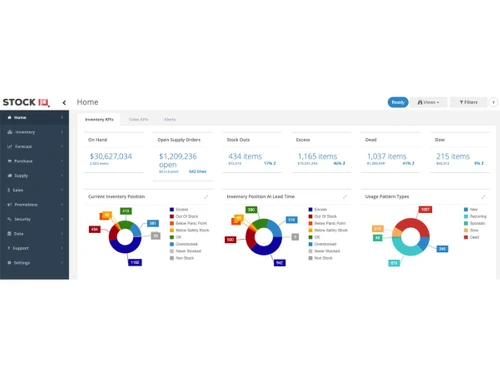
StockIQ inventory KPI
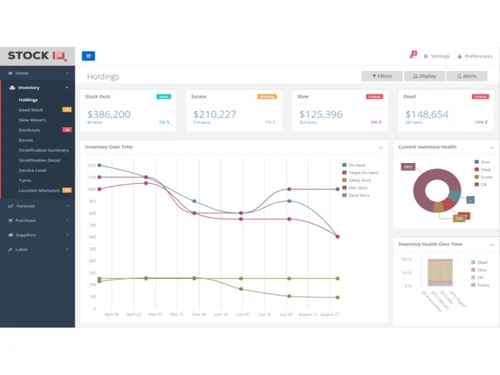
StockIQ holding

StockIQ

Brand: StockIQ Technologies

  • 4.2

  • 4 Ratings

StockIQ is supply chain planning software for inventory control, order management, forecasting, and supplier performance tracking.

See More

Have you used StockIQ before?

Share your insights for better experience

Add a Review

Price Available on Request

Questions about pricing or customization? We’re here to help, just a click away.

100% Genuine
Products
Best Price
Guaranteed
Safe & Secure
Payment
  • Description

  • Pricing

  • Features

  • Specification

  • Review

  • FAQ

StockIQ Software Overview

What is StockIQ?

StockIQ is a smart supply chain planning software for smooth management of inventory and forecast demand. It gathers all data centrally, and helps to ensure proper information flow in real-time among supply chain processes. It helps in smart planning, inventory management, analyzing past data, tracking supplier performance, and generating smart replenishment plans.

StockIQ interface is easy-to-use and comes with dashboards, alerts, and planning tools that can be adapted as needed. The software uses part data and tools for demand forecasting, inventory optimization, and supplier tracking.

It also helps to plan stock levels, avoid shortages, and manage expiry dates. Users can plan and monitor promotions, track supplier delays, and align teams with SIOP tools. It also provides reports and integrates well with ERPs.

Why choose StockIQ?

  • Supply Chain Management: Gives right tools to help supply chain planning accuracy by analyzing demand, supplier data, and inventory trends.
  • Inventory Control: Prevents stockouts and excess inventory with smart safety stock levels and expiry tracking.
  • Performance Tracking: Helps to evaluate supplier reliability and delivery timelines, improving vendor coordination, enhancing performance.
  • Order Management: It automates replenishment planning, simplifies ordering and ATP calculations, thus supporting timely and efficient order fulfilment.
  • Promotion Planning: Supports seasonal and regional campaign tracking, to align stock levels with promotional demand leading to customer satisfaction.

Benefits of StockIQ

  • User-Friendly Interface: Easy-to-use dashboards and planning tools make it simple for teams to manage supply chain tasks efficiently.
  • Better Forecasting: Uses historical data and trends to give reliable demand predictions as per the market conditions.
  • Reduced Inventory Costs: It optimizes stock levels, helping businesses to avoid excess inventory and minimize holding costs.
  • Better Coordination: Tracks supplier performance and delays, improving vendor relationships and delivery timelines.
  • Better Decision Making: It provides real-time alerts and reports to help managers take quick, better decisions for smoother operations.
  • ERP Integrations: It supports integrations with other software and connects smoothly with ERP software like Tally, SAP, and Dynamics, making data sharing easier.

Pricing of StockIQ

StockIQ details are available on request at techjockey.com.

StockIQ may vary based on factors like customization, additional features required, number of users, and the deployment type. Please request a callback for subscription-related details and to avail offers on premium packages.

Read more

StockIQ Technologies Company Details

Founded Year:  2015

StockIQ Technologies provides intelligent supply chain planning solutions for distributors and manufacturers.

Director/Founders Curtis Glesmann, Jake Latham
Company Size 1-100 Employees

StockIQ Pricing & Plans

Looking for The Right Pricing?

Share your requirements and get a plan built around your business.

  • Define your business needs
  • Get customised pricing
  • Choose features that fit your workflow

Price Available on Request

Get personalised StockIQ pricing that fits your needs. Our team will connect with you.

StockIQ Features

  • icon_check Demand Forecasting
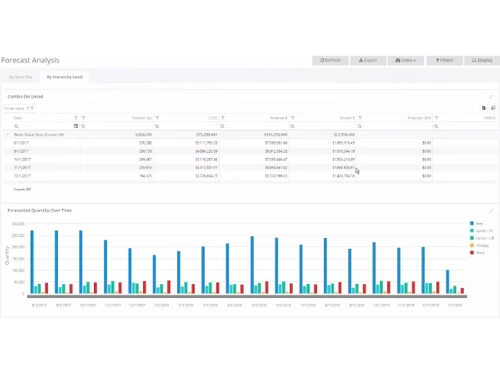
    Predict future demand accurately using past data, seasonal trends, and promotional event patterns.
  • icon_check Replenishment
    Automate reorder planning and purchase orders to maintain ideal stock levels across warehouses.
  • icon_check Performance Monitoring
    Track supplier lead times, fill rates, and send alerts to improve vendor accountability.
  • icon_check Promotions Management
    Adjust demand forecasts around sales campaigns without affecting base or seasonal inventory planning.
  • icon_check Inventory Optimization
    Analyse safety stock, item movement, backorders, and expiry dates to reduce inventory costs.
  • icon_check Multi-Location
    Plan and manage inventory across multiple warehouses, branches, and regional distribution centres.
  • icon_check ERP Integration
    Integrates smoothly with ERP systems like Tally, SAP, and Dynamics for unified business operations.
StockIQ Demo Video play icon

Get StockIQ Demo

Watch the demo video to explore key features, real workflows, and how the software fits your business needs.

Understand
Key Features
Personal
Demo Insights
Interactive
Demo Support

StockIQ Specifications

Supported Platforms
Ubuntu Ubuntu Windows Windows MacOS MacOS Linux Linux
Devices
Desktop Desktop
Deployment
Cloud-Based Cloud-Based
Suitable For
Manufacturing Healthcare Logistics Food & Beverage Electronics Wholesale
Business Specific
All Businesses
Business Size
Small Business Startups Medium Business Enterprises
Customer Support
Email Communities
Language
English
Training Resources
Webinars Videos

StockIQ Review

4.2

Out of 5

img

Overall Rating

Based on
4 Verified Ratings

Rating Breakdown

  • Features 4.3
  • Value for Money 4.2
  • Ease of Use 4.3
  • Customer Support 4.1

80% Recommend this Product

Add Review

Techjockey Trusted Reviews from Verified Users

No reviews are currently available for StockIQ. Discover similar Supply Chain Management Software reviews

  • GoComet

    4.4

    Whats great - RFQ, tracking, reconciliation—all in one, with AI-powered simplicity read more

  • Blue Yonder

    4.4

    Whats great - End-to-end SCM for retail, manufacturing, 3PL; robust functionality read more

  • Ecubix Smart Supply Chain

    4.3

    Whats great - Reduces errors, improves efficiency. read more

Articles for StockIQ

See All Related Articles

How much does StockIQ cost?

StockIQ software pricing is available on request at techjockey.com.

Who uses StockIQ software?

StockIQ is used by distributors, manufacturers, and retailers to manage inventory, forecast demand, and track suppliers.

How does StockIQ software work?

StockIQ is a supply chain planning software and works by analysing past data to forecast demand and optimize inventory.

Which operating systems are compatible with StockIQ software?

StockIQ software runs smoothly on Windows and cloud-based platforms.

Is a free demo available for StockIQ software?

Yes, a free demo of StockIQ software is available through techjockey.com.

Can StockIQ software integrate with ERP systems?

Yes, StockIQ integrates easily with ERPs like Tally, SAP, and Microsoft Dynamics.

Does StockIQ support multi-location inventory planning?

Yes, StockIQ software supports multi-location inventory planning.

Is StockIQ software suitable for seasonal demand forecasting?

Yes, StockIQ software handles seasonal trends and promotions, making it perfect for market fluctuations.

20,000+ Software Listed

Best Price Guranteed

Free Expert Consultation

2M+ Happy Customers

Terms and Condtions

close

Users with registered businesses can purchase goods from merchants on the platform to satisfy their business needs. Users are not permitted to utilize any products acquired through the platform for resale, advertising, business, or further distribution.

For each purchase made, users will receive a Tax Invoice (or 'GST invoice') that includes specific details such as:

  • the GSTIN of the user associated with their registered business, and

  • the specified Entity Name for their business.

It should be noted that not all products are eligible for GST Invoice. Only the products displayed by participating sellers with the 'GST-based Invoice Available' callout on the product description page would qualify.

Certain goods and services are not eligible to get a GST Invoice, including items with VAS, i.e., Value Added Services (e.g., Total Mobile Protection/Assured Buyback) and those involving an exchange offer at the time of purchase.

Users must ensure the accuracy of the GSTIN, and business entity name provided for the GST Invoice. Requests for corrections into GST Invoice would not be accommodated by Techjockey.com or any Seller, and any issues arising from user-provided information are the sole responsibility of users.

Techjockey.com is not liable for the GST Invoice or any associated input tax credit. To efficiently claim an input tax credit, users should select the registered place of business address as per the GST authority's data and follow the provisions of the GST Act and rules.

To claim an input tax credit, the delivery and billing addresses must match. Furthermore, input tax credits will not be granted if the delivery address and GSTIN on the invoice are from different states. In case of incorrect GST details provided during the order placement, the order will be canceled automatically.