linkedin
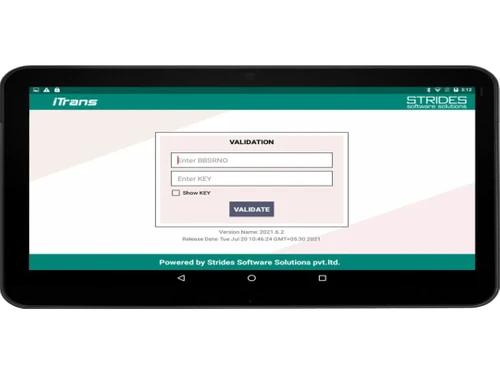
Strides iTRANS logo
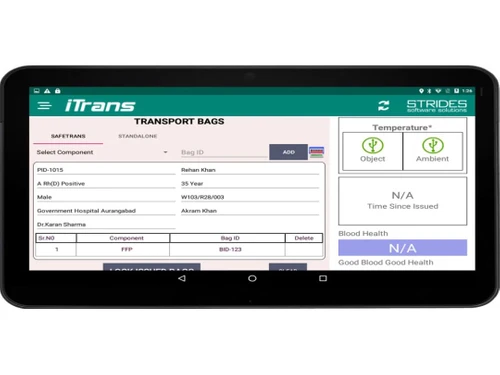
Strides iTRANS Dashboard
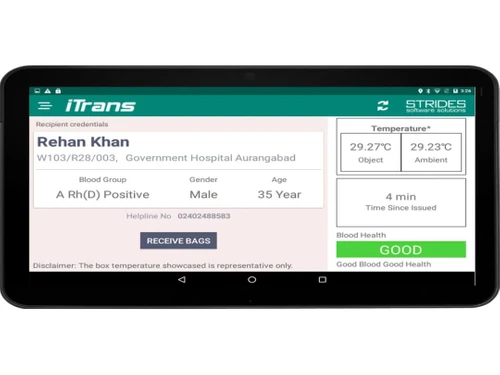
Strides iTRANS Donor
Strides iTRANS Blood Bank

Strides iTRANS

Brand: Strides Software Solutions

  • 4.2

  • 4 Ratings

Strides iTRANS offers features such as real-time inventory tracking, automated workflows, and customizable reporting, making it an ideal solution for blood banks looking to streamline their operations and improve patient care.

See More

Have you used Strides iTRANS before?

Share your insights for better experience

Add a Review

Price Available on Request

Questions about pricing or customization? We’re here to help, just a click away.

100% Genuine
Products
Best Price
Guaranteed
Safe & Secure
Payment
  • Description

  • Pricing

  • Features

  • Specification

  • Review

  • Compare

  • Alternatives

  • FAQ

Strides iTRANS Software Overview

What is Strides iTRANS Software?

Strides iTRANS is a comprehensive document conversion and accessibility software that enables users to convert documents into various accessible formats, including PDF, HTML, ePub, and more. It offers a range of features to enhance document accessibility, including OCR technology for image-based documents, support for multiple languages, and the ability to add alternative text and tags.

Strides iTRANS is a comprehensive blood bank management software that helps hospitals and blood banks automate and streamline their operations. It provides a centralized platform for managing blood inventory, donor information, and transfusion records.

Key Functionalities of Strides iTRANS

  • Unlimited Storage & Bandwidth: Store unlimited documents and benefit from unlimited bandwidth, ensuring you can handle even the most extensive document conversion projects.
  • OCR Technology: Utilize Optical Character Recognition (OCR) technology to convert scanned documents and images into editable text, enabling you to make the most of your existing document archive.
  • Multiple Format Support: Convert documents to a wide range of formats, including PDF, HTML, ePub, and more, ensuring that your documents are accessible to the broadest possible audience.
  • Collaboration Tools: Share documents with team members and collaborate on conversions in real time, ensuring that everyone is working on the most up-to-date version of the document.
  • Security and Compliance: Ensures data security and compliance with industry standards, including HIPAA and FERPA, giving you peace of mind that your documents are safe and secure.

Why Choose Strides iTRANS

  • Enhanced Accessibility: Make your documents accessible to individuals with disabilities, including those with visual, auditory, or motor impairments, ensuring that everyone can access and understand your content.
  • Increased Productivity: Streamline document conversion processes, saving time and effort and enabling you to focus on other essential tasks.
  • Affordable Pricing: Offer flexible pricing plans to suit different budgets, making it an affordable solution for businesses and organizations of all sizes.
  • Excellent Support: Provide comprehensive support and resources to users, ensuring you have the tools and knowledge to make the most of the software and achieve your document conversion goals.

Benefits of Strides iTRANS

  • Improved Document Accessibility: Convert documents to accessible formats, making them available to a broader audience and ensuring everyone can access and understand your content.
  • Increased Productivity: Streamline document conversion processes, saving time and effort and enabling you to focus on other essential tasks.
  • Secure and Compliant: Ensure data security and compliance with industry standards, including HIPAA and FERPA, giving you peace of mind that your documents are safe and secure.
  • Excellent Support: Provide comprehensive support and resources to users, ensuring you have the tools and knowledge to make the most of the software and achieve your document conversion goals.

Pricing of Strides iTRANS Software

Strides iTRANS offers flexible pricing plans at techjockey.com.

The pricing model is based on different parameters, including extra features, deployment type, and the total number of users. For further queries related to the product, you can contact our product team and learn more about the pricing and offers.

Read more

Strides Software Solutions Company Details

Founded Year:  2010

They are a young dynamic team focussed on tissue banking solutions.

Director/Founders Dinesh Mutha
Company Size 1-100 Employees

Strides iTRANS Pricing & Plans

Looking for The Right Pricing?

Share your requirements and get a plan built around your business.

  • Define your business needs
  • Get customised pricing
  • Choose features that fit your workflow

Price Available on Request

Get personalised Strides iTRANS pricing that fits your needs. Our team will connect with you.

Strides iTRANS Features

  • icon_check Blood Bank Management
    Manage all aspects of blood bank operations, including donor management, blood collection, inventory management, and transfusion.
  • icon_check Automated Digital Locking
    Secure blood bank inventory with automated digital locking systems.
  • icon_check Real Time Communication
    Facilitate real-time communication between blood banks, hospitals, and healthcare providers.
  • icon_check Integrations
    Integrate with other healthcare systems, such as HIS and LIS, for seamless data sharing.
  • icon_check Positive Patient Identification
    Ensure accurate patient identification and blood transfusion safety.
  • icon_check Haemovigilance Check List
    Track and manage haemovigilance data to improve patient safety.
  • icon_check Real Time Documentation
    Capture and manage blood bank data in real-time, eliminating the need for manual documentation.
  • icon_check Temperature & Humidity Tracking
    Monitor and maintain optimal temperature and humidity levels in blood storage areas.
  • icon_check Digital Display
    Display blood bank information, such as inventory levels, temperature, and humidity, on digital screens for easy monitoring and

Strides iTRANS Specifications

Supported Platforms
Ubuntu Ubuntu Windows Windows MacOS MacOS Linux Linux
Devices
Desktop Desktop
Deployment
Cloud-Based Cloud-Based
Suitable For
Healthcare Hospital
Business Specific
Hospitals
Business Size
Small Business Medium Business Enterprises
Customer Support
Email Communities
Language
English

Strides iTRANS Review

4.2

Out of 5

img

Overall Rating

Based on
4 Verified Ratings

Rating Breakdown

  • Features 4
  • Value for Money 4.7
  • Ease of Use 4.3
  • Customer Support 3.8

100% Recommend this Product

Add Review

Be the First to Review

This product has no reviews yet. Be the first to leave your feedback.

Add Review

Compare Strides iTRANS With other Blood Bank Management Software

Products
Ratings
Pricing
Device Supported
Deployment
Supported Platforms
  • img

    Strides iTRANS

  • 4.2

  • Price On Request

  • Desktop

    Mobile

  • Web based

    On Premises

  • Windows

    Mac OS

  • img

    eBloodBanking

  • 4.5

  • Price On Request

  • Desktop

    Mobile

  • Web based

    On Premises

  • Windows

    Mac OS

  • img

    Bagmo

  • 4.7

  • Price On Request

  • Desktop

    Mobile

  • Web based

    On Premises

  • Windows

    Mac OS

  • img

    Z Info Blood Bank

  • 4.2

  • Price On Request

  • Desktop

    Mobile

  • Web based

    On Premises

  • Windows

    Mac OS

(0) Product(s) selected

Strides iTRANS Alternatives

See All Strides iTRANS Alternatives

Available

Price on Request

Articles for Strides iTRANS

See All Related Articles

Which operating systems support Strides iTRANS software?

Strides iTRANS software is compatible with Windows, macOS, and Linux operating systems.

Is there a Strides iTRANS app?

Yes, Strides iTRANS offers a mobile app for iOS and Android devices, allowing users to convert and access documents on the go.

What is the deployment type of Strides iTRANS software?

Strides iTRANS is a desktop application and a cloud-based solution.

Who are the potential users of Strides iTRANS software?

Strides iTRANS is ideal for individuals and organizations looking to improve document accessibility, including educational institutions, government agencies, businesses, and individuals with disabilities.

Is there any free trial for Strides iTRANS software?

Yes, Strides iTRANS offers a free trial. Visit techjockey.com to download the trial version.

Is Strides iTRANS software free?

Strides iTRANS is not free but offers flexible pricing plans to suit different budgets. Visit techjockey.com for more pricing information.

How can you download Strides iTRANS software?

You can download Strides iTRANS software from techjockey.com.

How does Strides iTRANS software work?

Strides iTRANS uses OCR technology to extract text from scanned documents and images. It also provides a range of features to improve document accessibility, such as adding alternative text and tags and converting documents into accessible formats like PDF, HTML, and ePub.

20,000+ Software Listed

Best Price Guranteed

Free Expert Consultation

2M+ Happy Customers

Terms and Condtions

close

Users with registered businesses can purchase goods from merchants on the platform to satisfy their business needs. Users are not permitted to utilize any products acquired through the platform for resale, advertising, business, or further distribution.

For each purchase made, users will receive a Tax Invoice (or 'GST invoice') that includes specific details such as:

  • the GSTIN of the user associated with their registered business, and

  • the specified Entity Name for their business.

It should be noted that not all products are eligible for GST Invoice. Only the products displayed by participating sellers with the 'GST-based Invoice Available' callout on the product description page would qualify.

Certain goods and services are not eligible to get a GST Invoice, including items with VAS, i.e., Value Added Services (e.g., Total Mobile Protection/Assured Buyback) and those involving an exchange offer at the time of purchase.

Users must ensure the accuracy of the GSTIN, and business entity name provided for the GST Invoice. Requests for corrections into GST Invoice would not be accommodated by Techjockey.com or any Seller, and any issues arising from user-provided information are the sole responsibility of users.

Techjockey.com is not liable for the GST Invoice or any associated input tax credit. To efficiently claim an input tax credit, users should select the registered place of business address as per the GST authority's data and follow the provisions of the GST Act and rules.

To claim an input tax credit, the delivery and billing addresses must match. Furthermore, input tax credits will not be granted if the delivery address and GSTIN on the invoice are from different states. In case of incorrect GST details provided during the order placement, the order will be canceled automatically.