linkedin
Tap To Speak logo
play Tap To Speak demo
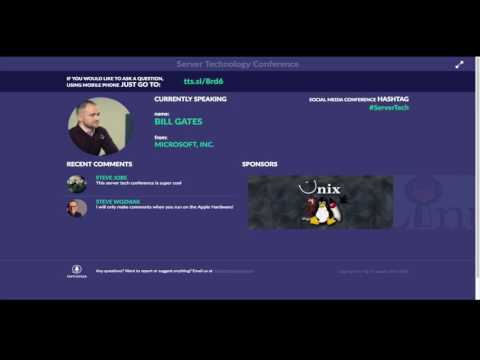
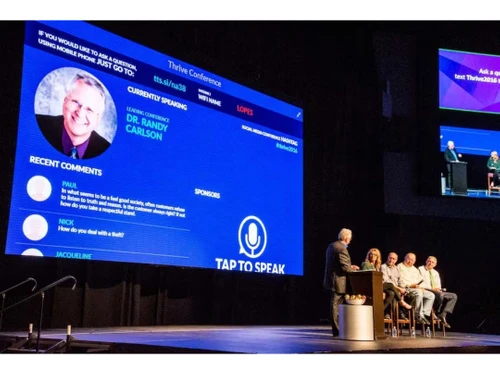
Tap To Speak conference
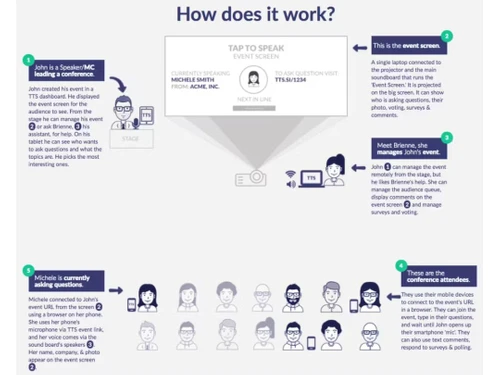
Tap To Speak work

Tap To Speak

Brand: Tap To Speak

  • 4.4

  • 5 Ratings

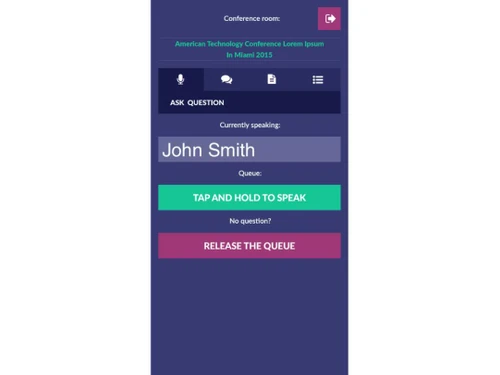
An app that helps people with speech difficulties communicate by allowing them to create sentences through tapping on their device, which it then reads aloud.

See More

Have you used Tap To Speak before?

Share your insights for better experience

Add a Review

Price Available on Request

Questions about pricing or customization? We’re here to help, just a click away.

100% Genuine
Products
Best Price
Guaranteed
Safe & Secure
Payment
  • Description

  • Pricing

  • Features

  • Specification

  • Review

  • Compare

  • Alternatives

  • FAQ

Tap To Speak Software Overview

What is Tap To Speak?

Tap To Speak is an innovative app designed to assist individuals who struggle with verbal communication. It enables users to construct sentences by simply tapping on their device's screen, which the app then vocalizes in a clear and natural voice. This feature is particularly helpful for people with speech difficulties due to conditions like autism, stroke, or other speech disorders.

This audience response software is user-friendly and supports various touch gestures, making it accessible for those with limited motor skills. Users can easily customize their experience by adjusting settings such as voice speed and volume to fit their preferences. Tap To Speak aims to empower individuals by giving them a voice, allowing them to express their thoughts and needs more effectively. Additionally, the app can be used in various settings, including at home, school, or in social situations, enhancing communication and interaction with others.

Why Choose Tap To Speak Software?

  • Real-Time Audience Interaction: Facilitates live polls, quizzes, and Q&A sessions, allowing presenters to gather immediate feedback and adjust content accordingly.
  • User-Friendly Interface: Participants can easily engage using their smartphones or other devices, making the platform accessible and convenient.
  • Comprehensive Analytics: Provides detailed insights into audience responses, enabling presenters to analyze engagement and improve future presentations.
  • Customizable Branding: Allows for the incorporation of custom branding elements, ensuring consistency with organizational identity.
  • Mobile Access: Participants can engage from their mobile devices, enhancing accessibility and convenience.
  • Anonymous Feedback: Enables participants to provide feedback anonymously, encouraging honest and open communication.
  • Live Results Sharing: Displays real-time results during sessions, fostering transparency and immediate audience engagement.
  • Affordable Pricing: Offers a basic plan at $97 per user, with a free version and trial available, providing cost-effective solutions for various needs.

Benefits of Tap To Speak Software

  • Improves Event Accessibility: Enables remote participants to engage fully in events, making it ideal for hybrid or virtual setups.
  • Encourages Equal Participation: Reduces the barrier for shy or introverted individuals to contribute, fostering inclusive interactions.
  • Custom Session Moderation: Allows presenters to control and moderate live interactions to maintain session focus and decorum.
  • Quick Feedback Loops: Facilitates immediate evaluation of session effectiveness through live audience input.
  • Event Archiving: Stores past sessions and audience responses for easy retrieval and long-term data use.
  • Brand Reputation Boost: Enhances the perception of professionalism and innovation in events, positively reflecting on organizers.
  • Cross-Device Compatibility: Works seamlessly across various devices, including smartphones, tablets, and laptops.
  • Optimized for Various Event Types: Tailored for use in conferences, educational lectures, corporate meetings, or large-scale events.
  • Enhanced Post-Event Insights: Delivers actionable insights for refining future events based on comprehensive audience feedback.

Pricing of Tap To Speak

Tap To Speak price details are available on request at techjockey.com.

The pricing model is based on different parameters, including extra features, deployment type, and the total number of users. For further queries related to the product, you can contact our product team and learn more about the pricing and offers.

Read more

Tap To Speak Pricing & Plans

Looking for The Right Pricing?

Share your requirements and get a plan built around your business.

  • Define your business needs
  • Get customised pricing
  • Choose features that fit your workflow

Price Available on Request

Get personalised Tap To Speak pricing that fits your needs. Our team will connect with you.

Tap To Speak Features

  • icon_check Speech Recognition
    Converts audience speech into text instantly for smooth, accessible interactions.
  • icon_check Audiences
    Tailors engagement for diverse audience groups in events and meetings.
  • icon_check Real Time Information
    Delivers instant updates and feedback during live sessions.
  • icon_check Communication
    Enables dynamic Q&A, polls, and seamless presenter-audience interaction.
  • icon_check Audience Engagement Tools
    Provides tools like polls, quizzes, and feedback to enhance participation.
Tap To Speak Demo Video play icon

Get Tap To Speak Demo

Watch the demo video to explore key features, real workflows, and how the software fits your business needs.

Understand
Key Features
Personal
Demo Insights
Interactive
Demo Support

Tap To Speak Specifications

Supported Platforms
iOS iOS Android Android
Devices
Mobile Mobile
Deployment
Cloud-Based Cloud-Based
Suitable For
All Industries
Business Specific
All Businesses
Business Size
Small Business Startups Medium Business
Language
English

Explore the Best Alternative Solutions Similar to Your Business Size and Needs

Enterprises

Designed for complex and large-scale business needs

Quizizz

4.3

Slido

4.4

Ahaslides

4.1

See More

Tap To Speak Review

4.4

Out of 5

img

Overall Rating

Based on
5 Verified Ratings

Rating Breakdown

  • Features 4.2
  • Value for Money 4.3
  • Ease of Use 4.5
  • Customer Support 4.7

86% Recommend this Product

Add Review

Be the First to Review

This product has no reviews yet. Be the first to leave your feedback.

Add Review

Compare Tap To Speak With other Audience Response Software

Products
Ratings
Pricing
Device Supported
Deployment
Supported Platforms
  • img

    Tap To Speak

  • 4.4

  • Price On Request

  • Desktop

    Mobile

  • Web based

    On Premises

  • Windows

    Mac OS

  • img

    poll everywhere

  • 4.4

  • Price On Request

  • Desktop

    Mobile

  • Web based

    On Premises

  • Windows

    Mac OS

  • img

    Slido

  • 4.4

  • Price On Request

  • Desktop

    Mobile

  • Web based

    On Premises

  • Windows

    Mac OS

  • img

    Ahaslides

  • 4.1

  • Price On Request

  • Desktop

    Mobile

  • Web based

    On Premises

  • Windows

    Mac OS

  • img

    Pigeonhole Live

  • 4.1

  • Price On Request

  • Desktop

    Mobile

  • Web based

    On Premises

  • Windows

    Mac OS

  • img

    Meetingpulse

  • 4.1

  • Price On Request

  • Desktop

    Mobile

  • Web based

    On Premises

  • Windows

    Mac OS

  • img

    Quizizz

  • 4.3

  • Price On Request

  • Desktop

    Mobile

  • Web based

    On Premises

  • Windows

    Mac OS

  • img

    Dialogloop

  • 4

  • Price On Request

  • Desktop

    Mobile

  • Web based

    On Premises

  • Windows

    Mac OS

  • img

    Crowdpurr

  • 4

  • Price On Request

  • Desktop

    Mobile

  • Web based

    On Premises

  • Windows

    Mac OS

  • img

    myQuiz

  • 4.1

  • Price On Request

  • Desktop

    Mobile

  • Web based

    On Premises

  • Windows

    Mac OS

(0) Product(s) selected

Tap To Speak Alternatives

See All Tap To Speak Alternatives

What is the cost of Tap To Speak Software?

The cost of Tap To Speak Software is available upon request at techjockey.com.

Is there a mobile app for Tap To Speak Software?

Yes, Tap To Speak Software offers an Android and iOS mobile app.

Which operating systems are compatible with Tap To Speak Software?

Tap To Speak Software is compatible with Android and iOS mobile apps only.

Does Tap To Speak Software offer a free trial?

Yes, Tap To Speak offers a free trial.

How does Tap To Speak Software function?

Tap To Speak software functions by allowing users to create sentences by tapping on their device's screen, which the app then vocalizes using natural-sounding voices.

Who can benefit from using Tap To Speak Software?

Individuals with speech difficulties, such as those with autism or after a stroke, can benefit from using Tap To Speak software.

Is there a free demo available for Tap To Speak Software?

Yes, a free demo is available for Tap To Speak software, allowing users to try its features before purchasing.

Is Tap To Speak Software available for free?

No, Tap To Speak software is not available for free.

20,000+ Software Listed

Best Price Guranteed

Free Expert Consultation

2M+ Happy Customers

Terms and Condtions

close

Users with registered businesses can purchase goods from merchants on the platform to satisfy their business needs. Users are not permitted to utilize any products acquired through the platform for resale, advertising, business, or further distribution.

For each purchase made, users will receive a Tax Invoice (or 'GST invoice') that includes specific details such as:

  • the GSTIN of the user associated with their registered business, and

  • the specified Entity Name for their business.

It should be noted that not all products are eligible for GST Invoice. Only the products displayed by participating sellers with the 'GST-based Invoice Available' callout on the product description page would qualify.

Certain goods and services are not eligible to get a GST Invoice, including items with VAS, i.e., Value Added Services (e.g., Total Mobile Protection/Assured Buyback) and those involving an exchange offer at the time of purchase.

Users must ensure the accuracy of the GSTIN, and business entity name provided for the GST Invoice. Requests for corrections into GST Invoice would not be accommodated by Techjockey.com or any Seller, and any issues arising from user-provided information are the sole responsibility of users.

Techjockey.com is not liable for the GST Invoice or any associated input tax credit. To efficiently claim an input tax credit, users should select the registered place of business address as per the GST authority's data and follow the provisions of the GST Act and rules.

To claim an input tax credit, the delivery and billing addresses must match. Furthermore, input tax credits will not be granted if the delivery address and GSTIN on the invoice are from different states. In case of incorrect GST details provided during the order placement, the order will be canceled automatically.