linkedin
Tenna logo
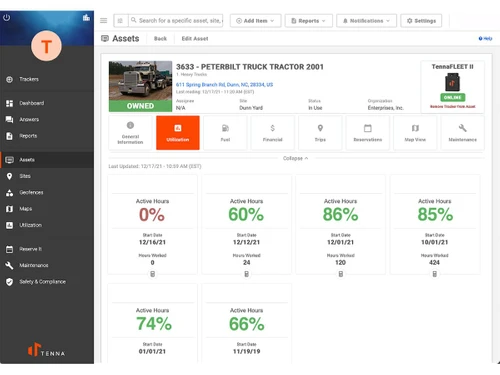
tenna-interface
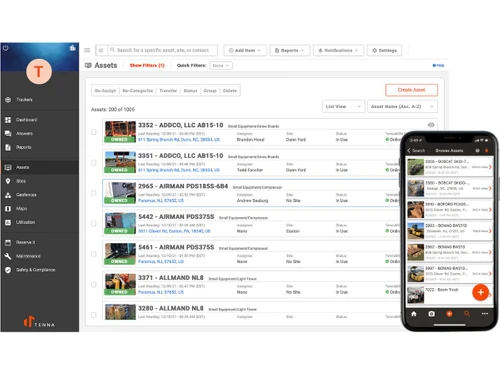
tenna-items
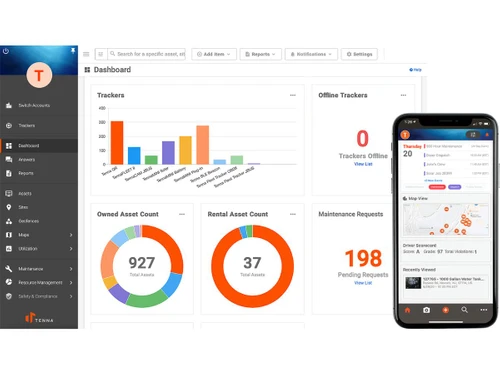
tenna-analytics

Tenna

Brand: Tenna

  • No Ratings & Reviews

Tenna keeps heavy equipment connected across demanding construction schedules. Missing asset updates can no longer impede important decisions.

See More

Have you used Tenna before?

Share your insights for better experience

Add a Review

Price Available on Request

Questions about pricing or customization? We’re here to help, just a click away.

100% Genuine
Products
Best Price
Guaranteed
Safe & Secure
Payment
  • Description

  • Pricing

  • Features

  • Specification

  • Review

  • FAQ

Tenna Software Overview

What is Tenna Software?

Tenna can be best defined as a digital command center for construction-related equipment supervision. It makes contractors track important business assets through one connected software environment. Equipment-related information reaches teams without repeated manual follow-ups. Construction planning carries greater clarity during demanding project schedules.

Large construction businesses rely on Tenna for handling machinery across active project locations. Equipment supervisors find it quite useful during transportation and resource planning responsibilities. Yard teams may also use the platform while supervising stored business assets on a regular basis. The widely trusted software solution overall makes construction activities move ahead with fewer equipment-related interruptions.

Why Choose Tenna Software?

  • Clear Equipment View: Equipment locations reach teams without unnecessary searching. Site planning carries better visibility.
  • Maintenance Timing: Service schedules arrive before equipment issues create interruptions. Repair planning faces fewer surprises.
  • Better Tool Tracking: Smaller tools receive stronger tracking across active construction areas. Fewer headaches result from missing assets.
  • Usage Data Access: Engine hour records provide clearer equipment activity details. Resource planning gains better direction.
  • Project Asset Balance: Equipment allocation matches project requirements with better accuracy. Jobsite confusion causes fewer delays.
  • Fuel Cost Awareness: Fuel usage reports highlight unnecessary equipment consumption patterns. Expense tracking carries better clarity.
  • Mixed Fleet Handling: Different vehicle types connect through one platform environment. Fleet oversight carries less complexity.
  • Cost Tracking Ease: Project expenses connect directly with equipment usage information. Budget reviews gain stronger accuracy.

Benefits of Tenna Software

  • Faster Theft Response: Missing machinery receives quicker attention through connected tracking records. Recovery chances rise during unexpected situations.
  • Downtime Reduction: Fault information reaches teams before bigger equipment troubles emerge. Construction schedules face fewer unexpected pauses.
  • Stronger Location Alerts: Geofencing notifications highlight unusual equipment movement patterns quickly. Site supervisors receive faster security awareness.
  • Repair History Access: Previous service records reach teams without repeated paperwork searches. Equipment reviews carry better accuracy.
  • Order Tracking Ease: Equipment requests move through connected dispatch records smoothly. Site teams avoid repeated follow-up calls.
  • RFID Tag Visibility: Tagged assets receive better identification across construction environments. Equipment handling becomes less uncertain.
  • Lifecycle Monitoring: Equipment history tracks usage across multiple construction projects. Replacement planning gains clearer direction.
  • Reporting Clarity: Cost reports gather useful equipment information under one platform. Business reviews carry stronger financial understanding.

Tenna Software Pricing

Tenna Software price is available on request at techjockey.com.

The pricing model is based on different parameters, including extra features, deployment type, and the total number of users. For further queries related to the product, you can contact our product team and learn more about the pricing and offers.

Read more

Tenna Company Details

Founded Year:  2015

Tenna is the construction technology platform powering equipment fleet operations. Beyond tracking, Tenna connects every aspect of fleet management, giving contractors a full-picture view of their equipment operations and a greater understanding of equipment trends, so they can increase productivity

Director/Founders Austin Conti, Jose Cueva
Company Size 101-500 Employees

Tenna Pricing & Plans

Looking for The Right Pricing?

Share your requirements and get a plan built around your business.

  • Define your business needs
  • Get customised pricing
  • Choose features that fit your workflow

Price Available on Request

Get personalised Tenna pricing that fits your needs. Our team will connect with you.

Tenna Features

  • icon_check Equipment Utilization Monitoring
    Captures runtime and usage metrics to measure equipment productivity and identify underutilized assets.
  • icon_check Preventive Maintenance Scheduling
    Automates service intervals based on engine hours, mileage, or calendar timelines to reduce downtime.
  • icon_check Mixed Fleet Telematics Integration
    Aggregates telematics data from multiple OEM systems into a unified fleet management interface.
  • icon_check Asset Inventory Management
    Maintains a centralized registry of equipment, tools, and attachments with status and assignment data.
  • icon_check Order Management
    Generates, assigns, and tracks maintenance work orders across technicians and service locations.
  • icon_check Fuel Usage Monitoring
    Tracks fuel consumption and fueling events to analyze cost trends and detect irregular usage.
  • icon_check Compliance Reporting
    Records equipment inspections and safety checklists to maintain regulatory compliance documentation.
  • icon_check Geofencing and Location Alerts
    Configures geographic boundaries to trigger alerts when equipment enters or exits defined areas.
  • icon_check RFID Asset Tagging
    Supports scannable identification methods for quick asset lookup and field-level tracking.
  • icon_check Equipment Lifecycle Management
    Tracks acquisition, deployment, maintenance history, and disposal stages of each asset.
  • icon_check Fault Management
    Logs equipment fault codes and downtime events for maintenance analysis and root cause review.
  • icon_check Project Based Asset Allocation
    Assigns equipment to specific projects and tracks cost distribution by job or location.
  • icon_check Cost Tracking and Reporting
    Aggregates operational, maintenance, and fuel costs to evaluate total asset ownership expense.
  • icon_check Role-Based Access Control (RBAC)
    Restricts platform functionality based on defined organizational roles and permissions.

Tenna Specifications

Supported Platforms
Ubuntu Ubuntu Windows Windows MacOS MacOS Linux Linux
Devices
Desktop Desktop
Deployment
Cloud-Based Cloud-Based
Suitable For
Construction
Business Specific
All Businesses
Business Size
Enterprises SMBs MSMEs
Customer Support
Email Communities
Language
English
Integration
API Integration
Training Resources
Videos
AI Features
AI Integrated

Tenna Review

Techjockey Trusted Reviews from Verified Users

No reviews are currently available for Tenna. Discover similar Construction Management Software reviews

  • Primus KRONO

    4.1

    Whats great - Great customer service, very quick to reply, had a small issue (my fault) which they responded and resolved quickly. read more

  • Oracle Aconex

    4.3

    Whats great - The best thing about the software is that it lets me organize and manage the meeting documents from a central location. This ... read more

  • QS Plus Builder Plus

    4.7

    Whats great - It is a simple brisk approach to break something. It's decent to see an easy to understand interface that carries administrat... read more

Articles for Tenna

See All Related Articles

How much does Tenna Software cost?

Tenna pricing is available on request at techjockey.com. Final costs depend on selected features, deployment type, and user requirements.

Who uses Tenna Software?

Construction companies and contractors commonly use Tenna for equipment tracking. Field crews and fleet teams also rely on it.

Is there a mobile app available for Tenna Software?

Yes, Tenna offers an official mobile application for field teams. The app works well for construction and yard crews.

Which operating systems are compatible with Tenna Software?

Tenna supports Windows, Ubuntu, Linux, and macOS platforms. Users can access it across multiple business environments.

Does Tenna Software offer a free trial?

Yes, Tenna does offer a free trial for new users. This means businesses can explore its features before final decisions.

How does Tenna Software function?

Tenna tracks equipment through GPS, RFID tags, and connected telematics systems. The advanced construction management solution also handles maintenance, inventory, and asset reporting.

20,000+ Software Listed

Best Price Guranteed

Free Expert Consultation

2M+ Happy Customers

Terms and Condtions

close

Users with registered businesses can purchase goods from merchants on the platform to satisfy their business needs. Users are not permitted to utilize any products acquired through the platform for resale, advertising, business, or further distribution.

For each purchase made, users will receive a Tax Invoice (or 'GST invoice') that includes specific details such as:

  • the GSTIN of the user associated with their registered business, and

  • the specified Entity Name for their business.

It should be noted that not all products are eligible for GST Invoice. Only the products displayed by participating sellers with the 'GST-based Invoice Available' callout on the product description page would qualify.

Certain goods and services are not eligible to get a GST Invoice, including items with VAS, i.e., Value Added Services (e.g., Total Mobile Protection/Assured Buyback) and those involving an exchange offer at the time of purchase.

Users must ensure the accuracy of the GSTIN, and business entity name provided for the GST Invoice. Requests for corrections into GST Invoice would not be accommodated by Techjockey.com or any Seller, and any issues arising from user-provided information are the sole responsibility of users.

Techjockey.com is not liable for the GST Invoice or any associated input tax credit. To efficiently claim an input tax credit, users should select the registered place of business address as per the GST authority's data and follow the provisions of the GST Act and rules.

To claim an input tax credit, the delivery and billing addresses must match. Furthermore, input tax credits will not be granted if the delivery address and GSTIN on the invoice are from different states. In case of incorrect GST details provided during the order placement, the order will be canceled automatically.