linkedin
ThermoAnalytics CoTherm logo
play What is CoTherm?
Thermoanalytics CoTherm Automation
Thermoanalytics CoTherm Coupling

ThermoAnalytics CoTherm

Brand: ThermoAnalytics

  • 4.1

  • 4 Ratings

CoTherm is a coupling and automation software for managing CAE tasks, optimizing designs, and thermal and system-level simulations.

See More

Have you used ThermoAnalytics CoTherm before?

Share your insights for better experience

Add a Review

Price Available on Request

Questions about pricing or customization? We’re here to help, just a click away.

100% Genuine
Products
Best Price
Guaranteed
Safe & Secure
Payment
  • Description

  • Pricing

  • Features

  • Specification

  • Review

  • Compare

  • Alternatives

  • FAQ

ThermoAnalytics CoTherm Software Overview

What is ThermoAnalytics CoTherm Software?

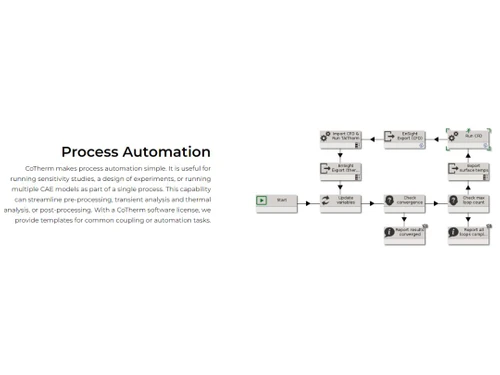
ThermoAnalytics CoTherm is a process automation and coupling software. It helps easily integrate and automate tasks for various computer-aided engineering programs. Its graphical user interface allows users to construct coupling processes easily. It can manage pre-processing, transient analysis, thermal analysis, and post-processing for various applications such as thermal management, signature prediction, optimization, and testing. It allows users to create various coupling processes, automation processes, optimize the design by evaluating parameters, and integrate with many popular thermal and CFD codes, thus helping in designing better products, designs, and automation.

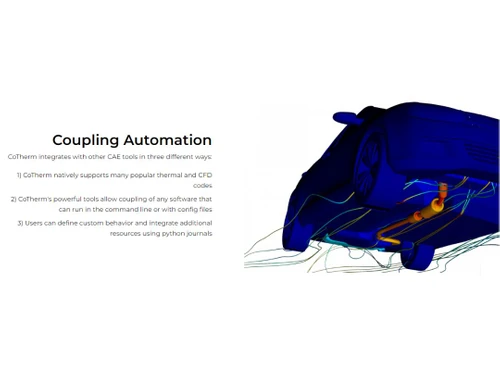
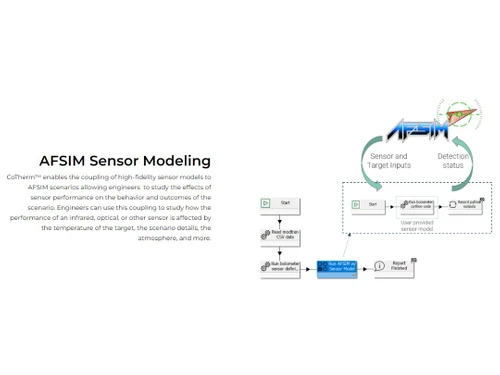
It helps in fast design optimization by providing quick answers to challenges. It supports mathematically rigorous solutions for optimal design choices. It helps in the thermal analysis of designs by integrating various CAE tools and CFD codes. It supports easy process sharing, collaboration, and teamwork. Users can define custom behavior and integrate more resources using Python journals. The software supports integration with high-processor computing queueing systems for parallel processing parameters and AFSIM CoTherm integration for studying performance effects.

Why Choose ThermoAnalytics CoTherm Platform?

  • Automated Processes:Helps automate pre-processing, analysis, and post-processing tasks, reducing manual intervention in simulation workflows.
  • Optimization of heat exchangers:It can couple thermal and CFD codes to develop an optimized design and performance of heat exchangers, like radiators, condensers, etc.
  • Testing of HVAC systems:Supports testing the performance and reliability of HVAC systems and their components, like compressors, valves, and fans.
  • Multi-model integration:Easily integrate diverse simulation models, giving a better approach to system analysis and understanding complex interactions.

Benefits of ThermoAnalytics CoTherm CAE Software

  • Efficiency: Increases efficiency of thermal and system-level simulations by coupling and automating various CAE programs.
  • Time and cost saving: Reduces time and cost of pre-processing, transient analysis, thermal analysis, etc., by using parallel execution, data caching, and optimization.
  • Collaboration: Helps in easy process sharing within and across teams, which helps in smooth teamwork, collaboration, and knowledge exchange.
  • Interface: A friendly graphical interface makes the simulation and analysis quick and more accessible.
  • Integration: Use applications of thermal and system-level simulations for different needs by integrating with many popular CAE tools and CFD codes.

Pricing of ThermoAnalytics CoTherm CAE Platform

ThermoAnalytics CoTherm CAE platform pricing is available on request at techjockey.com.

Its price in India may vary based on factors like customization, additional features required, number of users, and the deployment type. Please request a call back for subscription-related details and to avail offers on premium packages.

Read more

ThermoAnalytics Company Details

Founded Year:  1996

ThermoAnalytics is an employee-owned company with its headquarters in Michigan's scenic Upper Peninsula. ThermoAnalytics is a leading developer of thermal, fluid-flow, and infrared modeling software.

Director/Founders Keith Johnson
Company Size 101-500 Employees

ThermoAnalytics CoTherm Pricing & Plans

Looking for The Right Pricing?

Share your requirements and get a plan built around your business.

  • Define your business needs
  • Get customised pricing
  • Choose features that fit your workflow

Price Available on Request

Get personalised ThermoAnalytics CoTherm pricing that fits your needs. Our team will connect with you.

ThermoAnalytics CoTherm Features

  • icon_check Efficient & versatile coupling
    Couples and automates CAE programs for thermal simulations.
  • icon_check Versatile GUI
    The graphical user interface lets users easily construct and customize complex coupling processes.
  • icon_check Fast analysis
    Reduces simulation time and cost with parallel execution, data caching, and optimization.
  • icon_check Streamline pre-processing
    Simplifies pre-processing by integrating with many popular thermal and CFD codes.
  • icon_check Optimization capabilities
    Enables optimization of design and performance of thermal systems and components.
  • icon_check Global & local methods
    Supports both global and local coupling methods for different simulation scenarios.
  • icon_check Supports thermal & CFD codes
    Works with many thermal and CFD codes, such as TAITherm, Fluent, and Star-CCM+.
  • icon_check Define custom behavior
    Users can define custom behavior using python journals and scripts.
  • icon_check Usability + Support
    Provides a user-friendly interface, documentation, tutorials, and technical support.
  • icon_check AFSIM Sensor Modeling
    Can model the thermal effects of sensors in AFSIM, a military simulation tool.
ThermoAnalytics CoTherm Demo Video play icon

Get ThermoAnalytics CoTherm Demo

Watch the demo video to explore key features, real workflows, and how the software fits your business needs.

Understand
Key Features
Personal
Demo Insights
Interactive
Demo Support

ThermoAnalytics CoTherm Specifications

Supported Platforms
Ubuntu Ubuntu Windows Windows MacOS MacOS Linux Linux
Devices
Desktop Desktop Mobile Mobile Tablet Tablet iPad iPad
Deployment
Cloud-Based Cloud-Based
Suitable For
Manufacturing Education Aerospace Universities
Business Specific
All Businesses
Business Size
Small Business Startups Medium Business Enterprises
Customer Support
Phone Email Live Chat Communities
Language
Nederlands English français 日本人 한국어 普通话
Training Resources
Live Online Webinars Documentation Videos

Explore the Best Alternative Solutions Similar to Your Business Size and Needs

ThermoAnalytics CoTherm Review

4.1

Out of 5

img

Overall Rating

Based on
4 Verified Ratings

Rating Breakdown

  • Features 4.3
  • Value for Money 3.6
  • Ease of Use 4.3
  • Customer Support 4.2

82% Recommend this Product

Add Review

Be the First to Review

This product has no reviews yet. Be the first to leave your feedback.

Add Review

Compare ThermoAnalytics CoTherm With other CAE Software

Products
Ratings
Pricing
Device Supported
Deployment
Supported Platforms
  • img

    ThermoAnalytics CoTherm

  • 4.1

  • Price On Request

  • Desktop

    Mobile

  • Web based

    On Premises

  • Windows

    Mac OS

  • img

    Azore CFD

  • 4.3

  • Price On Request

  • Desktop

    Mobile

  • Web based

    On Premises

  • Windows

    Mac OS

  • img

    CAEplex

  • 4.6

  • Price On Request

  • Desktop

    Mobile

  • Web based

    On Premises

  • Windows

    Mac OS

  • img

    Altair SimSolid

  • 4.4

  • Price On Request

  • Desktop

    Mobile

  • Web based

    On Premises

  • Windows

    Mac OS

  • img

    FLOW 3D

  • 4.3

  • Price On Request

  • Desktop

    Mobile

  • Web based

    On Premises

  • Windows

    Mac OS

  • img

    BETA CAE Systems

  • 4.4

  • Price On Request

  • Desktop

    Mobile

  • Web based

    On Premises

  • Windows

    Mac OS

  • img

    Moldex3D

  • 4.3

  • Price On Request

  • Desktop

    Mobile

  • Web based

    On Premises

  • Windows

    Mac OS

  • img

    CAE Fidesys

  • 4.2

  • Price On Request

  • Desktop

    Mobile

  • Web based

    On Premises

  • Windows

    Mac OS

  • img

    Samadii SCIV

  • 4.1

  • Price On Request

  • Desktop

    Mobile

  • Web based

    On Premises

  • Windows

    Mac OS

  • img

    Moldflow

  • 4.0

  • Price On Request

  • Desktop

    Mobile

  • Web based

    On Premises

  • Windows

    Mac OS

(2) Product(s) selected

ThermoAnalytics CoTherm Alternatives

See All ThermoAnalytics CoTherm Alternatives

Starting Price:

$8,760

Which operating system does ThermoAnalytics CoTherm support?

ThermoAnalytics CoTherm is compatible with Ubuntu, Windows, macOS, and Linux operating systems.

Is there any ThermoAnalytics CoTherm app?

The ThermoAnalytics CoTherm app is not available for mobile devices.

What is the deployment type of ThermoAnalytics CoTherm?

ThermoAnalytics CoTherm supports cloud-based deployment.

How much does ThermoAnalytics CoTherm cost?

ThermoAnalytics CoTherm pricing is available on request at techjockey.com.

Who are the potential users of ThermoAnalytics CoTherm?

ThermoAnalytics CoTherm is typically used in automotive, energy, military, HVAC, and food service industries by engineers and designers for thermal and system-level simulations.

Is there any free trial or demo for ThermoAnalytics CoTherm?

ThermoAnalytics CoTherm demo is available for free with techjockey.com.

Is ThermoAnalytics CoTherm free?

ThermoAnalytics CoTherm does not offer a free trial. However, the premium plan with advanced features and exciting deals is available at techjockey.com.

How can you download ThermoAnalytics CoTherm?

ThermoAnalytics CoTherm installation is not required, as it is cloud-based. Just open the Setup Wizard to get started.

How does ThermoAnalytics CoTherm work?

ThermoAnalytics CoTherm helps with engineering simulations through coupling, easy-to-use design optimization, and integration with various CAE tools, making analysis fast and giving great results for different applications.

20,000+ Software Listed

Best Price Guranteed

Free Expert Consultation

2M+ Happy Customers

Terms and Condtions

close

Users with registered businesses can purchase goods from merchants on the platform to satisfy their business needs. Users are not permitted to utilize any products acquired through the platform for resale, advertising, business, or further distribution.

For each purchase made, users will receive a Tax Invoice (or 'GST invoice') that includes specific details such as:

  • the GSTIN of the user associated with their registered business, and

  • the specified Entity Name for their business.

It should be noted that not all products are eligible for GST Invoice. Only the products displayed by participating sellers with the 'GST-based Invoice Available' callout on the product description page would qualify.

Certain goods and services are not eligible to get a GST Invoice, including items with VAS, i.e., Value Added Services (e.g., Total Mobile Protection/Assured Buyback) and those involving an exchange offer at the time of purchase.

Users must ensure the accuracy of the GSTIN, and business entity name provided for the GST Invoice. Requests for corrections into GST Invoice would not be accommodated by Techjockey.com or any Seller, and any issues arising from user-provided information are the sole responsibility of users.

Techjockey.com is not liable for the GST Invoice or any associated input tax credit. To efficiently claim an input tax credit, users should select the registered place of business address as per the GST authority's data and follow the provisions of the GST Act and rules.

To claim an input tax credit, the delivery and billing addresses must match. Furthermore, input tax credits will not be granted if the delivery address and GSTIN on the invoice are from different states. In case of incorrect GST details provided during the order placement, the order will be canceled automatically.