 USA
USA UAE
UAESmall Business
Designed for startups and growing businesses

See More





Brand: Kratikal Tech Pvt Ltd
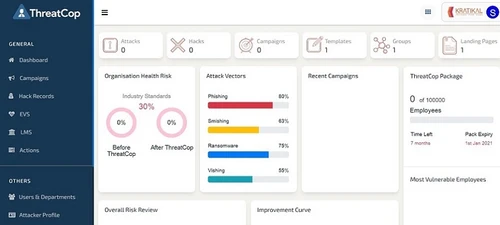
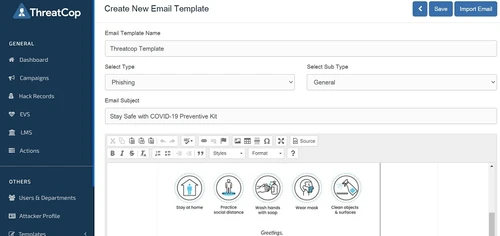
ThreatCop is one of the best cyber security solutions available in Indian market. The software allows companies to assess their security protocols by running simulation tools. The simulation tools identify various cyber risks such as phishing attacks, vishing, ransomware, etc. and removes it. Users are provided a dashboard to access cyber security health check-up reports of their organization in...
See MoreHave you used ThreatCop before?
Share your insights for better experience
Brand: Kratikal Tech Pvt Ltd
Founded Year: 2012
Kratikal Tech Limited is an end to end cyber security solutions provider. It is the trusted partner for enterprises and individuals, seeking to protect their brand, business and dignity from baffling cyber attacks.
Looking for The Right Pricing?
Share your requirements and get a plan built around your business.
Price Available on Request
Get personalised ThreatCop pricing that fits your needs. Our team will connect with you.
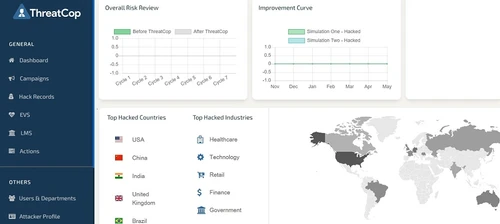
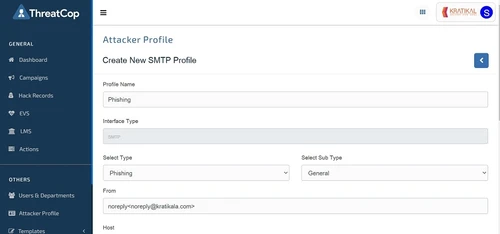
 LMS (Automated Training Campaigns) Unlimited Security Attack Periodic Assessment Phishing Protection Dashboards Overall Health Attack Vector Email Templates Schedule Campaigns Hack Record of Employees Geolocation Tag Dummy Replication of Latest Attacks Automated Security Awareness Program Employee Behavioral Profile Industry Comparison

Watch the demo video to explore key features, real workflows, and how the software fits your business needs.
 Ubuntu
  Windows
  MacOS
MacOS  Desktop
  Cloud-Based
  Perpetual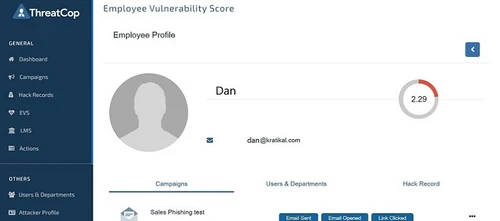
Small Business
Designed for startups and growing businesses
Medium Business
Built for business growth and flexibility
Enterprises
Designed for complex and large-scale business needs
4.9
Out of 5

Overall Rating
Based on
11 Verified Reviews
Rating Breakdown
97% Recommend this Product
Add ReviewCustomers generally express high satisfaction with ThreatCop, praising its effectiveness in enhancing employee awareness of cyber threats and its user-friendly interface. Users appreciate the frequent updates to training content, which keeps them informed about the latest trends in cybersecurity. Many reviewers highlight the tool's ability to simulate real-time attacks and its role in reducing organizational vulnerabilities. Notably, there are very few complaints, with users reporting no significant issues or desired changes, indicating a strong overall positive sentiment towards the product.
Pros
"ThreatCop teaches the employee to detect various kinds of cyber threats and reduces the risk of being hit by a cyber attack."
"ThreatCop training platform provides the updated resources and guidance you need to stay ahead of technology change"
"They update their content quite often through which we can be updated in the latest cyber trends."
Cons
"For now, there is nothing I would like to change in this tool."
"I don’t think that there is anything to dislike about this tool."
"It is quite an effective tool, and we have not encountered any difficulties till now."

Jan 12, 2021
Techjockey Verified
“Incredible Tool for Securing the Workforce Against”
Pros
ThreatCop teaches the employee to detect various kinds of cyber threats and reduces the risk of being hit by a cyber attack.
Cons
For now, there is nothing I would like to change in this tool.
Nov 7, 2020
Techjockey Verified
“Top-Notch Security Awareness and Training Platform”
Pros
ThreatCop training platform provides the updated resources and guidance you need to stay ahead of technology change
Cons
There is nothing to dislike about this tool.
Nov 7, 2020
Techjockey Verified
“Help in Staying Updated on the Latest Cyber Threat”
Pros
They update their content quite often through which we can be updated in the latest cyber trends.
Cons
We did not find anything to dislike about this tool.

ThreatCop
Price On Request
Desktop
Mobile
Web based
On Premises
Windows
Mac OS

Avast Ultimate Business Security
₹ 399
Desktop
Mobile
Web based
On Premises
Windows
Mac OS

Singularity Complete
Price On Request
Desktop
Mobile
Web based
On Premises
Windows
Mac OS

Resecurity
Price On Request
Desktop
Mobile
Web based
On Premises
Windows
Mac OS

NVADR
Price On Request
Desktop
Mobile
Web based
On Premises
Windows
Mac OS

AntiFraud AI
₹ 750
Desktop
Mobile
Web based
On Premises
Windows
Mac OS

Kela
Price On Request
Desktop
Mobile
Web based
On Premises
Windows
Mac OS

IObit Advanced SystemCare
₹ 2393
Desktop
Mobile
Web based
On Premises
Windows
Mac OS

RiskAnalytics
Price On Request
Desktop
Mobile
Web based
On Premises
Windows
Mac OS

ImmuniWeb Discovery
Price On Request
Desktop
Mobile
Web based
On Premises
Windows
Mac OS

Avast Essential Business Security
₹ 2343
Desktop
Mobile
Web based
On Premises
Windows
Mac OS
(0) Product(s) selected
Available
Price on Request
Available
Price on Request
Available
Price on Request
Starting Price:
€14,995 /Year

Available
Price on Request

Available
Price on Request

Starting Price:
$34 /Year

Starting Price:
$3 /Month

Available
Price on Request

Available
Price on Request

Starting Price:
$49 /Month








ThreatCop can identify six attack vectors.
ThreatCop allows users to make voice-based reports.
ThreatCop has received several prestigious awards such as – top 10 most innovative product by DSCI-NASSCOM, Oracle Global Start-up Systems, etc. In addition to that this software is recognized under Start-up India initiative.
Techjockey offers demo before purchase for ThreatCop. Please request a call to get your demo scheduled today.
ThreatCop works in three simple steps: 1. Simulation: This includes attack simulation and analytics operation in real-time. 2. Knowledge Sharing: Documentation of all the attacks and creation of comprehensive study material of the threats. 3. Assessment: It involves domain specific cumulative assessment
20,000+ Software Listed
Best Price Guranteed
Free Expert Consultation
2M+ Happy Customers
Terms and Condtions

Users with registered businesses can purchase goods from merchants on the platform to satisfy their business needs. Users are not permitted to utilize any products acquired through the platform for resale, advertising, business, or further distribution.
For each purchase made, users will receive a Tax Invoice (or 'GST invoice') that includes specific details such as:
the GSTIN of the user associated with their registered business, and
the specified Entity Name for their business.
It should be noted that not all products are eligible for GST Invoice. Only the products displayed by participating sellers with the 'GST-based Invoice Available' callout on the product description page would qualify.
Certain goods and services are not eligible to get a GST Invoice, including items with VAS, i.e., Value Added Services (e.g., Total Mobile Protection/Assured Buyback) and those involving an exchange offer at the time of purchase.
Users must ensure the accuracy of the GSTIN, and business entity name provided for the GST Invoice. Requests for corrections into GST Invoice would not be accommodated by Techjockey.com or any Seller, and any issues arising from user-provided information are the sole responsibility of users.
Techjockey.com is not liable for the GST Invoice or any associated input tax credit. To efficiently claim an input tax credit, users should select the registered place of business address as per the GST authority's data and follow the provisions of the GST Act and rules.
To claim an input tax credit, the delivery and billing addresses must match. Furthermore, input tax credits will not be granted if the delivery address and GSTIN on the invoice are from different states. In case of incorrect GST details provided during the order placement, the order will be canceled automatically.



