linkedin
Tracet logo
play Tracet - Enterprise Fixed Asset Management Solution
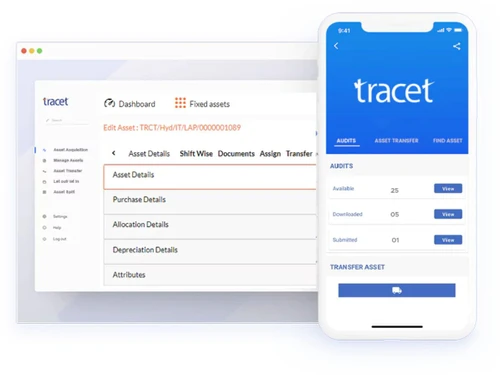
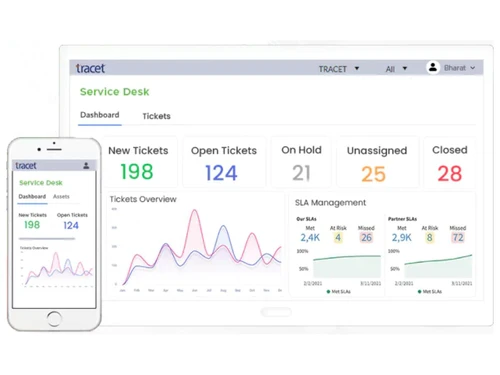
Tracet-Dashboard
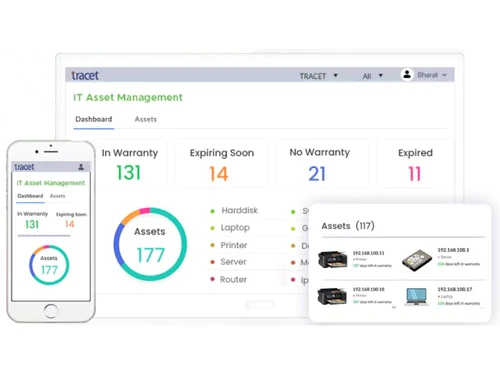
Tracet-IT Asset Management

Tracet

Brand: Adaequare Info

  • 4.2

  • 5 Ratings & 3 Reviews

Tracet is a top of the line multi-faceted fixed asset management solution. The software is easy to use and deploy which makes it beneficial to inculcate into office usage at any time. This fixed asset management software also allows users to update their data in time to get started instantly. Users of Tracet can instantly track and manage their fixed assets across different branches along with r...

See More

Have you used Tracet before?

Share your insights for better experience

Add a Review

Price Available on Request

Questions about pricing or customization? We’re here to help, just a click away.

100% Genuine
Products
Best Price
Guaranteed
Safe & Secure
Payment
  • Description

  • Pricing

  • Features

  • Specification

  • Review

  • Compare

  • Alternatives

  • FAQ

Tracet Software Overview

What is Tracet? 

Tracet is a top of the line multi-faceted fixed asset management solution. The software is easy to use and deploy which makes it beneficial to inculcate into office usage at any time. This fixed asset management software also allows users to update their data in time to get started instantly. Users of Tracet can instantly track and manage their fixed assets across different branches along with regulatory compliance and asset verification instantaneously. 

Tracet offers a business-centric approach where users can create customized fields for smooth operation. It supports the following businesses: 

  1. Hospitals
  2. Retail Chains
  3. Manufacturing Plants
  4. Schools
  5. Government Offices
  6. Logistic services, among many others. 
  7. Tracet is a scalable solution that facilitates the working for companies of all sizes. It easily fits in the daily fixed asset management workflow for large enterprise-sized operations and small-scale start-ups alike. 

What features does Tracet offer? 

Here is a quick overview of the features offered by Tracet software:

  1. Responsive user interface
  2. Scalable cloud service 
  3. Data security 
  4. Role-based data access
  5. Document management 
  6. Business process management 
  7. Workflow designing 
  8. ERP management 
  9. Device integration

Fixed Asset Management with Tracet 

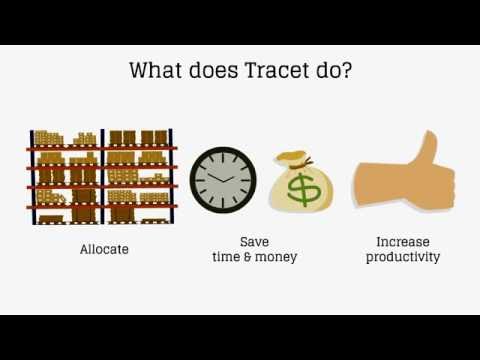
Tracet offers next-gen features to handle fixed assets. It keeps a thorough track of maintenance costs, updates, insurance, documentation. The software also lets the user know when they have to dispose of the documents and assets to clear the paperwork clutter and reduce losses, respectively. Tracet offers a separate module for managing IT assets. This allows companies to manage their hardware and software with managed asset information. The usage of this fixed asset management software results in reduced expenditure on assets and improvement in their shelf-life considerably.

What is the price of Tracet? 

Tracet prices vary based on customer requirements. Please request a call to get the appropriate quotation as per your necessities. 

Read more

Adaequare Info Company Details

Founded Year:  2003

Adaequare is a CMMi Level 3 Certified company and has global presence across 3 different locations.

Director/Founders Pavan Peechara and Peechara Neelima.
Company Size 1-100 Employees

Tracet Pricing & Plans

Looking for The Right Pricing?

Share your requirements and get a plan built around your business.

  • Define your business needs
  • Get customised pricing
  • Choose features that fit your workflow

Price Available on Request

Get personalised Tracet pricing that fits your needs. Our team will connect with you.

Tracet Features

  • icon_check Central ERP Integration
    Tracet fixed asset management software allows users to handle ERP-specific data through API integration services
  • icon_check Responsive UI
    Tracet offers a device ready responsive user interface for all browsers and devices. 
  • icon_check Scalable Application
    Companies using Tracet can scale their software as their operation grows with time. 
  • icon_check Secure
    This fixed asset management software uses an online firewall system to protect all the data from theft or leakage. 
  • icon_check BPM/Workflow
    Companies can automate their asset tracking workflow and can visually design the entire workflow process. 
  • icon_check Asset Lifecycle Management
    Manages assets from procurement to disposal, ensuring full lifecycle visibility and control.
  • icon_check Barcode/RFID
    Uses barcode, QR, and RFID tagging for fast asset identification, tracking, and audit accuracy.
  • icon_check Multi-location Tracking
    Tracks assets across departments, branches, and locations with centralized visibility.
  • icon_check Depreciation Management
    Automates depreciation calculations as per Companies Act and IT Act for compliance.
  • icon_check Audit & Compliance
    Generates audit-ready reports and ensures regulatory compliance with predefined standards.
  • icon_check Document Management
    Stores asset-related documents like invoices, warranties, and certificates in a centralized system.
  • icon_check Asset Assignment & Transfer
    Enables assignment, transfer, and retirement of assets across users and locations efficiently.
  • icon_check Maintenance Tracking
    Tracks maintenance schedules, service history, and warranties to improve asset performance.
  • icon_check Custom Reports & Dashboards
    Provides real-time dashboards and custom reports for better decision-making and tracking.
  • icon_check Integration Support
    Easily integrates with external tools, CI/CD pipelines, and monitoring systems for workflow automation.
Tracet Demo Video play icon

Get Tracet Demo

Watch the demo video to explore key features, real workflows, and how the software fits your business needs.

Understand
Key Features
Personal
Demo Insights
Interactive
Demo Support

Tracet Specifications

Supported Platforms
Windows Windows iOS iOS Android Android MacOS MacOS
Devices
Desktop Desktop Mobile Mobile Tablet Tablet
Deployment
Cloud-Based Cloud-Based Perpetual Perpetual
Suitable For
All Industries
Business Specific
All Businesses
Business Size
Individual Small Business Startups Medium Business Enterprises SMBs SMEs
Customer Support
Phone Email Communities
Language
English
Integration
API Integration
Training Resources
Documentation Videos
Technology
Next Generation

Tracet Reviews

4.2

Out of 5

img

Overall Rating

Based on
3 Verified Reviews

Rating Breakdown

  • Features 4.3
  • Value for Money 4.6
  • Ease of Use 4.6
  • Customer Support 4.5

88% Recommend this Product

Add Review

Ansh Timbadia

Manager

Industry: Industrial Automation User since: < 6 months

4.5

Reviewed on: Jun 28, 2023

Techjockey Verified

“Tracet- A great FA software”

Pros

- Detailed asset tracking - Customisation of reports - Ease of use - Project cost tracking - Entire life cycle of asset usage

Cons

none found

Reason to switch

- Detailed reports - Better control of FA movement - Project wise reports - Asset servicing reports

manu raj

User

4.7

Reviewed on: Feb 10, 2019

Techjockey Verified

“Tracking asset ”

Pros

Tracet helps in tracking assets at each subscriber level which worked as an aid to our business. We are very content with this product and would recommend others also to use the software

Cons

Needs to be connected to internet all the time

Abhishek Anand

User

4.2

Reviewed on: Feb 23, 2018

Techjockey Verified

“Very good service”

Pros

Within minutes, I was contacted by Brittany, who proceeded to listen to my company's needs, and ask insightful questions that helped me pinpoint aspects of my search that I hadn't previously considered.

Cons

N/A

Compare Tracet With other Fixed Asset Management Software

Products
Ratings
Pricing
Device Supported
Deployment
Supported Platforms
  • img

    Tracet

  • 4.2

  • Price On Request

  • Desktop

    Mobile

  • Web based

    On Premises

  • Windows

    Mac OS

  • img

    Crown FAMS

  • 4.4

  • Price On Request

  • Desktop

    Mobile

  • Web based

    On Premises

  • Windows

    Mac OS

  • img

    FastFacts FAMS

  • 4.6

  • Price On Request

  • Desktop

    Mobile

  • Web based

    On Premises

  • Windows

    Mac OS

(0) Product(s) selected

Tracet Alternatives

See All Tracet Alternatives

Available

Price on Request

How can I access Tracet?

Tracet is a web application which can be accessed over intranet or internet through an internet browser.

What are the minimum system requirements for Tracet??

Minimum hardware and software requirements are: 1. Operating System: Windows 7 onwards 2. RAM: 2GB (minimum) 3. Hard Disk: 80GB (minimum) 4. Software: Any functional web-browser

What is the technology stack of Tracet?

Tracet supports the following technologies:? 1. .net Framework 4.5? 2. Multi-tenant support? 3. SQL Server 2008 R2? 4. N-tier architecture? 5. ASP.net MVC

Can I get a demo for Tracet??

Tracet is available for an online demo with Techjockey. Please request a call to get your demo scheduled.

How can I access support in real-time through Tracet??

Tracet offers a live chat support built in the system that can be simply accessed by clicking on “Chat now” option. The software also has an integrated email query handling system.

20,000+ Software Listed

Best Price Guranteed

Free Expert Consultation

2M+ Happy Customers

Terms and Condtions

close

Users with registered businesses can purchase goods from merchants on the platform to satisfy their business needs. Users are not permitted to utilize any products acquired through the platform for resale, advertising, business, or further distribution.

For each purchase made, users will receive a Tax Invoice (or 'GST invoice') that includes specific details such as:

  • the GSTIN of the user associated with their registered business, and

  • the specified Entity Name for their business.

It should be noted that not all products are eligible for GST Invoice. Only the products displayed by participating sellers with the 'GST-based Invoice Available' callout on the product description page would qualify.

Certain goods and services are not eligible to get a GST Invoice, including items with VAS, i.e., Value Added Services (e.g., Total Mobile Protection/Assured Buyback) and those involving an exchange offer at the time of purchase.

Users must ensure the accuracy of the GSTIN, and business entity name provided for the GST Invoice. Requests for corrections into GST Invoice would not be accommodated by Techjockey.com or any Seller, and any issues arising from user-provided information are the sole responsibility of users.

Techjockey.com is not liable for the GST Invoice or any associated input tax credit. To efficiently claim an input tax credit, users should select the registered place of business address as per the GST authority's data and follow the provisions of the GST Act and rules.

To claim an input tax credit, the delivery and billing addresses must match. Furthermore, input tax credits will not be granted if the delivery address and GSTIN on the invoice are from different states. In case of incorrect GST details provided during the order placement, the order will be canceled automatically.