linkedin
Video Highlight logo
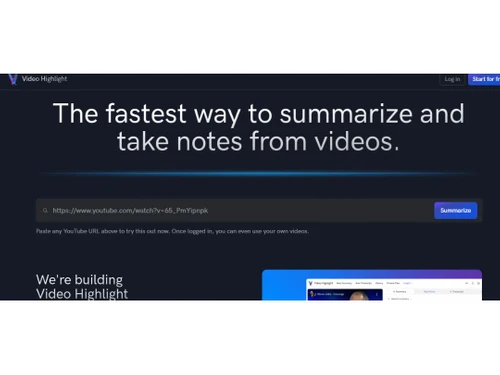
video highlight homepage
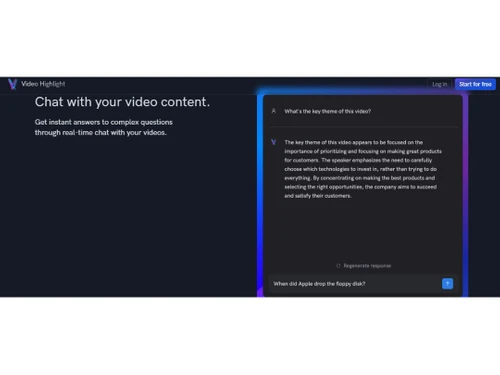
video highlight content
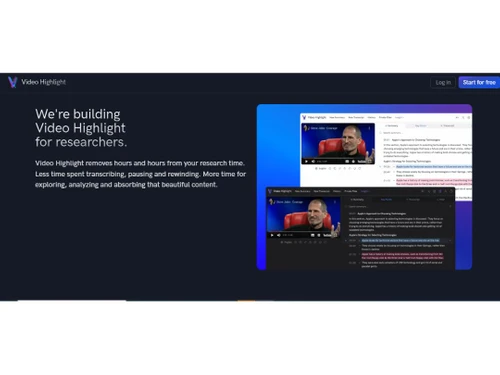
video highlight researchers

Video Highlight

Brand: Video Highlight

  • 4.2

  • 6 Ratings

Tool that uses AI to automatically create summaries and transcripts from videos, helping users quickly find and analyze important moments without watching videos.

See More

Have you used Video Highlight before?

Share your insights for better experience

Add a Review

Price Available on Request

Questions about pricing or customization? We’re here to help, just a click away.

100% Genuine
Products
Best Price
Guaranteed
Safe & Secure
Payment
  • Description

  • Pricing

  • Features

  • Specification

  • Review

  • Compare

  • Alternatives

  • FAQ

Video Highlight Software Overview

What is Video Highlight?

Video Highlight is a software tool designed to simplify the process of analyzing and extracting insights from video content. It uses AI technology to create time stamped summaries and transcripts, allowing users to quickly find and focus on important moments without the hassle of manually scrubbing through footage.

This video summarizer enables users to highlight key segments of videos and engage in interactive chats, making it easier to discuss and share insights with others. This tool is particularly useful for professionals who need to review large amounts of video content efficiently, saving them time and effort. By streamlining video analysis, Video Highlight helps users concentrate on the most relevant information, enhancing productivity and collaboration.

Why Choose Video Highlight Software?

  • Time Efficiency: It saves users hours by automatically generating timestamped summaries and transcripts, eliminating the need for manual scrubbing through videos.
  • AI-Powered Insights: The software uses artificial intelligence to highlight key moments, allowing users to focus on the most important information quickly.
  • Interactive Features: Users can engage in interactive chats about the video content, facilitating better collaboration and discussion.
  • User-Friendly Interface: The platform is designed to be intuitive and easy to use, making it accessible for individuals with varying technical skills.
  • Versatile Applications: It can be used for various purposes, including education, training, and content creation, making it suitable for a wide range of industries.
  • Free Trial Available: Users can start using Video Highlight for free, allowing them to experience its features before committing to a subscription.

Benefits of Video Highlight Software

  • Automated Content Summarization: Quickly generates concise summaries of lengthy videos, allowing users to grasp key points without watching the entire footage.
  • Timestamped Highlights: Provides specific timestamps for important moments in the video, making it easy to navigate directly to relevant sections.
  • Transcription Services: Converts spoken content into text, enabling easier searchability and reference for users reviewing the material.
  • Collaboration Tools: Facilitates team discussions and feedback through interactive features, enhancing communication around video content.
  • Customizable Viewing Experience: Users can tailor how they view and interact with video highlights, improving engagement and usability.
  • Integration Capabilities: Easily integrates with other software tools and platforms, streamlining workflows for users who manage multiple applications.
  • Multi-Language Support: Offers transcription and summarization in various languages, catering to a global audience and diverse user needs.
  • User Analytics: Tracks user engagement with video content, providing insights into which sections are most viewed or discussed.
  • Cloud-Based Access: Allows users to access their video highlights from anywhere, ensuring flexibility and convenience for remote teams.

Pricing of Video Highlight

Video Highlight price details are available on request at techjockey.com.

The pricing model is based on different parameters, including extra features, deployment type, and the total number of users. For further queries related to the product, you can contact our product team and learn more about the pricing and offers.

Read more

Video Highlight Pricing & Plans

Looking for The Right Pricing?

Share your requirements and get a plan built around your business.

  • Define your business needs
  • Get customised pricing
  • Choose features that fit your workflow

Price Available on Request

Get personalised Video Highlight pricing that fits your needs. Our team will connect with you.

Video Highlight Features

  • icon_check Timestamped Summaries
    Automatically creates a summary with timestamps, making it easy to jump to specific moments in the video.
  • icon_check Highlight Key Moments
    Allows users to select and emphasize important or engaging parts of the video.
  • icon_check Real-time Chat
    Enables live communication or feedback during video review, enhancing collaboration.
  • icon_check Notion Integration
    Syncs with Notion to organize and manage video highlights and notes seamlessly.
  • icon_check AI Video Outlines
    Uses AI to automatically generate an outline or structure of key moments within the video.
  • icon_check Smart Search
    Offers intelligent search capabilities to find specific scenes or keywords within the video quickly.
  • icon_check Screenshots
    Lets users capture still images from the video to highlight specific frames.
  • icon_check Export
    Provides the option to export the video highlights in different formats for sharing or editing.

Video Highlight Specifications

Supported Platforms
Ubuntu Ubuntu Windows Windows MacOS MacOS Linux Linux
Devices
Desktop Desktop Mobile Mobile Tablet Tablet iPad iPad
Deployment
Cloud-Based Cloud-Based
Suitable For
All Industries
Business Specific
All Businesses
Business Size
Small Business Startups Medium Business Enterprises
Customer Support
Email Communities
Language
English
Training Resources
Videos
AI Features
AI Integrated

Explore the Best Alternative Solutions Similar to Your Business Size and Needs

Video Highlight Review

4.2

Out of 5

img

Overall Rating

Based on
6 Verified Ratings

Rating Breakdown

  • Features 4.2
  • Value for Money 4.1
  • Ease of Use 4.2
  • Customer Support 4.3

88% Recommend this Product

Add Review

Be the First to Review

This product has no reviews yet. Be the first to leave your feedback.

Add Review

Compare Video Highlight With other Video Summarizers

Products
Ratings
Pricing
Device Supported
Deployment
Supported Platforms
  • img

    Video Highlight

  • 4.2

  • Price On Request

  • Desktop

    Mobile

  • Web based

    On Premises

  • Windows

    Mac OS

  • img

    TubeGuide

  • 4.0

  • Price On Request

  • Desktop

    Mobile

  • Web based

    On Premises

  • Windows

    Mac OS

  • img

    NoteGPT

  • 4.1

  • Price On Request

  • Desktop

    Mobile

  • Web based

    On Premises

  • Windows

    Mac OS

  • img

    Eightify

  • 4.4

  • Price On Request

  • Desktop

    Mobile

  • Web based

    On Premises

  • Windows

    Mac OS

  • img

    Summify

  • 4.2

  • Price On Request

  • Desktop

    Mobile

  • Web based

    On Premises

  • Windows

    Mac OS

  • img

    YouTube Summarizer

  • 4.3

  • Price On Request

  • Desktop

    Mobile

  • Web based

    On Premises

  • Windows

    Mac OS

  • img

    VidCatter IO

  • 4.1

  • Price On Request

  • Desktop

    Mobile

  • Web based

    On Premises

  • Windows

    Mac OS

  • img

    VideoSage

  • 4.3

  • Price On Request

  • Desktop

    Mobile

  • Web based

    On Premises

  • Windows

    Mac OS

  • img

    SummarQ

  • 4.2

  • Price On Request

  • Desktop

    Mobile

  • Web based

    On Premises

  • Windows

    Mac OS

  • img

    summarize tech

  • 4.1

  • Price On Request

  • Desktop

    Mobile

  • Web based

    On Premises

  • Windows

    Mac OS

(0) Product(s) selected

Video Highlight Alternatives

See All Video Highlight Alternatives

Starting Price:

$7 /Month

Available

Price on Request

Starting Price:

$5 /Month

Starting Price:

$5 /Month

Articles for Video Highlight

See All Related Articles

How much does Video Highlight Software Cost?

The pricing details for Video Highlight software are available upon request at techjockey.com.

Is there any Video Highlight Software App?

No, there are no mobile apps available for Video Highlight on platforms like iOS and Android.

Which operating system does Video Highlight Software Support?

Video Highlight software supports Windows, MacOS, Ubuntu, and Linux.

Does Video Highlight offer a free trial?

Yes, Video Highlight software offers a free trial for users to explore features before committing.

How does Video Highlight Software Work?

Video Highlight Software works by using AI to automatically generate timestamped summaries and transcripts from video content, allowing users to quickly identify and analyze important moments.

Who are the potential users of Video Highlight Software?

Potential users of Video Highlight Software include educators, content creators, marketers, and anyone who needs to analyze video material efficiently.

Is there any free demo for Video Highlight Software?

Yes, there is a free demo available for Video Highlight Software, allowing users to explore its features before making a commitment.

Is Video Highlight Software Free?

Video Highlight Software is not entirely free; while it offers a free trial, full access typically requires a subscription or payment.

20,000+ Software Listed

Best Price Guranteed

Free Expert Consultation

2M+ Happy Customers

Terms and Condtions

close

Users with registered businesses can purchase goods from merchants on the platform to satisfy their business needs. Users are not permitted to utilize any products acquired through the platform for resale, advertising, business, or further distribution.

For each purchase made, users will receive a Tax Invoice (or 'GST invoice') that includes specific details such as:

  • the GSTIN of the user associated with their registered business, and

  • the specified Entity Name for their business.

It should be noted that not all products are eligible for GST Invoice. Only the products displayed by participating sellers with the 'GST-based Invoice Available' callout on the product description page would qualify.

Certain goods and services are not eligible to get a GST Invoice, including items with VAS, i.e., Value Added Services (e.g., Total Mobile Protection/Assured Buyback) and those involving an exchange offer at the time of purchase.

Users must ensure the accuracy of the GSTIN, and business entity name provided for the GST Invoice. Requests for corrections into GST Invoice would not be accommodated by Techjockey.com or any Seller, and any issues arising from user-provided information are the sole responsibility of users.

Techjockey.com is not liable for the GST Invoice or any associated input tax credit. To efficiently claim an input tax credit, users should select the registered place of business address as per the GST authority's data and follow the provisions of the GST Act and rules.

To claim an input tax credit, the delivery and billing addresses must match. Furthermore, input tax credits will not be granted if the delivery address and GSTIN on the invoice are from different states. In case of incorrect GST details provided during the order placement, the order will be canceled automatically.