 USA
USA UAE
UAESmall Business
Designed for startups and growing businesses

See More





Brand: Voila
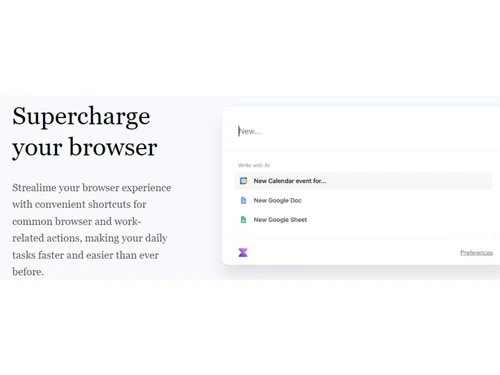
Voila is an AI-powered browser assistant designed to enhance productivity. It offers a Chrome extension and features for various tasks like crafting emails, blog writing, product development, and SEO content creation.
See MoreHave you used Voila before?
Share your insights for better experience
Brand: Voila
Founded Year: 2023
Voila is AI-powered browser assistant to level up your productivity.
Core Writing & Editing Tools
 Paraphrasing Grammar & Punctuation Check Tone & Style Adjustment File Upload Management Spelling & Proofing Content Formatting Version History Readability Score Content Scoring Vocabulary Enhancement
 Content Generation
SEO-Optimized Content Social Media Posts Blog Post Creation Audience Targeting Marketing Copy Headlines & Taglines Content Ideas Topic Clustering Custom Templates Automated Outlining Video Script Generation Collaboration
Team Collaboration Export & Sharing Options API Access Security and Compliance
User Access Management Data Encryption SOC 2 Compliance GDPR Compliant AI Act Compliance Bias Mitigation Audit Logs Integrations
Browser Extension API Integration Third Party Integration Google Workspace Integration Microsoft Office Integration Learning Management System (LMS) Integration CMS Integration Language Support
Multilingual Writing Translation Assistance Localization Suggestions Analytics & Reporting
Content Optimization Suggestions Performance Analytics Predictive Analysis AI Capabilities
AI Detection Custom Prompts Summarisation Multi-Model Support Plagiarism Detection Citation Generation Citation Suggestions AI Content Generation Administrative Features
Team Management API Access Role-Based Access Control (RBAC) User Access Management Data Loss Prevention Others
AI Image Generator YouTube Transcripts 

Watch the demo video to explore key features, real workflows, and how the software fits your business needs.
 Ubuntu
  Windows
  MacOS
MacOS  Linux
Linux  Desktop
  Cloud-Based

Small Business
Designed for startups and growing businesses
Medium Business
Built for business growth and flexibility
Enterprises
Designed for complex and large-scale business needs
4.5
Out of 5

Overall Rating
Based on
4 Verified Ratings
Rating Breakdown
85% Recommend this Product
Add ReviewTechjockey Trusted Reviews from Verified Users
No reviews are currently available for Voila. Discover similar AI Writing Assistants reviews

WordAi
Whats great - I've been using WordAi for the last 2 months. Being a professional blogger and running my own business, I've seen the need fo... read more

Hushl
Whats great - Sandbox feedback loop—community suggestions elevate content read more

LongShot
Whats great - Compared to many AI writing tools with fewer features, LongShot gives great value. SEO tools, fact checking, niche templates ... read more

Voila
Price On Request
Desktop
Mobile
Web based
On Premises
Windows
Mac OS

Paperpal
Price On Request
Desktop
Mobile
Web based
On Premises
Windows
Mac OS

Rayo
Price On Request
Desktop
Mobile
Web based
On Premises
Windows
Mac OS

Quillbot AI
Price On Request
Desktop
Mobile
Web based
On Premises
Windows
Mac OS

Junia AI
Price On Request
Desktop
Mobile
Web based
On Premises
Windows
Mac OS

HIX AI Writer
₹ 1081
Desktop
Mobile
Web based
On Premises
Windows
Mac OS

Text Cortex
Price On Request
Desktop
Mobile
Web based
On Premises
Windows
Mac OS

Shopia
Price On Request
Desktop
Mobile
Web based
On Premises
Windows
Mac OS

SEO AI
Price On Request
Desktop
Mobile
Web based
On Premises
Windows
Mac OS

Yarnit
Price On Request
Desktop
Mobile
Web based
On Premises
Windows
Mac OS

Autoblogging AI
Price On Request
Desktop
Mobile
Web based
On Premises
Windows
Mac OS
(2) Product(s) selected
Starting Price:
₹2,596 /Month
Starting Price:
$34 /Month
Starting Price:
$49 /Month
Starting Price:
$49 /month

Starting Price:
$19

Starting Price:
$29 /Month

Starting Price:
$16 /Month

Starting Price:
$13 /Month

Starting Price:
$25 /Month

Starting Price:
£2 /Month

Starting Price:
$45 /Month
Voila software pricing starts at $8 at techjockey.com.
Voila is an AI-powered browser assistant designed to enhance productivity. It functions as a Chrome extension and integrates with various tasks like crafting emails, blog writing, product development, SEO, content translation, and more. This tool streamlines workflows through faster processing, grammar checks, and AI-driven assistance.
Voila software supports Windows, MacOS, Linux, Ubuntu.
Voila is available as a Chrome extension and accessible on Desktop, Mobile, Tablet, and iPad devices.
Yes, Voila is suitable for small businesses. Its features like AI-powered writing assistance, SEO content creation, and efficient translation can help small businesses enhance their online presence, streamline content creation, and improve overall productivity.
Contact techjockey.com to explore trial options for Voila. They can provide information about available testing periods. You can contact our product experts for more information.
Voila offers features like a Chrome extension, email crafting assistance, blog writing tools, product development support, SEO content creation, text translation, faster processing, grammar checks, and AI-driven productivity enhancements. You can contact our product experts for more information.
Voila targets individuals and professionals seeking to boost productivity across various tasks, including content creation, email communication, and product development. Its AI-powered features assist users in streamlining workflows and improving efficiency.
As an AI-powered browser extension, Voila likely leverages the security features of the Chrome browser itself. Additionally, being a cloud-based tool, data is likely stored on secure servers. For detailed information about Viola's specific security measures, it's best to consult techjockey.com.
20,000+ Software Listed
Best Price Guranteed
Free Expert Consultation
2M+ Happy Customers
Terms and Condtions

Users with registered businesses can purchase goods from merchants on the platform to satisfy their business needs. Users are not permitted to utilize any products acquired through the platform for resale, advertising, business, or further distribution.
For each purchase made, users will receive a Tax Invoice (or 'GST invoice') that includes specific details such as:
the GSTIN of the user associated with their registered business, and
the specified Entity Name for their business.
It should be noted that not all products are eligible for GST Invoice. Only the products displayed by participating sellers with the 'GST-based Invoice Available' callout on the product description page would qualify.
Certain goods and services are not eligible to get a GST Invoice, including items with VAS, i.e., Value Added Services (e.g., Total Mobile Protection/Assured Buyback) and those involving an exchange offer at the time of purchase.
Users must ensure the accuracy of the GSTIN, and business entity name provided for the GST Invoice. Requests for corrections into GST Invoice would not be accommodated by Techjockey.com or any Seller, and any issues arising from user-provided information are the sole responsibility of users.
Techjockey.com is not liable for the GST Invoice or any associated input tax credit. To efficiently claim an input tax credit, users should select the registered place of business address as per the GST authority's data and follow the provisions of the GST Act and rules.
To claim an input tax credit, the delivery and billing addresses must match. Furthermore, input tax credits will not be granted if the delivery address and GSTIN on the invoice are from different states. In case of incorrect GST details provided during the order placement, the order will be canceled automatically.



