linkedin
WinAir logo
play WinAir - Maintenance Programs Overview
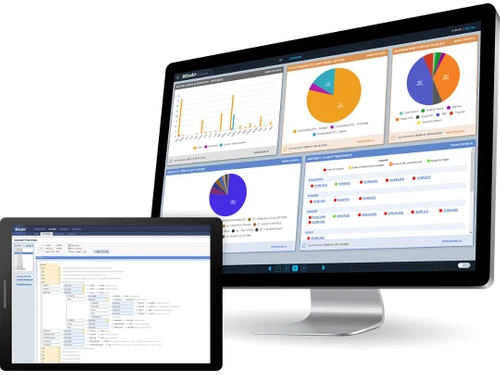
WinAir dashboard
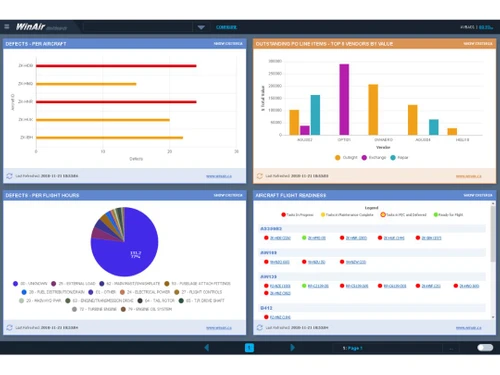
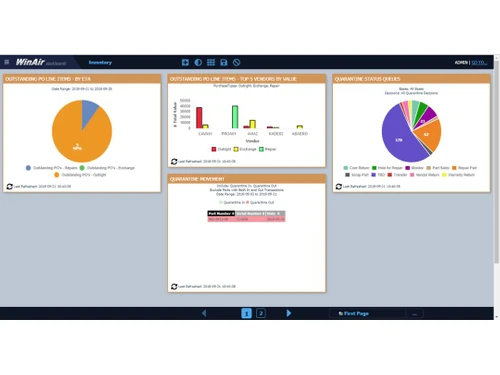
WinAir graphs

WinAir

Brand: AV-BASE Systems

  • 4.3

  • 5 Ratings

WinAir is aviation management software providing digital support for managing aircraft maintenance, inventory, and compliance, enabling smooth operations.

See More

Have you used WinAir before?

Share your insights for better experience

Add a Review

Price Available on Request

Questions about pricing or customization? We’re here to help, just a click away.

100% Genuine
Products
Best Price
Guaranteed
Safe & Secure
Payment
  • Description

  • Pricing

  • Features

  • Specification

  • Review

  • Compare

  • Alternatives

  • FAQ

WinAir Software Overview

What is WinAir?

WinAir is an aviation management software designed to manage aircraft maintenance, inventory control, and regulatory compliance. It digitizes aviation management tasks and acts like a centralized platform for task management of aviation operators, MROs, and CAMOs. This platform helps to track maintenance schedules, manage parts inventory, ensure information flow among departments, and follow proper industry regulations.

The software comes with a cloud-based or on-premise system suiting different user needs. Its interface provides a customizable dashboard giving real-time data information, displaying key metrics with visuals, and providing access to various tools.

WinAir key features include automated maintenance tracking, inventory management, and compliance monitoring. It helps departments to communicate in real-time, provides automated workflows for better operational efficiency, reduces downtime, and prevents regulatory penalties. It provides Automated maintenance scheduling for better planning of maintenance tasks. The software’s reporting and analytics tools give valuable insights for decision-making. From project management, and data migration to hosting it takes care of all your aviation needs.

Why choose WinAir Aviation Software?

  • Automated Maintenance Scheduling: Helps in aircraft maintenance through automated scheduling, timely inspections and repairs, reducing downtime and operational costs.
  • Real-Time Work Order Tracking: Supports real-time work order tracking to ensure timely completion and accurate record-keeping.
  • Inventory Control: Provides inventory control, managing spare parts and supplies, reducing wastage, and ensuring availability of the components.
  • Regulatory Compliance Monitoring: Maintains adherence to aviation safety regulations, reducing risks of fines or operational disruptions due to non-compliance.
  • Data-Driven Decision Making: Provides real-time analytics and reporting tools for helping in decision-making on maintenance, budgeting, and resource allocation.

Benefits of WinAir Aviation Software

  • Increased Efficiency : Automates workflows, reducing manual effort and improving overall maintenance productivity.
  • Cost Savings : Optimizes inventory and maintenance planning, lowering unnecessary expenses and resource wastage.
  • Regulatory Compliance : Ensures adherence to aviation safety standards, minimizing risks of fines and operational disruptions.
  • Reduced Downtime : Streamlines maintenance scheduling to keep aircraft operational and minimize ground time.
  • Enhanced Decision-Making : Provides real-time data insights for strategic planning and resource allocation.
  • Improved Data Accuracy : Eliminates errors with automated record-keeping and validation processes for precise reporting.

Pricing of WinAir

WinAir price details are available on request at techjockey.com.

WinAir price in India may vary based on factors like customization, additional features required, number of users, and the deployment type. Please request a call back for subscription-related details and to avail offers on premium packages.

Read more

AV-BASE Systems Company Details

Founded Year:  1988

WinAir has over 30 years of experience as a leader in aviation management software. Companies rely on WinAir to efficiently and effectively track and manage aircraft maintenance and inventory control.

Director/Founders Kyle Vergeer
Company Size 101-500 Employees

WinAir Pricing & Plans

Looking for The Right Pricing?

Share your requirements and get a plan built around your business.

  • Define your business needs
  • Get customised pricing
  • Choose features that fit your workflow

Price Available on Request

Get personalised WinAir pricing that fits your needs. Our team will connect with you.

WinAir Features

  • icon_check Project Management
    Facilitates project planning and execution, ensuring timely completion and resource allocation for maintenance tasks.
  • icon_check Activity Dashboard
    Provides a visual overview of ongoing activities, aiding in quick decision-making and progress tracking.
  • icon_check Alerts & Notifications
    Sends timely alerts and notifications for scheduled maintenance, work order updates, and inventory status.
  • icon_check Inventory Management
    Streamlines inventory control, managing spare parts, supplies, and ensuring availability for maintenance activities.
  • icon_check Document Management
    Organizes and stores maintenance-related documents, ensuring easy access and regulatory compliance.
  • icon_check Maintenance Management
    Supports the planning, execution, and tracking of maintenance tasks, ensuring efficient operations.
  • icon_check Real time Data
    Provides real-time data on maintenance activities, work orders, and inventory, aiding in informed decision-making.
  • icon_check Cost Tracking
    Monitors and tracks maintenance costs, helping in budget planning and cost control.
  • icon_check Compliance Management
    Ensures adherence to industry standards and regulations, minimizing the risk of non-compliance.
  • icon_check Components/parts Monitoring
    Tracks the status and condition of components and parts, ensuring timely maintenance and replacement.
WinAir Demo Video play icon

Get WinAir Demo

Watch the demo video to explore key features, real workflows, and how the software fits your business needs.

Understand
Key Features
Personal
Demo Insights
Interactive
Demo Support

WinAir Specifications

Supported Platforms
Windows Windows
Devices
Desktop Desktop
Deployment
Cloud-Based Cloud-Based
Suitable For
All Industries
Business Specific
All Businesses
Business Size
Enterprises MSMBs MSMEs
Customer Support
Phone Email
Language
English
Integration
API Integration

WinAir Review

4.3

Out of 5

img

Overall Rating

Based on
5 Verified Ratings

Rating Breakdown

  • Features 3.8
  • Value for Money 4.5
  • Ease of Use 4.6
  • Customer Support 4.5

88% Recommend this Product

Add Review

Be the First to Review

This product has no reviews yet. Be the first to leave your feedback.

Add Review

Compare WinAir With other Aviation Software

Products
Ratings
Pricing
Device Supported
Deployment
Supported Platforms
  • img

    WinAir

  • 4.3

  • Price On Request

  • Desktop

    Mobile

  • Web based

    On Premises

  • Windows

    Mac OS

  • img

    MPulse

  • 4.4

  • Price On Request

  • Desktop

    Mobile

  • Web based

    On Premises

  • Windows

    Mac OS

  • img

    FMX

  • 4.1

  • Price On Request

  • Desktop

    Mobile

  • Web based

    On Premises

  • Windows

    Mac OS

  • img

    MX System

  • 4.1

  • Price On Request

  • Desktop

    Mobile

  • Web based

    On Premises

  • Windows

    Mac OS

  • img

    Ramco Aviation

  • 4.2

  • Price On Request

  • Desktop

    Mobile

  • Web based

    On Premises

  • Windows

    Mac OS

  • img

    Fluix

  • 4.5

  • Price On Request

  • Desktop

    Mobile

  • Web based

    On Premises

  • Windows

    Mac OS

  • img

    Upkeep

  • 4.5

  • Price On Request

  • Desktop

    Mobile

  • Web based

    On Premises

  • Windows

    Mac OS

  • img

    eMaint CMMS

  • 4.0

  • Price On Request

  • Desktop

    Mobile

  • Web based

    On Premises

  • Windows

    Mac OS

(0) Product(s) selected

WinAir Alternatives

See All WinAir Alternatives

Available

Price on Request

FMX

4.1

Available

Price on Request

Available

Price on Request

Starting Price:

$20 /user/month

Starting Price:

$20 /User/Month

Starting Price:

$33 /user/month

Who are the potential users of WinAir Aviation Software?

WinAir is used by airlines, charter operators, MROs, CAMOs, helicopter operators, and other aviation businesses managing fleet maintenance.

How much does the WinAir Aviation Software Cost?

WinAir price details are available on request at techjockey.com.

Can a user integrate WinAir with third-party software?

Yes, WinAir integrates with accounting, flight operations, and ERP systems to improve workflow efficiency.

Can I access WinAir Aviation Software remotely?

Yes, WinAir offers cloud-based hosting, allowing users to securely access data from anywhere with an internet connection.

How can a user track work orders in WinAir?

Users can track work orders in real-time through WinAir's work order tracking module.

Can I get a demo of WinAir before purchasing?

Yes, WinAir Aviation Software offers a demo to showcase its features and functionalities before implementation.

On which operating systems can WinAir run?

WinAir Aviation Software runs on Windows and cloud-based platforms, making it accessible from various devices and locations.

How can a user migrate existing maintenance data into WinAir?

WinAir provides data migration services to import maintenance records, compliance data, and inventory into the system.

Can I receive alerts and notifications in WinAir Aviation Software?

Yes, WinAir provides alerts and notifications for scheduled maintenance, work order updates, and inventory status.

Can a user customize the dashboard in WinAir?

Yes, users can customize the activity dashboard in WinAir to display relevant information and metrics.

20,000+ Software Listed

Best Price Guranteed

Free Expert Consultation

2M+ Happy Customers

Terms and Condtions

close

Users with registered businesses can purchase goods from merchants on the platform to satisfy their business needs. Users are not permitted to utilize any products acquired through the platform for resale, advertising, business, or further distribution.

For each purchase made, users will receive a Tax Invoice (or 'GST invoice') that includes specific details such as:

  • the GSTIN of the user associated with their registered business, and

  • the specified Entity Name for their business.

It should be noted that not all products are eligible for GST Invoice. Only the products displayed by participating sellers with the 'GST-based Invoice Available' callout on the product description page would qualify.

Certain goods and services are not eligible to get a GST Invoice, including items with VAS, i.e., Value Added Services (e.g., Total Mobile Protection/Assured Buyback) and those involving an exchange offer at the time of purchase.

Users must ensure the accuracy of the GSTIN, and business entity name provided for the GST Invoice. Requests for corrections into GST Invoice would not be accommodated by Techjockey.com or any Seller, and any issues arising from user-provided information are the sole responsibility of users.

Techjockey.com is not liable for the GST Invoice or any associated input tax credit. To efficiently claim an input tax credit, users should select the registered place of business address as per the GST authority's data and follow the provisions of the GST Act and rules.

To claim an input tax credit, the delivery and billing addresses must match. Furthermore, input tax credits will not be granted if the delivery address and GSTIN on the invoice are from different states. In case of incorrect GST details provided during the order placement, the order will be canceled automatically.