linkedin
Upkeep logo
play UpKeep — Asset Operations Management Solution
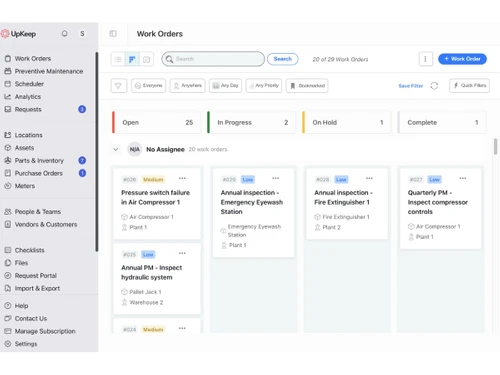
UpKeep-work order
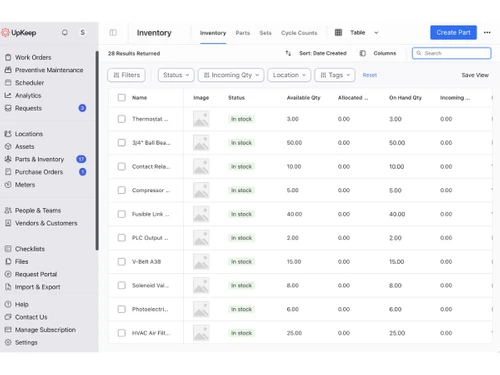
UpKeep-inventory

Upkeep

Brand: UpKeep Maintenance Management

  • 4.5

  • 3 Ratings

UpKeep is a cloud-based computerized maintenance management system (CMMS) software that helps businesses streamline facility and equipment maintenance.

See More

Have you used Upkeep before?

Share your insights for better experience

Add a Review
Starting Price
$20

View plans

100% Genuine
Products
Best Price
Guaranteed
Safe & Secure
Payment
  • Description

  • Pricing

  • Features

  • Specification

  • Review

  • Compare

  • Alternatives

  • FAQ

Starting at $20

Upkeep Software Overview

What is UpKeep?

UpKeep is a computerized maintenance management system that empowers businesses to scale efficiently by equipping Maintenance and Reliability teams with the necessary tools and information for streamlined operations. It allows users to create work orders on the go, receive real-time task updates, and receive instant alerts when assets require attention.

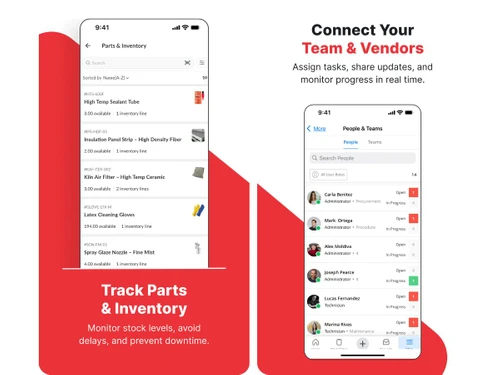
The platform offers asset, inventory, and work order management alongside preventive maintenance scheduling. Users benefit from a concise overview of tasks, displaying upcoming work, due dates, criticality, and assigned assets or workers. It also offers comprehensive notes, color-coded priority ratings, images, asset attachments, and user assignments.

Why Choose UpKeep Software?

  • The CMMS software allows you to assign reactive repairs or planned maintenance tasks to specific technicians.
  • It enables you to visualize all work orders in a list or calendar for easy planning.
  • The platform allows you to filter your work order view by technician, asset, location, or priority.
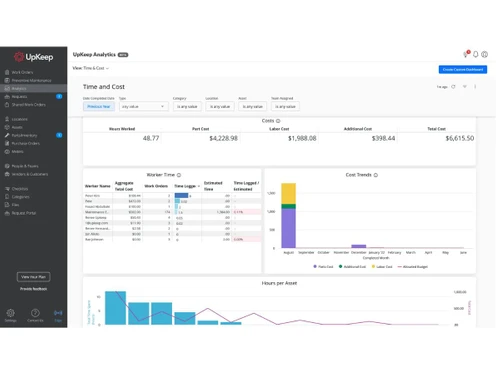
  • It enables you to analyze work order trends to identify areas for reducing maintenance costs.
  • The CMMS software allows you to log labor hours on each work order to optimize technician efficiency.

Benefits of UpKeep Platform

  • The CMMS software allows you to track the entire maintenance history of each asset for future reference.
  • It allows you to set minimum stock levels for parts and receive alerts when supplies get low.
  • The platform enables you to utilize QR codes to streamline asset documentation processes.
  • It allows you to gain visibility into overall maintenance costs, downtime trends, and resource allocation.
  • The CMMS software allows you to convert incoming maintenance requests into work orders and assign them efficiently.

Pricing of Upkeep CMMS Software

UpKeep price in India starts from $20 at techjockey.com. It comes with multiple pricing plans and caters to a diverse customer base.

For subscription-related details and offers on premium packages, please request a call back from our product experts.

Read more

UpKeep Maintenance Management Company Details

Founded Year:  2014

UpKeep Maintenance Management

Director/Founders Ryan Chan
Company Size 1-100

Upkeep Pricing & Plans

Essential
Starting at $20
    • Users

      Users
      Users
    • Monthly

      Monthly
      Monthly

Key Features

  • Unlimted locations

  • Custom Categories

  • Work Order Management

  • Asset Management

  • Unlimited work orders

Premium
Starting at $55
    • Users

      Users
      Users
    • Monthly

      Monthly
      Monthly

Key Features

  • UpKeep Studio

  • PM scheduling

  • Custom checklists

  • Work Order Management

  • Preventive Maintenance

Upkeep Features

  • icon_check Asset Management
    Maintain detailed asset records, track lifecycle history, and monitor performance, costs, and maintenance activities.
  • icon_check Reporting & Analytics
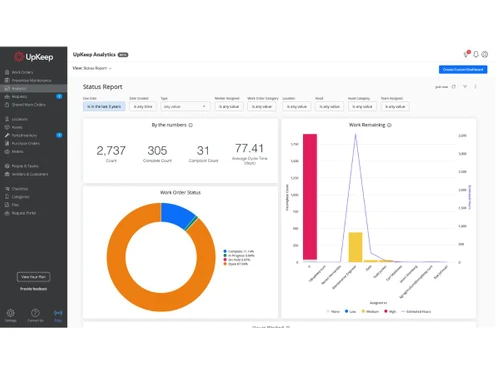
    Generate dashboards and reports on KPIs like downtime, costs, and efficiency to support data-driven decisions.
  • icon_check Vendor Management
    Store vendor details, track service contracts, and manage supplier interactions for maintenance and procurement activities.
  • icon_check Purchase Order Management
    Create and manage purchase orders for parts and services, with approval workflows and budget tracking.
  • icon_check Role-Based Access Control (RBAC)
    Define user roles and permissions to ensure secure access to data and system features based on responsibilities.
  • icon_check Alerts & Notifications
    Send automated alerts for work orders, due maintenance, and inventory thresholds to keep teams informed and proactive.
  • icon_check Work Order Management
    Create, assign, prioritize, and track maintenance work orders with real-time status updates and technician accountability.
  • icon_check Estimate Time & Cost
    Forecast labor hours and material expenses for work orders.
  • icon_check Data Import
    Transfer existing asset, maintenance, and inventory data into the system.
  • icon_check Checklist Management
    Design and assign digital checklists to ensure standardized completion of tasks.
  • icon_check Workflow Automation
    Set up automatic triggers for tasks like work order approvals or notifications.
  • icon_check Attachment Support
    Include photos, videos, or documents within work orders for reference.
  • icon_check Multi-Location
    Manage assets, work orders, and teams across multiple sites from a central platform.
  • icon_check Barcode Scanning
    Use barcode scanners to identify and access asset information quickly.
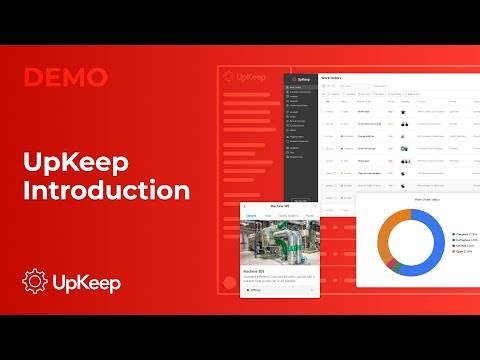
Upkeep Demo Video play icon

Get Upkeep Demo

Watch the demo video to explore key features, real workflows, and how the software fits your business needs.

Understand
Key Features
Personal
Demo Insights
Interactive
Demo Support

Upkeep Specifications

Supported Platforms
Windows Windows iOS iOS Android Android MacOS MacOS
Devices
Desktop Desktop Mobile Mobile Tablet Tablet iPad iPad
Deployment
Cloud-Based Cloud-Based
Suitable For
All Industries
Business Specific
All Businesses
Business Size
Individual Small Business Startups Medium Business Enterprises SMBs SMEs Freelancers
Customer Support
Phone Email Live Chat Communities
Language
English
Integration
API Integration
Training Resources
Live Online Webinars Documentation Videos
AI Features
AI Integrated
Technology
Next Generation
Compliance Regulation
CCPA CPRA

Explore the Best Alternative Solutions Similar to Your Business Size and Needs

Upkeep Review

4.5

Out of 5

img

Overall Rating

Based on
3 Verified Ratings

Rating Breakdown

  • Features 4.6
  • Value for Money 4.3
  • Ease of Use 4.6
  • Customer Support 4.6

90% Recommend this Product

Add Review

Be the First to Review

This product has no reviews yet. Be the first to leave your feedback.

Add Review
Compare Upkeep With other CMMS Software

Products
Ratings
Pricing
Device Supported
Deployment
Supported Platforms
  • img

    Upkeep

  • 4.5

  • Price On Request

  • Desktop

    Mobile

  • Web based

    On Premises

  • Windows

    Mac OS

  • img

    ATL-CMMS

  • 4.1

  • ₹ 7500

  • Desktop

    Mobile

  • Web based

    On Premises

  • Windows

    Mac OS

  • img

    Limble CMMS

  • 4.8

  • Price On Request

  • Desktop

    Mobile

  • Web based

    On Premises

  • Windows

    Mac OS

  • img

    Click Maint CMMS

  • 4.1

  • Price On Request

  • Desktop

    Mobile

  • Web based

    On Premises

  • Windows

    Mac OS

  • img

    MaintainX

  • 4.3

  • Price On Request

  • Desktop

    Mobile

  • Web based

    On Premises

  • Windows

    Mac OS

  • img

    Fiix

  • 4.3

  • Price On Request

  • Desktop

    Mobile

  • Web based

    On Premises

  • Windows

    Mac OS

  • img

    Cryotos CMMS

  • 4.4

  • Price On Request

  • Desktop

    Mobile

  • Web based

    On Premises

  • Windows

    Mac OS

  • img

    Abexa Worldwide

  • 5

  • Price On Request

  • Desktop

    Mobile

  • Web based

    On Premises

  • Windows

    Mac OS

  • img

    Gruntify

  • 4.3

  • Price On Request

  • Desktop

    Mobile

  • Web based

    On Premises

  • Windows

    Mac OS

  • img

    Zoidii

  • 4.5

  • Price On Request

  • Desktop

    Mobile

  • Web based

    On Premises

  • Windows

    Mac OS

  • img

    Opscale CMMS

  • 4.0

  • Price On Request

  • Desktop

    Mobile

  • Web based

    On Premises

  • Windows

    Mac OS

(0) Product(s) selected

Upkeep Alternatives

See All Upkeep Alternatives

Starting Price:

$25 /User/Month

Fiix

4.3

Starting Price:

$45 /Month

Starting Price:

$19 /Month

Starting Price:

$39 /Month

Available

Price on Request

Starting Price:

$33 /user/month

Starting Price:

$100 /Month

Articles for Upkeep

See All Related Articles

Which operating system does UpKeep support?

UpKeep is compatible with Ubuntu, Windows, MacOS, and Linux operating systems.

Is there any UpKeep app?

UpKeep is unavailable for Android and iOS app users.

What is the deployment type of UpKeep software?

UpKeep supports web-based deployment.

How much does UpKeep cost?

UpKeep price starts at $20 on techjockey.com.

Who are the potential users of UpKeep?

UpKeep can help maintenance teams maintain physical assets.

Does UpKeep offer a free demo?

Yes, a demo of UpKeep is available at techjockey.com.

Is UpKeep free?

Yes, UpKeep is available for free.

Does UpKeep offer a free trial?

Yes, UpKeep offers a free trial to allow users to test the software before committing to a subscription.

How can you download UpKeep software?

UpKeep is a web-based application that does not need to be downloaded. So, just open the setup wizard and get started.

How does UpKeep software work?

UpKeep is an asset operations management solution that allows users to track work orders, maintain assets, and schedule preventative maintenance.

20,000+ Software Listed

Best Price Guranteed

Free Expert Consultation

2M+ Happy Customers

Terms and Condtions

close

Users with registered businesses can purchase goods from merchants on the platform to satisfy their business needs. Users are not permitted to utilize any products acquired through the platform for resale, advertising, business, or further distribution.

For each purchase made, users will receive a Tax Invoice (or 'GST invoice') that includes specific details such as:

  • the GSTIN of the user associated with their registered business, and

  • the specified Entity Name for their business.

It should be noted that not all products are eligible for GST Invoice. Only the products displayed by participating sellers with the 'GST-based Invoice Available' callout on the product description page would qualify.

Certain goods and services are not eligible to get a GST Invoice, including items with VAS, i.e., Value Added Services (e.g., Total Mobile Protection/Assured Buyback) and those involving an exchange offer at the time of purchase.

Users must ensure the accuracy of the GSTIN, and business entity name provided for the GST Invoice. Requests for corrections into GST Invoice would not be accommodated by Techjockey.com or any Seller, and any issues arising from user-provided information are the sole responsibility of users.

Techjockey.com is not liable for the GST Invoice or any associated input tax credit. To efficiently claim an input tax credit, users should select the registered place of business address as per the GST authority's data and follow the provisions of the GST Act and rules.

To claim an input tax credit, the delivery and billing addresses must match. Furthermore, input tax credits will not be granted if the delivery address and GSTIN on the invoice are from different states. In case of incorrect GST details provided during the order placement, the order will be canceled automatically.