linkedin
FastMaint logo
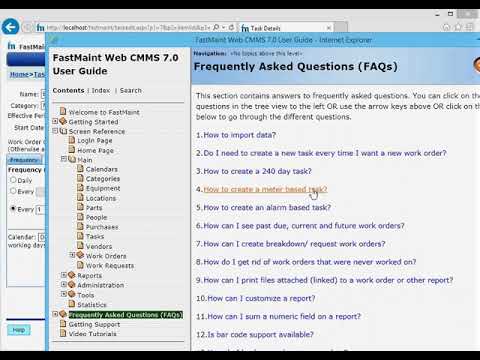
play FastMaint CMMS - Managing Maintenance Tasks
FastMaint Maintenance
FastMaint CMMS

FastMaint

Brand: SMGlobal

  • 4.3

  • 4 Ratings

FastMaint is a CMMS software solution designed to streamline maintenance operations and asset management, offering features like work order management and preventive maintenance scheduling.

See More

Have you used FastMaint before?

Share your insights for better experience

Add a Review
Starting Price
$100

View plans

100% Genuine
Products
Best Price
Guaranteed
Safe & Secure
Payment
  • Description

  • Pricing

  • Features

  • Specification

  • Review

  • Compare

  • Alternatives

  • FAQ

Starting at $100

FastMaintSoftware Overview

What is FastMaint?

FastMaint is a comprehensive CMMS software tailored to optimize maintenance operations and asset management for businesses of all sizes. It facilitates efficient work order management, preventive maintenance scheduling, and asset tracking to ensure equipment reliability and prolong lifespan.

With user-friendly interfaces and customizable features, FastMaint enables easy implementation and adaptation to various industries and organizational needs. Its robust reporting and analytics capabilities empower informed decision-making and continuous improvement in maintenance processes. FastMaint ultimately enhances productivity, reduces downtime, and improves overall operational efficiency for businesses.

Why Choose FastMaint Software?

  • Streamlined Maintenance Operations: It centralizes maintenance processes, simplifying work order management, preventive maintenance scheduling, and asset tracking for improved efficiency.
  • Enhanced Asset Management: With features for asset tracking and maintenance history tracking, It helps organizations effectively monitor and maintain their equipment and facilities.
  • Increased Equipment Reliability: Facilitating preventive maintenance scheduling and tracking reduces equipment downtime, prolongs asset lifespan, and enhances reliability.
  • User-Friendly Interface: Its intuitive interface makes it easy to navigate and implement, ensuring user adoption and efficient utilization across teams.
  • Cost Savings: It helps organizations save on maintenance costs by optimizing workflows, reducing downtime, and preventing costly equipment failures.
  • Regulatory Compliance: It ensures organizations remain compliant with industry regulations and standards by facilitating proper maintenance scheduling, documentation, and reporting.

Benefits of FastMaint Platform

  • Improved Workforce Collaboration: It fosters collaboration among maintenance teams through streamlined communication and task management, enhancing overall productivity.
  • Efficient Resource Allocation: By providing insights into equipment usage and maintenance history, It enables organizations to allocate resources effectively and prioritize maintenance activities.
  • Scalability: It offers scalability to accommodate the growing needs of organizations, allowing for easy expansion and adaptation to changing maintenance requirements.
  • Reduced Administrative Burden: Automated scheduling, reporting, and documentation features minimize administrative tasks, freeing up time for maintenance professionals to focus on core activities.
  • Enhanced Customer Satisfaction: Ensuring equipment reliability and minimizing downtime contributes to improved service delivery and customer satisfaction.
  • Integration Capabilities: It seamlessly integrates with other business systems, facilitating data exchange and interoperability across departments for enhanced efficiency and decision-making.

Pricing of FastMaint CMMS Software

FastMaint prices in India start from $100 per month at techjockey.com.

The pricing model is based on different parameters, including extra features, deployment type, and the total number of users. For further queries related to the product, you can contact our product team and learn more about the pricing and offers.

Read more

SMGlobal Company Details

Founded Year:  2002

FastMaint CMMS Software - Maintenance Management Software

Director/Founders Samina Mughal
Company Size 1-100 Employees

FastMaint Pricing & Plans

Cloud
Starting at $100
    • Licenses

      Licenses
      Licenses
    • Monthly

      Monthly
      Monthly

Key Features

  • Reduce Data Entry

  • Schedule Preventive Maintenance (PM)

  • Better Work Instructions & Feedback

  • Maintenance Inventory

  • Vendor Management

Standard
Starting at $2500
    • Licenses (One Time)

      Licenses (One Time)
      Licenses (One Time)

Key Features

  • Reduce Data Entry

  • Schedule Preventive Maintenance (PM)

  • Better Work Instructions & Feedback

  • Maintenance Inventory

  • Vendor Management

Professional
Starting at $6000
    • Licenses (One Time)

      Licenses (One Time)
      Licenses (One Time)

Key Features

  • Reduce Data Entry

  • Schedule Preventive Maintenance (PM)

  • Better Work Instructions & Feedback

  • Maintenance Inventory

  • Vendor Management

Web
Starting at $6000
    • Licenses (One Time)

      Licenses (One Time)
      Licenses (One Time)

Key Features

  • Reduce Data Entry

  • Schedule Preventive Maintenance (PM)

  • Better Work Instructions & Feedback

  • Maintenance Inventory

  • Vendor Management

FastMaint Features

  • icon_check Dashboard and KPIs
    Visual dashboards provide real-time insights into maintenance activities, KPIs, and asset performance metrics.
  • icon_check Asset Management
    Maintain detailed equipment records, service history, and performance data for better lifecycle management.
  • icon_check Reporting & Analytics
    Generate standard and custom reports to analyze maintenance performance, downtime, and cost trends.
  • icon_check Document Management
    Attach manuals, images, and documents to assets and work orders for quick reference and better tracking.
  • icon_check Audit Trail
    Track all maintenance actions and changes with detailed logs for accountability and compliance purposes.
  • icon_check Custom Fields
    Configure custom data fields and forms to adapt the system according to specific business requirements.
  • icon_check Alerts & Notifications
    Send automated alerts and updates to users regarding work orders, schedules, and maintenance activities.
  • icon_check Asset Tracking
    Tracks and manages assets throughout their lifecycle, including acquisition, maintenance, and disposal.
  • icon_check Inventory Control
    Manages inventory levels, stock locations, and replenishment processes to ensure efficient operations.
  • icon_check Preventive Maintenance
    Schedules and automates routine maintenance tasks to prevent equipment failures and prolong asset lifespan.
  • icon_check Purchasing
    Manages procurement processes, including vendor selection, purchase orders, and invoice tracking.
  • icon_check Scheduling
    Plans and schedules maintenance activities, resources, and personnel to optimize workflow efficiency.
  • icon_check Work Order Management
    Creates, assigns, tracks, and manages work orders efficiently to ensure timely completion of maintenance tasks.
  • icon_check Service History Tracking
    Records and tracks maintenance activities and service history for assets, enabling informed decision-making and analysis.
FastMaint Demo Video play icon

Get FastMaint Demo

Watch the demo video to explore key features, real workflows, and how the software fits your business needs.

Understand
Key Features
Personal
Demo Insights
Interactive
Demo Support

FastMaint Specification

Supported Platforms
Windows Windows Linux Linux
Devices
Desktop Desktop
Deployment
Web-Based Web-Based Perpetual Perpetual
Suitable For
All Industries
Business Specific
All Businesses
Business Size
Small Business Medium Business Enterprises SMBs SMEs MSMEs
Customer Support
Phone Email
Language
English
Training Resources
In Person Live Online Documentation Videos

Explore the Best Alternative Solutions Similar to Your Business Size and Needs

FastMaint Review

4.3

Out of 5

img

Overall Rating

Based on
4 Verified Ratings

Rating Breakdown

  • Features 4.2
  • Value for Money 4.3
  • Ease of Use 4.3
  • Customer Support 4.2

87% Recommend this Product

Add Review

Be the First to Review

This product has no reviews yet. Be the first to leave your feedback.

Add Review

Compare FastMaint With other CMMS Software

Products
Ratings
Pricing
Device Supported
Deployment
Supported Platforms
  • img

    FastMaint

  • 4.3

  • Price On Request

  • Desktop

    Mobile

  • Web based

    On Premises

  • Windows

    Mac OS

  • img

    ATL-CMMS

  • 4.1

  • ₹ 7500

  • Desktop

    Mobile

  • Web based

    On Premises

  • Windows

    Mac OS

  • img

    Limble CMMS

  • 4.8

  • Price On Request

  • Desktop

    Mobile

  • Web based

    On Premises

  • Windows

    Mac OS

  • img

    Click Maint CMMS

  • 4.1

  • Price On Request

  • Desktop

    Mobile

  • Web based

    On Premises

  • Windows

    Mac OS

  • img

    MaintainX

  • 4.3

  • Price On Request

  • Desktop

    Mobile

  • Web based

    On Premises

  • Windows

    Mac OS

  • img

    Fiix

  • 4.3

  • Price On Request

  • Desktop

    Mobile

  • Web based

    On Premises

  • Windows

    Mac OS

  • img

    Cryotos CMMS

  • 4.4

  • Price On Request

  • Desktop

    Mobile

  • Web based

    On Premises

  • Windows

    Mac OS

  • img

    Upkeep

  • 4.5

  • Price On Request

  • Desktop

    Mobile

  • Web based

    On Premises

  • Windows

    Mac OS

  • img

    Abexa Worldwide

  • 5

  • Price On Request

  • Desktop

    Mobile

  • Web based

    On Premises

  • Windows

    Mac OS

  • img

    Gruntify

  • 4.3

  • Price On Request

  • Desktop

    Mobile

  • Web based

    On Premises

  • Windows

    Mac OS

  • img

    Zoidii

  • 4.5

  • Price On Request

  • Desktop

    Mobile

  • Web based

    On Premises

  • Windows

    Mac OS

(0) Product(s) selected

FastMaint Alternatives

See All FastMaint Alternatives

Starting Price:

$25 /User/Month

Fiix

4.3

Starting Price:

$45 /Month

Starting Price:

$20 /User/Month

Starting Price:

$19 /Month

Starting Price:

$39 /Month

Available

Price on Request

Starting Price:

$33 /user/month

Articles for FastMaint

See All Related Articles

Which operating system does FastMaint Software Support?

FastMaint Software is compatible with Ubuntu, Windows, Linux and MacOS.

Is there any FastMaint Software App?

FastMaint Software app is not available for Android and iOS app users.

What is the deployment type of FastMaint Software?

It supports cloud-based deployment.

How much does FastMaint Software Cost?

FastMaint prices in India start at $100 per month at techjockey.com.

Who are the potential users of FastMaint Software?

FastMaint Software is typically used by all industries to optimize maintenance operations and asset management for businesses of all sizes.

Is there any free demo for FastMaint Software?

Yes, a demo of FastMaint is available at techjockey.com.

Is FastMaint Software Free?

FastMaint Software is not available for free. You can connect with our product experts to learn more about the pricing plans.

Does FastMaint offer a free trial?

Yes, FastMaint Software offers a free trial.

How can you download FastMaint Software?

FastMaint Software installation is not required, as it is cloud-based. Just open the Setup Wizard to get started.

How Does FastMaint Software Work?

FastMaint Software works by centralizing maintenance operations facilitating tasks such as asset tracking, inventory control, preventive maintenance scheduling, and work order management for streamlined maintenance workflows.

20,000+ Software Listed

Best Price Guranteed

Free Expert Consultation

2M+ Happy Customers

Terms and Condtions

close

Users with registered businesses can purchase goods from merchants on the platform to satisfy their business needs. Users are not permitted to utilize any products acquired through the platform for resale, advertising, business, or further distribution.

For each purchase made, users will receive a Tax Invoice (or 'GST invoice') that includes specific details such as:

  • the GSTIN of the user associated with their registered business, and

  • the specified Entity Name for their business.

It should be noted that not all products are eligible for GST Invoice. Only the products displayed by participating sellers with the 'GST-based Invoice Available' callout on the product description page would qualify.

Certain goods and services are not eligible to get a GST Invoice, including items with VAS, i.e., Value Added Services (e.g., Total Mobile Protection/Assured Buyback) and those involving an exchange offer at the time of purchase.

Users must ensure the accuracy of the GSTIN, and business entity name provided for the GST Invoice. Requests for corrections into GST Invoice would not be accommodated by Techjockey.com or any Seller, and any issues arising from user-provided information are the sole responsibility of users.

Techjockey.com is not liable for the GST Invoice or any associated input tax credit. To efficiently claim an input tax credit, users should select the registered place of business address as per the GST authority's data and follow the provisions of the GST Act and rules.

To claim an input tax credit, the delivery and billing addresses must match. Furthermore, input tax credits will not be granted if the delivery address and GSTIN on the invoice are from different states. In case of incorrect GST details provided during the order placement, the order will be canceled automatically.