
linkedin
Equipment360 logo
play Fleet Maintenance Software for Heavy Equipment | HCSS Equipment360
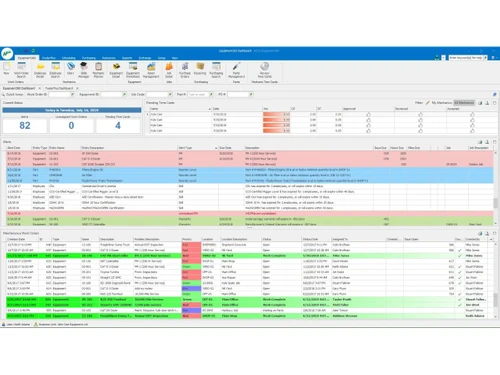
equipment360-workflows
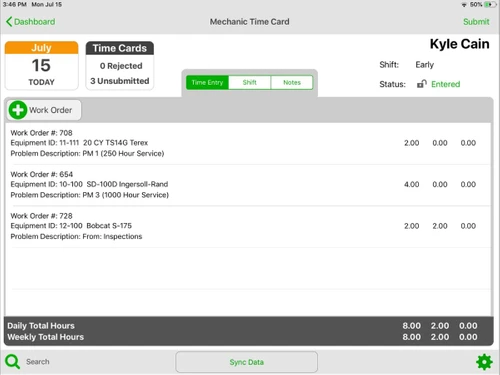
equipment360-timecards

Equipment360

Brand: Heavy Construction Systems Specialists

  • No Ratings & Reviews

Equipment360 is a CMMS software for heavy equipment maintenance, asset tracking, and preventive scheduling in construction.

See More

Have you used Equipment360 before?

Share your insights for better experience

Add a Review

Price Available on Request

Questions about pricing or customization? We’re here to help, just a click away.

100% Genuine
Products
Best Price
Guaranteed
Safe & Secure
Payment
  • Description

  • Pricing

  • Features

  • Specification

  • Review

  • FAQ

Equipment360 Software Overview

What is Equipment360?

Equipment360 is a specialized CMMS software platform designed by HCSS specifically for heavy equipment maintenance in construction and field services. It is essential asset management software that helps fleet managers and shop personnel optimize the lifecycle of expensive machinery. Instead of relying on paper logs and scattered spreadsheets, Equipment360 centralizes all maintenance data into one digital system. It enables automatic preventive maintenance scheduling based on meter hours or calendar days, generates work orders with complete service history, and tracks repair costs, parts inventory, and equipment health.

The platform is built to bridge the gap between the field and the shop. Mechanics can use the mobile app on iPads to manage repairs, access equipment history, and submit time cards directly from the job site. When an operator reports a defect during an inspection, the system can automatically generate a maintenance request. As a comprehensive asset management software solution, Equipment360 also integrates with HCSS telematics to import real-time usage data, with FuelerPlus to track fuel costs, and with accounting systems like Sage and Viewpoint for seamless financial data flow.

Why Choose Equipment360?

  • Work Order Management: Creates, tracks, and manages work orders with complete service history and repair status.
  • Preventive Maintenance Scheduling: Schedules maintenance based on time, usage hours, or mileage using automated alerts.
  • Equipment Maintenance Tracking: Tracks service events and repair history to maintain accurate equipment lifecycle records.
  • Inspection Management: Captures equipment condition data and triggers corrective maintenance actions automatically.
  • Maintenance Request Management: Allows users to submit and track repair requests from field or shop.
  • Inventory Management: Tracks spare parts, quantities, and reorder levels to ensure parts availability for maintenance.
  • Alerts & Notifications: Generates alerts for maintenance due dates, certifications, and service requirements automatically.
  • Mobile Maintenance Management: Provides mobile access to create and manage maintenance tasks remotely from iOS devices.
  • Equipment Utilization Tracking: Tracks runtime, mileage, and operational hours to support maintenance planning.

Benefits of Equipment360

  • Reduces Unplanned Downtime: Automated preventive maintenance detects issues before major breakdowns occur.
  • Increases Asset Lifespan: Consistent maintenance tracking ensures heavy machinery operates at peak efficiency longer.
  • Streamlines Shop Workflow: Eliminates paper-based processes for real-time visibility of daily maintenance tasks.
  • Improves Cost Control: Tracks repair costs including labor and parts to identify unprofitable assets.
  • Integrates with HCSS Ecosystem: Seamlessly connects with HeavyJob, Telematics, and FuelerPlus for unified data.

Equipment360 Pricing

Equipment360 pricing is available on request at techjockey.com. The pricing model is based on different parameters, including extra features, deployment type, and the total number of users. For further queries related to the product, you can contact our product team and learn more about the pricing and offers.

Read more

Heavy Construction Systems Specialists Company Details

Founded Year:  1986

HCSS has been developing software to help construction companies streamline their operations.

Director/Founders Mike Rydin
Company Size 101-500 Employees

Equipment360 Pricing & Plans

Looking for The Right Pricing?

Share your requirements and get a plan built around your business.

  • Define your business needs
  • Get customised pricing
  • Choose features that fit your workflow

Price Available on Request

Get personalised Equipment360 pricing that fits your needs. Our team will connect with you.

Equipment360 Features

  • icon_check Work Order Management
    Creates, tracks, and manages maintenance work orders with complete service history, cost details, and repair status records.
  • icon_check Preventive Maintenance Scheduling
    Schedules maintenance based on time, usage hours, or mileage using automated alerts to ensure timely equipment servicing.
  • icon_check Equipment Maintenance Tracking
    Tracks maintenance activities, service events, and repair history to maintain accurate equipment health and lifecycle records.
  • icon_check Inspection Management
    Enables inspection workflows to capture equipment condition data and trigger corrective maintenance actions automatically.
  • icon_check Maintenance Request Management
    Allows users to submit, track, and manage repair requests from field or shop to streamline maintenance response workflows.
  • icon_check Inventory Management
    Tracks spare parts, quantities, usage, and reorder levels to ensure required inventory is available for maintenance tasks.
  • icon_check Alerts & Notifications
    Generates alerts for maintenance due dates, certifications, inspections, and equipment service requirements automatically.
  • icon_check Service History Tracking
    Maintains complete historical records of repairs, inspections, and maintenance events for equipment audit and analysis.
  • icon_check Asset Performance Monitoring
    Monitors equipment operational performance and maintenance trends to identify inefficiencies and optimize utilization.
  • icon_check Mobile Maintenance Management
    Provides mobile access to maintenance workflows allowing users to create, update, and manage maintenance tasks remotely.
  • icon_check Equipment Utilization Tracking
    Tracks usage metrics such as runtime, mileage, and operational hours to support maintenance planning and optimization.
  • icon_check Workflow Automation
    Automates maintenance processes such as work order generation and service scheduling based on inspection or alert triggers.
  • icon_check Planning & Scheduling
    Provides tools to plan and assign maintenance tasks efficiently based on equipment condition and operational requirements.
  • icon_check Data Reporting
    Generates maintenance reports and analytics to support decision-making and maintenance performance evaluation processes.
Equipment360 Demo Video play icon

Get Equipment360 Demo

Watch the demo video to explore key features, real workflows, and how the software fits your business needs.

Understand
Key Features
Personal
Demo Insights
Interactive
Demo Support

Equipment360 Specifications

Supported Platforms
Windows Windows MacOS MacOS Linux Linux
Devices
Desktop Desktop
Deployment
Cloud-Based Cloud-Based
Suitable For
Logistics Automobiles Transportation Supply Chain
Business Specific
All Businesses
Business Size
Small Business Medium Business Enterprises SMBs SMEs MSMEs
Customer Support
Phone Email Live Chat Communities
Language
English
Integration
API Integration
Training Resources
Webinars Documentation Videos

Equipment360 Review

Be the First to Review

This product has no reviews yet. Be the first to leave your feedback.

Add Review

Articles for Equipment360

See All Related Articles

How much does Equipment360 cost?

Equipment360 pricing is available on request at Techjockey.com.

How does Equipment360 work?

Equipment360 centralizes equipment data, automates preventive maintenance scheduling based on usage, enables mobile work order management, and tracks parts inventory and repair costs from a single platform.

Who uses Equipment360?

It is used by heavy civil contractors, fleet managers, mechanics, and shop personnel in construction, energy, and utility industries managing heavy equipment fleets.

Does it have a mobile app?

Yes, it provides a mobile application for iOS/iPad allowing mechanics to manage repairs, access equipment history, and submit time cards from the field.

What does it integrate with?

It integrates with HCSS HeavyJob, HCSS Telematics, FuelerPlus, and accounting systems like Sage 300, Timberline, and Viewpoint.

Can it track preventive maintenance automatically?

Yes, it automatically schedules maintenance based on calendar days, equipment meter readings, or odometer readings with alert notifications.

20,000+ Software Listed

Best Price Guranteed

Free Expert Consultation

2M+ Happy Customers

Terms and Condtions

close

Users with registered businesses can purchase goods from merchants on the platform to satisfy their business needs. Users are not permitted to utilize any products acquired through the platform for resale, advertising, business, or further distribution.

For each purchase made, users will receive a Tax Invoice (or 'GST invoice') that includes specific details such as:

  • the GSTIN of the user associated with their registered business, and

  • the specified Entity Name for their business.

It should be noted that not all products are eligible for GST Invoice. Only the products displayed by participating sellers with the 'GST-based Invoice Available' callout on the product description page would qualify.

Certain goods and services are not eligible to get a GST Invoice, including items with VAS, i.e., Value Added Services (e.g., Total Mobile Protection/Assured Buyback) and those involving an exchange offer at the time of purchase.

Users must ensure the accuracy of the GSTIN, and business entity name provided for the GST Invoice. Requests for corrections into GST Invoice would not be accommodated by Techjockey.com or any Seller, and any issues arising from user-provided information are the sole responsibility of users.

Techjockey.com is not liable for the GST Invoice or any associated input tax credit. To efficiently claim an input tax credit, users should select the registered place of business address as per the GST authority's data and follow the provisions of the GST Act and rules.

To claim an input tax credit, the delivery and billing addresses must match. Furthermore, input tax credits will not be granted if the delivery address and GSTIN on the invoice are from different states. In case of incorrect GST details provided during the order placement, the order will be canceled automatically.