
linkedin
HeavyBid logo
play Construction Estimating & Bidding Software - HCSS HeavyBid
heavybid-dashboard
heavybid-facilities

HeavyBid

Brand: Heavy Construction Systems Specialists

  • 4.1

  • 3 Ratings

HeavyBid is construction estimating software enabling contractors to bid faster, improve accuracy, and win projects profitably.

See More

Have you used HeavyBid before?

Share your insights for better experience

Add a Review

Price Available on Request

Questions about pricing or customization? We’re here to help, just a click away.

100% Genuine
Products
Best Price
Guaranteed
Safe & Secure
Payment
  • Description

  • Pricing

  • Features

  • Specification

  • Review

  • FAQ

HeavyBid Software Overview

What is HeavyBid?

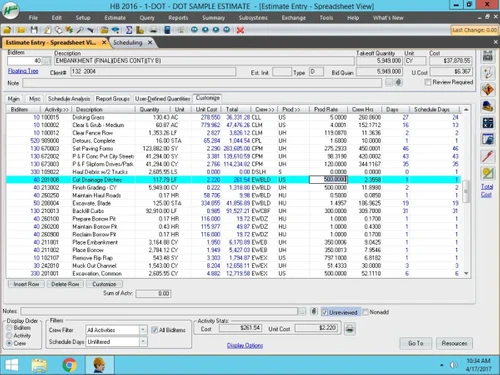
HeavyBid is specialized construction estimating software that streamlines bidding for heavy civil projects. It works by combining historical data, cost libraries, and automated calculations to produce accurate estimates quickly.

Its interface is designed for clarity, offering intuitive navigation, customizable views, and easy access to subcontractor comparisons, ensuring estimators can manage complex bids with confidence and efficiency.

Key features include automated error detection, subcontractor analysis tools, and integrated cost databases. Users benefit from flexible estimate building, standardized processes, and seamless integration with other HCSS applications.

This Construction Estimating Software also supports resource allocation, productivity tracking, and customizable reporting. Its ability to handle large-scale data while maintaining precision makes it a trusted solution for contractors aiming to improve bid speed, accuracy, and profitability.

Why Choose HeavyBid?

  • Quote Management: HeavyBid Construction Estimating Software provides tools to evaluate supplier and subcontractor offers side by side, simplifying selection without recalculating estimates.
  • Bid Setup: Enables contractors to assemble complex project estimates quickly, reducing manual effort and ensuring consistent submissions.
  • Error Control: Highlights calculation mistakes or missing data automatically, helping estimators avoid costly inaccuracies before finalizing bids.
  • Data History: easyBid uses past project records and cost libraries to refine current estimates, improving accuracy and strengthening competitive strategies.
  • Proposal: Generates clear, structured bid documents with customizable reporting, ensuring professional presentation and stronger chances of winning contracts.

Benefits of HeavyBid

  • Time Savings: Reduces bid preparation duration significantly, allowing contractors to focus more on project strategy.
  • Accuracy Boost: HeavyBid enhances estimate precision by leveraging cost libraries and historical data for reliable calculations.
  • Risk Reduction: Minimizes costly mistakes through automated error detection and consistent estimating processes across projects.
  • Collaboration Ease: HeavyBid Construction Estimating Software improves teamwork by enabling multiple estimators to contribute seamlessly within a unified estimating environment.
  • Competitive Edge: Strengthens bidding success rates by producing professional proposals that highlight profitability and efficiency.
  • Data Integration: Connects with related construction management tools, ensuring smooth transfer of information across project workflows.

Pricing of HeavyBid

HeavyBid details are available on request at techjockey.com.

HeavyBid may vary based on factors like customization, additional features required, number of users, and the deployment type. Please request a callback for subscription-related details and to avail offers on premium packages at techjockey.com.

Read more

Heavy Construction Systems Specialists Company Details

Founded Year:  1986

HCSS has been developing software to help construction companies streamline their operations.

Director/Founders Mike Rydin
Company Size 101-500 Employees

HeavyBid Pricing & Plans

Looking for The Right Pricing?

Share your requirements and get a plan built around your business.

  • Define your business needs
  • Get customised pricing
  • Choose features that fit your workflow

Price Available on Request

Get personalised HeavyBid pricing that fits your needs. Our team will connect with you.

HeavyBid Features

  • icon_check Quote Management
    Manage and compare subcontractor quotes and self-performed work for accurate, competitive estimates.
  • icon_check Error Detection
    Prevent costly mistakes with auto error detection, locked calculators, and built-in safeguards.
  • icon_check Markup and Pricing
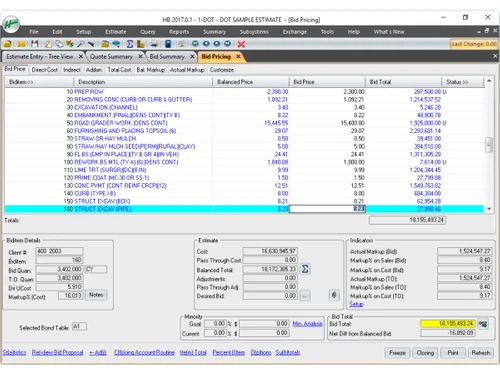
    Automatically calculate costs, prices, and markups using historical data to optimize profitability.
  • icon_check Proposal Management
    Produce professional proposals quickly that comply with owner specifications and project requirements.
  • icon_check Templates
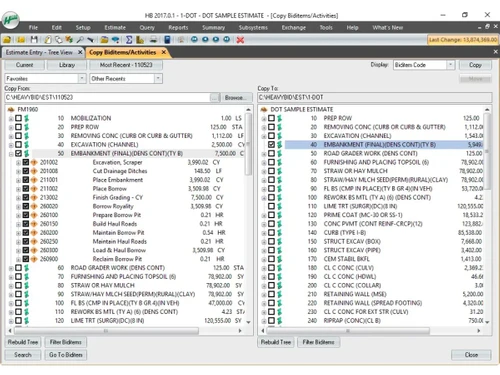
    Create and reuse customizable templates to standardize estimating processes across projects.
  • icon_check Data Integration
    Leverage past project data to improve estimate accuracy and support strategic decision-making.
  • icon_check Crew Management
    Define reusable activities and crews to streamline estimation and maintain consistency across bids.
  • icon_check Data Import/Export
    Import bid items directly from Department of Transportation websites to save time and ensure compliance.
  • icon_check Bid Review Checklists
    Review estimates using detailed checklists to catch errors and validate completeness before submission.
  • icon_check Collaboration Tools
    Enable multiple estimators to work simultaneously on a project with real-time updates and collaboration.
  • icon_check Version Control
    Track changes across multiple versions of estimates to maintain history and ensure accountability.
  • icon_check Third Party Integration
    Seamlessly connect with accounting platforms like Vista, QuickBooks, and Sage 300 for accurate flow.
  • icon_check Risk Management
    Built-in safeguards and calculators help identify high-risk areas and minimize potential losses.
HeavyBid Demo Video play icon

Get HeavyBid Demo

Watch the demo video to explore key features, real workflows, and how the software fits your business needs.

Understand
Key Features
Personal
Demo Insights
Interactive
Demo Support

HeavyBid Specifications

Supported Platforms
Ubuntu Ubuntu Windows Windows MacOS MacOS Linux Linux
Devices
Desktop Desktop
Deployment
Cloud-Based Cloud-Based
Suitable For
Construction
Business Specific
All Businesses
Business Size
Small Business Startups Medium Business Enterprises SMBs SMEs MSMBs MSMEs
Customer Support
Phone Email Communities
Language
English
Integration
API Integration
Training Resources
Webinars Videos

HeavyBid Review

4.1

Out of 5

img

Overall Rating

Based on
3 Verified Ratings

Rating Breakdown

  • Features 3.6
  • Value for Money 4.6
  • Ease of Use 4.1
  • Customer Support 4.1

80% Recommend this Product

Add Review

Be the First to Review

This product has no reviews yet. Be the first to leave your feedback.

Add Review

Articles for HeavyBid

See All Related Articles

How much does HeavyBid cost?

HeavyBid pricing can be requested at techjockey.com.

Who uses HeavyBid?

HeavyBid is used by contractors, estimators, and construction firms for preparing accurate bids on heavy civil projects.

How does HeavyBid Construction Estimating Software work?

HeavyBid Construction Estimating Software works by combining cost libraries, historical data, and automated calculations to streamline estimating and bidding processes.

Which operating systems are compatible with HeavyBid Construction Estimating Software?

HeavyBid runs smoothly on OS like Windows 10, Windows 11, and compatible server environments for enterprise deployment.

Is a free demo available for HeavyBid software?

Yes, a free demo of HeavyBid software is available to help users explore its estimating and bidding capabilities.

Does HeavyBid integrate with other construction tools?

HeavyBid Construction Estimating Software integrates smoothly with HCSS applications like HeavyJob and Dispatcher, ensuring smooth data flow across project workflows.

Can HeavyBid handle subcontractor quotes?

Yes, HeavyBid Construction Estimating Software allows side-by-side comparison of subcontractor and supplier quotes without recalculating the entire estimate.

Does HeavyBid support error detection?

HeavyBid includes automated error-checking features that highlight missing data or miscalculations before bid submission.

Can HeavyBid Construction Estimating Software generate professional proposals?

Yes, HeavyBid generates structured, customizable bid proposals that improve presentation quality and strengthen chances of winning contracts.

20,000+ Software Listed

Best Price Guranteed

Free Expert Consultation

2M+ Happy Customers

Terms and Condtions

close

Users with registered businesses can purchase goods from merchants on the platform to satisfy their business needs. Users are not permitted to utilize any products acquired through the platform for resale, advertising, business, or further distribution.

For each purchase made, users will receive a Tax Invoice (or 'GST invoice') that includes specific details such as:

  • the GSTIN of the user associated with their registered business, and

  • the specified Entity Name for their business.

It should be noted that not all products are eligible for GST Invoice. Only the products displayed by participating sellers with the 'GST-based Invoice Available' callout on the product description page would qualify.

Certain goods and services are not eligible to get a GST Invoice, including items with VAS, i.e., Value Added Services (e.g., Total Mobile Protection/Assured Buyback) and those involving an exchange offer at the time of purchase.

Users must ensure the accuracy of the GSTIN, and business entity name provided for the GST Invoice. Requests for corrections into GST Invoice would not be accommodated by Techjockey.com or any Seller, and any issues arising from user-provided information are the sole responsibility of users.

Techjockey.com is not liable for the GST Invoice or any associated input tax credit. To efficiently claim an input tax credit, users should select the registered place of business address as per the GST authority's data and follow the provisions of the GST Act and rules.

To claim an input tax credit, the delivery and billing addresses must match. Furthermore, input tax credits will not be granted if the delivery address and GSTIN on the invoice are from different states. In case of incorrect GST details provided during the order placement, the order will be canceled automatically.