linkedin
Bolster logo
play Best construction estimating software - Send estimates in 7 mins
bolsterbuilt insurance
bolsterbuilt leads

Bolster

Brand: CostCertified

  • 4.3

  • 5 Ratings

Bolster is a cost estimation software that helps construction industries manage estimates, invoices, payments, and schedules.

See More

Have you used Bolster before?

Share your insights for better experience

Add a Review
Starting Price
$299

View plans

100% Genuine
Products
Best Price
Guaranteed
Safe & Secure
Payment
  • Description

  • Pricing

  • Features

  • Specification

  • Review

  • Compare

  • Alternatives

  • FAQ

Starting at $299

Bolster Software Overview

What is Bolster?

Bolster is a cost estimation software platform designed for construction industries. It helps constructors to manage estimates, invoices, payments, and scheduling tasks. It has a centralized customer relationship management dashboard that acts as a single platform for managing customers, giving details on leads, projects, contacts, etc. It has a quick and accurate quote estimation feature using an interactive proposal system.

Its features include instant pricing adjustments, online payment integration, and interactive proposal generation. It also has an AutoCost feature that helps in the real-time pricing of items. It helps in project management with features like one-click automated scheduling tools for managing tasks, project task overview, and details giving project insights.

Why Choose Bolster Software?

  • Estimation generation: Helps to generate fast and accurate quotes based on inputs in minutes and thus improves the turnaround time and client satisfaction.
  • Interactive proposals: Creates interactive proposals that help clients visualize tasks-related upgrades, making effective communication.
  • Integrated payments: Generates itemized invoices and receives payments faster with integrated online payment processing.
  • Automated scheduling: Helps in effective project management, project view, and transition from estimates to project execution with one-click automated scheduling.
  • Centralized management: A single platform to manage all leads and tasks from a centralized CRM dashboard for project management and customer engagement.

Benefits of Bolster Platform

  • Fast: It generates accurate estimates, reducing time spent on manual calculations.
  • Increased profits: With the support of interactive proposals and visual upgrades, client engagement and profitability are increased.
  • Better cash flow: This comes with integrated payment processing, which ensures faster invoicing and quicker payment receipts.
  • Project management: Makes project management efficient through automated scheduling, better overview, minimizing delays, and optimizing resource allocation.
  • Single platform: It provides a centralized CRM dashboard to comprehensively view all projects, enhancing oversight and organization.

Pricing of Bolster

Bolster price in India starts at $299 at techjockey.com.

Its price in India may vary based on factors like customization, additional features required, the number of users, and the deployment type. Please request a call back for subscription-related details and to avail of offers on premium packages.

Read more

CostCertified Company Details

Founded Year:  2016

CostCertified

Director/Founders CostCertified
Company Size 101-500 Employees

Bolster Pricing & Plans

Essentials
Starting at $299
    • Licenses

      Licenses
      Licenses
    • Monthly

      Monthly
      Monthly

Key Features

  • Unlimited estimates

  • Unlimited presentations

  • Unlimited projects

  • 1 user

  • 1x 1:1 coaching session (+ free support)

Plus
Starting at $399
    • Licenses

      Licenses
      Licenses
    • Monthly

      Monthly
      Monthly

Key Features

  • Unlimited estimates

  • Unlimited presentations

  • Unlimited projects

  • 2 user

  • 1x 1:1 coaching session (+ free support)

  • Access to all integrations

  • OpenQuotes

Pro
Starting at $499
    • Licenses

      Licenses
      Licenses
    • Monthly

      Monthly
      Monthly

Key Features

  • Unlimited estimates

  • Unlimited presentations

  • Unlimited projects

  • 3 user

  • 3x 1:1 coaching session (+ free support)

  • Access to all integrations

  • OpenQuotes

  • AutoCost

Bolster Features

  • icon_check Automated Change Orders
    Simplify project updates with automated change orders, decreasing manual tasks and errors.
  • icon_check Pre-built Templates
    Save time using templates for estimates, proposals, and invoices.
  • icon_check Real-time Price Change
    Adjust estimates quickly with real-time price changes for accurate and current project costs.
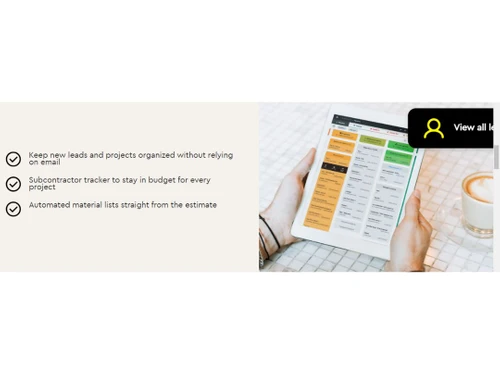
  • icon_check Subcontractor Tracker
    Monitor subcontractor activities and progress with an integrated tracker.
  • icon_check Customer Support
    Get proper customer support for issues smoothing software operations.
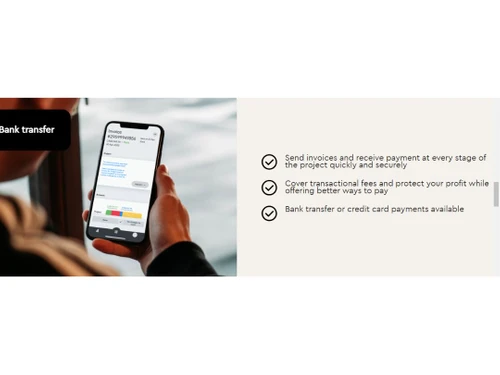
  • icon_check Bank Transfer
    Carry out secure, efficient payments with integrated bank transfer options for proper financial transactions.
  • icon_check Dashboard
    Use a centralized dashboard to view all project data, improving tracking and decision-making.
  • icon_check AutoCost
    Access live pricing based on location, making estimates accurate and market-relevant.
  • icon_check Customized Policies
    Implement policies per the business needs for better compliance and operational flexibility.
Bolster Demo Video play icon

Get Bolster Demo

Watch the demo video to explore key features, real workflows, and how the software fits your business needs.

Understand
Key Features
Personal
Demo Insights
Interactive
Demo Support

Bolster Specifications

Supported Platforms
Ubuntu Ubuntu Windows Windows MacOS MacOS Linux Linux
Devices
Desktop Desktop
Deployment
Cloud-Based Cloud-Based
Suitable For
Construction
Business Specific
Construction
Business Size
Small Business Startups Medium Business Enterprises
Customer Support
Email Communities
Language
English
Training Resources
Videos

Explore the Best Alternative Solutions Similar to Your Business Size and Needs

Bolster Review

4.3

Out of 5

img

Overall Rating

Based on
5 Verified Ratings

Rating Breakdown

  • Features 4.4
  • Value for Money 4.3
  • Ease of Use 4.4
  • Customer Support 4.2

94% Recommend this Product

Add Review

Be the First to Review

This product has no reviews yet. Be the first to leave your feedback.

Add Review

Compare Bolster With other Construction Estimating Software

Products
Ratings
Pricing
Device Supported
Deployment
Supported Platforms
  • img

    Bolster

  • 4.3

  • Price On Request

  • Desktop

    Mobile

  • Web based

    On Premises

  • Windows

    Mac OS

  • img

    RSMeans Data

  • 4.8

  • Price On Request

  • Desktop

    Mobile

  • Web based

    On Premises

  • Windows

    Mac OS

  • img

    RIB CostX

  • 4.2

  • Price On Request

  • Desktop

    Mobile

  • Web based

    On Premises

  • Windows

    Mac OS

  • img

    PlanSwift

  • 4.4

  • Price On Request

  • Desktop

    Mobile

  • Web based

    On Premises

  • Windows

    Mac OS

  • img

    HeavyBid

  • 4.1

  • Price On Request

  • Desktop

    Mobile

  • Web based

    On Premises

  • Windows

    Mac OS

  • img

    STACK

  • 4.5

  • Price On Request

  • Desktop

    Mobile

  • Web based

    On Premises

  • Windows

    Mac OS

  • img

    Sage Estimating

  • 4.3

  • Price On Request

  • Desktop

    Mobile

  • Web based

    On Premises

  • Windows

    Mac OS

  • img

    RIB Candy

  • 4.4

  • Price On Request

  • Desktop

    Mobile

  • Web based

    On Premises

  • Windows

    Mac OS

  • img

    Access ConQuest

  • 4.3

  • Price On Request

  • Desktop

    Mobile

  • Web based

    On Premises

  • Windows

    Mac OS

  • img

    Clear Estimates

  • 4.2

  • Price On Request

  • Desktop

    Mobile

  • Web based

    On Premises

  • Windows

    Mac OS

(0) Product(s) selected

Bolster Alternatives

See All Bolster Alternatives

Available

Price on Request

Available

Price on Request

Starting Price:

$249 /Month

Available

Price on Request

Starting Price:

$10

Starting Price:

$105 /Month

Articles for Bolster

See All Related Articles

How fast can I generate an estimate using Bolster?

Bolster comes with pre-built templates, an interactive proposal system, and real-time pricing that helps to generate estimates in minutes.

What is the use of the real-time price change feature in Bolster?

Bolster real-time price feature helps to update estimates with current market prices making it price-relevant automatically.

Does Bolster help in subcontractor tracking?

Yes, Bolster has a feature of a subcontractor tracker that allows monitoring activities and project progress of subcontractors.

How accurate are the Bolster generated estimates?

Bolster estimates are highly accurate due to the AutoCost feature, which uses live pricing based on location.

What is the use of the Bolster centralized dashboard?

Bolster centralized dashboard acts as a single platform giving a view of leads, client details, proposals, booked contracts, the in-progress status of tasks, and invoices.

What modes of payment does Bolster offer?

Bolster provides secure payments through integrated bank transfer options and online payment modes for efficient transactions.

Does Bolster offer free demos to its users?

Yes, Bolster provides 14 days of free trial for its users.

Who are Bolster users, and how do they benefit from it?

Bolster is a cost-estimation software suitable for construction industries by contractors and subcontractors for generating estimates, schedules, invoices, and payments.

On which operating system does Bolster constructor cost estimation software work?

Bolster’s construction cost estimation software is compatible with Windows operating systems.

20,000+ Software Listed

Best Price Guranteed

Free Expert Consultation

2M+ Happy Customers

Terms and Condtions

close

Users with registered businesses can purchase goods from merchants on the platform to satisfy their business needs. Users are not permitted to utilize any products acquired through the platform for resale, advertising, business, or further distribution.

For each purchase made, users will receive a Tax Invoice (or 'GST invoice') that includes specific details such as:

  • the GSTIN of the user associated with their registered business, and

  • the specified Entity Name for their business.

It should be noted that not all products are eligible for GST Invoice. Only the products displayed by participating sellers with the 'GST-based Invoice Available' callout on the product description page would qualify.

Certain goods and services are not eligible to get a GST Invoice, including items with VAS, i.e., Value Added Services (e.g., Total Mobile Protection/Assured Buyback) and those involving an exchange offer at the time of purchase.

Users must ensure the accuracy of the GSTIN, and business entity name provided for the GST Invoice. Requests for corrections into GST Invoice would not be accommodated by Techjockey.com or any Seller, and any issues arising from user-provided information are the sole responsibility of users.

Techjockey.com is not liable for the GST Invoice or any associated input tax credit. To efficiently claim an input tax credit, users should select the registered place of business address as per the GST authority's data and follow the provisions of the GST Act and rules.

To claim an input tax credit, the delivery and billing addresses must match. Furthermore, input tax credits will not be granted if the delivery address and GSTIN on the invoice are from different states. In case of incorrect GST details provided during the order placement, the order will be canceled automatically.