linkedin
RSMeans Data logo
play RSMeans Data Online: How to Create Your First Estimate
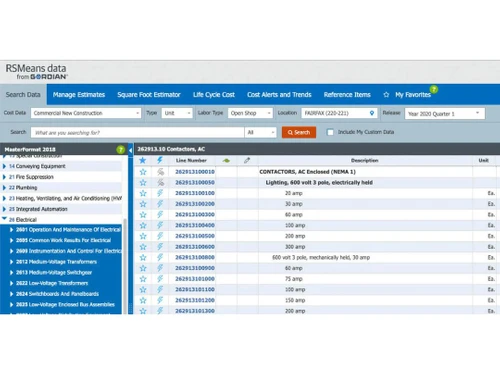
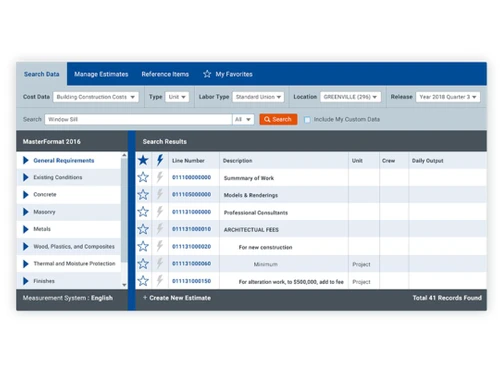
rsmeans data dashboard
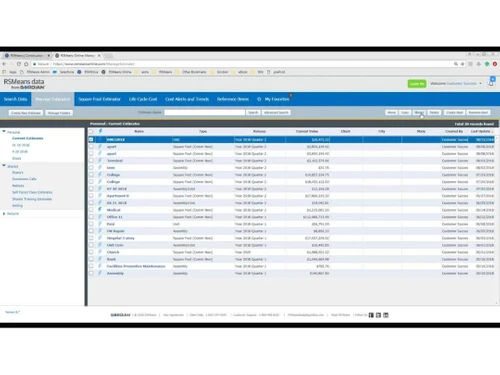
rsmeans data profiles

RSMeans Data

Brand: Gordian

  • 4.8

  • 3 Ratings

RSMeans Data is an online construction cost estimating software with up-to-date data for accurate project budgeting.

See More

Have you used RSMeans Data before?

Share your insights for better experience

Add a Review
Starting Price
$2268

View plans

100% Genuine
Products
Best Price
Guaranteed
Safe & Secure
Payment
  • Description

  • Pricing

  • Features

  • Specification

  • Review

  • Compare

  • Alternatives

  • FAQ

Starting at $2,268

RSMeans Data Software Overview

What is RSMeans Data?

RSMeans Data is construction cost estimating software that consists of an online construction database for exact estimation and project budgeting. It consists of a detailed database of construction costs, including material, labor, and equipment prices. This helps users to create accurate estimates using unit costs, assemblies, or square foot models.

This software is available 24/7 on both desktop and mobile devices. RSMeans Data provides a user-friendly interface that supports keyword and CSI MasterFormat searches for quick access to frequently used items. It helps to customize estimation appearance. It provides localized cost factors, automatically updates quarterly, and other tools for better estimation. It can integrate with eTakeoff for better takeoffs for project planning and cost management.

Why Choose RSMeans Data Software?

  • Estimation: Helps to create detailed construction cost estimates using unit costs, assemblies, or square foot models for accurate project planning.
  • Budgeting: Develop project budgets by accessing up-to-date material, labor, and equipment costs tailored to specific locations.
  • Database: Makes use of the comprehensive, cloud-based database with detailed price breakdowns, including material, labor, and productivity rates.
  • Planning: To ensure feasibility and profitability, plan construction projects efficiently with predictive cost data and advanced estimating tools.
  • Cost Management: Maintain control over project costs with automatic quarterly updates and localized cost factors, minimizing the risk of budget overruns.

Benefits of RSMeans Platform

  • Accuracy: It provides accurate cost estimates with up-to-date, localized data for better project planning.
  • Efficiency: Helps to save time with quick access to detailed cost breakdowns and better estimation tools.
  • Accessibility: It is a cloud-based platform available 24/7 on desktop and mobile devices for on-the-go access.
  • Customization: Localizes cost data to specific locations and project requirements for better estimates.
  • Integration: Supports integration with eTakeoff for enhanced takeoffs and comprehensive project cost management.

Pricing of RSMeans Data

RSMeans Data price in India starts at $ 2268. RSMeans Data has multiple pricing plans and caters to a diverse customer base.

For subscription-related details and offers on premium packages, please request a call back from our product experts.

Read more

Gordian Company Details

Founded Year:  1990

Gordian

Director/Founders Harry H. Mellon, Robert Coffey
Company Size 501-1000 Employees

RSMeans Data Pricing & Plans

Core-1 x Full Library
Starting at $2268
    • Licenses

      Licenses
      Licenses
    • Yearly

      Yearly
      Yearly

Key Features

  • Building Construction Costs

  • Commercial Renovation

  • Concrete and Masonry

  • Electrical Costs

  • Green Building

Complete-1 x Full Library
Starting at $3901
    • Licenses

      Licenses
      Licenses
    • Yearly

      Yearly
      Yearly

Key Features

  • Building Construction Costs

  • Commercial Renovation

  • Concrete and Masonry

  • Electrical Costs

  • Green Building

RSMeans Data Features

  • icon_check Assemblies costs
    Quickly estimate project costs using pre-built assemblies, combining multiple items into unit prices.
  • icon_check Union + data set selection
    Access a wide range of data sets, ensuring union and non-union labor costs are represented.
  • icon_check Unit price estimate creation
    Generate detailed cost estimates with precise unit prices for each material, labor, and equipment.
  • icon_check Square foot estimator
    Easily create estimates for large-scale projects by calculating costs based on square footage.
  • icon_check Customize export estimate
    Customize and export estimates to meet specific project needs in various formats.
  • icon_check Advanced user security
    Ensure data protection with security features, preventing unauthorized access and maintaining confidentiality.
  • icon_check Roles & Permissions
    Assign specific roles and permissions to team members, controlling access for project management.
  • icon_check Flexible hierarchies
    Organize and manage project data using flexible hierarchies for easy navigation and data retrieval.
  • icon_check Data history
    Track changes and access historical data for better decision-making and project evaluation.
  • icon_check Advance Reporting
    Generate reports with advanced reporting tools, providing insights for project analysis and management.
RSMeans Data Demo Video play icon

Get RSMeans Data Demo

Watch the demo video to explore key features, real workflows, and how the software fits your business needs.

Understand
Key Features
Personal
Demo Insights
Interactive
Demo Support

RSMeans Data Specifications

Supported Platforms
Ubuntu Ubuntu Windows Windows MacOS MacOS Linux Linux
Devices
Desktop Desktop Mobile Mobile Tablet Tablet iPad iPad
Deployment
Cloud-Based Cloud-Based
Suitable For
Construction
Business Specific
Construction
Business Size
Small Business Startups Medium Business Enterprises
Customer Support
Phone Email Communities
Language
English
Training Resources
In Person Live Online Webinars Videos

Explore the Best Alternative Solutions Similar to Your Business Size and Needs

RSMeans Data Review

4.8

Out of 5

img

Overall Rating

Based on
3 Verified Ratings

Rating Breakdown

  • Features 4.6
  • Value for Money 5
  • Ease of Use 4.8
  • Customer Support 5

90% Recommend this Product

Add Review

Be the First to Review

This product has no reviews yet. Be the first to leave your feedback.

Add Review

Compare RSMeans Data With other Construction Estimating Software

Products
Ratings
Pricing
Device Supported
Deployment
Supported Platforms
  • img

    RSMeans Data

  • 4.8

  • Price On Request

  • Desktop

    Mobile

  • Web based

    On Premises

  • Windows

    Mac OS

  • img

    RIB CostX

  • 4.2

  • Price On Request

  • Desktop

    Mobile

  • Web based

    On Premises

  • Windows

    Mac OS

  • img

    PlanSwift

  • 4.4

  • Price On Request

  • Desktop

    Mobile

  • Web based

    On Premises

  • Windows

    Mac OS

  • img

    HeavyBid

  • 4.1

  • Price On Request

  • Desktop

    Mobile

  • Web based

    On Premises

  • Windows

    Mac OS

  • img

    STACK

  • 4.5

  • Price On Request

  • Desktop

    Mobile

  • Web based

    On Premises

  • Windows

    Mac OS

  • img

    Sage Estimating

  • 4.3

  • Price On Request

  • Desktop

    Mobile

  • Web based

    On Premises

  • Windows

    Mac OS

  • img

    RIB Candy

  • 4.4

  • Price On Request

  • Desktop

    Mobile

  • Web based

    On Premises

  • Windows

    Mac OS

  • img

    Access ConQuest

  • 4.3

  • Price On Request

  • Desktop

    Mobile

  • Web based

    On Premises

  • Windows

    Mac OS

  • img

    Clear Estimates

  • 4.2

  • Price On Request

  • Desktop

    Mobile

  • Web based

    On Premises

  • Windows

    Mac OS

  • img

    esti-mate

  • 4.0

  • Price On Request

  • Desktop

    Mobile

  • Web based

    On Premises

  • Windows

    Mac OS

(0) Product(s) selected

RSMeans Data Alternatives

See All RSMeans Data Alternatives

Available

Price on Request

Available

Price on Request

Starting Price:

$249 /Month

Available

Price on Request

Starting Price:

$299

Starting Price:

$10

Starting Price:

$105 /Month

Articles for RSMeans Data

See All Related Articles

Does RSMeans Data provide historical cost data?

Yes, RSMeans Data tracks changes and provides access to historical data for informed decision-making.

How often does RSMeans Data cost data is updated?

The cost data of RSMeans Data is updated quarterly.

Can I use RSMeans Data to estimate large-scale projects?

RSMeans Data includes a square-foot estimator, which is suitable for large-scale projects.

Is a demo available for RSMeans Data?

A free trial is available for RSMeans Data users to explore the features and capabilities.

On which operating systems can RSMeans Data run?

The RSMeans Data construction estimation software is cloud-based and accessible on Windows and macOS through web browsers.

Can multiple users access the RSMeans Data software simultaneously?

Yes, RSMeans Data software supports multiple users with customizable roles and permissions.

Who can benefit from RSMeans Data?

RSMeans Data software is suitable for accurate cost estimates for estimators, project managers, architects, and contractors.

What types of construction projects does RSMeans cover?

RSMeans Data software covers residential, commercial, industrial, and infrastructure projects.

20,000+ Software Listed

Best Price Guranteed

Free Expert Consultation

2M+ Happy Customers

Terms and Condtions

close

Users with registered businesses can purchase goods from merchants on the platform to satisfy their business needs. Users are not permitted to utilize any products acquired through the platform for resale, advertising, business, or further distribution.

For each purchase made, users will receive a Tax Invoice (or 'GST invoice') that includes specific details such as:

  • the GSTIN of the user associated with their registered business, and

  • the specified Entity Name for their business.

It should be noted that not all products are eligible for GST Invoice. Only the products displayed by participating sellers with the 'GST-based Invoice Available' callout on the product description page would qualify.

Certain goods and services are not eligible to get a GST Invoice, including items with VAS, i.e., Value Added Services (e.g., Total Mobile Protection/Assured Buyback) and those involving an exchange offer at the time of purchase.

Users must ensure the accuracy of the GSTIN, and business entity name provided for the GST Invoice. Requests for corrections into GST Invoice would not be accommodated by Techjockey.com or any Seller, and any issues arising from user-provided information are the sole responsibility of users.

Techjockey.com is not liable for the GST Invoice or any associated input tax credit. To efficiently claim an input tax credit, users should select the registered place of business address as per the GST authority's data and follow the provisions of the GST Act and rules.

To claim an input tax credit, the delivery and billing addresses must match. Furthermore, input tax credits will not be granted if the delivery address and GSTIN on the invoice are from different states. In case of incorrect GST details provided during the order placement, the order will be canceled automatically.