linkedin
Joist logo
Joist-payments
Joist-estimates
Joist-scheduling

Joist

Brand: EverCommerce

  • No Ratings & Reviews

Have you used Joist before?

Share your insights for better experience

Add a Review
Starting Price
$10

View plans

100% Genuine
Products
Best Price
Guaranteed
Safe & Secure
Payment
  • Description

  • Pricing

  • Features

  • Specification

  • Review

Starting at $10

Joist Software Overview

EverCommerce Company Details

Founded Year:  2017

EverCommerce is a portfolio company born from the leadership team of renowned private equity firms and Fortune 500 enterprises.

Director/Founders Eric Remer
Company Size 1000+ Employees

Joist Pricing & Plans

Basics
Starting at $10
    • Licenses

      Licenses
      Licenses
    • Monthly

      Monthly
      Monthly

Key Features

  • Up to 5 documents per month

  • Online payments

  • Estimates to Invoices

  • Homeowner financing

Pro
Starting at $17
    • Licenses

      Licenses
      Licenses
    • Monthly

      Monthly
      Monthly

Key Features

  • Everything in Basics, plus

  • Unlimited documents & clients

  • Add line items & document photos

  • Track client activity

Elite
Starting at $32
    • Licenses

      Licenses
      Licenses
    • Monthly

      Monthly
      Monthly

Key Features

  • Everything in Pro, plus

  • Add license and insurance

  • Generate business reports

  • Social Integrations

Joist Features

  • icon_check Estimate Management
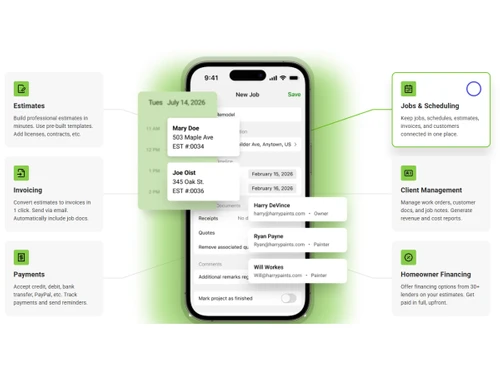
    Create, customize, and send professional estimates with detailed pricing, line items, taxes, and markups from anywhere.
  • icon_check Invoice Management
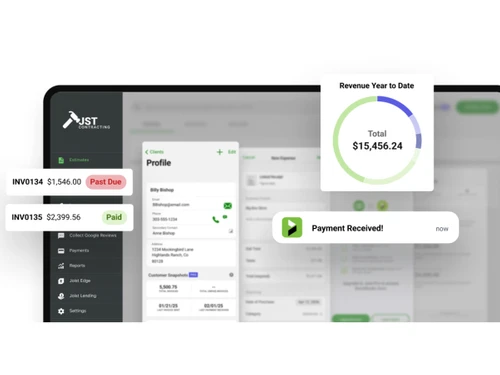
    Create branded invoices, convert estimates into invoices, send them to clients, and track their payment status easily.
  • icon_check Online Payments
    Accept card, ACH, and mobile wallet payments directly from invoices while keeping payment activity organized.
  • icon_check Payment Tracking
    Track paid, pending, and overdue payments in one place to maintain visibility over customer balances and cash flow.
  • icon_check Expense Tracking
    Record job expenses and capture receipts from your phone to understand project costs and maintain accurate financial records.
  • icon_check Client Management
    Store client contact details, notes, documents, past work, and payment activity together for easier customer management.
  • icon_check Financial Reporting
    View revenue, invoice, and sales tax information through built-in reports for better financial visibility and planning.
  • icon_check QuickBooks Integration
    Sync estimates, invoices, and payments with QuickBooks to reduce manual data entry and keep accounting records updated.
  • icon_check Project Templates
    Reuse saved project templates to create detailed estimates and invoices faster while maintaining consistent business documents.
  • icon_check Change Order Management
    Update project pricing when work changes by creating change orders that clearly document additional project requirements.
  • icon_check Digital Signature
    Let customers review and electronically sign estimates online to speed up approvals and start projects sooner.
  • icon_check Payment Reminders
    Automatically send reminders for upcoming or overdue invoices to encourage timely payments and maintain healthy cash flow.
  • icon_check Deposit Management
    Request deposits through estimates or invoices to secure projects and collect payments before work or materials begin.
  • icon_check Milestone Payments
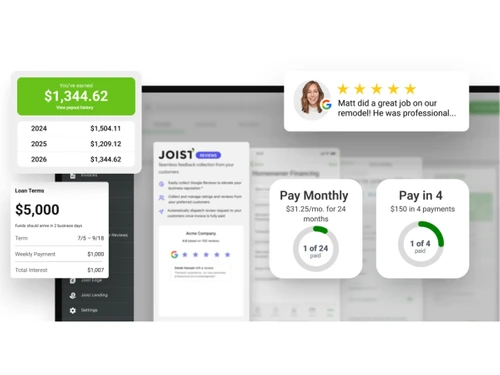
    Set payment schedules and collect deposits or milestone payments to keep project billing aligned with work progress.
  • icon_check Review Management
    Automatically send Google review requests after payment to help contractors collect customer feedback and build reputation.
  • icon_check Document Management
    Attach contracts, photos, agreements, and other files to estimates or invoices to keep important job information organized.

Joist Specifications

Supported Platforms
Windows Windows iOS iOS Android Android MacOS MacOS
Devices
Desktop Desktop Mobile Mobile Tablet Tablet iPad iPad
Deployment
Cloud-Based Cloud-Based
Suitable For
Construction
Business Specific
Construction
Business Size
Individual Small Business SMBs SMEs Freelancers
Customer Support
Phone Email
Language
English
Integration
API Integration

Joist Review

Be the First to Review

This product has no reviews yet. Be the first to leave your feedback.

Add Review

Articles for Joist

See All Related Articles

20,000+ Software Listed

Best Price Guranteed

Free Expert Consultation

2M+ Happy Customers

Terms and Condtions

close

Users with registered businesses can purchase goods from merchants on the platform to satisfy their business needs. Users are not permitted to utilize any products acquired through the platform for resale, advertising, business, or further distribution.

For each purchase made, users will receive a Tax Invoice (or 'GST invoice') that includes specific details such as:

  • the GSTIN of the user associated with their registered business, and

  • the specified Entity Name for their business.

It should be noted that not all products are eligible for GST Invoice. Only the products displayed by participating sellers with the 'GST-based Invoice Available' callout on the product description page would qualify.

Certain goods and services are not eligible to get a GST Invoice, including items with VAS, i.e., Value Added Services (e.g., Total Mobile Protection/Assured Buyback) and those involving an exchange offer at the time of purchase.

Users must ensure the accuracy of the GSTIN, and business entity name provided for the GST Invoice. Requests for corrections into GST Invoice would not be accommodated by Techjockey.com or any Seller, and any issues arising from user-provided information are the sole responsibility of users.

Techjockey.com is not liable for the GST Invoice or any associated input tax credit. To efficiently claim an input tax credit, users should select the registered place of business address as per the GST authority's data and follow the provisions of the GST Act and rules.

To claim an input tax credit, the delivery and billing addresses must match. Furthermore, input tax credits will not be granted if the delivery address and GSTIN on the invoice are from different states. In case of incorrect GST details provided during the order placement, the order will be canceled automatically.