
linkedin
Sage Estimating logo
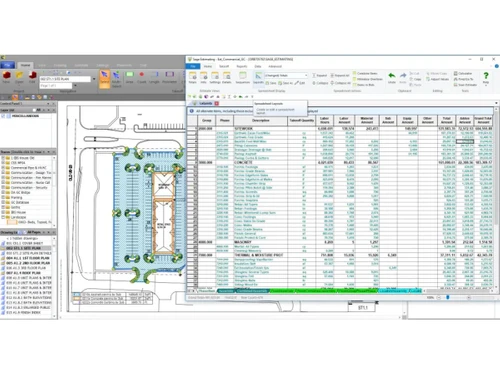
play Sage Estimating Create new estimate
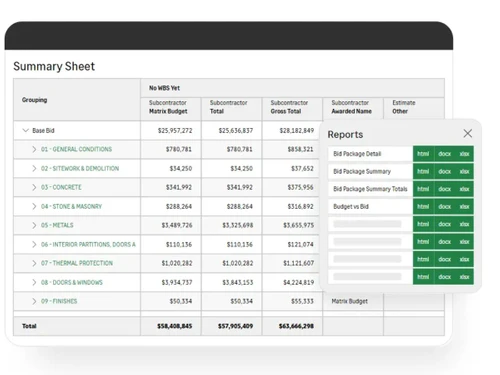
sage estimating-summary
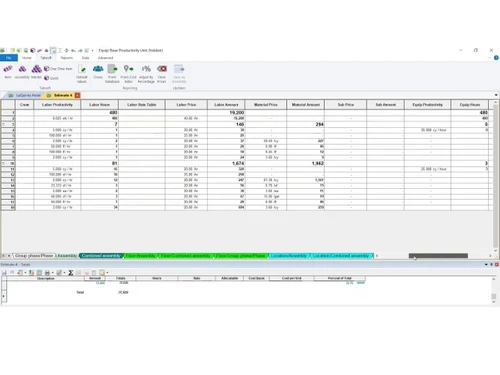
sage estimating-settings

Sage Estimating

Brand: Sage Group plc

  • 4.3

  • 4 Ratings

Sage Estimating is construction estimating software delivering fast, accurate bids with trade-specific cost database

See More

Have you used Sage Estimating before?

Share your insights for better experience

Add a Review

Price Available on Request

Questions about pricing or customization? We’re here to help, just a click away.

100% Genuine
Products
Best Price
Guaranteed
Safe & Secure
Payment
  • Description

  • Pricing

  • Features

  • Specification

  • Review

  • FAQ

Sage Estimating Software Overview

What is Sage Estimating?

Sage Estimating is construction estimating software designed to streamline bid preparation. It works by automating takeoffs, applying cost databases, and reducing manual spreadsheet errors. The interface is user-friendly, offering clear navigation, customizable views, and collaborative access for multiple estimators.

Its workflow ensures accuracy, efficiency, and consistency, helping contractors produce competitive proposals while minimizing risks during preconstruction.

Why Choose Sage Estimating?

  • Bid Preparation: Enables contractors to quickly generate competitive proposals by automating takeoffs, applying cost libraries, and reducing manual spreadsheet errors.
  • Risk Reduction: Sage Estimating Construction Estimating Software minimizes costly mistakes through built-in formulas, structured workflows, and consistent data application across residential, commercial, and industrial projects.
  • Collaboration: Allows multiple estimators to work simultaneously on shared projects, ensuring accuracy, transparency, and efficiency in preconstruction team environments.
  • Digital Takeoffs: This Construction Estimating Software automates measurement extraction directly from drawings, speeding up quantity calculations and eliminating manual errors during early project estimating stages.
  • Subcontractor Comparison: Provides bid analysis tools to review, level, and evaluate subcontractor proposals, ensuring fair selection and stronger closing accuracy.

Benefits of Sage Estimating

  • Faster Bids: Produces competitive proposals quickly by automating takeoffs and streamlining preconstruction estimating workflows.
  • Error Reduction: Sage Estimating Construction Estimating Software prevents costly mistakes through built-in formulas, structured processes, and consistent application of project data.
  • Team Efficiency: Supports multiple estimators working together, improving collaboration, transparency, and accuracy across shared projects.
  • Cost Libraries: Provides trade-specific databases that deliver reliable pricing, ensuring estimates reflect industry standards and market conditions.
  • Bid Analysis: This Construction Estimating Software levels subcontractor proposals with comparison tools, helping contractors select fair, accurate, and competitive offers.
  • Data Protection: Safeguards ongoing work with auto-save functionality, reducing risks of accidental loss during project estimating.

Pricing of Sage Estimating

Sage Estimating details are available on request at techjockey.com.

Sage Estimating may vary based on factors like customization, additional features required, number of users, and the deployment type. Please request a callback for subscription-related details and to avail offers on premium packages at techjockey.com.

Read more

Sage Group plc Company Details

Founded Year:  1981

Sage provide businesses with software and services that are simple and easy to use, as we work with you to give you that feeling of confidence. Customers trust our Payroll, HR, and Finance software to make business flow with ease.

Director/Founders Chad Ruff, Colin Cooper, David Goldman, Graham Wylie, P. Addo-Nyarko, Paul Milford Muller, Simonetta
Company Size 1000+ Employees

Sage Estimating Pricing & Plans

Looking for The Right Pricing?

Share your requirements and get a plan built around your business.

  • Define your business needs
  • Get customised pricing
  • Choose features that fit your workflow

Price Available on Request

Get personalised Sage Estimating pricing that fits your needs. Our team will connect with you.

Sage Estimating Features

  • icon_check Database Management
    Maintain centralized trade-specific cost databases with materials, labor, and equipment pricing.
  • icon_check Quantity Takeoff
    Perform accurate 2D and 3D takeoff from digital plans, models, or PDFs to streamline estimating.
  • icon_check Assembly Creation
    Build smart assemblies to quickly calculate costs for groups of related materials and labor.
  • icon_check Bid Management
    Compare subcontractor bids using structured evaluation tools to identify best cost combinations.
  • icon_check Team Collaboration
    Allow multiple estimators to work concurrently on the same estimate with role-based access.
  • icon_check Cost Code Integration
    Integrate with job cost structures to align estimates with accounting and project budgets.
  • icon_check What If Analysis
    Model different cost scenarios or assumptions to evaluate project risks and opportunities.
  • icon_check Change Management
    Track and update cost impacts of scope changes quickly to maintain accurate estimates.
  • icon_check Templates
    Use predefined templates to standardize estimating practices and reduce setup time.
  • icon_check Subcontractor Management
    Track subcontractor bids, compliance, and awards directly from within the estimating platform.
  • icon_check ERP Integration
    Seamlessly transfer accepted bids into Sage 300 CRE or Sage 100 Contractor for job costing.
  • icon_check Proposal Management
    Produce polished, client-ready proposals directly from estimate data to speed up bid delivery.
Sage Estimating Demo Video play icon

Get Sage Estimating Demo

Watch the demo video to explore key features, real workflows, and how the software fits your business needs.

Understand
Key Features
Personal
Demo Insights
Interactive
Demo Support

Sage Estimating Specifications

Supported Platforms
Ubuntu Ubuntu Windows Windows MacOS MacOS Linux Linux
Devices
Desktop Desktop
Deployment
Cloud-Based Cloud-Based
Suitable For
Construction
Business Specific
All Businesses
Business Size
Small Business Startups Medium Business Enterprises SMBs SMEs MSMBs MSMEs
Customer Support
Email Communities
Language
English
Integration
API Integration
Training Resources
Documentation Videos
AI Features
AI Integrated

Sage Estimating Review

4.3

Out of 5

img

Overall Rating

Based on
4 Verified Ratings

Rating Breakdown

  • Features 4.2
  • Value for Money 4.5
  • Ease of Use 4.1
  • Customer Support 4.6

80% Recommend this Product

Add Review

Be the First to Review

This product has no reviews yet. Be the first to leave your feedback.

Add Review

Articles for Sage Estimating

See All Related Articles

How much does Sage Estimating cost?

Sage Estimating pricing customized plans are available at techjockey.com. on placing request.

Who uses Sage Estimating Construction Estimating Software?

Sage Estimating is used by contractors, builders, and construction firms for preparing accurate bids and managing preconstruction workflows.

How does Sage Estimating work?

Sage Estimating Construction Estimating Software works by automating takeoffs, applying trade-specific cost databases, and streamlining bid analysis to deliver precise project estimates.

Which operating systems are compatible with Sage Estimating Software?

Sage Estimating runs smoothly on OS like Windows 10 and Windows 11.

Is a free demo available for Sage Estimating Construction Estimating Software?

Yes, a free demo of Sage Estimating software is available at techjockey.com.

Does Sage Estimating support collaborative estimating?

Yes, Sage Estimating Construction Estimating Software allows multiple estimators to work on the same project simultaneously, improving team efficiency and transparency.

Can Sage Estimating handle subcontractor bid comparisons?

Yes, Sage Estimating includes bid analysis tools that help contractors review, level, and select fair subcontractor proposals.

Does Sage Estimating integrate with other Sage construction tools?

Yes, Sage Estimating Construction Estimating Software integrates with Sage Intacct Construction, Sage 300 CRE, and Sage 100 Contractor for connected workflows.

What core features make Sage Estimating unique?

Sage Estimating offers digital takeoffs, AI-powered estimating, trade-specific cost libraries, auto-save protection, and error-prevention formulas as standout features.

20,000+ Software Listed

Best Price Guranteed

Free Expert Consultation

2M+ Happy Customers

Terms and Condtions

close

Users with registered businesses can purchase goods from merchants on the platform to satisfy their business needs. Users are not permitted to utilize any products acquired through the platform for resale, advertising, business, or further distribution.

For each purchase made, users will receive a Tax Invoice (or 'GST invoice') that includes specific details such as:

  • the GSTIN of the user associated with their registered business, and

  • the specified Entity Name for their business.

It should be noted that not all products are eligible for GST Invoice. Only the products displayed by participating sellers with the 'GST-based Invoice Available' callout on the product description page would qualify.

Certain goods and services are not eligible to get a GST Invoice, including items with VAS, i.e., Value Added Services (e.g., Total Mobile Protection/Assured Buyback) and those involving an exchange offer at the time of purchase.

Users must ensure the accuracy of the GSTIN, and business entity name provided for the GST Invoice. Requests for corrections into GST Invoice would not be accommodated by Techjockey.com or any Seller, and any issues arising from user-provided information are the sole responsibility of users.

Techjockey.com is not liable for the GST Invoice or any associated input tax credit. To efficiently claim an input tax credit, users should select the registered place of business address as per the GST authority's data and follow the provisions of the GST Act and rules.

To claim an input tax credit, the delivery and billing addresses must match. Furthermore, input tax credits will not be granted if the delivery address and GSTIN on the invoice are from different states. In case of incorrect GST details provided during the order placement, the order will be canceled automatically.