linkedin
MaintainX logo
play Navigate MaintainX | Restocking Parts
maintainx-dashboard
maintainx-orders

MaintainX

Brand: MaintainX

  • 4.3

  • 4 Ratings

Have you used MaintainX before?

Share your insights for better experience

Add a Review
Starting Price
$25

View plans

100% Genuine
Products
Best Price
Guaranteed
Safe & Secure
Payment
  • Description

  • Pricing

  • Features

  • Specification

  • Review

Starting at $25

MaintainX Software Overview

MaintainX Company Details

Founded Year:  2018

MaintainX is the leading maintenance and work execution software, designed specifically for industrial and frontline teams.

Director/Founders Chris Turlica, Hugo Dozois-Caouette, Mathieu Marengère-Gosselin, Nick Haase
Company Size 501-1000 Employees

MaintainX Pricing & Plans

Essential
Starting at $25
    • Users

      Users
      Users
    • Monthly

      Monthly
      Monthly

Key Features

  • Unlimited Work Orders with attached images

  • Unlimited repeating Work Orders

  • 3 Work Orders with attached Procedures

  • 3-month access to Advanced Analytics

  • Unlimited requester users

Premium
Starting at $75
    • Users

      Users
      Users
    • Monthly

      Monthly
      Monthly

Key Features

  • Everything in Essential, plus:

  • Unlimited Work Orders with attached Procedures

  • Unlimited access to Advanced Analytics

  • Meter-based maintenance

  • Parts inventory management

  • Purchase order management

  • Time and cost tracking

  • Open REST API access

  • Dedicated Account Manager

  • External Work Orders

MaintainX Features

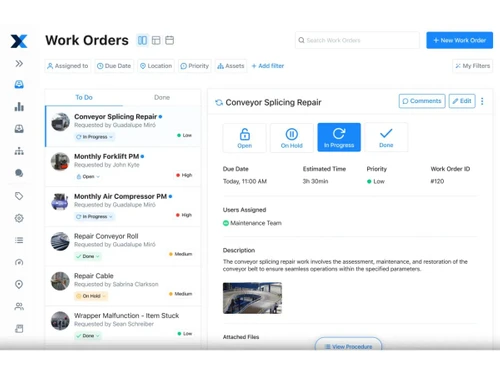
  • icon_check Work Order Management
    Create, assign and track work orders across sites, ensuring jobs are captured, prioritized and completed efficiently.
  • icon_check Preventive Maintenance Scheduling
    Automate recurring maintenance tasks by time or usage to reduce unplanned downtime and extend asset life.
  • icon_check Hierarchy Management
    Build structured asset trees and location maps to organize equipment, sub-assets and track maintenance history.
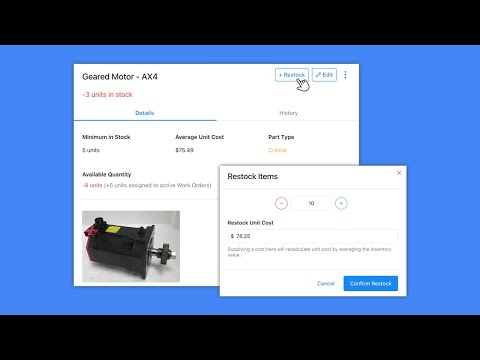
  • icon_check Parts Management
    Monitor parts usage, set low-stock alerts and manage multi-site inventory to avoid critical shortages.
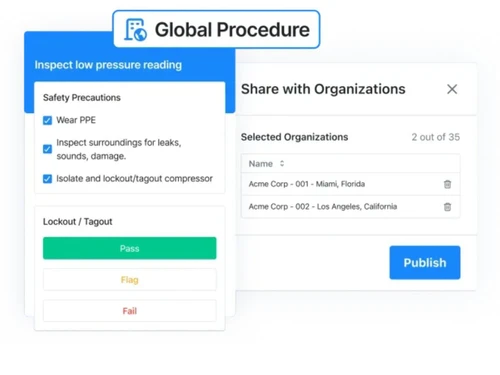
  • icon_check Inspection Management
    Digitise inspection procedures and safety checklists to standardise operations and ensure compliance.
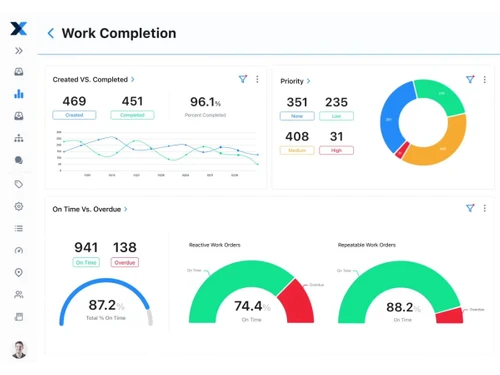
  • icon_check Reports & Analytics
    Use real-time dashboards and built-in reports to turn maintenance data into actionable insights.
  • icon_check Role-Based Access Control (RBAC)
    Configure role-based access and custom permissions so users see only what they should and do what they need.
  • icon_check Multi Location Management
    Manage multiple facilities or locations from one platform, compare KPIs and standardise processes.
  • icon_check API Integration
    Connect to ERPs, IoT sensors, MES systems and other tools via REST API and integrations for seamless workflow.
  • icon_check Barcode Scanning
    Tag assets with QR or barcodes, scan in the field to quickly access or create work orders tied to that asset.
  • icon_check Alerts & Notifications
    Set up alerts, overdue flags and escalation flows so critical work doesn’t fall through the cracks.
  • icon_check Real-Time Collaboration
    Field and office teams communicate in-app via messages, photos and updates tied to work orders and assets.
  • icon_check Data Import/Export
    Import assets, parts, locations or historical data in bulk (CSV/Excel) to speed implementation and data onboarding.
  • icon_check Audit Trail
    Maintain full history of maintenance activity (who did what, when, where) to support audits, safety and regulatory needs.
  • icon_check Anomaly Detection
    The system analyses historic work-order and sensor data to detect anomalies and alert you before breakdowns occur.
MaintainX Demo Video play icon

Get MaintainX Demo

Watch the demo video to explore key features, real workflows, and how the software fits your business needs.

Understand
Key Features
Personal
Demo Insights
Interactive
Demo Support

MaintainX Specifications

Supported Platforms
Windows Windows iOS iOS Android Android MacOS MacOS
Devices
Desktop Desktop Mobile Mobile Tablet Tablet iPad iPad
Deployment
Cloud-Based Cloud-Based
Suitable For
Manufacturing Education Hospitality Transportation Food & Beverage Property Automotive
Business Specific
All Businesses
Business Size
Small Business Medium Business Enterprises SMBs SMEs MSMBs MSMEs
Customer Support
Email Communities
Language
English français Português Español
Integration
API Integration
Training Resources
Webinars Documentation Videos
AI Features
AI Integrated

MaintainX Review

4.3

Out of 5

img

Overall Rating

Based on
4 Verified Ratings

Rating Breakdown

  • Features 4.1
  • Value for Money 4.7
  • Ease of Use 4.1
  • Customer Support 4.3

80% Recommend this Product

Add Review

Be the First to Review

This product has no reviews yet. Be the first to leave your feedback.

Add Review

Articles for MaintainX

See All Related Articles

20,000+ Software Listed

Best Price Guranteed

Free Expert Consultation

2M+ Happy Customers

Terms and Condtions

close

Users with registered businesses can purchase goods from merchants on the platform to satisfy their business needs. Users are not permitted to utilize any products acquired through the platform for resale, advertising, business, or further distribution.

For each purchase made, users will receive a Tax Invoice (or 'GST invoice') that includes specific details such as:

  • the GSTIN of the user associated with their registered business, and

  • the specified Entity Name for their business.

It should be noted that not all products are eligible for GST Invoice. Only the products displayed by participating sellers with the 'GST-based Invoice Available' callout on the product description page would qualify.

Certain goods and services are not eligible to get a GST Invoice, including items with VAS, i.e., Value Added Services (e.g., Total Mobile Protection/Assured Buyback) and those involving an exchange offer at the time of purchase.

Users must ensure the accuracy of the GSTIN, and business entity name provided for the GST Invoice. Requests for corrections into GST Invoice would not be accommodated by Techjockey.com or any Seller, and any issues arising from user-provided information are the sole responsibility of users.

Techjockey.com is not liable for the GST Invoice or any associated input tax credit. To efficiently claim an input tax credit, users should select the registered place of business address as per the GST authority's data and follow the provisions of the GST Act and rules.

To claim an input tax credit, the delivery and billing addresses must match. Furthermore, input tax credits will not be granted if the delivery address and GSTIN on the invoice are from different states. In case of incorrect GST details provided during the order placement, the order will be canceled automatically.