
linkedin
Accops HyDesk logo
play Unified Control. Compliance-Ready Digital Workspaces
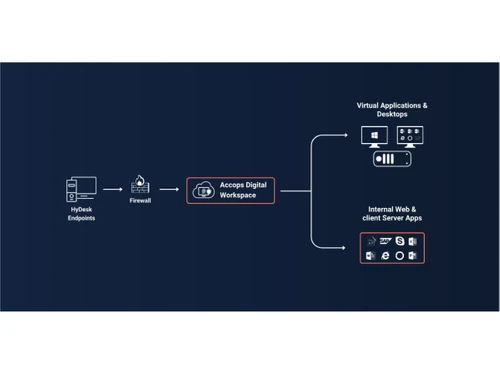
Accops HyDesk Flowchart
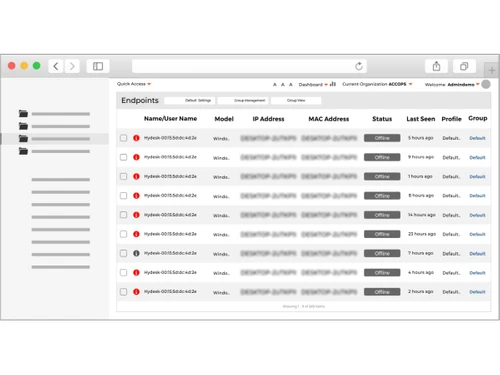
Accops HyDesk Endpoints

Accops HyDesk

Brand: Accops

  • No Ratings & Reviews

Accops HyDesk is a family of energy-efficient, eco-smart thin client endpoint devices designed to replace legacy PC-based computing with secure, centrally managed virtual desktop access.

See More

Have you used Accops HyDesk before?

Share your insights for better experience

Add a Review

Price Available on Request

Questions about pricing or customization? We’re here to help, just a click away.

100% Genuine
Products
Best Price
Guaranteed
Safe & Secure
Payment
  • Description

  • Pricing

  • Features

  • Specification

  • Review

  • FAQ

Accops HyDesk Software Overview

What is Accops HyDesk?

Accops HyDesk is a family of energy-efficient, eco-smart thin client hardware running on secure operating systems, either the locked-down, Linux-based Accops HyDesk OS or Windows IoT Enterprise. Optimized for Virtual Desktop Infrastructure (VDI) deployments, the platform allows IT teams to centrally manage devices, enforce security policies, and securely stream or audit workspaces from a single console. HyDesk also offers kiosk-based access to prevent unauthorized interaction with the underlying operating system, ensuring a consistent and secure user experience.

It supports universal USB redirection, multi-monitor setups, touch-enabled devices, desktop mode, and automated power-saving capabilities. Compatible with leading virtualization platforms, Accops HyDesk improves endpoint security, reduces IT administration, and simplifies device lifecycle management across on-premises, cloud, and hybrid environments.

Benefits of Accops HyDesk

  • Hybrid Configuration: Deploy and manage endpoints across on-premises, cloud, and hybrid environments.
  • Centralized Management: Configure, monitor, and update devices from a single management console.
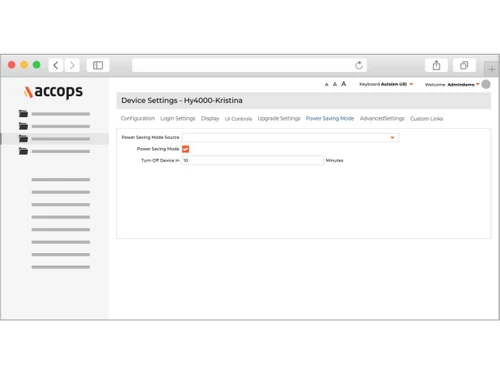
  • Auto Power Saver Mode: Reduce power consumption with automated energy-saving features.
  • Hyper Smart Devices: Transform endpoints into secure, optimized devices for virtual workspaces.
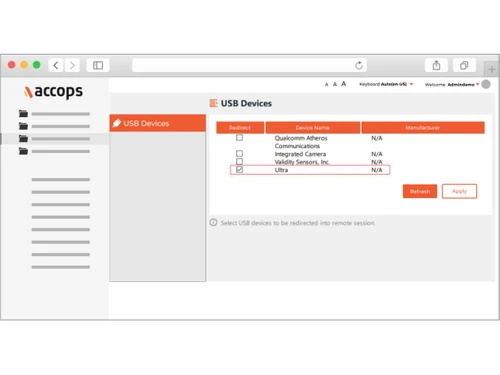
  • Universal USB Redirection: Enable seamless access to USB devices and peripherals within virtual sessions.

Why Use Accops HyDesk?

  • VDI-Optimized Platform: Deliver a smooth and reliable experience for virtual desktop users.
  • Secure Kiosk Access: Restrict users to authorized applications by hiding the underlying operating system.
  • Centralized Device Control: Manage endpoint configurations, updates, and policies from a unified console.
  • Broad Hypervisor Compatibility: Deploy seamlessly with VMware vSphere, Nutanix AHV, Microsoft Hyper-V, Azure, AWS, Google Cloud, and more.
  • Highly Reliable Devices: Minimize downtime with enterprise-grade devices engineered for dependable performance.
  • Desktop Mode Support: Provide a familiar desktop experience for enhanced user productivity.
  • Multi-Monitor Compatibility: Improve multitasking with support for multiple display configurations.
  • Touchscreen Support: Enable single-touch and multi-touch functionality on Linux-based devices.

Accops HyDesk Pricing

Accops HyDesk price is available on request at techjockey. The pricing model is based on different parameters, including extra features, deployment type, and the total number of users. For further queries related to the product, you can contact our product team and learn more about the pricing and offers.

Read more

Accops Company Details

Founded Year:  2012

Accops is a premier digital workspace and cybersecurity solutions provider, empowering thousands of organisations globally. Delivering robust, integrated IT infrastructure, Accops accelerates business growth while ensuring secure remote access. Backed by a responsive customer care ecosystem

Director/Founders Mohan Bhat, Vijender Yadav
Company Size 101-500 Employees

Accops HyDesk Pricing & Plans

Looking for The Right Pricing?

Share your requirements and get a plan built around your business.

  • Define your business needs
  • Get customised pricing
  • Choose features that fit your workflow

Price Available on Request

Get personalised Accops HyDesk pricing that fits your needs. Our team will connect with you.

Accops HyDesk Features

  • icon_check Thin Client Computing
    Replace traditional PCs with secure, energy-efficient thin clients.
  • icon_check Hybrid Endpoint Device
    Support both virtual desktop access and local computing workloads.
  • icon_check Virtual Desktop Access
    Connect seamlessly to VDI environments and virtual workspaces.
  • icon_check Remote Desktop Access
    Access enterprise desktops securely from centralized infrastructure.
  • icon_check Application Virtualization Support
    Run centrally hosted applications without local installation.
  • icon_check USB Device Support
    Enable secure access to USB storage and peripherals.
  • icon_check Centralized Device Management
    Configure and manage endpoint devices from a central console.
  • icon_check Firmware Management
    Deploy firmware updates centrally across endpoints.
  • icon_check Endpoint Security
    Protect endpoint devices from unauthorized access and threats.
  • icon_check Data Loss Prevention
    Prevent sensitive business data from being stored on endpoints.
  • icon_check Role-Based Access Control (RBAC)
    Assign administrative permissions based on user roles.
  • icon_check Audit Logs
    Record device activities and administrative actions for compliance.
  • icon_check Compact Form Factor
    Deploy space-saving endpoint devices across offices.
  • icon_check Low Power Consumption
    Reduce energy usage compared to conventional desktop PCs.
  • icon_check Peripheral Redirection
    Redirect USB devices, printers, scanners, and peripherals to virtual sessions.
Accops HyDesk Demo Video play icon

Get Accops HyDesk Demo

Watch the demo video to explore key features, real workflows, and how the software fits your business needs.

Understand
Key Features
Personal
Demo Insights
Interactive
Demo Support

Accops HyDesk Specifications

Supported Platforms
Windows Windows Linux Linux
Devices
Desktop Desktop
Deployment
Cloud-Based Cloud-Based
Suitable For
All Industries
Business Specific
All Businesses
Business Size
Small Business Startups Medium Business Enterprises
Customer Support
Phone Email
Language
English
Training Resources
Webinars Documentation Videos

Accops HyDesk Review

Be the First to Review

This product has no reviews yet. Be the first to leave your feedback.

Add Review

How much does Accops HyDesk software cost?

Accops HyDesk pricing is available on request at techjockey.

Is there a mobile app for Accops HyDesk?

No, Accops HyDesk is Linux-based, designed for desktops, laptops, and thin client devices.

Which operating systems are compatible with Accops HyDesk?

Accops HyDesk thin clients run on the secure, embedded Linux-based Accops HyDesk OS, and are compatible with any supported version of Windows IoT Enterprise OS for organizations requiring a Windows-embedded desktop experience.

Does Accops HyDesk offer a free trial?

Yes, Accops HyDesk offers a free trial for organizations to evaluate its endpoint management and VDI capabilities.

How does Accops HyDesk function?

Accops HyDesk converts endpoint devices into secure thin clients for virtual desktop access. It provides centralized device management, kiosk-based access, universal USB redirection, power-saving features, and seamless connectivity with virtual desktop infrastructure.

Who uses Accops HyDesk?

Accops HyDesk is used by enterprises, government organizations, educational institutions, healthcare providers, BFSI organizations, and businesses deploying secure virtual desktop infrastructure.

Is a free demo available for Accops HyDesk?

Yes, Accops HyDesk free demo is available at techjockey.

Is Accops HyDesk available for free?

No, Accops HyDesk free version is not available online.

20,000+ Software Listed

Best Price Guranteed

Free Expert Consultation

2M+ Happy Customers

Terms and Condtions

close

Users with registered businesses can purchase goods from merchants on the platform to satisfy their business needs. Users are not permitted to utilize any products acquired through the platform for resale, advertising, business, or further distribution.

For each purchase made, users will receive a Tax Invoice (or 'GST invoice') that includes specific details such as:

  • the GSTIN of the user associated with their registered business, and

  • the specified Entity Name for their business.

It should be noted that not all products are eligible for GST Invoice. Only the products displayed by participating sellers with the 'GST-based Invoice Available' callout on the product description page would qualify.

Certain goods and services are not eligible to get a GST Invoice, including items with VAS, i.e., Value Added Services (e.g., Total Mobile Protection/Assured Buyback) and those involving an exchange offer at the time of purchase.

Users must ensure the accuracy of the GSTIN, and business entity name provided for the GST Invoice. Requests for corrections into GST Invoice would not be accommodated by Techjockey.com or any Seller, and any issues arising from user-provided information are the sole responsibility of users.

Techjockey.com is not liable for the GST Invoice or any associated input tax credit. To efficiently claim an input tax credit, users should select the registered place of business address as per the GST authority's data and follow the provisions of the GST Act and rules.

To claim an input tax credit, the delivery and billing addresses must match. Furthermore, input tax credits will not be granted if the delivery address and GSTIN on the invoice are from different states. In case of incorrect GST details provided during the order placement, the order will be canceled automatically.