linkedin
Accops DaaS logo
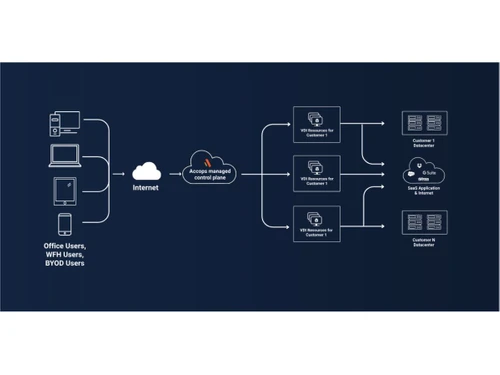
Accops DaaS Flowchart
Accops DaaS applications
Accops DaaS compliant

Accops DaaS

Brand: Accops

  • No Ratings & Reviews

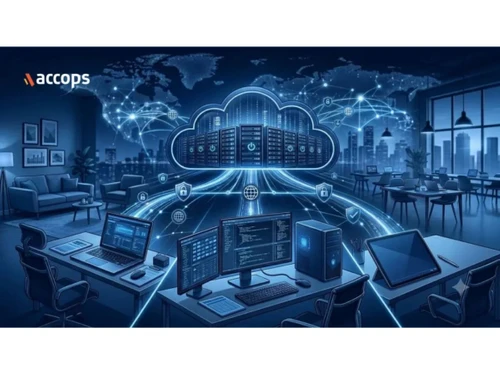
Accops DaaS is a fully managed, subscription-based virtual desktop service that securely delivers Windows, Linux, and cloud workspaces to any user device.

See More

Have you used Accops DaaS before?

Share your insights for better experience

Add a Review

Price Available on Request

Questions about pricing or customization? We’re here to help, just a click away.

100% Genuine
Products
Best Price
Guaranteed
Safe & Secure
Payment
  • Description

  • Pricing

  • Features

  • Specification

  • Review

  • FAQ

Accops DaaS Software Overview

What is Accops DaaS?

Accops DaaS (Desktop-as-a-Service) is a fully managed, cloud-hosted virtual workspace solution that securely delivers desktops and applications to employees on any device from any location. Unlike traditional on-premises Virtual Desktop Infrastructure (VDI) which requires heavy upfront Capital Expenditure (CapEx) and complex back-end management, Accops DaaS provides a single point of contact for complete workspace delivery, significantly lowering the total cost of ownership (TCO) through a flexible pay-as-you-consume subscription model.

Designed to simplify enterprise remote work, Accops DaaS handles the heavy lifting, including deployment, scaling, operations, upgrades, and monitoring. It supports pooled (shared) and personal (dedicated) desktops across Windows, Windows Server, and Linux environments, and features native Azure integration to ensure optimal performance for modern collaboration tools.

Why Choose Accops DaaS?

  • Zero-CapEx Financial Model: Shifts heavy upfront hardware investments to a predictable, pay-as-you-consume OpEx model, meaning you only pay for active usage.
  • Fast Workforce Onboarding: Allows IT teams to instantly provision secure virtual workspaces for new employees, external vendors, and developers, with the ability to immediately revoke access once contracts conclude.
  • Turnkey Managed Service: Eliminates operational burdens by handing over infrastructure configuration, updates, patch management, and support to the Accops team.
  • Uninterrupted Business Continuity: Ensures key corporate functions remain operational by letting employees transition seamlessly to remote access during local disruptions or physical office closures.
  • Native Azure Cloud Integration: Optimizes cloud virtual desktops with built-in support for FSLogix container profile management and Microsoft Teams media redirection.

Benefits of Accops DaaS

  • Complete Endpoint Security: Mitigates data leakage risks on personal (BYOD) or unmanaged devices by blocking local USB storage, preventing screen sharing, and restricting printing.
  • Flexible Virtual Workspaces: Provides tailored environments using pooled (shared) or personal (dedicated) desktops across Windows and Linux to match diverse user roles.
  • Integrated Multi-Factor Authentication: Secures entry to virtual environments with built-in MFA options, supporting SMS, email, mobile authenticator apps, and biometric checks.
  • Zero-Trace BYOD Support: Prevents corporate data from residing on end-user physical machines, ensuring all computing and storage happen strictly within the secure cloud container.
  • Centralized Compliance Control: Enforces security posture verification, contextual access controls, and detailed audit logging to track exactly who is accessing resources.

Pricing Of Accops DaaS

Accops DaaS pricing is available on request at techjockey.com. The subscription-based model is highly predictable and designed to scale according to your user headcount, hypervisor choices, and specific performance profiles. For custom configurations and bundled security features, contact our technology team to request a personalized quote.

Read more

Accops Company Details

Founded Year:  2012

Accops is a premier digital workspace and cybersecurity solutions provider, empowering thousands of organisations globally. Delivering robust, integrated IT infrastructure, Accops accelerates business growth while ensuring secure remote access. Backed by a responsive customer care ecosystem

Director/Founders Mohan Bhat, Vijender Yadav
Company Size 101-500 Employees

Accops DaaS Pricing & Plans

Looking for The Right Pricing?

Share your requirements and get a plan built around your business.

  • Define your business needs
  • Get customised pricing
  • Choose features that fit your workflow

Price Available on Request

Get personalised Accops DaaS pricing that fits your needs. Our team will connect with you.

Accops DaaS Features

  • icon_check Desktop-as-a-Service (DaaS)
    Deliver fully managed cloud-hosted virtual desktops on a subscription model.
  • icon_check Virtual Desktops
    Provision, manage, monitor, and maintain virtual desktops centrally.
  • icon_check Virtual Desktop Infrastructure (VDI)
    Deliver secure Windows and Linux virtual desktops from centralised infrastructure.
  • icon_check Remote Desktop Access
    Access enterprise desktops securely from any location.
  • icon_check Remote Application Access
    Deliver business applications without local installation.
  • icon_check Secure Digital Workspace
    Provide a unified and secure workspace for hybrid employees.
  • icon_check Zero Trust Access
    Apply context-aware Zero Trust policies before granting access.
  • icon_check Multi-Factor Authentication (MFA)
    Secure user authentication with SMS, email, app, and biometric verification.
  • icon_check Data Loss Prevention
    Prevent unauthorized copy, download, printing, and screen sharing of data.
  • icon_check Endpoint Control
    Enforce security policies on endpoint devices accessing virtual desktops.
  • icon_check Performance Monitoring
    Monitor virtual desktop health and user experience in real time.
  • icon_check Analytics Dashboard
    View desktop utilization, performance, and infrastructure insights.
  • icon_check Centralized Management
    Manage users, desktops, policies, and resources from one interface.
  • icon_check Disaster Recovery
    Ensure virtual desktop availability during infrastructure failures.
  • icon_check Audit Logs
    Record user activities and administrative actions for compliance.
  • icon_check Role-Based Access Control (RBAC)
    Control administrative permissions using predefined user roles.

Accops DaaS Specifications

Supported Platforms
Ubuntu Ubuntu Windows Windows MacOS MacOS Linux Linux
Devices
Desktop Desktop Mobile Mobile Tablet Tablet iPad iPad
Deployment
Cloud-Based Cloud-Based Perpetual Perpetual
Suitable For
All Industries
Business Specific
All Businesses
Business Size
Small Business Startups Medium Business Enterprises
Customer Support
Phone Email
Language
English
Training Resources
Webinars Documentation Videos

Accops DaaS Review

Be the First to Review

This product has no reviews yet. Be the first to leave your feedback.

Add Review

How much does Accops DaaS cost?

Accops DaaS pricing is available on request.

Which operating systems are compatible with Accops DaaS?

Accops DaaS supports pooled and personal workspaces across Windows, Windows Server, and Linux environments.

Does Accops DaaS offer a free trial?

Yes, Accops DaaS free trial is available on its official website.

How does Accops DaaS function?

Accops DaaS delivers secure virtual desktops and business applications from a centralized, fully managed cloud platform to any end-user device.

Who uses Accops DaaS?

Accops DaaS is used by enterprises, BFSI, healthcare, pharma, IT/ITeS, and government organizations looking to rapidly provision secure virtual workspaces without managing physical infrastructure.

Is a free demo available for Accops DaaS?

Yes, Accops provides a free demo to help organizations explore its managed virtual desktop capabilities.

Is Accops DaaS available for free?

No, Accops DaaS free version is not available online.

20,000+ Software Listed

Best Price Guranteed

Free Expert Consultation

2M+ Happy Customers

Terms and Condtions

close

Users with registered businesses can purchase goods from merchants on the platform to satisfy their business needs. Users are not permitted to utilize any products acquired through the platform for resale, advertising, business, or further distribution.

For each purchase made, users will receive a Tax Invoice (or 'GST invoice') that includes specific details such as:

  • the GSTIN of the user associated with their registered business, and

  • the specified Entity Name for their business.

It should be noted that not all products are eligible for GST Invoice. Only the products displayed by participating sellers with the 'GST-based Invoice Available' callout on the product description page would qualify.

Certain goods and services are not eligible to get a GST Invoice, including items with VAS, i.e., Value Added Services (e.g., Total Mobile Protection/Assured Buyback) and those involving an exchange offer at the time of purchase.

Users must ensure the accuracy of the GSTIN, and business entity name provided for the GST Invoice. Requests for corrections into GST Invoice would not be accommodated by Techjockey.com or any Seller, and any issues arising from user-provided information are the sole responsibility of users.

Techjockey.com is not liable for the GST Invoice or any associated input tax credit. To efficiently claim an input tax credit, users should select the registered place of business address as per the GST authority's data and follow the provisions of the GST Act and rules.

To claim an input tax credit, the delivery and billing addresses must match. Furthermore, input tax credits will not be granted if the delivery address and GSTIN on the invoice are from different states. In case of incorrect GST details provided during the order placement, the order will be canceled automatically.