linkedin
Altium 365 logo
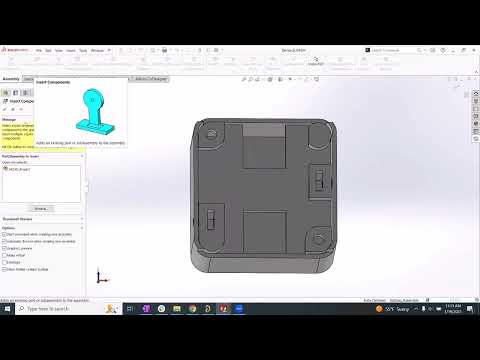
play ECAD-MCAD CoDesign with Altium 365 & SOLIDWORKS
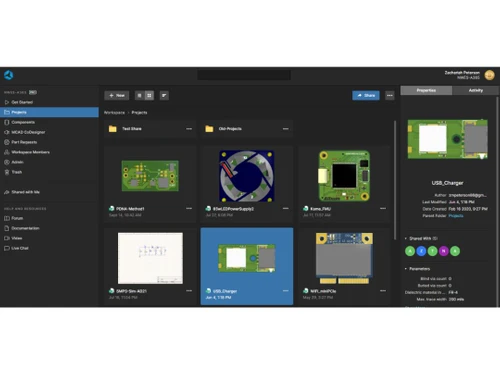
Altium 365 projects

Altium 365

Brand: Altium Limited

  • 4.3

  • 4 Ratings

Designed for electronic product development that facilitates real-time collaboration on PCB designs, allowing users to access and manage their design data from anywhere.

See More

Have you used Altium 365 before?

Share your insights for better experience

Add a Review

Price Available on Request

Questions about pricing or customization? We’re here to help, just a click away.

100% Genuine
Products
Best Price
Guaranteed
Safe & Secure
Payment
  • Description

  • Pricing

  • Features

  • Specification

  • Review

  • Compare

  • Alternatives

  • FAQ

Altium 365 Software Overview

What is Altium 365?

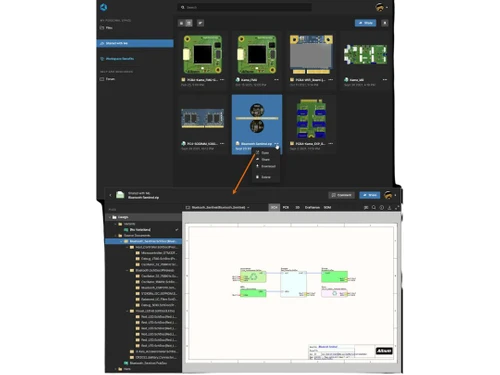
Altium 365 is a cloud-based platform designed for electronic product development that enhances collaboration among teams working on printed circuit board (PCB) designs. It allows users to access, edit, and share design files in real-time from any location with an internet connection, breaking down geographical barriers.

The platform includes features like automated backups, robust data security, and version control to protect and manage design data effectively. Altium 365 also supports seamless integration with other tools and offers functionalities for component management, making it easier to find and verify parts. Additionally, it fosters collaboration between different disciplines, such as electrical and mechanical engineering, ensuring that all team members can contribute to the design process efficiently.

Why Choose Altium 365 Software?

  • Seamless Cloud Collaboration: Altium 365 enables real-time collaboration among team members, allowing them to access and edit designs from anywhere, which enhances teamwork and communication.
  • Robust Data Security: The platform ensures data protection with end-to-end encryption and regular backups, safeguarding sensitive design information against loss or unauthorized access.
  • Version Control: Altium 365 automatically tracks changes made to projects, allowing users to revert to previous versions easily, which helps maintain data integrity throughout the design process.
  • Centralized Data Management: Users can manage all design files and components in one secure location, making it easier to find and use necessary resources without confusion.
  • Automated Backups: Continuous backups of project data provide peace of mind by preventing data loss due to unforeseen events or system failures.
  • Enhanced Design Accuracy: Integration with component databases ensures that designers work with the most up-to-date and verified component information, reducing errors in the design process.
  • Streamlined Workflows: The platform automates various tasks, such as component selection and validation, which saves time and reduces manual effort in the design workflow.
  • Flexible Access Control: Users can easily share projects with team members or external collaborators while controlling their access rights, ensuring that sensitive information remains secure.
  • Integrated Tools for ECAD: Altium 365 connects with other electronic design automation (EDA) tools, facilitating a smoother workflow between different engineering disciplines.
  • Improved Project Management: The software includes task tracking features that help teams manage their work efficiently, ensuring that important action items are not overlooked during the design process.

Benefits of Altium 365 Software

  • Multiple Workspaces: Users can create and manage different workspaces, allowing teams to compartmentalize projects and focus on specific tasks without distractions.
  • Unlimited Data Storage: The platform offers unlimited storage for projects and component libraries, eliminating concerns about running out of space or incurring extra costs.
  • Jira Integration: Altium 365 integrates with Jira, enabling synchronization of project tasks and improving workflow efficiency by keeping track of project statuses.
  • Real-Time Price Insights: Users can view custom pricing and discounts from suppliers directly in the Bill of Materials (BOM), facilitating more accurate cost estimates during the design process.
  • Enhanced Component Management: The software allows for quick searches and validations of components, streamlining the selection process and ensuring compatibility with design requirements.
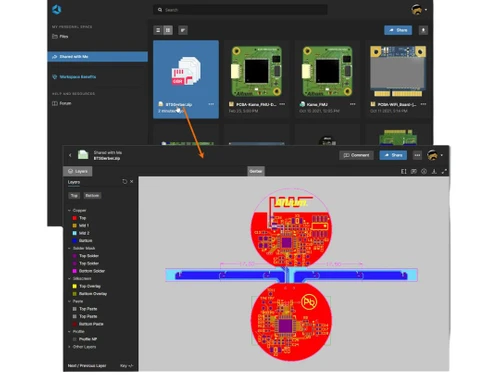
  • Web-Based Viewer: Stakeholders can access designs without needing to install software, broadening participation and facilitating feedback from non-technical users.
  • Automated Feedback Loop: The platform supports direct feedback from stakeholders, helping designers make informed decisions based on collective input.
  • Continuous Backup System: Altium 365 provides automated backups to ensure data integrity and prevent loss due to unforeseen events or system failures.
  • ECAD-MCAD Collaboration: The platform facilitates effective collaboration between electrical and mechanical design teams, enhancing the overall development process.
  • User Authentication Features: With Single Sign-On (SSO) and Multi-Factor Authentication (MFA), Altium 365 enhances security, ensuring that only authorized users have access to sensitive design data.

Pricing of Altium 365

Altium 365 price is available upon request at techjockey.com.

The pricing model is based on different parameters, including extra features, deployment type, and the total number of users. For further queries related to the product, you can contact our product team and learn more about the pricing and offers.

Read more

Altium 365 Pricing & Plans

Looking for The Right Pricing?

Share your requirements and get a plan built around your business.

  • Define your business needs
  • Get customised pricing
  • Choose features that fit your workflow

Price Available on Request

Get personalised Altium 365 pricing that fits your needs. Our team will connect with you.

Altium 365 Features

  • icon_check Presentation Tools
    Create detailed and professional presentations of your designs.
  • icon_check Data Import/Export
    Seamlessly integrate and share data across platforms and tools.
  • icon_check 3D Imagery
    Visualize designs in 3D for enhanced accuracy and clarity.
  • icon_check Collaboration Tools
    Facilitate teamwork with tools for real-time collaboration.
  • icon_check CAD Tools
    Utilize advanced CAD functionalities for precision design.
  • icon_check Data Management
    Organize and manage design data efficiently for streamlined workflows.
  • icon_check Cloud Storage
    Securely store and access your projects from anywhere.
  • icon_check Library
    Access a comprehensive library of components and templates.
  • icon_check Electrical Design
    Design robust electrical circuits with specialized tools.
  • icon_check Manufacturing
    Simplify the transition from design to production with manufacturing support.
  • icon_check Teamwork
    Enhance collaboration with tools for distributed teams.
  • icon_check Design Export
    Export designs in various formats for external use and sharing.
Altium 365 Demo Video play icon

Get Altium 365 Demo

Watch the demo video to explore key features, real workflows, and how the software fits your business needs.

Understand
Key Features
Personal
Demo Insights
Interactive
Demo Support

Altium 365 Specifications

Supported Platforms
Windows Windows
Devices
Desktop Desktop
Deployment
Cloud-Based Cloud-Based Perpetual Perpetual
Suitable For
All Industries
Business Specific
All Businesses
Business Size
Small Business Startups Medium Business Enterprises SMBs SMEs MSMBs MSMEs
Customer Support
Live Chat Communities Forums
Language
English
Training Resources
Webinars Documentation Videos

Explore the Best Alternative Solutions Similar to Your Business Size and Needs

Altium 365 Review

4.3

Out of 5

img

Overall Rating

Based on
4 Verified Ratings

Rating Breakdown

  • Features 4.2
  • Value for Money 4.3
  • Ease of Use 4.3
  • Customer Support 4.5

87% Recommend this Product

Add Review

Techjockey Trusted Reviews from Verified Users

No reviews are currently available for Altium 365. Discover similar Electrical Design Software reviews

  • Transformers Design Software

    4.4

    Whats great - I was wary at what was my first attempt to buy software from other than the maker, but this experience worked out perfect. Ev... read more

  • AUTOCAD Mep Toolset

    4.4

    Whats great - autodesk-autocad-mep it is anything but difficult to plan 2D and 3D drawing , and its simple handle too . what's more, the en... read more

  • Solid Edge

    5.0

    Whats great - We are using solid edge, It is very easy to learn and use for 3D Modelling. No hanging Issue, It is handling large assemblies... read more

Compare Altium 365 With other Electrical Design Software

Products
Ratings
Pricing
Device Supported
Deployment
Supported Platforms
  • img

    Altium 365

  • 4.3

  • Price On Request

  • Desktop

    Mobile

  • Web based

    On Premises

  • Windows

    Mac OS

  • img

    AutoCAD Electrical

  • 4.3

  • Price On Request

  • Desktop

    Mobile

  • Web based

    On Premises

  • Windows

    Mac OS

  • img

    PowerCalc

  • 4.4

  • Price On Request

  • Desktop

    Mobile

  • Web based

    On Premises

  • Windows

    Mac OS

  • img

    Aveva

  • 4.3

  • Price On Request

  • Desktop

    Mobile

  • Web based

    On Premises

  • Windows

    Mac OS

  • img

    E3 Series

  • 4.1

  • Price On Request

  • Desktop

    Mobile

  • Web based

    On Premises

  • Windows

    Mac OS

  • img

    ELEK Cable Pro Web

  • 4.4

  • Price On Request

  • Desktop

    Mobile

  • Web based

    On Premises

  • Windows

    Mac OS

  • img

    Elec Calc

  • 4.2

  • Price On Request

  • Desktop

    Mobile

  • Web based

    On Premises

  • Windows

    Mac OS

(2) Product(s) selected

Altium 365 Alternatives

See All Altium 365 Alternatives

Available

Price on Request

How much does Altium 365 Software Cost?

Altium 365 price in India is available upon request at techjockey.com.

Is there any Altium 365 Software App?

No, Altium 365 does not have an app available for Android and iOS.

Which operating system does Altium 365 Software Support?

Altium 365 supports the Windows operating system.

Does Altium 365 offer a free trial?

Yes, Altium 365 offers a 30-day free trial for users to explore its features.

How does Altium 365 Software Work?

Altium 365 works by providing a cloud-based platform that allows teams to collaborate on PCB designs in real time, manage components, and access design data from anywhere.

Who are the potential users of Altium 365 Software?

Potential users of Altium 365 include electrical engineers, PCB designers, product development teams, and organizations involved in electronic hardware design.

Is there any free demo for Altium 365 Software?

Yes, Altium 365 provides a free demo upon request.

Is Altium 365 Software Free?

Altium 365 is not available for free.

20,000+ Software Listed

Best Price Guranteed

Free Expert Consultation

2M+ Happy Customers

Terms and Condtions

close

Users with registered businesses can purchase goods from merchants on the platform to satisfy their business needs. Users are not permitted to utilize any products acquired through the platform for resale, advertising, business, or further distribution.

For each purchase made, users will receive a Tax Invoice (or 'GST invoice') that includes specific details such as:

  • the GSTIN of the user associated with their registered business, and

  • the specified Entity Name for their business.

It should be noted that not all products are eligible for GST Invoice. Only the products displayed by participating sellers with the 'GST-based Invoice Available' callout on the product description page would qualify.

Certain goods and services are not eligible to get a GST Invoice, including items with VAS, i.e., Value Added Services (e.g., Total Mobile Protection/Assured Buyback) and those involving an exchange offer at the time of purchase.

Users must ensure the accuracy of the GSTIN, and business entity name provided for the GST Invoice. Requests for corrections into GST Invoice would not be accommodated by Techjockey.com or any Seller, and any issues arising from user-provided information are the sole responsibility of users.

Techjockey.com is not liable for the GST Invoice or any associated input tax credit. To efficiently claim an input tax credit, users should select the registered place of business address as per the GST authority's data and follow the provisions of the GST Act and rules.

To claim an input tax credit, the delivery and billing addresses must match. Furthermore, input tax credits will not be granted if the delivery address and GSTIN on the invoice are from different states. In case of incorrect GST details provided during the order placement, the order will be canceled automatically.