linkedin
Astah logo
play Smoother UML Modeling with Astah
astah uml-diagrams
astah uml-flowchart

Astah

Brand: ChangeVision

  • No Ratings & Reviews

A professional project management software used for designing, visualizing, and documenting software systems and architectures.

See More

Have you used Astah before?

Share your insights for better experience

Add a Review
Starting Price
$7

View plans

100% Genuine
Products
Best Price
Guaranteed
Safe & Secure
Payment
  • Description

  • Pricing

  • Features

  • Specification

  • Review

  • FAQ

Starting at $7

Astah Software Overview

What is Astah?

Astah is a project management software that helps users design, visualize, and document complex systems, processes, and software architectures in a structured and efficient way.

It provides a wide range of diagramming tools, including UML diagrams, flowcharts, ER diagrams, and data flow diagrams, enabling teams to plan, analyze, and communicate ideas clearly.

With its intuitive interface and collaboration-friendly features, Astah supports better project planning, improved team coordination, and streamlined software development workflows.

Why Choose Astah?

  • Comprehensive Diagramming Tools: Astah supports a wide range of diagrams like UML, flowcharts, ER diagrams, and data flow diagrams, helping you visualize systems and processes clearly.
  • Improves Team Collaboration: Enables teams to share, understand, and communicate complex ideas effectively through visual models and structured documentation.
  • User-Friendly Interface: Offers an intuitive and easy-to-navigate interface, making it accessible for both beginners and experienced professionals.
  • Efficient Project Planning: Helps in organizing project requirements, workflows, and system architecture, leading to better planning and execution.

Benefits of Astah

  • Clear Visualization of Complex Systems: Helps break down complicated processes and architectures into easy-to-understand diagrams, improving clarity and decision-making.
  • Better Project Planning: Enables structured planning of workflows, requirements, and system designs, leading to more organized and efficient project execution.
  • Improved Team Communication: Visual diagrams make it easier for teams to collaborate and stay aligned, reducing misunderstandings.
  • Enhanced Documentation: Creates detailed and professional diagrams that serve as reliable project documentation for future reference.
  • Increased Productivity: Simplifies design and modeling tasks, allowing teams to work faster and more efficiently.
  • Versatile Use Cases: Suitable for software development, business process modeling, database design, and more.

Astah Pricing

Astah pricing starts at USD 7 at techjockey.com. The pricing model is based on different parameters, including the amount of bandwidth you need, the number of servers you need, and the features you need. For further queries related to the product, you can contact our product team and learn more about the pricing and offers.

Read more

ChangeVision Company Details

Founded Year:  2002

Change Vision, Inc. is enhancing the visualization and understanding of complex systems. Our flagship products, under the "Astah" suite, are designed to bring clarity and precision to the software design and system safety sectors.

Director/Founders Change Vision, Inc.
Company Size 1-100 Employees

Astah Pricing & Plans

Astah UML
Key Features
  • Class Diagramming
  • Sequence Diagramming
  • Use Case Modeling
  • State Machine Diagrams
  • Component Diagramming
  • Deployment Modeling
Starting at $7
    • Licenses

      Licenses
      Licenses
    • Monthly

      Monthly
      Monthly

Key Features

  • Class Diagramming

  • Sequence Diagramming

  • Use Case Modeling

  • State Machine Diagrams

  • Component Diagramming

  • Deployment Modeling

Astah Features

  • icon_check Class Diagramming
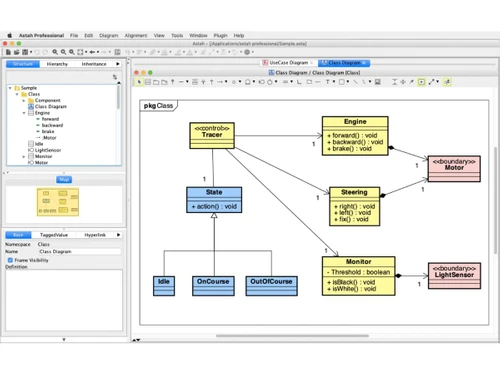
    Enables structural modeling by defining system classes, attributes, operations, and the relationships between distinct types.
  • icon_check Sequence Diagramming
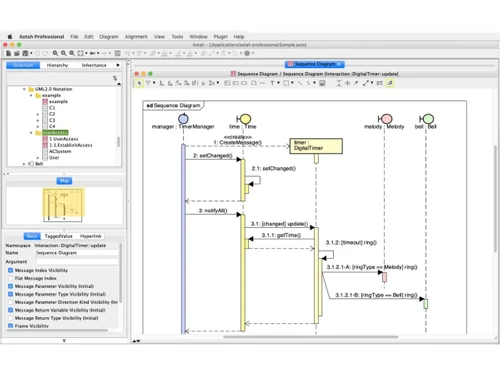
    Visualizes object interactions and message exchanges over time to model the dynamic behavior of complex software logic flows.
  • icon_check Use Case Modeling
    Captures functional requirements by defining actors and their interactions with the system to achieve specific business goals.
  • icon_check State Machine Diagrams
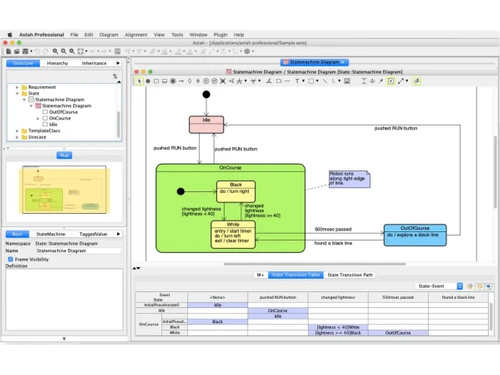
    Illustrates the lifecycle of an object by defining various states and the specific events that trigger transitions between them.
  • icon_check Component Diagramming
    Describes the physical organization and dependencies of software components to visualize the high-level system architecture.
  • icon_check Deployment Modeling
    Maps software artifacts to physical hardware nodes to visualize the execution architecture and network topology of a system.
  • icon_check Communication Diagrams
    Emphasizes the structural organization of objects that exchange messages, focusing on the relationships between the instances.
  • icon_check Java Reverse Engineering
    Analyzes existing Java source code to automatically generate corresponding UML class diagrams for legacy system visualization.
  • icon_check Java Code Generation
    Transforms UML class models into skeleton Java source code to accelerate development and ensure architectural consistency.
  • icon_check Project File Merging
    Supports collaborative workflows by allowing multiple users to integrate separate model files into a single unified project.
  • icon_check Model Search and Replace
    Provides advanced utility to locate and modify specific model elements, attributes, or text strings across the entire project.
  • icon_check HTML Documentation Export
    Generates comprehensive web-based reports of the model, enabling stakeholders to navigate diagrams via a standard browser.
  • icon_check Document Generation
    Produces editable rich text reports containing diagram images and model specifications for formal technical documentation.
Astah Demo Video play icon

Get Astah Demo

Watch the demo video to explore key features, real workflows, and how the software fits your business needs.

Understand
Key Features
Personal
Demo Insights
Interactive
Demo Support

Astah Specifications

Supported Platforms
Windows Windows MacOS MacOS Linux Linux
Devices
Desktop Desktop
Deployment
Perpetual Perpetual
Suitable For
All Industries
Business Specific
All Businesses
Business Size
Individual Small Business Medium Business Enterprises SMBs MSMEs Freelancers
Customer Support
Email Communities
Language
English
Training Resources
Videos

Astah Review

Techjockey Trusted Reviews from Verified Users

No reviews are currently available for Astah. Discover similar Flowchart Software reviews

  • SmartDraw

    4.4

    Whats great - Excellent service and aftercare with helping with questions relating to installation. Also a price that is amazing.? read more

  • Creately

    4.5

    Whats great - Visual collaboration features are ideal for brainstorming plans and processes. Highly suited for teams as in-built video conf... read more

  • ConceptDraw MINDMAP

    4.5

    Whats great - Project planning and management software with built-in themes. Allows you to customize themes accordingly. read more

Articles for Astah

See All Related Articles

How much does Astah cost?

Astah pricing starts at USD 7 at techjockey.com. Pricing is customised based on specific business needs.

Which operating system does Astah support?

Astah supports multiple operating systems, including Windows, macOS, and Linux. This cross-platform compatibility makes it accessible for diverse teams.

How does Astah work?

Astah provides a visual interface to create diagrams like UML, flowcharts, and ER diagrams. Users can design, edit, and organize models to represent systems and workflows clearly.

Is Astah suitable for small businesses?

Yes, Astah is suitable for small businesses, especially those involved in software development or system design. It helps improve planning, documentation, and team collaboration.

Does Astah offer a free trial or a demo?

Yes, Astah typically offers a free trial version. There are also limited free editions available for students and basic use.

What features does Astah offer?

It includes UML diagramming, flowcharts, ER diagrams, data flow diagrams, project modeling tools, and collaboration-friendly features for documentation.

Is there an Astah App?

Astah is available as a desktop application. There is no dedicated mobile app for Android or iOS.

Who are the potential users of Astah?

It is ideal for developers, system architects, business analysts, students, and project managers who need visual modeling tools.

How secure is Astah?

Astah is considered secure for local use, as project files are stored on your system. Security also depends on how users manage and share their files.

What is Astah used for?

Astah is used for creating diagrams to design, analyze, and document systems and processes. It helps teams visualize ideas and improve software development workflows.

20,000+ Software Listed

Best Price Guranteed

Free Expert Consultation

2M+ Happy Customers

Terms and Condtions

close

Users with registered businesses can purchase goods from merchants on the platform to satisfy their business needs. Users are not permitted to utilize any products acquired through the platform for resale, advertising, business, or further distribution.

For each purchase made, users will receive a Tax Invoice (or 'GST invoice') that includes specific details such as:

  • the GSTIN of the user associated with their registered business, and

  • the specified Entity Name for their business.

It should be noted that not all products are eligible for GST Invoice. Only the products displayed by participating sellers with the 'GST-based Invoice Available' callout on the product description page would qualify.

Certain goods and services are not eligible to get a GST Invoice, including items with VAS, i.e., Value Added Services (e.g., Total Mobile Protection/Assured Buyback) and those involving an exchange offer at the time of purchase.

Users must ensure the accuracy of the GSTIN, and business entity name provided for the GST Invoice. Requests for corrections into GST Invoice would not be accommodated by Techjockey.com or any Seller, and any issues arising from user-provided information are the sole responsibility of users.

Techjockey.com is not liable for the GST Invoice or any associated input tax credit. To efficiently claim an input tax credit, users should select the registered place of business address as per the GST authority's data and follow the provisions of the GST Act and rules.

To claim an input tax credit, the delivery and billing addresses must match. Furthermore, input tax credits will not be granted if the delivery address and GSTIN on the invoice are from different states. In case of incorrect GST details provided during the order placement, the order will be canceled automatically.