USA
USA UAE
UAE

Small Business
Designed for startups and growing businesses
See More





Brand: SmartDraw
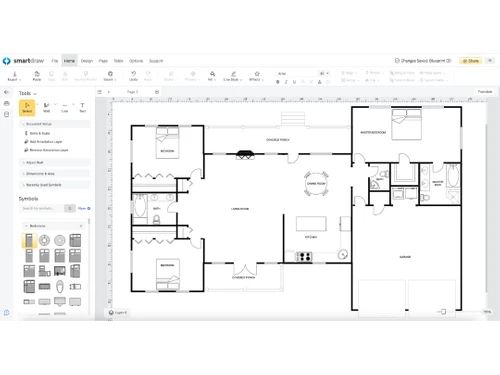
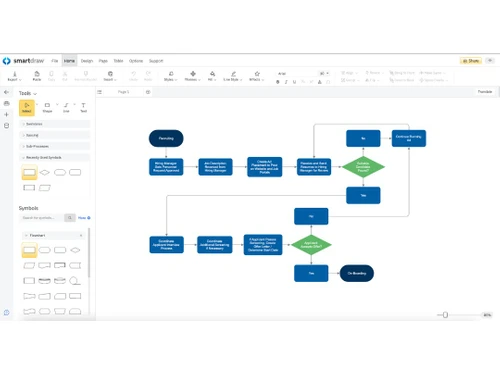
SmartDraw Software is a comprehensive floor plan software. The software offers 4500+ templates and 70 different diagram types, starting from floor plans to flowchart. Its intelligent formatting system makes it suitable for contractors, architects, business executives and project managers. They get to add, edit or delete shapes from a diagram as per their business needs. Users can export their dia...
See MoreHave you used SmartDraw before?
Share your insights for better experience
Brand: SmartDraw
Founded Year: 1994
SmartDraw
 Intelligent Formatting Professional Results Integrated Templates Engineering Power Data Import/Export Collaborate Seamlessly Symbol Library Data-Driven Automation Real-Time Collaboration Whiteboarding & Brainstorming Tools Seamless Integration Cloud Storage Comments & Annotations

Watch the demo video to explore key features, real workflows, and how the software fits your business needs.
 Ubuntu
  Windows
  iOS
iOS  Android MacOS
  Linux
Linux  Desktop
  Mobile
  Tablet
  iPad
iPad  Cloud-Based
  Perpetual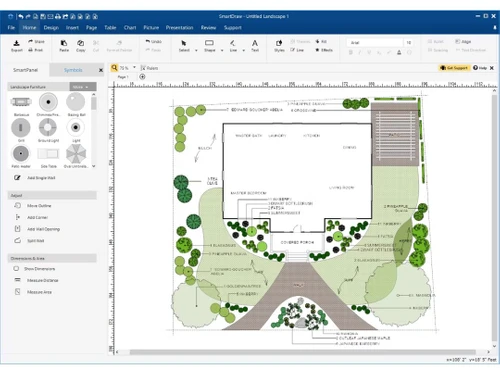
Small Business
Designed for startups and growing businesses
Medium Business
Built for business growth and flexibility
Enterprises
Designed for complex and large-scale business needs
4.3
Out of 5

Overall Rating
Based on
4 Verified Reviews
Rating Breakdown
95% Recommend this Product
Add ReviewCustomers generally appreciate SmartDraw for its excellent customer service, ease of use, and the ability to create professional-quality diagrams quickly. Users highlight the helpful features like the Smart Panel and the variety of templates available. However, some common concerns include the high cost of the software, fluctuating performance of the online version, and weak collaboration capabilities. Overall, users find significant value in the application but note areas for improvement, particularly in resource consumption and installation speed.
Pros
"Excellent service and aftercare with helping with questions relating to installation. Also a price that is amazing.?"
Cons
"Weak collaboration features. It is very expensive you asked me. The speed of the online version sometimes fluctuates negatively."
"Consume abundant resources, and its installation is so slow that it becomes tedious waiting until fully charged."

Oct 4, 2017
Techjockey Verified
“great purchase”
Pros
Excellent service and aftercare with helping with questions relating to installation. Also a price that is amazing.?
Cons
N/A
Sep 27, 2017
Techjockey Verified
“quick service & customer support”
Pros
they helped me locate the right software for my business
Cons
N/A
Apr 5, 2018
Techjockey Verified
“SmartDraw makes it easier than any other app to quickly create professional-quality diagrams.”
Pros
Helpful Smart Panel feature. Good integration options. It is very Easy to use. It has a desktop and online version that allows you to work in any place, it is very useful. Smart Draw is a very complete application for all types of diagrams that you need.
Cons
Weak collaboration features. It is very expensive you asked me. The speed of the online version sometimes fluctuates negatively.

SmartDraw
$ 83.40 excl. GST
Desktop
Mobile
Web based
On Premises
Windows
Mac OS

Diagrams.Net
Price On Request
Desktop
Mobile
Web based
On Premises
Windows
Mac OS

Lucidchart
Price On Request
Desktop
Mobile
Web based
On Premises
Windows
Mac OS

thinkComposer
Price On Request
Desktop
Mobile
Web based
On Premises
Windows
Mac OS

Zen Flowchart
Price On Request
Desktop
Mobile
Web based
On Premises
Windows
Mac OS

Creately
Price On Request
Desktop
Mobile
Web based
On Premises
Windows
Mac OS

Terrastruct
Price On Request
Desktop
Mobile
Web based
On Premises
Windows
Mac OS

Microsoft Visio
₹ 498
Desktop
Mobile
Web based
On Premises
Windows
Mac OS

Gliffy
Price On Request
Desktop
Mobile
Web based
On Premises
Windows
Mac OS

Visme
Price On Request
Desktop
Mobile
Web based
On Premises
Windows
Mac OS

Cacoo
Price On Request
Desktop
Mobile
Web based
On Premises
Windows
Mac OS
(0) Product(s) selected
Starting Price:
$20 /User/Month

Available
Price on Request

Starting Price:
$6 /Month

Starting Price:
$18 /3Month

Starting Price:
$129 /Device

Starting Price:
$20 /Month

Starting Price:
$10 /Quantity

Starting Price:
$7 /Month
Starting Price:
$50 /License
Yes, the software offers a variety of in-built extensions, helping the designers to point out the exact source of relevant data. They can also create customized extensions using the VirtualScript SDK.
Yes, you can save your own designs as a custom template by clicking on “save as” and selecting “SmartDraw Template” once you are done with the design.
Yes, you can request an online demo of SmartDraw Software. Our in-house software experts will get back to you as per your mentioned time schedule.
Yes, you can create Venn diagrams with SmartDraw Software to depict the differences and similarities between multiple items. SmartDraw offers a variety of templates on Venn diagrams.
Yes, SmartDraw Software has a dedicated mobile app available on Android and iOS platforms.
The pricing of SmartDraw is available at USD 119 per year at techjockey.com.
20,000+ Software Listed
Best Price Guranteed
Free Expert Consultation
2M+ Happy Customers
Terms and Condtions

Users with registered businesses can purchase goods from merchants on the platform to satisfy their business needs. Users are not permitted to utilize any products acquired through the platform for resale, advertising, business, or further distribution.
For each purchase made, users will receive a Tax Invoice (or 'GST invoice') that includes specific details such as:
the GSTIN of the user associated with their registered business, and
the specified Entity Name for their business.
It should be noted that not all products are eligible for GST Invoice. Only the products displayed by participating sellers with the 'GST-based Invoice Available' callout on the product description page would qualify.
Certain goods and services are not eligible to get a GST Invoice, including items with VAS, i.e., Value Added Services (e.g., Total Mobile Protection/Assured Buyback) and those involving an exchange offer at the time of purchase.
Users must ensure the accuracy of the GSTIN, and business entity name provided for the GST Invoice. Requests for corrections into GST Invoice would not be accommodated by Techjockey.com or any Seller, and any issues arising from user-provided information are the sole responsibility of users.
Techjockey.com is not liable for the GST Invoice or any associated input tax credit. To efficiently claim an input tax credit, users should select the registered place of business address as per the GST authority's data and follow the provisions of the GST Act and rules.
To claim an input tax credit, the delivery and billing addresses must match. Furthermore, input tax credits will not be granted if the delivery address and GSTIN on the invoice are from different states. In case of incorrect GST details provided during the order placement, the order will be canceled automatically.