linkedin
Visual Paradigm logo
play How to Create a Butterfly Chart - VisualParadigm demo
Visual Paradigm scratchpad
Visual Paradigm dash

Visual Paradigm

Brand: Visual Paradigm

  • 4.4

  • 4 Ratings

Helps software developers create, visualize, and manage IT systems using various modeling techniques like UML diagrams.

See More

Have you used Visual Paradigm before?

Share your insights for better experience

Add a Review
Starting Price
$6

View plans

100% Genuine
Products
Best Price
Guaranteed
Safe & Secure
Payment
  • Description

  • Pricing

  • Features

  • Specification

  • Review

  • Compare

  • Alternatives

  • FAQ

Starting at $6

Visual Paradigm Software Overview

What is Visual Paradigm?

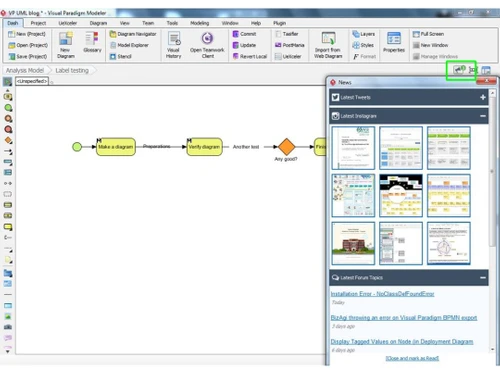
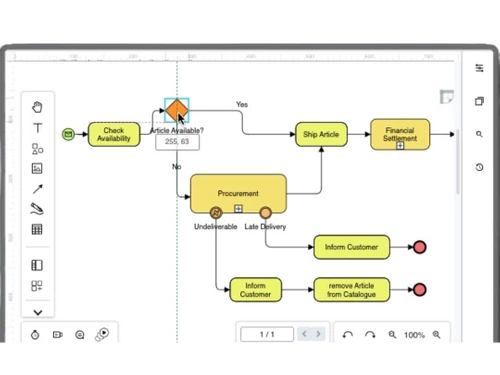
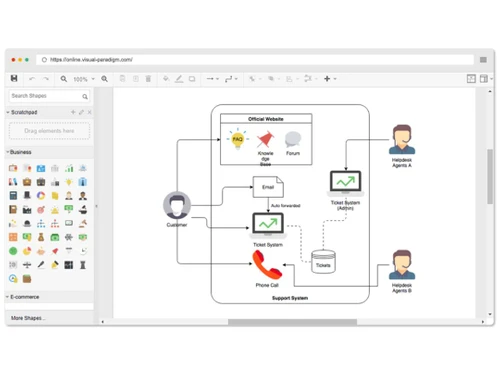
Visual Paradigm is an all-in-one project management and flowchart software designed to enhance the software development process. It offers a range of modeling tools, including UML diagrams, flowcharts, and ER diagrams, to help teams visualize and design their projects effectively.

With features for agile project management, Visual Paradigm supports Scrum and Kanban methodologies, facilitating better collaboration and workflow management. This project management software also provides templates and documentation tools to streamline project documentation and reporting. Its intuitive interface makes it accessible for both technical and non-technical users.

Why Choose Visual Paradigm Software?

  • Comprehensive Modeling Tools: It offers a wide range of modeling tools, including UML, flowcharts, ER diagrams, and BPM, catering to various project needs.
  • Agile Support: It supports Agile methodologies like Scrum and Kanban, allowing teams to adapt quickly to changing requirements and improve collaboration.
  • User-Friendly Interface: Its intuitive design makes it easy for users of all skill levels to create and manage diagrams without extensive training.
  • Collaboration Features: It enables real-time collaboration among team members, facilitating better communication and project alignment.
  • Integration Capabilities: It integrates seamlessly with popular tools such as Jira, Confluence, and Slack, enhancing workflow and productivity.
  • Comprehensive Documentation: It provides tools for generating documentation, which helps maintain project clarity and ensures all stakeholders are informed.
  • Cross-Platform Availability: It can be used on various operating systems, including Windows, macOS, and Linux, offering flexibility for diverse teams.
  • Educational Resources: It includes tutorials, templates, and a supportive community, making it easier for users to learn and maximize its features.

Benefits of Visual Paradigm Software

  • Version Control: It supports version control for projects, allowing teams to track changes, manage different versions, and revert to previous iterations if needed.
  • Customizable Templates: Users can create and customize templates for diagrams and reports, streamlining the process of documentation and ensuring consistency across projects.
  • Simulation and Testing: It allows users to simulate business processes and workflows, enabling teams to test scenarios and identify potential issues before implementation.
  • Code Generation: It can generate code from UML diagrams, accelerating the development process by translating designs into executable code in various programming languages.
  • Cloud Collaboration: It offers cloud-based features that facilitate remote access and collaboration, allowing teams to work together effectively from different locations.
  • Business Process Management: It includes features for business process modeling, enabling organizations to analyze and optimize their workflows for increased efficiency.
  • Extensive Support and Documentation: It provides detailed documentation, support forums, and customer service to assist users in troubleshooting and maximizing its potential.
  • Visual Reports: It allows users to create visually appealing reports and presentations directly from their diagrams, making it easier to communicate ideas to stakeholders.
  • Change Management: It includes tools for managing changes in project requirements, helping teams adapt and respond to modifications efficiently.
  • Integration with CI/CD Tools: It integrates with Continuous Integration and Continuous Deployment (CI/CD) tools, supporting DevOps practices and improving the software development lifecycle.

Pricing of Visual Paradigm

Visual Paradigm price in India starts at $6 per month at techjockey.com.

The pricing model is based on different parameters, including extra features, deployment type, and the total number of users. For further queries related to the product, you can contact our product team and learn more about the pricing and offers.

Read more

Visual Paradigm Company Details

Founded Year:  2006

Visual Paradigm is a leading and globally recognized provider for Business and IT Transformation software solutions.

Director/Founders Curtis Tsang
Company Size 1-100 Employees

Visual Paradigm Pricing & Plans

Modeler-Subscription
Starting at $6
    • Monthly

      Monthly
      Monthly
    • Licenses

      Licenses
      Licenses

Key Features

  • ER diagram

  • Plug-in development

  • BPMN diagram (business process mapping)

  • Zachman Framework

  • Textual analysis

  • Impact analysis

Standard-Subscription
Starting at $19
    • Monthly

      Monthly
      Monthly
    • Licenses

      Licenses
      Licenses

Key Features

  • UML diagram

  • Online diagram editor

  • Business Model Canvas

  • Organization chart

  • UX wireframe

  • Plug-in development

Professional-Subscription
Starting at $35
    • Monthly

      Monthly
      Monthly
    • Licenses

      Licenses
      Licenses

Key Features

  • Scrum Framework Tool

  • Nexus Framework Tool

  • On-Demand Model ETL

  • BMM diagram

  • Visual file cabinet

  • STEPS wizards

Enterprise-Subscription
Starting at $89
    • Monthly

      Monthly
      Monthly
    • Licenses

      Licenses
      Licenses

Key Features

  • LeSS Framework Tool

  • Scrum Process Canvas customization

  • TOGAF ADM Guide-Through customization

  • TOGAF ADM Just-in-Time Process Map

  • Just-in-Time Process Map customization

  • PERT Chart

Visual Paradigm Features

  • icon_check Project Management
    Provides tools to plan, track, and manage projects efficiently from start to finish.
  • icon_check Agile & Scrum Development
    Supports Agile and Scrum methodologies, helping teams manage sprints, backlogs, and tasks.
  • icon_check Online Diagrams
    Offers a wide range of online diagram tools like flowcharts, UML, and ERD to visualize processes and systems.
  • icon_check User Experience
    Assists in designing and improving user experience through wireframes, prototypes, and user flows.
  • icon_check Customer Experience Design
    Helps design customer journeys and touchpoints for better customer engagement and satisfaction.
  • icon_check Database Engineering
    Enables the design, modeling, and generation of databases, supporting database engineering processes.
  • icon_check Team Collaboration
    Facilitates real-time collaboration among team members, ensuring better communication and coordination.
  • icon_check Gantt Chart
    Provides Gantt charts for visualizing project timelines and tracking task progress.
  • icon_check Textual Analysis
    Analyzes text-based data to extract insights and information, useful for requirement gathering and documentation.
  • icon_check Drag-and-Drop Editor
    Easily create diagrams using a visual drag-and-drop editor with alignment guides and dynamic snapping tools.
  • icon_check Visual Modeling Tools
    Build and manage model elements with efficient reusability, transformations, and syntax validation.
  • icon_check Enterprise Architecture
    Utilize TOGAF ADM lifecycle tools including ArchiMate, capability maps, and ADM deliverables.
  • icon_check Database Engineering
    Create ERDs from existing databases and export DDL scripts or update schemas automatically.
  • icon_check AI Diagram Generation
    Use AI to translate textual descriptions into structured, professionally designed diagrams.
  • icon_check Process modeling
    Design, analyze, and optimize workflows with BPMN, process maps, and simulation tools.
Visual Paradigm Demo Video play icon

Get Visual Paradigm Demo

Watch the demo video to explore key features, real workflows, and how the software fits your business needs.

Understand
Key Features
Personal
Demo Insights
Interactive
Demo Support

Visual Paradigm Specifications

Supported Platforms
Ubuntu Ubuntu Windows Windows MacOS MacOS Linux Linux
Devices
Desktop Desktop
Deployment
Cloud-Based Cloud-Based Perpetual Perpetual
Suitable For
All Industries
Business Specific
All Businesses
Business Size
Individual Small Business Startups Medium Business Enterprises SMBs SMEs
Customer Support
Email Live Chat Communities Forums
Language
English
Integration
API Integration
Training Resources
Webinars Documentation Videos
AI Features
AI Integrated
Technology
Next Generation

Explore the Best Alternative Solutions Similar to Your Business Size and Needs

Visual Paradigm Review

4.4

Out of 5

img

Overall Rating

Based on
4 Verified Ratings

Rating Breakdown

  • Features 4.3
  • Value for Money 4.1
  • Ease of Use 4.5
  • Customer Support 4.6

92% Recommend this Product

Add Review

Techjockey Trusted Reviews from Verified Users

No reviews are currently available for Visual Paradigm. Discover similar Flowchart Software reviews

  • SmartDraw

    4.4

    Whats great - Excellent service and aftercare with helping with questions relating to installation. Also a price that is amazing.? read more

  • Creately

    4.5

    Whats great - Visual collaboration features are ideal for brainstorming plans and processes. Highly suited for teams as in-built video conf... read more

  • ConceptDraw MINDMAP

    4.5

    Whats great - Project planning and management software with built-in themes. Allows you to customize themes accordingly. read more

Compare Visual Paradigm With other Flowchart Software

Products
Ratings
Pricing
Device Supported
Deployment
Supported Platforms
  • img

    Visual Paradigm

  • 4.4

  • Price On Request

  • Desktop

    Mobile

  • Web based

    On Premises

  • Windows

    Mac OS

  • img

    Diagrams.Net

  • 4.4

  • Price On Request

  • Desktop

    Mobile

  • Web based

    On Premises

  • Windows

    Mac OS

  • img

    thinkComposer

  • 4.3

  • Price On Request

  • Desktop

    Mobile

  • Web based

    On Premises

  • Windows

    Mac OS

  • img

    Lucidchart

  • 4.4

  • Price On Request

  • Desktop

    Mobile

  • Web based

    On Premises

  • Windows

    Mac OS

  • img

    SmartDraw

  • 4.3

  • Price On Request

  • Desktop

    Mobile

  • Web based

    On Premises

  • Windows

    Mac OS

  • img

    Zen Flowchart

  • 4.5

  • Price On Request

  • Desktop

    Mobile

  • Web based

    On Premises

  • Windows

    Mac OS

  • img

    Terrastruct

  • 4.1

  • Price On Request

  • Desktop

    Mobile

  • Web based

    On Premises

  • Windows

    Mac OS

  • img

    Creately

  • 4.5

  • Price On Request

  • Desktop

    Mobile

  • Web based

    On Premises

  • Windows

    Mac OS

  • img

    Microsoft Visio

  • 4.5

  • ₹ 498

  • Desktop

    Mobile

  • Web based

    On Premises

  • Windows

    Mac OS

  • img

    Gliffy

  • 4.1

  • Price On Request

  • Desktop

    Mobile

  • Web based

    On Premises

  • Windows

    Mac OS

  • img

    Visme

  • 4.4

  • Price On Request

  • Desktop

    Mobile

  • Web based

    On Premises

  • Windows

    Mac OS

(0) Product(s) selected

Visual Paradigm Alternatives

See All Visual Paradigm Alternatives

Starting Price:

$20 /User/Month

Starting Price:

$18 /3Month

Starting Price:

$129 /Device

Starting Price:

$20 /Month

Starting Price:

$10 /Quantity

Starting Price:

$7 /Month
Articles for Visual Paradigm

See All Related Articles

What is the pricing for Visual Paradigm Software?

The price of Visual Paradigm software in India starts at $6 per month, as listed on techjockey.com.

Is there a mobile application available for Visual Paradigm Software?

o, Visual Paradigm does not offer a mobile app for both Android and iOS devices.

Which operating systems are supported by Visual Paradigm Software?

Visual Paradigm supports Ubuntu, Windows, MacOS, and Linux operating systems.

Does Visual Paradigm Software offer a free trial period?

Yes, Visual Paradigm offers a free trial period for users to explore its features before purchasing.

What is the functionality of Visual Paradigm Software?

Visual Paradigm provides tools for project management, diagramming, Agile development, and team collaboration.

Who can benefit from using Visual Paradigm Software?

Software developers, project managers, business analysts, and design teams can all benefit from Visual Paradigm.

Is there a free demo available for Visual Paradigm Software?

Yes, Visual Paradigm provides a free demo for users to experience its capabilities.

Is Visual Paradigm Software available for free?

o, Visual Paradigm software is available for free.

What types of diagrams can be created with Visual Paradigm Software?

Users can create UML diagrams, flowcharts, ER diagrams, BPM diagrams, and many more with Visual Paradigm.

20,000+ Software Listed

Best Price Guranteed

Free Expert Consultation

2M+ Happy Customers

Terms and Condtions

close

Users with registered businesses can purchase goods from merchants on the platform to satisfy their business needs. Users are not permitted to utilize any products acquired through the platform for resale, advertising, business, or further distribution.

For each purchase made, users will receive a Tax Invoice (or 'GST invoice') that includes specific details such as:

  • the GSTIN of the user associated with their registered business, and

  • the specified Entity Name for their business.

It should be noted that not all products are eligible for GST Invoice. Only the products displayed by participating sellers with the 'GST-based Invoice Available' callout on the product description page would qualify.

Certain goods and services are not eligible to get a GST Invoice, including items with VAS, i.e., Value Added Services (e.g., Total Mobile Protection/Assured Buyback) and those involving an exchange offer at the time of purchase.

Users must ensure the accuracy of the GSTIN, and business entity name provided for the GST Invoice. Requests for corrections into GST Invoice would not be accommodated by Techjockey.com or any Seller, and any issues arising from user-provided information are the sole responsibility of users.

Techjockey.com is not liable for the GST Invoice or any associated input tax credit. To efficiently claim an input tax credit, users should select the registered place of business address as per the GST authority's data and follow the provisions of the GST Act and rules.

To claim an input tax credit, the delivery and billing addresses must match. Furthermore, input tax credits will not be granted if the delivery address and GSTIN on the invoice are from different states. In case of incorrect GST details provided during the order placement, the order will be canceled automatically.