linkedin
Cacoo logo
Cacoo all
Cacoo chart
Cacoo templates

Cacoo

Brand: Nulab

  • 4.0

  • 4 Ratings

An online mind mapping software, Cacoo comes with an elaborate library of formats and icons. It offers the features you require to create flowcharts, wireframes, organizational diagrams, and that's only the tip of the iceberg. Likewise, you can import pictures and screen captures with your own resources to refine your diagrams. Cacoo can help you set up your first chart in minutes, while you visu...

See More

Have you used Cacoo before?

Share your insights for better experience

Add a Review
Starting Price
$6

View plans

100% Genuine
Products
Best Price
Guaranteed
Safe & Secure
Payment
  • Description

  • Pricing

  • Features

  • Specification

  • Review

  • Compare

  • Alternatives

  • FAQ

Starting at $6

Cacoo Software Overview

What is Cacoo?

An online mind mapping software, Cacoo comes with an elaborate library of formats and icons. It offers the features you require to create flowcharts, wireframes, organizational diagrams, and that's only the tip of the iceberg. Likewise, you can import pictures and screen captures with your own resources to refine your diagrams.

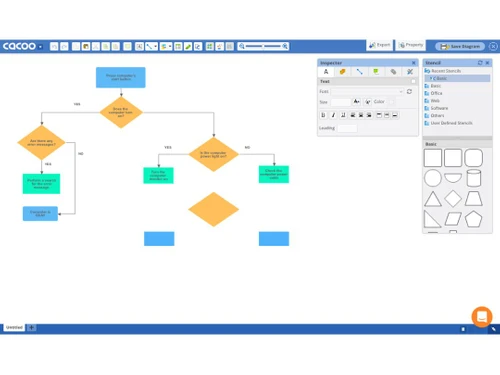
Cacoo can help you set up your first chart in minutes, while you visualize your process, Cacoo makes it easier to understand, streamlines and lets your diagram communicate with others. Diagrams and mind maps are the easiest and effective way of achieving an idea in your head to an easy shareable experience.

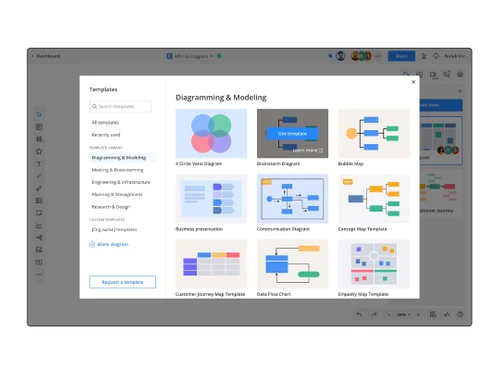
You can start with a template or draw freely on a blank canvas. While you are in the midst of creating your masterpieces, you can even get feedback at every step. With Cacoo’s presentation mode, you can also share your diagrams and mind maps before a large group of people. This can help you get more inputs or comments on your project. Further, you can send an entire folder or a selected diagram using the “view only” or “edit links”.

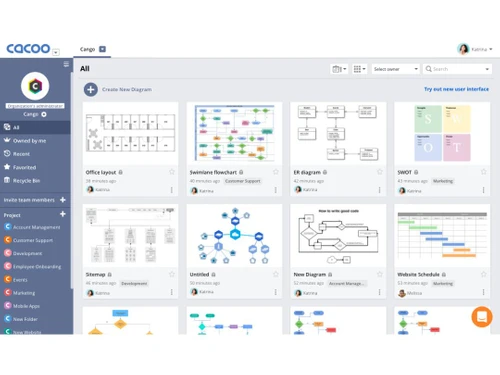
Here is a sneak peek into the Cacoo’s dashboard:

  1. One single place for every need- Whether you need a diagram, project plan, or documentation, you can manage everything at one single place. Cacoo keeps itself updated for all the members of the team.

  2. In-app chat- With in-built chat support, you may discuss ideas and share feedback with your team without even leaving the editor.
  3. Dynamic charts- You can either create charts or graphs with your own set of data. You can even import from your own spreadsheet or input it directly.
  4. Embedding diagrams- It enables you to embed your charts or diagrams into a blog or website. It automatically gets updated when edited with Cacoo.

Pricing of Cacoo

Cacoo pricing starts is availabale on USD 6 per month at techjockey.com.

Read more

Nulab Company Details

Founded Year:  2004

Nulab is a growing software company that provides online collaboration tools for teams of all sizes.

Director/Founders Masanori Hashimoto, Shinsuke Tabata, Toshitaka Agata
Company Size 101-500 Employees

Cacoo Pricing & Plans

Pro
Key Features
  • 1 user
  • Unlimited sheets
  • Templates & shapes
  • Multiple export options
  • Real-time editing*
  • In-app video chat*
  • Comment & chat*
  • Revision history
Starting at $6
    • Licenses

      Licenses
      Licenses
    • Monthly

      Monthly
      Monthly

Key Features

  • 1 user

  • Unlimited sheets

  • Templates & shapes

  • Multiple export options

  • Real-time editing*

  • In-app video chat*

  • Comment & chat*

  • Revision history

Cacoo Features

  • icon_check Sticky Notes
    Add sticky notes and reactions to organize brainstorming ideas and asynchronous team feedback directly on boards.
  • icon_check Technical Diagramming Tools
    Import AWS diagrams or convert code into editable visual diagrams with technical diagramming support.
  • icon_check Media Library
    Quickly insert images, icons, GIFs, and team avatars to make visuals more engaging and informative.
  • icon_check Multi-User Editing
    Collaborate in real time, edit the same board together, and sync changes instantly across all users.
  • icon_check Seamless Integration
    Connect with tools like Backlog, Slack, Google Drive, Docs, Teams, and Confluence for smoother workflows.
  • icon_check Collaboration
    You can add new members to a group or folders and give them instant access to documents or diagrams that they require.
  • icon_check Secure sharing
    Protect sensitive visuals with password controls and manage external access securely.
  • icon_check Workflow Automation
    The step-by-step process of workflow is automated with Cacoo hence, reducing your time and efforts.
  • icon_check Dashboards
    Cacoo’s dashboard provides a high level of overview for all the completed, active, overdue, and total workflows for every
  • icon_check Feedback Management
    You can create a proactive workflow review management and work on the positive and negative client experiences.
  • icon_check Brainstorming
    Cacoo’s enhanced mind mapping helps you in brainstorming around the topic or add branches to connect to the sub ideas.
  • icon_check Presentations
    You can prepare and store presentations online and start with one of the many templates while collaborating in real-time with
  • icon_check Revision History
    You can track when was the last time a diagram was edited, and accordingly can save its versions to compare the changes over
  • icon_check Integrations
    Cacoo’s online mind mapping software works well with almost all the other applications. You can manage and store your diagrams
  • icon_check Screen Capture
    You can capture your own screenshots and redefine your diagrams or designs.
  • icon_check Flow Diagramming
    To ease out the user journey and easily access your website, you can make the most of Cacoo’s flow diagrams by breaking it down

Cacoo Specifications

Supported Platforms
Ubuntu Ubuntu Windows Windows iOS iOS Android Android MacOS MacOS Linux Linux
Devices
Desktop Desktop Mobile Mobile
Deployment
Cloud-Based Cloud-Based
Suitable For
All Industries
Business Specific
All Businesses
Business Size
Individual Small Business Startups Medium Business Enterprises SMBs SMEs
Customer Support
Email Live Chat Communities
Language
English 日本人
Integration
API Integration
Training Resources
Live Online Webinars Documentation Videos
AI Features
AI Integrated
Technology
Next Generation
Compliance Regulation
CCPA CPRA

Cacoo Integrations

Explore the Best Alternative Solutions Similar to Your Business Size and Needs

Cacoo Review

4.0

Out of 5

img

Overall Rating

Based on
4 Verified Ratings

Rating Breakdown

  • Features 4
  • Value for Money 4
  • Ease of Use 4.1
  • Customer Support 4.1

92% Recommend this Product

Add Review

Techjockey Trusted Reviews from Verified Users

No reviews are currently available for Cacoo. Discover similar Flowchart Software reviews

  • SmartDraw

    4.4

    Whats great - Excellent service and aftercare with helping with questions relating to installation. Also a price that is amazing.? read more

  • Creately

    4.5

    Whats great - Visual collaboration features are ideal for brainstorming plans and processes. Highly suited for teams as in-built video conf... read more

  • ConceptDraw MINDMAP

    4.5

    Whats great - Project planning and management software with built-in themes. Allows you to customize themes accordingly. read more

Compare Cacoo With other Flowchart Software

Products
Ratings
Pricing
Device Supported
Deployment
Supported Platforms
  • img

    Cacoo

  • 4.0

  • Price On Request

  • Desktop

    Mobile

  • Web based

    On Premises

  • Windows

    Mac OS

  • img

    Diagrams.Net

  • 4.4

  • Price On Request

  • Desktop

    Mobile

  • Web based

    On Premises

  • Windows

    Mac OS

  • img

    thinkComposer

  • 4.3

  • Price On Request

  • Desktop

    Mobile

  • Web based

    On Premises

  • Windows

    Mac OS

  • img

    Lucidchart

  • 4.4

  • Price On Request

  • Desktop

    Mobile

  • Web based

    On Premises

  • Windows

    Mac OS

  • img

    SmartDraw

  • 4.3

  • Price On Request

  • Desktop

    Mobile

  • Web based

    On Premises

  • Windows

    Mac OS

  • img

    Zen Flowchart

  • 4.5

  • Price On Request

  • Desktop

    Mobile

  • Web based

    On Premises

  • Windows

    Mac OS

  • img

    Terrastruct

  • 4.1

  • Price On Request

  • Desktop

    Mobile

  • Web based

    On Premises

  • Windows

    Mac OS

  • img

    Creately

  • 4.5

  • Price On Request

  • Desktop

    Mobile

  • Web based

    On Premises

  • Windows

    Mac OS

  • img

    Microsoft Visio

  • 4.5

  • ₹ 498

  • Desktop

    Mobile

  • Web based

    On Premises

  • Windows

    Mac OS

  • img

    Gliffy

  • 4.1

  • Price On Request

  • Desktop

    Mobile

  • Web based

    On Premises

  • Windows

    Mac OS

  • img

    Visme

  • 4.4

  • Price On Request

  • Desktop

    Mobile

  • Web based

    On Premises

  • Windows

    Mac OS

(0) Product(s) selected

Cacoo Alternatives

See All Cacoo Alternatives

Starting Price:

$20 /User/Month

Starting Price:

$18 /3Month

Starting Price:

$129 /Device

Starting Price:

$20 /Month

Starting Price:

$10 /Quantity

Starting Price:

$7 /Month
Articles for Cacoo

See All Related Articles

Does Cacoo have a live collaboration?

Cacoo’s in-app chat function allows the collaborators to have live communications within the charts or diagrams. This enables them in sharing ideas and communicating with ease.

How can one share the work?

Cacoo allows work sharing with multiple options such as shared folders, links and emails. One can even embed the diagram on a webpage.

What are the exporting formats with Cacoo?

One can export the diagrams using PNG, PDF, SVG, PowerPoint etc.

Does Cacoo has a shared folder?

Yes, Cacoo offers the shared folder to manager and store diagrams and enables you to further discuss it with the team.

What are the security and privacy measures by Cacoo?

Cacoo uses HTTPS that encrypts all the data that is sent and received with SSL

How much does Cacoo cost?

Cacoo pricing starts is availabale on USD 6 per month at techjockey.com.

20,000+ Software Listed

Best Price Guranteed

Free Expert Consultation

2M+ Happy Customers

Terms and Condtions

close

Users with registered businesses can purchase goods from merchants on the platform to satisfy their business needs. Users are not permitted to utilize any products acquired through the platform for resale, advertising, business, or further distribution.

For each purchase made, users will receive a Tax Invoice (or 'GST invoice') that includes specific details such as:

  • the GSTIN of the user associated with their registered business, and

  • the specified Entity Name for their business.

It should be noted that not all products are eligible for GST Invoice. Only the products displayed by participating sellers with the 'GST-based Invoice Available' callout on the product description page would qualify.

Certain goods and services are not eligible to get a GST Invoice, including items with VAS, i.e., Value Added Services (e.g., Total Mobile Protection/Assured Buyback) and those involving an exchange offer at the time of purchase.

Users must ensure the accuracy of the GSTIN, and business entity name provided for the GST Invoice. Requests for corrections into GST Invoice would not be accommodated by Techjockey.com or any Seller, and any issues arising from user-provided information are the sole responsibility of users.

Techjockey.com is not liable for the GST Invoice or any associated input tax credit. To efficiently claim an input tax credit, users should select the registered place of business address as per the GST authority's data and follow the provisions of the GST Act and rules.

To claim an input tax credit, the delivery and billing addresses must match. Furthermore, input tax credits will not be granted if the delivery address and GSTIN on the invoice are from different states. In case of incorrect GST details provided during the order placement, the order will be canceled automatically.