USA
USA UAE
UAESmall Business
Designed for startups and growing businesses

See More




Brand: PROTOIO
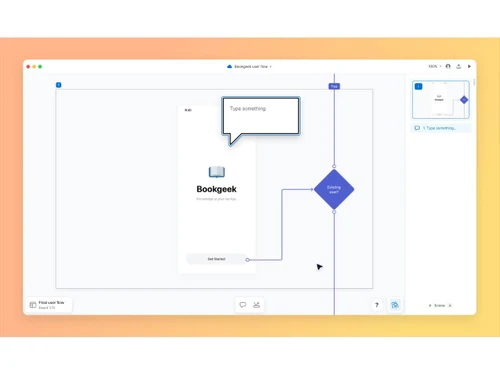
Overflow transforms design presentations and user flows into interactive stories, enabling teams to collaborate, present designs, and gather feedback more effectively.
See MoreHave you used Overflow before?
Share your insights for better experience
Brand: PROTOIO
Founded Year: 2011
PROTOIO INC is the software company behind Proto.io and Overflow, the productivity tools that help teams build better products.
 User Flow Mapping Design Tool Integration Interactive Prototypes Flow Connectors Hotspot Linking Presentation Tools Annotations Device Frames Version History Collaboration & Sharing Multiple Export Options Auto Layout Alignment Design Resync Visual Storytelling UX Documentation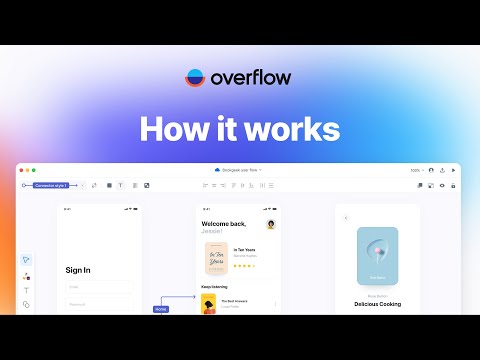

Watch the demo video to explore key features, real workflows, and how the software fits your business needs.
 Windows
  MacOS
MacOS  Linux
Linux  Desktop
  Cloud-Based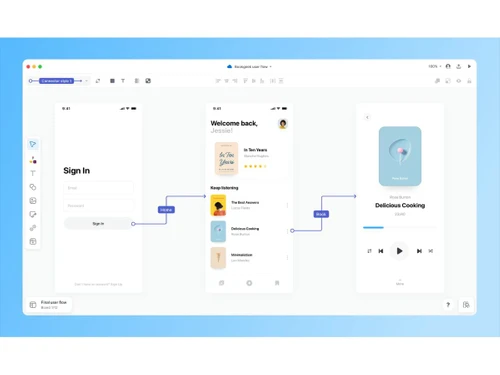
Small Business
Designed for startups and growing businesses
Medium Business
Built for business growth and flexibility
Enterprises
Designed for complex and large-scale business needs
Techjockey Trusted Reviews from Verified Users
No reviews are currently available for Overflow. Discover similar Flowchart Software reviews

SmartDraw
Whats great - Excellent service and aftercare with helping with questions relating to installation. Also a price that is amazing.? read more

Creately
Whats great - Visual collaboration features are ideal for brainstorming plans and processes. Highly suited for teams as in-built video conf... read more

ConceptDraw MINDMAP
Whats great - Project planning and management software with built-in themes. Allows you to customize themes accordingly. read more

Overflow
Price On Request
Desktop
Mobile
Web based
On Premises
Windows
Mac OS
Diagrams.Net
Price On Request
Desktop
Mobile
Web based
On Premises
Windows
Mac OS

thinkComposer
Price On Request
Desktop
Mobile
Web based
On Premises
Windows
Mac OS

Lucidchart
Price On Request
Desktop
Mobile
Web based
On Premises
Windows
Mac OS
SmartDraw
Price On Request
Desktop
Mobile
Web based
On Premises
Windows
Mac OS

Zen Flowchart
Price On Request
Desktop
Mobile
Web based
On Premises
Windows
Mac OS

Terrastruct
Price On Request
Desktop
Mobile
Web based
On Premises
Windows
Mac OS
Creately
Price On Request
Desktop
Mobile
Web based
On Premises
Windows
Mac OS

Microsoft Visio
₹ 498
Desktop
Mobile
Web based
On Premises
Windows
Mac OS

Gliffy
Price On Request
Desktop
Mobile
Web based
On Premises
Windows
Mac OS

Visme
Price On Request
Desktop
Mobile
Web based
On Premises
Windows
Mac OS
(0) Product(s) selected
Available
Price on Request
Starting Price:
$20 /User/Month

Available
Price on Request

Starting Price:
$6 /Month

Starting Price:
$18 /3Month

Starting Price:
$129 /Device

Starting Price:
$10 /Quantity

Starting Price:
$7 /Month
Starting Price:
$50 /License
Overflow is a user flow diagramming tool designed for design teams to create interactive user flows, stunning design presentations, and step-by-step walkthroughs. It allows users to bring in designs from other tools to build user journey diagrams and share interactive presentations.
Overflow price starts at USD 20 at techjcokey.com.
Overflow's main features include interactive user flow diagramming, design tool integrations (Figma, Sketch, Adobe XD), multiple presentation modes (Canvas, Prototype, Story), and robust collaboration tools like comments, version history, and shared folders. It also offers cloud storage, sharing capabilities, and desktop applications for macOS and Windows.
Yes, Overflow offers a 14-day free trial that allows full access to the desktop app and cloud sharing features without any limitations. No credit card is required to start the trial, and you can cancel at any time.
Overflow is primarily designed for design teams, including designers and product managers, who need to create, present, and collaborate on user flows and design presentations. It supports individual use and team collaboration with project editors.
Overflow integrates seamlessly with popular design tools such as Figma, Sketch, Adobe XD, and Adobe Photoshop, allowing users to import their designs in seconds. This enables them to use their existing designs as a base for user flows and presentations, with easy re-syncing after design iterations.
Overflow offers three distinct presentation views: Canvas view for birds-eye user flow diagrams, Prototype view for screen-by-screen interaction and rapid prototyping, and Story view for creating interactive, self-guided design walkthroughs. These options allow for diverse ways to engage audiences and present design stories.
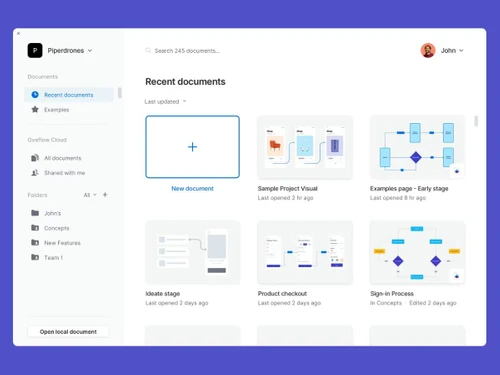
Overflow enhances team collaboration by allowing users to invite teammates as project editors, offering unlimited version history, and enabling feedback through comments. Teams can organize work in shared folders, embed documents into other collaboration tools, and utilize free external reviewers for streamlined communication.
Yes, Overflow is designed to support asynchronous design critique by allowing users to share interactive presentations via a link, enabling stakeholders to explore the work at their own pace. This intuitive navigation facilitates easy following of the user journey and provides feedback without real-time meetings.
20,000+ Software Listed
Best Price Guranteed
Free Expert Consultation
2M+ Happy Customers
Terms and Condtions

Users with registered businesses can purchase goods from merchants on the platform to satisfy their business needs. Users are not permitted to utilize any products acquired through the platform for resale, advertising, business, or further distribution.
For each purchase made, users will receive a Tax Invoice (or 'GST invoice') that includes specific details such as:
the GSTIN of the user associated with their registered business, and
the specified Entity Name for their business.
It should be noted that not all products are eligible for GST Invoice. Only the products displayed by participating sellers with the 'GST-based Invoice Available' callout on the product description page would qualify.
Certain goods and services are not eligible to get a GST Invoice, including items with VAS, i.e., Value Added Services (e.g., Total Mobile Protection/Assured Buyback) and those involving an exchange offer at the time of purchase.
Users must ensure the accuracy of the GSTIN, and business entity name provided for the GST Invoice. Requests for corrections into GST Invoice would not be accommodated by Techjockey.com or any Seller, and any issues arising from user-provided information are the sole responsibility of users.
Techjockey.com is not liable for the GST Invoice or any associated input tax credit. To efficiently claim an input tax credit, users should select the registered place of business address as per the GST authority's data and follow the provisions of the GST Act and rules.
To claim an input tax credit, the delivery and billing addresses must match. Furthermore, input tax credits will not be granted if the delivery address and GSTIN on the invoice are from different states. In case of incorrect GST details provided during the order placement, the order will be canceled automatically.