USA
USA UAE
UAESmall Business
Designed for startups and growing businesses
See More


Brand: Auslogics
Auslogics Anti-Malware software scans, detects, and eliminates malware, viruses, and spyware from computers.
See MoreHave you used Auslogics Anti-Malware before?
Share your insights for better experience
View plans
 Save upto 18%, Get GST Invoice on your business purchase T&C Buy Now & Pay Later, Check offer on payment page.
 Brand: Auslogics
Founded Year: 2008
Auslogics Software Pty Ltd is a leading developer and publisher of computer maintenance and optimization software
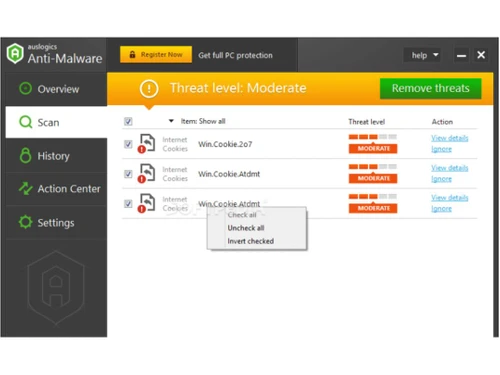
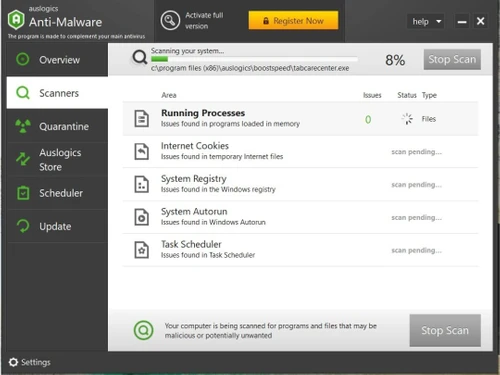
 Quick Scan Deep Scan Custom Scan Quarantine Potential Threats Flexible Scheduling Detects Cookies Analyzes Auto-Start Items Schedule Automatic Scans
  Windows
  Desktop
  Perpetual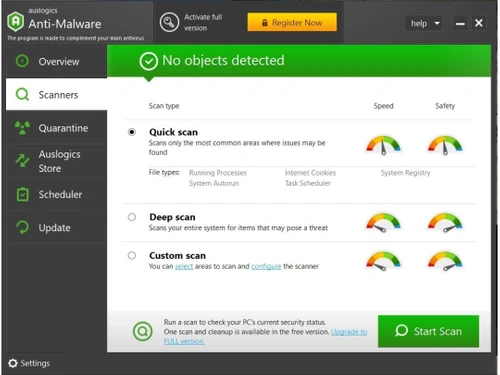
Small Business
Designed for startups and growing businesses
Medium Business
Built for business growth and flexibility
Enterprises
Designed for complex and large-scale business needs
4.1
Out of 5

Overall Rating
Based on
6 Verified Ratings
Rating Breakdown
90% Recommend this Product
Add ReviewTechjockey Trusted Reviews from Verified Users
No reviews are currently available for Auslogics Anti-Malware. Discover similar Anti Malware Software reviews

Virustotal
Whats great - I use VirusTotal, an essential tool for my cybersecurity, as it offers detailed threat analysis using multiple antivirus engi... read more

Malwarebytes
Whats great - I was looking for security software to install on my computer that would scan for malware & malicious software and clean my s... read more

NordVPN
Whats great - Cyber security is very important to me, and a good VPN is essential for that. I also hate ads and I hate having my online act... read more

Auslogics Anti-Malware
₹ 1504.45 excl. GST
Desktop
Mobile
Web based
On Premises
Windows
Mac OS

Adaware Web Companion
Price On Request
Desktop
Mobile
Web based
On Premises
Windows
Mac OS

HitmanPro
Price On Request
Desktop
Mobile
Web based
On Premises
Windows
Mac OS

Watchdog Anti-Malware
Price On Request
Desktop
Mobile
Web based
On Premises
Windows
Mac OS

TotalAV Anti-Malware
Price On Request
Desktop
Mobile
Web based
On Premises
Windows
Mac OS

Emsisoft Anti-Malware Home
₹ 2414
Desktop
Mobile
Web based
On Premises
Windows
Mac OS

ShieldApps Anti Malware
Price On Request
Desktop
Mobile
Web based
On Premises
Windows
Mac OS

Gridinsoft Anti-Malware
Price On Request
Desktop
Mobile
Web based
On Premises
Windows
Mac OS
Malwarebytes
Price On Request
Desktop
Mobile
Web based
On Premises
Windows
Mac OS
Virustotal
Price On Request
Desktop
Mobile
Web based
On Premises
Windows
Mac OS

SUPERAntiSpyware
Price On Request
Desktop
Mobile
Web based
On Premises
Windows
Mac OS
(0) Product(s) selected
Starting Price:
$20 /PC/Year
Yes, it is anti-malware software for the Windows operating systems, including Windows 10, 7, 8, 8.1, and 11.
Yes, the users can schedule scan timings according to their preferences, and these scans can be carried out without manual intervention.
You can use Auslogics Anti-Malware can be used along with other antivirus software without causing any conflicts.
Yes, Auslogics Anti-Malware can detect and remove various types of adware to protect your system.
Auslogics Anti-Malware comes with a user-friendly interface and clear navigation, making it accessible to all levels of users.
No, Auslogics Anti-Malware software is not available on mobile devices.
Yes, you can get a free demo of the Auslogics Anti-Malware platform that will allow you to test all the platform's main features and functionalities.
Auslogics Anti-Malware software pricing starts from INR 747 at techjockey.com.
Auslogics Anti-Malware quick scan carries out critical threats quickly, while deep scans inspect all files and registry of the system and are time-consuming.
Yes, you can create an Ignore List of files that you trust, and these files will be excluded while scanning.
Yes, a user can quarantine any file that the user does not trust.
Auslogics Anti-Malware is a lightweight and resource-friendly software.
Yes, you can get a free trial of Auslogics Anti-Malware solution.
20,000+ Software Listed
Best Price Guranteed
Free Expert Consultation
2M+ Happy Customers
Terms and Condtions

Users with registered businesses can purchase goods from merchants on the platform to satisfy their business needs. Users are not permitted to utilize any products acquired through the platform for resale, advertising, business, or further distribution.
For each purchase made, users will receive a Tax Invoice (or 'GST invoice') that includes specific details such as:
the GSTIN of the user associated with their registered business, and
the specified Entity Name for their business.
It should be noted that not all products are eligible for GST Invoice. Only the products displayed by participating sellers with the 'GST-based Invoice Available' callout on the product description page would qualify.
Certain goods and services are not eligible to get a GST Invoice, including items with VAS, i.e., Value Added Services (e.g., Total Mobile Protection/Assured Buyback) and those involving an exchange offer at the time of purchase.
Users must ensure the accuracy of the GSTIN, and business entity name provided for the GST Invoice. Requests for corrections into GST Invoice would not be accommodated by Techjockey.com or any Seller, and any issues arising from user-provided information are the sole responsibility of users.
Techjockey.com is not liable for the GST Invoice or any associated input tax credit. To efficiently claim an input tax credit, users should select the registered place of business address as per the GST authority's data and follow the provisions of the GST Act and rules.
To claim an input tax credit, the delivery and billing addresses must match. Furthermore, input tax credits will not be granted if the delivery address and GSTIN on the invoice are from different states. In case of incorrect GST details provided during the order placement, the order will be canceled automatically.