linkedin
Gridinsoft Anti-Malware logo
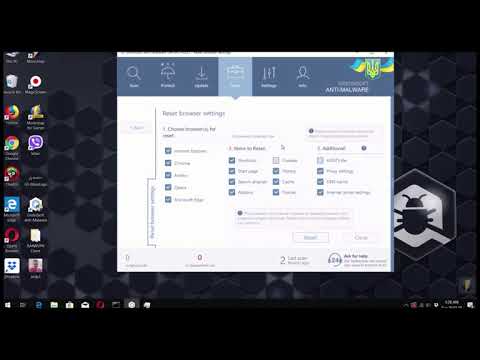
play How to reset browsers with Gridinsoft Anti-Malware?
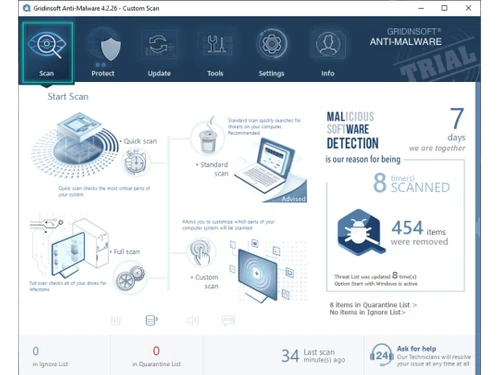
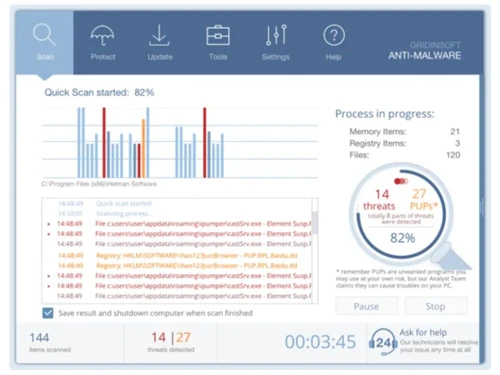
grindinsoft anti-malware dashboard
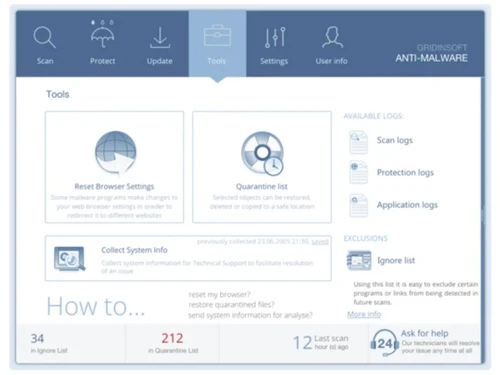
grindinsoft anti-malware graphs

Gridinsoft Anti-Malware

Brand: Gridinsoft

  • 4.5

  • 6 Ratings & 1 Review

Gridinsoft Anti-Malware is an innovative anti-malware application that provides real-time protection from viruses, spyware, malware, and threats.

See More

Have you used Gridinsoft Anti-Malware before?

Share your insights for better experience

Add a Review
Starting Price
$40

View plans

100% Genuine
Products
Best Price
Guaranteed
Safe & Secure
Payment
  • Description

  • Pricing

  • Features

  • Specification

  • Review

  • Compare

  • Alternatives

  • FAQ

Starting at $40

Gridinsoft Anti-Malware Software Overview

What is Gridinsoft Anti-Malware?

Gridinsoft Anti-Malware is an anti-malware software designed to protect systems from viruses, malware, trojans, and cyber threats. It has a friendly interface that provides options for scanning, protection, updates, and other tools for customization and protection. It uses sophisticated algorithms, heuristics, and neural networks that analyze two-stage malware. It performs behavioral analysis and signature detection to classify malware and remove or quarantine it.

It carries out deep scans and uses the Scan24 Engine to provide real-time protection. It keeps updating its database to ensure protection from evolving threats. Users can schedule the scan, get detailed reports of the scan and access logs, and get information on actions taken. It comes with a quarantine manager to quarantine applications, provides support for access control, and provides tools to reset browser settings to protect against online hacking.

Why Choose Gridinsoft Anti-Malware Software?

  • Malware removal: After a deep scan, it identifies and removes various types of malware, viruses, trojans, and spyware from the system, thus protecting it.
  • Real-time protection: Continuously monitors the system for potential and emerging threats to give quick alerts and automatically remove detected threats.
  • Automatic updates: The application regularly updates its malware database so that it is capable of handling new threats and thus giving protection from emerging risks.
  • Schedule scans: It carries out deep scans to identify and remove malware and allows users to schedule scans automatically when needed.
  • Powerful algorithm: The application uses a two-stage malware analysis algorithm that effectively detects threats and malware, thus keeping the system safe.

Benefits of Gridinsoft Anti-Malware Platform

  • User-Friendly interface: This interface has an intuitive design that makes it easy for users without technical expertise to navigate and manage security settings.
  • Deep scan: It thoroughly scans the system using its sophisticated algorithm, identifying and removing even deeply embedded malware threats.
  • Detailed reporting: Generates clear, concise reports on detected threats, actions taken, and system health, keeping the user informed about actions.
  • Advanced behavioral analysis: It can detect unusual activity and identify and mitigate zero-day threats effectively using behavioral analysis.
  • Real-time protection: Continuously protects the system against new and evolving malware threats through real-time protection.
  • Browser safety: It provides tools to reset browser settings and ensure that they are safe from hijacking or other online threats.

Pricing of Gridinsoft Anti-Malware

Gridinsoft Anti-Malware's price in India starts at $40. It offers multiple pricing plans and caters to a diverse customer base.

For subscription-related details and offers on premium packages, please request a call back from our product experts.

Read more

Gridinsoft Company Details

Founded Year:  2003

GridinSoft LLC has been working for every PC user's security since 2003.

Director/Founders Gridinsoft
Company Size 1-100 Employees

Gridinsoft Anti-Malware Pricing & Plans

Standard
Starting at $40
    • Licenses

      Licenses
      Licenses
    • Yearly

      Yearly
      Yearly

Key Features

  • One business PC or two home PCs

Family
Starting at $50
    • Licenses

      Licenses
      Licenses
    • Yearly

      Yearly
      Yearly

Key Features

  • 3 PCs

Extended
Starting at $60
    • Licenses

      Licenses
      Licenses
    • Yearly

      Yearly
      Yearly

Key Features

  • 5 PCs

Gridinsoft Anti-Malware Features

  • icon_check Gridinsoft Scan24 Engine
    Powerful scanning engine that quickly identifies and neutralizes malware threats to protect the system.
  • icon_check Signature-Based Detection
    Uses known malware signatures to detect and remove common threats from the system.
  • icon_check Behavior-Based Detection
    Identifies malicious activity by analyzing behavior patterns for threat detection.
  • icon_check Two-Stage Malware Analysis
    Combines static and dynamic analysis to identify malware and neutralize threats.
  • icon_check Internet Traffic Filtering
    Monitors and filters web traffic to block malicious sites and prevent online threats from infiltrating.
  • icon_check User acess control
    Provides customizable access controls to manage user permissions and application access.
  • icon_check On-Run Protection
    Provides continuous monitoring and protection, instantly responding to threats as they occur.
  • icon_check Reports
    Gives detailed reports on system health, detected threats, and actions taken for transparency.
Gridinsoft Anti-Malware Demo Video play icon

Get Gridinsoft Anti-Malware Demo

Watch the demo video to explore key features, real workflows, and how the software fits your business needs.

Understand
Key Features
Personal
Demo Insights
Interactive
Demo Support

Gridinsoft Anti-Malware Specifications

Supported Platforms
Windows Windows
Devices
Desktop Desktop
Deployment
Perpetual Perpetual
Suitable For
All Industries
Business Specific
All Businesses
Business Size
Small Business Startups Medium Business Enterprises
Customer Support
Email Communities
Language
English
Training Resources
Videos

Explore the Best Alternative Solutions Similar to Your Business Size and Needs

Gridinsoft Anti-Malware Review

4.5

Out of 5

img

Overall Rating

Based on
1 Verified Review

Rating Breakdown

  • Features 4.5
  • Value for Money 4.5
  • Ease of Use 4.3
  • Customer Support 4.5

93% Recommend this Product

Add Review

Gridinsoft Anti-Malware Video Review

youtubeVideoId

4.5

“Gridinsoft Anti-Malware: Review 2024 0026 Virus Detection Test”

Review by: How To Fix Guide

Compare Gridinsoft Anti-Malware With other Anti Malware Software

Products
Ratings
Pricing
Device Supported
Deployment
Supported Platforms
  • img

    Gridinsoft Anti-Malware

  • 4.5

  • Price On Request

  • Desktop

    Mobile

  • Web based

    On Premises

  • Windows

    Mac OS

  • img

    HitmanPro

  • 4.2

  • Price On Request

  • Desktop

    Mobile

  • Web based

    On Premises

  • Windows

    Mac OS

  • img

    Malwarebytes

  • 4.5

  • Price On Request

  • Desktop

    Mobile

  • Web based

    On Premises

  • Windows

    Mac OS

  • img

    Virustotal

  • 4.5

  • Price On Request

  • Desktop

    Mobile

  • Web based

    On Premises

  • Windows

    Mac OS

  • img

    SUPERAntiSpyware

  • 4.2

  • Price On Request

  • Desktop

    Mobile

  • Web based

    On Premises

  • Windows

    Mac OS

(2) Product(s) selected

Gridinsoft Anti-Malware Alternatives

See All Gridinsoft Anti-Malware Alternatives

Articles for Gridinsoft Anti-Malware

See All Related Articles

Can Gridinsoft Anti-Malware protect my system from Trojans?

Yes, Gridinsoft Anti-Malware can protect against Trojans, spyware, viruses, and other malware.

Does Gridinsoft Anti-Malware provide real-time protection?

Gridinsoft Anti-Malware has a powerful engine that provides real-time protection through monitoring and preventing threats.

How does Gridinsoft Anti-Malware work?

It uses signature-based detection, behavior-based detection, and two-stage malware analysis algorithms to detect and remove malware, protecting systems.

Can I try Gridinsoft Anti-Malware before purchasing?

Yes, Gridinsoft Anti-Malware offers six-day free trials for all users.

Do I need to update the malware database manually?

No, Gridinsoft Anti-Malware is capable of automatically updating the malware database. It regularly updates and ensures the database has the latest threats' signatures.

How often should I scan the system through Gridinsoft Anti-Malware?

It is better to carry out regular scans after downloading any new file. The program also allows you to schedule scans, which it will carry out automatically.

Can it control user access using Gridinsoft Anti-Malware?

Yes, Gridinsoft Anti-Malware allows user access control to be customized to enhance security, access, and manage permissions.

Does Gridinsoft Anti-Malware filter internet traffic?

Yes, Gridinsoft Anti-Malware includes internet traffic filtering to block malicious websites and online threats. It also provides built-in tools to reset browser settings.

Can I use Gridinsoft Anti-Malware with other anti-virus software?

Yes, Gridinsoft Anti-Malware can be used with other anti-virus applications.

20,000+ Software Listed

Best Price Guranteed

Free Expert Consultation

2M+ Happy Customers

Terms and Condtions

close

Users with registered businesses can purchase goods from merchants on the platform to satisfy their business needs. Users are not permitted to utilize any products acquired through the platform for resale, advertising, business, or further distribution.

For each purchase made, users will receive a Tax Invoice (or 'GST invoice') that includes specific details such as:

  • the GSTIN of the user associated with their registered business, and

  • the specified Entity Name for their business.

It should be noted that not all products are eligible for GST Invoice. Only the products displayed by participating sellers with the 'GST-based Invoice Available' callout on the product description page would qualify.

Certain goods and services are not eligible to get a GST Invoice, including items with VAS, i.e., Value Added Services (e.g., Total Mobile Protection/Assured Buyback) and those involving an exchange offer at the time of purchase.

Users must ensure the accuracy of the GSTIN, and business entity name provided for the GST Invoice. Requests for corrections into GST Invoice would not be accommodated by Techjockey.com or any Seller, and any issues arising from user-provided information are the sole responsibility of users.

Techjockey.com is not liable for the GST Invoice or any associated input tax credit. To efficiently claim an input tax credit, users should select the registered place of business address as per the GST authority's data and follow the provisions of the GST Act and rules.

To claim an input tax credit, the delivery and billing addresses must match. Furthermore, input tax credits will not be granted if the delivery address and GSTIN on the invoice are from different states. In case of incorrect GST details provided during the order placement, the order will be canceled automatically.