linkedin
Autodesk CFD logo
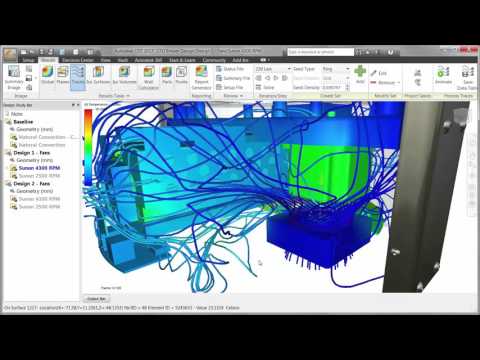
play Particle Tracing
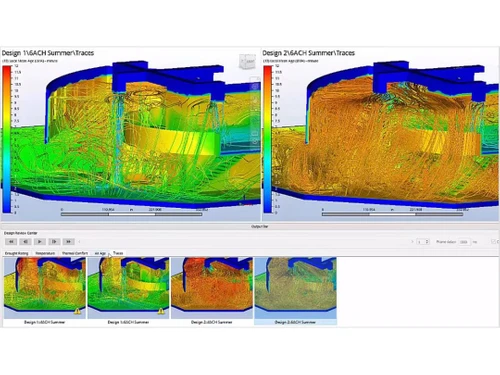
Autodesk CFD Thermal Insights
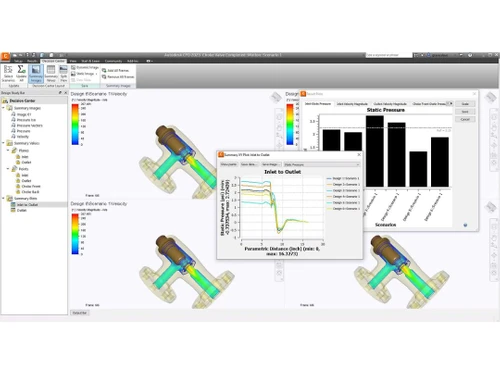
Autodesk CFD Optimize Designs

Autodesk CFD

Brand: Autodesk

  • 4.3

  • 4 Ratings

Autodesk CFD is used for simulating fluid flow, heat transfer, and related phenomena in engineering and design. It aids engineers in analyzing and optimizing product performance by predicting fluid behavior in real-world scenarios.

See More

Have you used Autodesk CFD before?

Share your insights for better experience

Add a Review

Price Available on Request

Questions about pricing or customization? We’re here to help, just a click away.

100% Genuine
Products
Best Price
Guaranteed
Safe & Secure
Payment
  • Description

  • Pricing

  • Features

  • Specification

  • Review

  • Compare

  • Alternatives

  • FAQ

Autodesk CFD Software Overview

What is Autodesk CFD?

Autodesk CFD, or Computational Fluid Dynamics, is software that helps engineers study how fluids move and how heat spreads in their designs. It's useful for improving product performance and efficiency by analyzing complex fluid behaviors.

With Autodesk CFD, engineers can simulate different scenarios to make better design choices without needing to build physical prototypes. It's got lots of tools for modeling and solving fluid flow and heat transfer problems, which is handy for industries like cars, planes, electronics, and energy. Plus, it works well with other Autodesk software, making it easier for engineers to do their job and design better products.

Why Choose Autodesk CFD Software?

  • Simulation Expertise: The software provides a wide range of tools for simulating fluid flow, heat transfer, and related effects, giving engineers detailed insights into complex fluid behaviors and thermal characteristics.
  • Design Optimization: Engineers can virtually test multiple design variations to enhance product performance and efficiency, saving time and resources by reducing the need for physical prototypes and testing.
  • Industry Integration: It seamlessly integrates with other industry-standard software, streamlining the design process and fostering collaboration among different teams working on the same project.
  • Tailored Solutions: With solutions designed for automotive, aerospace, electronics, and energy industries, it offers specialized capabilities to meet the unique simulation needs of various sectors.
  • User-Friendly Support: Featuring an intuitive interface and extensive support resources like tutorials and online communities, it ensures engineers of all levels can efficiently utilize its simulation features for their projects.

Benefits of Autodesk CFD Software

  • Accurate Predictions: It provides accurate predictions of fluid flow behavior, allowing engineers to make informed design decisions and optimize product performance.
  • Time and Cost Savings: By simulating fluid dynamics and heat transfer virtually, It helps reduce the need for costly physical prototypes and testing, saving both time and money in the design process.
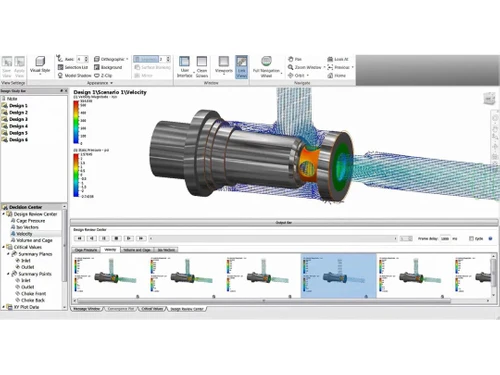
  • Insightful Visualization: With advanced visualization capabilities, It allows engineers to visualize and interpret simulation results effectively, gaining deeper insights into fluid behavior and heat transfer phenomena.
  • Improved Product Performance: Engineers can use Autodesk CFD to identify and address performance issues early in the design phase, resulting in products that are more reliable, efficient, and optimized for their intended applications.
  • Risk Reduction: It enables engineers to identify potential design flaws and performance issues early in the design process, reducing the risk of costly errors and ensuring product reliability.
  • Regulatory Compliance: It helps engineers ensure compliance with industry regulations and standards by providing accurate simulations and documentation for regulatory approval processes.

Pricing Of Autodesk CFD

Autodesk CFD price details are available on request at techjockey.com.

The pricing model is based on different parameters, including extra features, deployment type, and the total number of users. For further queries related to the product, you can contact our product team and learn more about the pricing and offers.

Read more

Autodesk Company Details

Founded Year:  1982

Autodesk makes software for people who make things. If you’ve ever driven a high-performance car, admired a towering skyscraper, used a smartphone, or watched a great film, chances are you’ve experienced what millions of Autodesk customers are doing with our software.

Director/Founders John Walker / Dan Drake
Company Size 1000+ Employees

Autodesk CFD Pricing & Plans

Looking for The Right Pricing?

Share your requirements and get a plan built around your business.

  • Define your business needs
  • Get customised pricing
  • Choose features that fit your workflow

Price Available on Request

Get personalised Autodesk CFD pricing that fits your needs. Our team will connect with you.

Autodesk CFD Features

  • icon_check Dynamic Modeling
    Enables accurate simulation of complex fluid flow and thermal behavior scenarios.
  • icon_check Graphical Modeling
    Facilitates creation and manipulation of 3D models for visualizing fluid flow phenomena.
  • icon_check Design Analysis
    Provides powerful tools to evaluate designs and optimize product performance.
  • icon_check 3D Simulation
    Performs detailed simulations to predict real-world behavior of designs.
  • icon_check 3D Modeling
    Offers comprehensive capabilities for creating intricate geometries and simulating fluid interactions.
  • icon_check Presentation Tools
    Includes tools for effective communication of simulation results.
  • icon_check User friendly Interface
    Enhances productivity with an intuitive interface for easy navigation.
  • icon_check Dashboard
    Provides centralized monitoring and access to key project metrics.
Autodesk CFD Demo Video play icon

Get Autodesk CFD Demo

Watch the demo video to explore key features, real workflows, and how the software fits your business needs.

Understand
Key Features
Personal
Demo Insights
Interactive
Demo Support

Autodesk CFD Specifications

Supported Platforms
Ubuntu Ubuntu Windows Windows MacOS MacOS Linux Linux
Devices
Desktop Desktop
Deployment
Cloud-Based Cloud-Based
Suitable For
All Industries
Business Specific
All Businesses
Business Size
Small Business Medium Business Enterprises
Customer Support
Email Communities
Language
English
Training Resources
Videos

Explore the Best Alternative Solutions Similar to Your Business Size and Needs

Autodesk CFD Review

4.3

Out of 5

img

Overall Rating

Based on
4 Verified Ratings

Rating Breakdown

  • Features 4.3
  • Value for Money 4.2
  • Ease of Use 4.8
  • Customer Support 3.8

92% Recommend this Product

Add Review

Be the First to Review

This product has no reviews yet. Be the first to leave your feedback.

Add Review

Compare Autodesk CFD With other CFD Software

Products
Ratings
Pricing
Device Supported
Deployment
Supported Platforms
  • img

    Autodesk CFD

  • 4.3

  • Price On Request

  • Desktop

    Mobile

  • Web based

    On Premises

  • Windows

    Mac OS

  • img

    Cadence Fidelity

  • 4.6

  • Price On Request

  • Desktop

    Mobile

  • Web based

    On Premises

  • Windows

    Mac OS

  • img

    SimFlow

  • 4.5

  • Price On Request

  • Desktop

    Mobile

  • Web based

    On Premises

  • Windows

    Mac OS

  • img

    Ansys Fluent

  • 4.1

  • Price On Request

  • Desktop

    Mobile

  • Web based

    On Premises

  • Windows

    Mac OS

  • img

    STAR CCM+

  • 4.3

  • Price On Request

  • Desktop

    Mobile

  • Web based

    On Premises

  • Windows

    Mac OS

  • img

    Flacs CFD

  • 4.1

  • Price On Request

  • Desktop

    Mobile

  • Web based

    On Premises

  • Windows

    Mac OS

  • img

    Converge CFD

  • 4.0

  • Price On Request

  • Desktop

    Mobile

  • Web based

    On Premises

  • Windows

    Mac OS

  • img

    Simulia XFlow

  • 4.3

  • Price On Request

  • Desktop

    Mobile

  • Web based

    On Premises

  • Windows

    Mac OS

  • img

    OrbitalStack

  • 4.6

  • Price On Request

  • Desktop

    Mobile

  • Web based

    On Premises

  • Windows

    Mac OS

  • img

    Ansys CFX

  • 4.2

  • Price On Request

  • Desktop

    Mobile

  • Web based

    On Premises

  • Windows

    Mac OS

  • img

    Altair CFD

  • 4.1

  • Price On Request

  • Desktop

    Mobile

  • Web based

    On Premises

  • Windows

    Mac OS

(0) Product(s) selected

Autodesk CFD Alternatives

See All Autodesk CFD Alternatives

Available

Price on Request

Which operating system does Autodesk CFD Software Support?

Autodesk CFD Software is compatible with Ubuntu, Windows, Linux and MacOS.

Is there any Autodesk CFD Software App?

Autodesk CFD Software app is not available for Android and iOS app users.

What is the deployment type of Autodesk CFD Software?

Autodesk CFD software supports web-based deployment.

How much does Autodesk CFD Software Cost?

Autodesk CFD price details are available on request at techjockey.com.

Who are the potential users of Autodesk CFD Software?

Autodesk CFD Software is typically used by all industries for simulating fluid flow, heat transfer, and related phenomena in engineering and design.

Is there any free demo for Autodesk CFD Software?

Free demo of Autodesk CFD is available at techjockey.com.

Is Autodesk CFD Software Free?

Autodesk CFD Software is not available for free. You can connect with our product experts to know more about the pricing plans.

Does this product offer a free trial?

Yes, Autodesk CFD Software offers a free trial.

How can you download Autodesk CFD Software?

Autodesk CFD Software installation is not required, as it is web-based. Just open the Setup Wizard to get started.

How does Autodesk CFD Software Work?

Autodesk CFD software works by allowing engineers to input design parameters and environmental conditions, then simulating fluid flow and heat transfer dynamics using computational methods. It provides detailed visualizations and analysis to help optimize designs for performance and efficiency.

20,000+ Software Listed

Best Price Guranteed

Free Expert Consultation

2M+ Happy Customers

Terms and Condtions

close

Users with registered businesses can purchase goods from merchants on the platform to satisfy their business needs. Users are not permitted to utilize any products acquired through the platform for resale, advertising, business, or further distribution.

For each purchase made, users will receive a Tax Invoice (or 'GST invoice') that includes specific details such as:

  • the GSTIN of the user associated with their registered business, and

  • the specified Entity Name for their business.

It should be noted that not all products are eligible for GST Invoice. Only the products displayed by participating sellers with the 'GST-based Invoice Available' callout on the product description page would qualify.

Certain goods and services are not eligible to get a GST Invoice, including items with VAS, i.e., Value Added Services (e.g., Total Mobile Protection/Assured Buyback) and those involving an exchange offer at the time of purchase.

Users must ensure the accuracy of the GSTIN, and business entity name provided for the GST Invoice. Requests for corrections into GST Invoice would not be accommodated by Techjockey.com or any Seller, and any issues arising from user-provided information are the sole responsibility of users.

Techjockey.com is not liable for the GST Invoice or any associated input tax credit. To efficiently claim an input tax credit, users should select the registered place of business address as per the GST authority's data and follow the provisions of the GST Act and rules.

To claim an input tax credit, the delivery and billing addresses must match. Furthermore, input tax credits will not be granted if the delivery address and GSTIN on the invoice are from different states. In case of incorrect GST details provided during the order placement, the order will be canceled automatically.