USA
USA UAE
UAESmall Business
Designed for startups and growing businesses
See More




Brand: Autodesk
Have you used Autodesk Revit before?
Share your insights for better experience
View plans
 Save upto 18%, Get GST Invoice on your business purchase T&C Buy Now & Pay Later, Check offer on payment page.
 Brand: Autodesk
Founded Year: 1982
Autodesk makes software for people who make things. If you’ve ever driven a high-performance car, admired a towering skyscraper, used a smartphone, or watched a great film, chances are you’ve experienced what millions of Autodesk customers are doing with our software.
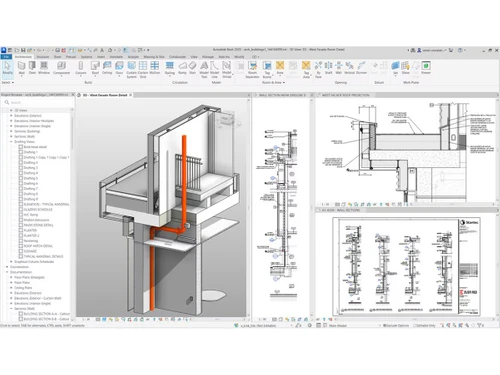
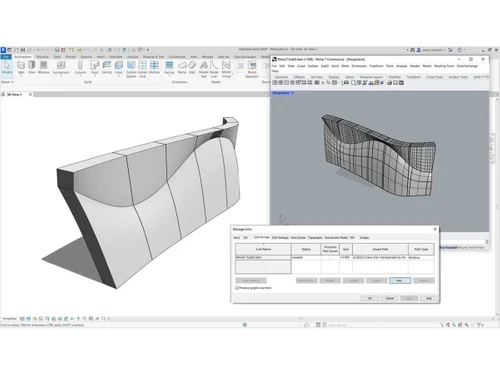
 Parametric Component Design Visibility Settings and Overrides BIM Content Libraries Personalization and Customization 3D Design Mode 3D Visualization High-Quality Documentation Auto-Generated Schedules Photo-realistic rendering in the cloud Help Verify Material Quantities

Watch the demo video to explore key features, real workflows, and how the software fits your business needs.
 Windows
  Desktop
  Perpetual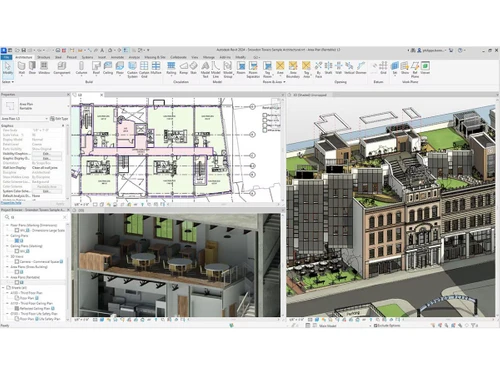
Small Business
Designed for startups and growing businesses
Medium Business
Built for business growth and flexibility
Enterprises
Designed for complex and large-scale business needs
4.3
Out of 5

Overall Rating
Based on
2 Verified Reviews
Rating Breakdown
85% Recommend this Product
Add Review
Aug 1, 2023
Techjockey Verified
“Revit software allows designers to create and document architectural projects with precision and accuracy.”
Pros
Autodesk Revit helps in creating accurate designs and provides document sheets with ease.
Cons
Needs training for beginners to work on as it is only easy, once you are trained.
Reason to switch
This product is great as it helps in visualizing deigns in a better way.
Apr 15, 2019
Techjockey Verified
“Validates the accuracy”
Pros
Autodesk Revit Model Review is an add-in tool for the Revit platform that validates the accuracy and consistency of your project(s), including correction options, which ensures your model is complete and correct.
Cons
NO CONS
Autodesk Revit
₹ 23600.00 excl. GST
Desktop
Mobile
Web based
On Premises
Windows
Mac OS

BIM Collaborate Pro
₹ 5900
Desktop
Mobile
Web based
On Premises
Windows
Mac OS
Navisworks
Price On Request
Desktop
Mobile
Web based
On Premises
Windows
Mac OS

Tekla Structures
₹ 95500
Desktop
Mobile
Web based
On Premises
Windows
Mac OS
Renga
₹ 99000
Desktop
Mobile
Web based
On Premises
Windows
Mac OS
StreamBIM
Price On Request
Desktop
Mobile
Web based
On Premises
Windows
Mac OS

Catenda
Price On Request
Desktop
Mobile
Web based
On Premises
Windows
Mac OS

Dalux
Price On Request
Desktop
Mobile
Web based
On Premises
Windows
Mac OS
EdiLus CONCRETE
Price On Request
Desktop
Mobile
Web based
On Premises
Windows
Mac OS
CSI Etabs
Price On Request
Desktop
Mobile
Web based
On Premises
Windows
Mac OS
Vectorworks Architect
Price On Request
Desktop
Mobile
Web based
On Premises
Windows
Mac OS
(0) Product(s) selected
Available
Price on Request
Available
Price on Request
Starting Price:
$153 /Month

Starting Price:
₹2,036 /Month

Starting Price:
$55

Available
Price on Request

Starting Price:
$139

Starting Price:
$1,060 /Year

Starting Price:
₹5,249 /Month

Starting Price:
€19 /Month

Available
Price on Request
DocPulse pricing is available at INR 23,600 at Techjockey. You can contact our experts for detailed pricing information.
Autodesk Revit is a software that is employed to create buildings and infrastructure, design in-depth 3D models, and properly organize construction records.
The architects, structural engineers, MEP engineers, contractors, and construction professionals use Autodesk Revit to design and align the building.
In Autodesk Revit, smart 3D objects are developed, where each object is data-carrying and automatically updated in drawings and schedules when data is modified.
There is a free trial of Autodesk Revit, and students or teachers are able to access educational versions to learn.
Autodesk Revit does not need AutoCAD, although they can be used together to add value in design and documentation.
Yes, Autodesk Revit is a 3D modeling software with the help of which one can design, visualise and document buildings appropriately.
Yes, it is possible to learn Autodesk Revit by tutorials, training, and practice, and more complex features take time to learn.
Revit is Building Information Modeling (BIM) software that allows architects, engineers, and construction (AEC) professionals to create highly detailed, intelligent 3D models of buildings and infrastructure.
0 0
The Divide command in Revit doesn't exist as a direct equivalent to the Divide command in AutoCAD. Instead, Revit uses a combination of tools like Split and Divide Parts to achieve similar results. Split is used to divide elements like walls or floors, while Divide Parts is used to create and manipulate separate parts within an element's composition.
0 1
To unhide the hidden elements in Revit, follow the steps given below:
1 2
To speed up Revit, you can consider the points given below:
0 0
To see a 3D view in Revit, follow the steps given below:
30 4
20,000+ Software Listed
Best Price Guranteed
Free Expert Consultation
2M+ Happy Customers
Terms and Condtions

Users with registered businesses can purchase goods from merchants on the platform to satisfy their business needs. Users are not permitted to utilize any products acquired through the platform for resale, advertising, business, or further distribution.
For each purchase made, users will receive a Tax Invoice (or 'GST invoice') that includes specific details such as:
the GSTIN of the user associated with their registered business, and
the specified Entity Name for their business.
It should be noted that not all products are eligible for GST Invoice. Only the products displayed by participating sellers with the 'GST-based Invoice Available' callout on the product description page would qualify.
Certain goods and services are not eligible to get a GST Invoice, including items with VAS, i.e., Value Added Services (e.g., Total Mobile Protection/Assured Buyback) and those involving an exchange offer at the time of purchase.
Users must ensure the accuracy of the GSTIN, and business entity name provided for the GST Invoice. Requests for corrections into GST Invoice would not be accommodated by Techjockey.com or any Seller, and any issues arising from user-provided information are the sole responsibility of users.
Techjockey.com is not liable for the GST Invoice or any associated input tax credit. To efficiently claim an input tax credit, users should select the registered place of business address as per the GST authority's data and follow the provisions of the GST Act and rules.
To claim an input tax credit, the delivery and billing addresses must match. Furthermore, input tax credits will not be granted if the delivery address and GSTIN on the invoice are from different states. In case of incorrect GST details provided during the order placement, the order will be canceled automatically.