linkedin
Spacerunner logo
play Explore SpaceRunner Introduction
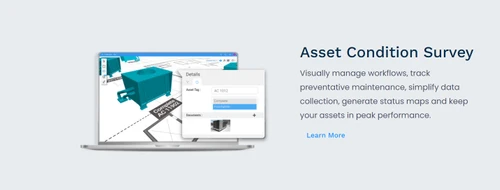
spacerunner asset condition survey
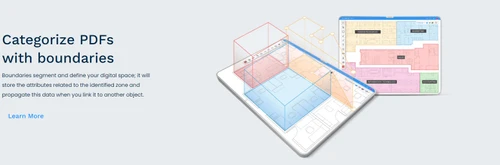
spacerunner categorize pdfs with boundaries

Spacerunner

Brand: Xyicon

  • 4.2

  • 4 Ratings

SpaceRunner is a cloud-based Building Information Modeling (BIM) collaboration and asset management software for facility planning and project visualization.

See More

Have you used Spacerunner before?

Share your insights for better experience

Add a Review
Starting Price
$55

View plans

100% Genuine
Products
Best Price
Guaranteed
Safe & Secure
Payment
  • Description

  • Pricing

  • Features

  • Specification

  • Review

  • Compare

  • Alternatives

  • FAQ

Starting at $55

SpacerunnerSoftware Overview

What is SpaceRunner?

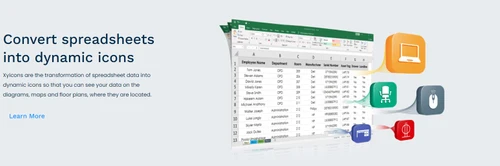
SpaceRunner is a Building Information Modeling (BIM) software designed to revolutionize asset management and project planning. It converts spreadsheet data into interactive 3D models. It gives users a visual and data-driven understanding of their spaces. The platform operates by linking assets, spaces, and associated data in one unified system for smooth tracking and updates.

With this BIM software, there is no need for any software installation. Users can import, edit, and export Revit and asset data, integrate IoT devices, and automate workflows. The interface is intuitive, giving interactive floor plans, 3D visualizations, and dashboards for easy navigation and real-time collaboration.

SpaceRunner provides asset tagging to simplify tracking and maintenance. It helps in space management to optimize spatial layouts. The dynamic dashboards give real-time insights. Users can create custom fields and tags for better data organization, generate reports in Excel, CSV, or PDF formats, and integrate with IoT devices for real-time monitoring. The scheduling feature provides timely maintenance and task organization.

Why choose SpaceRunner BIM Software?

  • BIM Model Collaboration: Enables teams to edit, share, and manage Revit models in the cloud without requiring local software.
  • Asset Management: Tracks, categorizes, and updates facility assets using custom fields, automation, and real-time monitoring for improved efficiency.
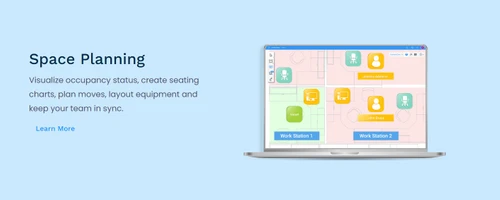
  • Space Planning: Provides interactive floor plans and 3D visualizations to optimize space utilization and project management.
  • IoT Integration: Connects with IoT devices to monitor asset conditions, ensuring predictive maintenance and real-time facility insights.
  • Data Export and Reporting: Generates detailed reports in Excel, CSV, and PDF formats for data analysis, compliance, and project documentation.

Benefits of SpaceRunner BIM Software

  • Better Visualization: Helps in transforming spreadsheet data into 3D models for better understanding and decision-making.
  • Efficient Asset Management: Helps in asset tracking and maintenance scheduling to save time and resources.
  • Real-Time Insights: The customizable dashboards provide up-to-the-minute data for helping in informed decision-making.
  • Optimized Space Utilization: Maximizing spatial efficiency to improve operational effectiveness.
  • Integration: Helps in connecting with other BIM tools to enhance workflows and data sharing.
  • Data Security: Comes with strong security measures and advanced security protocols to safeguard sensitive information.
  • Efficient Reporting: Exportable reports in multiple formats enhance decision-making and compliance tracking.

Pricing of SpaceRunner

SpaceRunner price in India starts at $ 55 at techjockey.com. SpaceRunner comes with multiple pricing plans and caters to the diverse customer base.

For subscription-related details and offers on premium packages, please request a call back from our product experts.

Read more

Xyicon Company Details

Founded Year:  2000

Established in 2000, Xyicon is a global information modeling platform and consulting company.

Director/Founders Jason Chavez
Company Size 101-500 Employees

Spacerunner Pricing & Plans

Basic
Starting at $55
    • Users

      Users
      Users
    • Monthly

      Monthly
      Monthly

Key Features

  • 1,000 Xyicons

  • 10 Spaces

  • System Reports

  • 3D Views

  • Excel Import

Standard
Starting at $95
    • Users

      Users
      Users
    • Monthly

      Monthly
      Monthly

Key Features

  • 5,000 Xyicons

  • 50 Spaces

  • User Defined Reports

  • 5 Calculated Fields (standard functions)

  • Conditional Formatting

Pro
Starting at $125
    • Users

      Users
      Users
    • Monthly

      Monthly
      Monthly

Key Features

  • 25,000 Xyicons

  • 250 Spaces

  • Custom 3D Xyicons

  • Premium Field Types

Spacerunner Features

  • icon_check Revit Integration
    Seamlessly integrates with Revit, enhancing workflows and enabling efficient data sharing across projects.
  • icon_check Custom Views
    Users can create personalized views for improved data visualization and better project analysis.
  • icon_check Measuring Tool
    Offers precision measurement tools to ensure accurate assessments and optimized design modifications.
  • icon_check Catalog
    Allows asset organization into catalogs for streamlined tracking and simplified resource management.
  • icon_check Transform PDFs into 3D Models
    Converts static PDFs into interactive 3D models for more dynamic data representation.
  • icon_check Empower users with conditional Formatting
    Enables users to highlight critical data using customizable conditional formatting rules.
  • icon_check Annotate Illustrations with Mark-Ups
    Provides mark-up tools to add notes or highlight important areas in designs effectively.
  • icon_check Reports
    Generates detailed reports to aid in analyzing project progress, asset performance, and maintenance tasks.
  • icon_check Calculated Fields
    Supports calculated fields for deriving values dynamically based on project-specific formulas.
  • icon_check Attach Files
    Allows users to attach files directly to assets or spaces for centralized data management.
  • icon_check Excel Integration
    Offers seamless Excel integration, simplifying data import/export and enhancing analysis capabilities.
Spacerunner Demo Video play icon

Get Spacerunner Demo

Watch the demo video to explore key features, real workflows, and how the software fits your business needs.

Understand
Key Features
Personal
Demo Insights
Interactive
Demo Support

Spacerunner Specification

Supported Platforms
Ubuntu Ubuntu Windows Windows MacOS MacOS Linux Linux
Devices
Desktop Desktop
Deployment
Web-Based Web-Based
Suitable For
Real Estate Architecture Construction
Business Specific
Real Estate Construction
Business Size
Small Business Startups Enterprises
Customer Support
Email
Language
English
Training Resources
Documentation Videos

Explore the Best Alternative Solutions Similar to Your Business Size and Needs

Spacerunner Review

4.2

Out of 5

img

Overall Rating

Based on
4 Verified Ratings

Rating Breakdown

  • Features 4.2
  • Value for Money 4.3
  • Ease of Use 4.3
  • Customer Support 4.1

95% Recommend this Product

Add Review

Techjockey Trusted Reviews from Verified Users

No reviews are currently available for Spacerunner. Discover similar BIM Software reviews

  • CSI Etabs

    4.4

    Whats great - Etabs is the best software for Structural building design because We can design all building models with earthquake design. read more

  • EdiLus CONCRETE

    4.8

    Whats great - Not only does the site have links to demo videos, but I received a call very quickly and after a short interview I was emaile... read more

  • Autodesk Revit

    4.4

    Whats great - Autodesk Revit helps in creating accurate designs and provides document sheets with ease. read more

Compare Spacerunner With other BIM Software

Products
Ratings
Pricing
Device Supported
Deployment
Supported Platforms
  • img

    Spacerunner

  • 4.2

  • Price On Request

  • Desktop

    Mobile

  • Web based

    On Premises

  • Windows

    Mac OS

  • img

    Tekla Structures

  • 4.5

  • ₹ 95500

  • Desktop

    Mobile

  • Web based

    On Premises

  • Windows

    Mac OS

  • img

    Renga

  • 4.2

  • ₹ 99000

  • Desktop

    Mobile

  • Web based

    On Premises

  • Windows

    Mac OS

  • img

    StreamBIM

  • 4.1

  • Price On Request

  • Desktop

    Mobile

  • Web based

    On Premises

  • Windows

    Mac OS

  • img

    Catenda

  • 4.4

  • Price On Request

  • Desktop

    Mobile

  • Web based

    On Premises

  • Windows

    Mac OS

  • img

    Dalux

  • 4.1

  • Price On Request

  • Desktop

    Mobile

  • Web based

    On Premises

  • Windows

    Mac OS

  • img

    EdiLus CONCRETE

  • 4.7

  • Price On Request

  • Desktop

    Mobile

  • Web based

    On Premises

  • Windows

    Mac OS

  • img

    CSI Etabs

  • 4.3

  • Price On Request

  • Desktop

    Mobile

  • Web based

    On Premises

  • Windows

    Mac OS

  • img

    BIMcloud

  • 4.3

  • Price On Request

  • Desktop

    Mobile

  • Web based

    On Premises

  • Windows

    Mac OS

(0) Product(s) selected

Spacerunner Alternatives

See All Spacerunner Alternatives

Available

Price on Request

Available

Price on Request

Available

Price on Request

Starting Price:

€19 /Month

Available

Price on Request

Articles for Spacerunner

See All Related Articles

How can a user manage assets in SpaceRunner?

Users can manage assets by tagging them with attributes, tracking their locations, and using dynamic dashboards for real-time updates.

Can I import spreadsheet data into SpaceRunner for visualization?

Yes, SpaceRunner enables users to transform spreadsheet data into interactive 3D models smoothly.

Who uses SpaceRunner BIM Software?

SpaceRunner is ideal for architects, facility managers, construction professionals, and project planners.

Is a demo of SpaceRunner available?

Yes, users can request a demo from Xyicon to explore SpaceRunner's capabilities.

How much does SpaceRunner BIM Software Cost?

SpaceRunner price in India starts at $ 55 at techjockey.com.

Can I import and export Revit data in SpaceRunner?

Yes, SpaceRunner allows users to import, export, and sync Revit databases using Excel.

Can I integrate SpaceRunner with other project management tools?

Yes, SpaceRunner integrates with Revit, Excel, and other tools for enhanced data synchronization.

Can a user track historical data changes in SpaceRunner BIM Software?

Yes, SpaceRunner includes a version history feature that tracks and records data modifications for analysis.

Can a user create custom fields and tags in SpaceRunner?

Yes, SpaceRunner allows users to create custom fields and tags to categorize and manage assets efficiently.

How can a user visualize data in SpaceRunner?

Users can visualize data through interactive floor plans, 3D BIM models, and dynamic dashboards.

What export formats does SpaceRunner support?

SpaceRunner BIM software supports exports in Excel, CSV, and PDF formats for easy data sharing and reporting.

20,000+ Software Listed

Best Price Guranteed

Free Expert Consultation

2M+ Happy Customers

Terms and Condtions

close

Users with registered businesses can purchase goods from merchants on the platform to satisfy their business needs. Users are not permitted to utilize any products acquired through the platform for resale, advertising, business, or further distribution.

For each purchase made, users will receive a Tax Invoice (or 'GST invoice') that includes specific details such as:

  • the GSTIN of the user associated with their registered business, and

  • the specified Entity Name for their business.

It should be noted that not all products are eligible for GST Invoice. Only the products displayed by participating sellers with the 'GST-based Invoice Available' callout on the product description page would qualify.

Certain goods and services are not eligible to get a GST Invoice, including items with VAS, i.e., Value Added Services (e.g., Total Mobile Protection/Assured Buyback) and those involving an exchange offer at the time of purchase.

Users must ensure the accuracy of the GSTIN, and business entity name provided for the GST Invoice. Requests for corrections into GST Invoice would not be accommodated by Techjockey.com or any Seller, and any issues arising from user-provided information are the sole responsibility of users.

Techjockey.com is not liable for the GST Invoice or any associated input tax credit. To efficiently claim an input tax credit, users should select the registered place of business address as per the GST authority's data and follow the provisions of the GST Act and rules.

To claim an input tax credit, the delivery and billing addresses must match. Furthermore, input tax credits will not be granted if the delivery address and GSTIN on the invoice are from different states. In case of incorrect GST details provided during the order placement, the order will be canceled automatically.