linkedin
Primus IFC logo
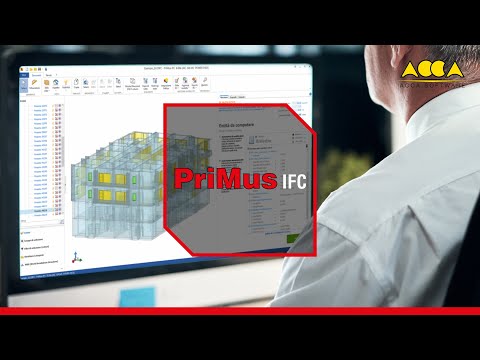
play BIM Quantity Takeoff Software - Primus IFC
Primus IFC-dashboard
Primus IFC-design

Primus IFC

Brand: ACCA

  • 4.4

  • 4 Ratings

  • Powerful BIM software for automatic quantity take off tasks.
  • Connects 3D models with cost estimation and measurements.
  • Updates quantities automatically when BIM model changes occur.
  • User friendly BIM software with built in IFC viewer.
See More

Have you used Primus IFC before?

Share your insights for better experience

Add a Review
Starting Price
€19

View plans

100% Genuine
Products
Best Price
Guaranteed
Safe & Secure
Payment
  • Description

  • Pricing

  • Features

  • Specification

  • Review

  • Compare

  • Alternatives

  • FAQ

Starting at €19

Primus IFC Software Overview

What is Primus IFC?

Primus IFC is a BIM Software that can be used to estimate the cost of construction and give a quantity take off directly out of BIM models. It supports IFC files, and they are standard files generated in many design programs.

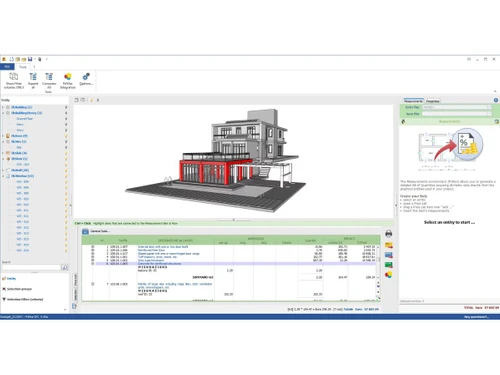
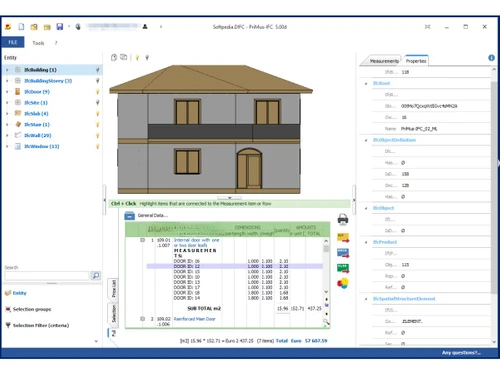
The program automatically scans the 3D building model and recognizes structural elements including walls, doors, slabs, and other parts of the structure. It then does calculations and relates them to the price lists in order to come up with a comprehensive cost estimate. As the BIM model changes, the quantity take off is also automatically changed.

Primus IFC also involves an in-built viewer to browse the 3D model and verify all the associated information. This BIM Software assists the professionals in construction to deal with measurements, cost, and project information under a single coordinated space.

Why Choose Primus IFC?

  • Automatic Quantity Take Off: Calculates quantities automatically based on BIM models saving time and eliminating manual errors in the measurement of quantities in building projects.
  • Dynamic Cost Updates: Calculations of quantities and cost estimates are updated dynamically each time the IFC model is changed or revised.
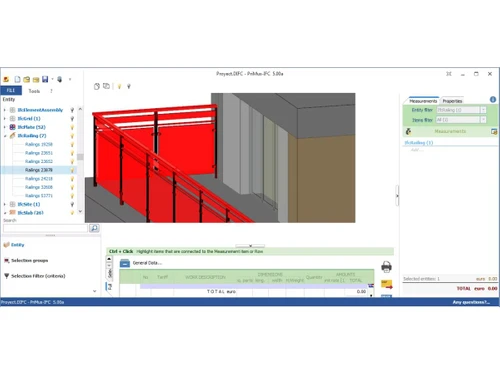
  • Built In IFC Viewer: It has a built-in viewer, which allows to visualize 3D models and validate the presence of project components.
  • Reusable Measurement Templates: This enables measurement rules to be saved in the form of templates to be used by other related projects in future quite easily.
  • Exports in Multiple Formats: Files are shared by taking off exports to Word, Excel, and standard exports.

Primus IFC Pricing

Primus IFC pricing is available at EUR 19 per month at Techjockey. The pricing system is determined by a number of parameters, such as extra functionality, deployment type, and the overall number of users. For more details about the product, you may call our product team to ask about prices and promotions

Read more

ACCA Company Details

Founded Year:  1989

ACCA has established a strong position in developing software solutions for the architectural, engineering and construction industries well known for ease of use, its highly creative and practical approach.

Director/Founders Guido Cianciulli
Company Size 101-500 Employees

Primus IFC Pricing & Plans

Monthly Subscription
Key Features
  • Dynamic Cost Estimation
  • Quantity Takeoff Automation
  • Model-Based Estimating
  • Time-Cost Integration
  • Real-Time Variance Analysis
  • Customizable Libraries
  • Data Interoperability
  • Scenario Comparison
  • Document Synchronization
  • Multi-Disciplinary Collaboration
Starting at €19
    • Quantity

      Quantity
      Quantity
    • Monthly

      Monthly
      Monthly

Key Features

  • Dynamic Cost Estimation

  • Quantity Takeoff Automation

  • Model-Based Estimating

  • Time-Cost Integration

  • Real-Time Variance Analysis

  • Customizable Libraries

  • Data Interoperability

  • Scenario Comparison

  • Document Synchronization

  • Multi-Disciplinary Collaboration

Primus IFC Features

  • icon_check Cost Estimation
    Automatically updates project costs in real time as the BIM model evolves, ensuring accurate budget forecasts.
  • icon_check BIM Quantity Takeoff
    Extracts precise quantities directly from the BIM model to minimize manual effort and reduce calculation errors.
  • icon_check Model-Based Estimating
    Links quantities and costs to model elements, aligning construction estimates directly with BIM project data.
  • icon_check Time-Cost Integration
    Connects 4D scheduling with 5D cost data to optimize timelines and budgets simultaneously in one environment.
  • icon_check Real-Time Variance Analysis
    Monitors cost impacts of design changes instantly, supporting informed decision-making during planning stages.
  • icon_check Customizable Libraries
    Allows creation and use of cost databases, enabling consistency and reusability across multiple projects.
  • icon_check Interoperability
    Supports openBIM standards (IFC) for smooth data exchange between PriMus IFC and other BIM authoring tools.
  • icon_check Scenario Comparison
    Enables comparison of multiple design and cost alternatives to identify the most efficient project solution.
  • icon_check Document Synchronization
    Keeps bills of quantities, estimates, and BIM models aligned, ensuring consistency across all project documents.
  • icon_check Multi-Disciplinary Collaboration
    Facilitates shared access for architects, engineers, and cost managers to work on accurate cost data together.
Primus IFC Demo Video play icon

Get Primus IFC Demo

Watch the demo video to explore key features, real workflows, and how the software fits your business needs.

Understand
Key Features
Personal
Demo Insights
Interactive
Demo Support

Primus IFC Specifications

Supported Platforms
Windows Windows
Devices
Desktop Desktop
Deployment
Cloud-Based Cloud-Based
Suitable For
Real Estate
Business Specific
Real Estate
Business Size
Small Business Startups Medium Business Enterprises
Customer Support
Phone Email Forums
Language
English
Training Resources
Videos

Explore the Best Alternative Solutions Similar to Your Business Size and Needs

Primus IFC Review

4.4

Out of 5

img

Overall Rating

Based on
4 Verified Ratings

Rating Breakdown

  • Features 4.2
  • Value for Money 4.3
  • Ease of Use 4.6
  • Customer Support 4.3

87% Recommend this Product

Add Review

Techjockey Trusted Reviews from Verified Users

No reviews are currently available for Primus IFC. Discover similar BIM Software reviews
  • CSI Etabs

    4.4

    Whats great - Etabs is the best software for Structural building design because We can design all building models with earthquake design. read more

  • EdiLus CONCRETE

    4.8

    Whats great - Not only does the site have links to demo videos, but I received a call very quickly and after a short interview I was emaile... read more

  • Autodesk Revit

    4.4

    Whats great - Autodesk Revit helps in creating accurate designs and provides document sheets with ease. read more

Compare Primus IFC With other BIM Software

Products
Ratings
Pricing
Device Supported
Deployment
Supported Platforms
  • img

    Primus IFC

  • 4.4

  • Price On Request

  • Desktop

    Mobile

  • Web based

    On Premises

  • Windows

    Mac OS

  • img

    EdiLus CONCRETE

  • 4.7

  • Price On Request

  • Desktop

    Mobile

  • Web based

    On Premises

  • Windows

    Mac OS

  • img

    Solarius PV

  • 4.1

  • ₹ 2036

  • Desktop

    Mobile

  • Web based

    On Premises

  • Windows

    Mac OS

  • img

    EdiLus STEEL

  • 4.2

  • ₹ 5226

  • Desktop

    Mobile

  • Web based

    On Premises

  • Windows

    Mac OS

  • img

    Primus TAKEOFF

  • 4.2

  • ₹ 5249

  • Desktop

    Mobile

  • Web based

    On Premises

  • Windows

    Mac OS

  • img

    EdiLus MASONRY

  • 4.2

  • Price On Request

  • Desktop

    Mobile

  • Web based

    On Premises

  • Windows

    Mac OS

  • img

    Tekla Structures

  • 4.5

  • ₹ 95500

  • Desktop

    Mobile

  • Web based

    On Premises

  • Windows

    Mac OS

  • img

    Renga

  • 4.2

  • ₹ 99000

  • Desktop

    Mobile

  • Web based

    On Premises

  • Windows

    Mac OS

  • img

    StreamBIM

  • 4.1

  • Price On Request

  • Desktop

    Mobile

  • Web based

    On Premises

  • Windows

    Mac OS

  • img

    Catenda

  • 4.4

  • Price On Request

  • Desktop

    Mobile

  • Web based

    On Premises

  • Windows

    Mac OS

  • img

    Dalux

  • 4.1

  • Price On Request

  • Desktop

    Mobile

  • Web based

    On Premises

  • Windows

    Mac OS

(0) Product(s) selected

Primus IFC Alternatives

See All Primus IFC Alternatives

Available

Price on Request

Available

Price on Request

Available

Price on Request

Articles for Primus IFC

See All Related Articles

How much does Primus IFC cost?

Primus IFC pricing is available at EUR 19 per month at Techjockey.

What is PriMus software used for?

PriMus software is an estimated construction cost and quantity take-off software based on drawings and BIM models.

Who uses PriMus IFC?

It is used by architects, engineers, quantity surveyors, and construction professionals in estimating and controlling the costs of projects.

Is there a free trial available?

Yes, PriMus IFC has one month of free trial with all features.

How does PriMus IFC work?

It imports IFC models, recognises elements, uses measurement rules and produces automatic quantity take-off reports.

Can PriMus IFC open files from other BIM software?

Yes, it opens IFC-files of most BIM authoring software with ease.

Does PriMus IFC update quantities after design changes?

Yes, it will update quantities and estimates automatically on revising the IFC model.

Can I export the quantity take-off results?

Yes, it supports the export of reports using Word, Excel, and standard compatible formats.

20,000+ Software Listed

Best Price Guranteed

Free Expert Consultation

2M+ Happy Customers

Terms and Condtions

close

Users with registered businesses can purchase goods from merchants on the platform to satisfy their business needs. Users are not permitted to utilize any products acquired through the platform for resale, advertising, business, or further distribution.

For each purchase made, users will receive a Tax Invoice (or 'GST invoice') that includes specific details such as:

  • the GSTIN of the user associated with their registered business, and

  • the specified Entity Name for their business.

It should be noted that not all products are eligible for GST Invoice. Only the products displayed by participating sellers with the 'GST-based Invoice Available' callout on the product description page would qualify.

Certain goods and services are not eligible to get a GST Invoice, including items with VAS, i.e., Value Added Services (e.g., Total Mobile Protection/Assured Buyback) and those involving an exchange offer at the time of purchase.

Users must ensure the accuracy of the GSTIN, and business entity name provided for the GST Invoice. Requests for corrections into GST Invoice would not be accommodated by Techjockey.com or any Seller, and any issues arising from user-provided information are the sole responsibility of users.

Techjockey.com is not liable for the GST Invoice or any associated input tax credit. To efficiently claim an input tax credit, users should select the registered place of business address as per the GST authority's data and follow the provisions of the GST Act and rules.

To claim an input tax credit, the delivery and billing addresses must match. Furthermore, input tax credits will not be granted if the delivery address and GSTIN on the invoice are from different states. In case of incorrect GST details provided during the order placement, the order will be canceled automatically.