linkedin
BIM Collaborate Pro logo
play Introducing BIM Collaborate - Bim Collaborate Autodesk Demo
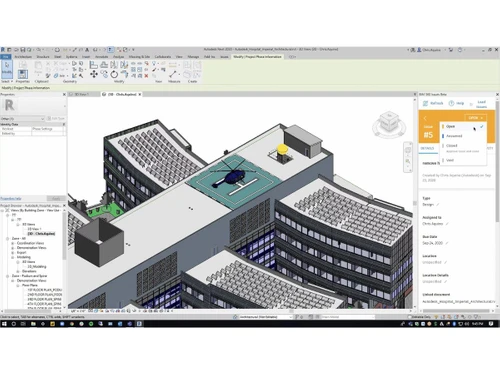
BIM Collaborate Pro-dashboard
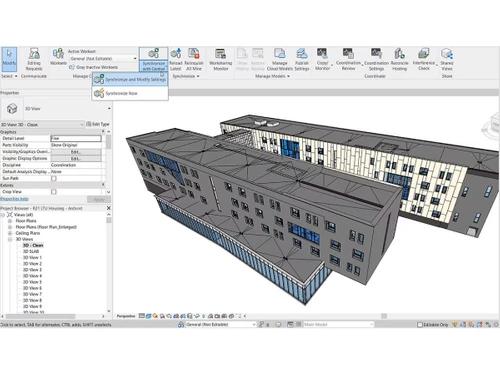
BIM Collaborate Pro-modify

BIM Collaborate Pro

Brand: Autodesk

  • 4.2

  • 3 Ratings

  • It helps teams collaborate on design and construction projects in real time.
  • It centralizes project data and improves coordination across teams.
  • It supports co-authoring in tools like Autodesk Revit, Autodesk Civil 3D, and AutoCAD Plant 3D.
  • Designed for AEC professionals managing complex projects.
See More

Have you used BIM Collaborate Pro before?

Share your insights for better experience

Add a Review
Starting Price
₹5,900 excl.GST
₹ 5,900 incl. GST

View plans

offer Save upto 18%, Get GST Invoice on your business purchase T&C
offer Buy Now & Pay Later, Check offer on payment page.
Buy Now
100% Genuine
Products
Best Price
Guaranteed
Safe & Secure
Payment
  • Description

  • Pricing

  • Features

  • Specification

  • Review

  • Compare

  • Alternatives

  • FAQ

Starting at ₹5,900
Buy Now

BIM Collaborate ProSoftware Overview

What is Autodesk BIM Collaborate Pro?

Autodesk BIM Collaborate Pro is a cloud-based engineering design collaboration and BIM software that was created by Autodesk. It allows architecture, engineering, and construction (AEC) teams to work together on project data within a centralized setting.

To coordinate the work, teams can collaboratively write designs, maintain documents, and oversee the progress of projects. It links data and workflows to remove broken communication and enhance project visibility.

It also facilitates cloud collaboration between various Autodesk tools that assist teams to collaborate effectively on complex infrastructure and building projects, with one source of truth.

What are the Benefits of Choosing Autodesk BIM Collaborate Pro?

  • Centralized Project Data: The platform also offers a single source of truth with all project files, models, and documents stored and managed in it, thus eliminating confusion and duplication of data.
  • Real-Time Collaboration: Concurrently, teams collaborate on files related to designs and make decisions faster and coordinate better between disciplines.
  • Improved Project Visibility: The users are able to track the progress, monitor the changes, and learn about the actions of the project to make sure that it is delivered on time.
  • Cross-Platform Integration: It is also compatible with other applications such as Revit, Civil 3D, and Plant 3D, which means the teams can work in different design environments.
  • Model Coordination and Clash Detection: Sophisticated systems assist in detecting and solving the design conflicts at a preliminary stage prior to construction and eliminate costly mistakes.
  • Cloud-Based Accessibility: It is cloud-based and can be used anywhere, which makes it suitable in the case of distributed teams and remote collaboration.
  • Secure Data Management: The platform can provide a safe sharing of data and access control, which protects the integrity and compliance of the project.
  • Flexible Workflows: Enables numerous workflows, such as design collaboration, document management, and model coordination on a single platform.

Autodesk BIM Collaborate Pro Pricing

Pricing for Autodesk BIM Collaborate Pro typically starts at INR 5,900 at Techjockey. You can get in touch with them for more information related to the software.

Read more

Autodesk Company Details

Founded Year:  1982

Autodesk makes software for people who make things. If you’ve ever driven a high-performance car, admired a towering skyscraper, used a smartphone, or watched a great film, chances are you’ve experienced what millions of Autodesk customers are doing with our software.

Director/Founders John Walker / Dan Drake
Company Size 1000+ Employees

BIM Collaborate Pro Pricing & Plans

Autodesk BIM Collaborate Pro
Key Features
  • Design collaboration
  • Project templates
  • Democratized access to data
  • Advanced change analytics
  • Project activity tracking

Calculated Price

5900 Exclusive of all taxes
    • Licenses

      Licenses
      Licenses
    • Monthly

      Monthly
      Monthly

Key Features

  • Design collaboration

  • Project templates

  • Democratized access to data

  • Advanced change analytics

  • Project activity tracking

BIM Collaborate Pro Features

  • icon_check Design Collaboration
    Share and manage project data with multidiscipline teams using controlled packages and structured workflows.
  • icon_check Model Coordination
    Detect clashes and visualize conflicts in aggregated models to resolve issues before construction begins.
  • icon_check Issue Management
    Create, assign, and resolve issues directly in the model with connected workflows across Revit and Navisworks.
  • icon_check Advanced Change Analytics
    Track design changes across disciplines to understand impacts, reduce rework, and maintain project integrity.
  • icon_check Cloud Worksharing
    Enable real-time co-authoring in Revit, Civil 3D, and Plant 3D with centralized data access in the cloud.
  • icon_check Document Management
    Store, organize, and control access to project files with version history and role-based permissions.
  • icon_check Templates
    Standardize project setup with reusable templates for consistent folder structures, roles, and permissions.
  • icon_check Digital Twin Integration
    Connect project data to Tandem for AEC to create, manage, and update digital twins throughout the asset lifecycle.
  • icon_check Dashboards
    Gain visibility into project health with dashboards that track activity, progress, and potential risks.
  • icon_check Common Data Platform
    Securely store and manage all project data in a centralized cloud environment to ensure a single source of truth for teams.
  • icon_check Design Collaboration
    Share and review design packages across different teams while maintaining control over how data is exchanged and consumed now.
  • icon_check Automated Clash Tech
    Identify and group hard clashes automatically within your 3D models to resolve constructability issues before they hit site.
  • icon_check Model Coordination
    View aggregated multi-disciplinary models in a single space to visualize how different systems interact in the final build.
  • icon_check Project Dashboard
    Monitor project health and coordination progress through visual dashboards that track open issues and clash trends today.
  • icon_check Customized Permissions
    Control project access with granular folder-level permissions for different companies, roles, and individual users now.
BIM Collaborate Pro Demo Video play icon

Get BIM Collaborate Pro Demo

Watch the demo video to explore key features, real workflows, and how the software fits your business needs.

Understand
Key Features
Personal
Demo Insights
Interactive
Demo Support

BIM Collaborate Pro Specification

Supported Platforms
Windows Windows iOS iOS Android Android MacOS MacOS
Devices
Desktop Desktop Mobile Mobile Tablet Tablet iPad iPad
Deployment
Web-Based Web-Based
Suitable For
Real Estate Construction
Business Specific
Real Estate
Business Size
Small Business Startups Medium Business Enterprises SMBs SMEs MSMEs
Customer Support
Phone Email Live Chat Communities Forums
Language
English
Integration
API Integration
Training Resources
In Person Live Online Webinars Documentation Videos
AI Features
AI Integrated
Technology
Next Generation
Compliance Regulation
CCPA

Explore the Best Alternative Solutions Similar to Your Business Size and Needs

BIM Collaborate Pro Review

4.2

Out of 5

img

Overall Rating

Based on
3 Verified Ratings

Rating Breakdown

  • Features 4.6
  • Value for Money 4.1
  • Ease of Use 4.3
  • Customer Support 3.8

93% Recommend this Product

Add Review

Techjockey Trusted Reviews from Verified Users

No reviews are currently available for BIM Collaborate Pro. Discover similar BIM Software reviews
  • CSI Etabs

    4.4

    Whats great - Etabs is the best software for Structural building design because We can design all building models with earthquake design. read more

  • EdiLus CONCRETE

    4.8

    Whats great - Not only does the site have links to demo videos, but I received a call very quickly and after a short interview I was emaile... read more
  • Autodesk Revit

    4.4

    Whats great - Autodesk Revit helps in creating accurate designs and provides document sheets with ease. read more

Compare BIM Collaborate Pro With other BIM Software

Products
Ratings
Pricing
Device Supported
Deployment
Supported Platforms
  • img

    BIM Collaborate Pro

  • 4.2

  • ₹ 5900.00 excl. GST

  • Desktop

    Mobile

  • Web based

    On Premises

  • Windows

    Mac OS

  • img

    Autodesk Revit

  • 4.3

  • ₹ 23600

  • Desktop

    Mobile

  • Web based

    On Premises

  • Windows

    Mac OS

  • img

    Navisworks

  • Price On Request

  • Desktop

    Mobile

  • Web based

    On Premises

  • Windows

    Mac OS

  • img

    Tekla Structures

  • 4.5

  • ₹ 95500

  • Desktop

    Mobile

  • Web based

    On Premises

  • Windows

    Mac OS

  • img

    Renga

  • 4.2

  • ₹ 99000

  • Desktop

    Mobile

  • Web based

    On Premises

  • Windows

    Mac OS

  • img

    StreamBIM

  • 4.1

  • Price On Request

  • Desktop

    Mobile

  • Web based

    On Premises

  • Windows

    Mac OS

  • img

    Catenda

  • 4.4

  • Price On Request

  • Desktop

    Mobile

  • Web based

    On Premises

  • Windows

    Mac OS

  • img

    Dalux

  • 4.1

  • Price On Request

  • Desktop

    Mobile

  • Web based

    On Premises

  • Windows

    Mac OS

  • img

    EdiLus CONCRETE

  • 4.7

  • Price On Request

  • Desktop

    Mobile

  • Web based

    On Premises

  • Windows

    Mac OS

  • img

    CSI Etabs

  • 4.3

  • Price On Request

  • Desktop

    Mobile

  • Web based

    On Premises

  • Windows

    Mac OS

(0) Product(s) selected

BIM Collaborate Pro Alternatives

See All BIM Collaborate Pro Alternatives

Available

Price on Request

Available

Price on Request

Available

Price on Request

Starting Price:

€19 /Month

Available

Price on Request

Articles for BIM Collaborate Pro

See All Related Articles

How much does Autodesk BIM Collaborate Pro cost?

Pricing starts at approximately INR 3,934 per month when billed annually, while monthly plans are available at higher rates.

How does Autodesk BIM Collaborate Pro work?

It works by centralizing project data in the cloud, enabling teams to collaborate, co-author designs, manage documents, and track project progress in real time.

Who uses Autodesk BIM Collaborate Pro?

It is used by architects, engineers, construction professionals, BIM managers, and AEC teams working on complex infrastructure and building projects.

Is Autodesk BIM Collaborate Pro cloud-based?

Yes, it is a fully cloud-based platform that allows users to access and collaborate on projects from anywhere.

Does Autodesk BIM Collaborate Pro support multiple design tools?

Yes, it integrates with Autodesk tools such as Revit, Civil 3D, and Plant 3D for seamless collaboration.

Can it help reduce construction errors?

Yes, features like model coordination and clash detection help identify issues early, reducing errors and rework during construction.

Is it suitable for large projects?

Yes, it is designed to handle complex, multi-disciplinary projects and supports scalable collaboration workflows.

20,000+ Software Listed

Best Price Guranteed

Free Expert Consultation

2M+ Happy Customers

Terms and Condtions

close

Users with registered businesses can purchase goods from merchants on the platform to satisfy their business needs. Users are not permitted to utilize any products acquired through the platform for resale, advertising, business, or further distribution.

For each purchase made, users will receive a Tax Invoice (or 'GST invoice') that includes specific details such as:

  • the GSTIN of the user associated with their registered business, and

  • the specified Entity Name for their business.

It should be noted that not all products are eligible for GST Invoice. Only the products displayed by participating sellers with the 'GST-based Invoice Available' callout on the product description page would qualify.

Certain goods and services are not eligible to get a GST Invoice, including items with VAS, i.e., Value Added Services (e.g., Total Mobile Protection/Assured Buyback) and those involving an exchange offer at the time of purchase.

Users must ensure the accuracy of the GSTIN, and business entity name provided for the GST Invoice. Requests for corrections into GST Invoice would not be accommodated by Techjockey.com or any Seller, and any issues arising from user-provided information are the sole responsibility of users.

Techjockey.com is not liable for the GST Invoice or any associated input tax credit. To efficiently claim an input tax credit, users should select the registered place of business address as per the GST authority's data and follow the provisions of the GST Act and rules.

To claim an input tax credit, the delivery and billing addresses must match. Furthermore, input tax credits will not be granted if the delivery address and GSTIN on the invoice are from different states. In case of incorrect GST details provided during the order placement, the order will be canceled automatically.