linkedin
Dalux logo
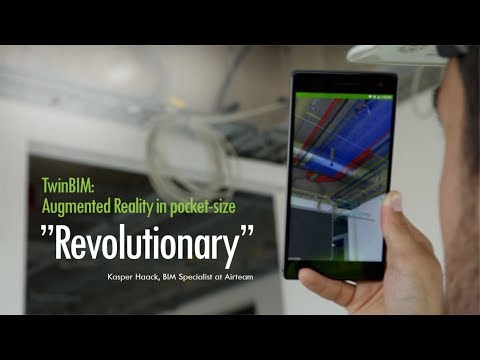
play Dalux TwinBIM - Dalux Demo
Dalux-bim viewer
Dalux-construction

Dalux

Brand: Dalux Copenhagen

  • 4.1

  • 5 Ratings

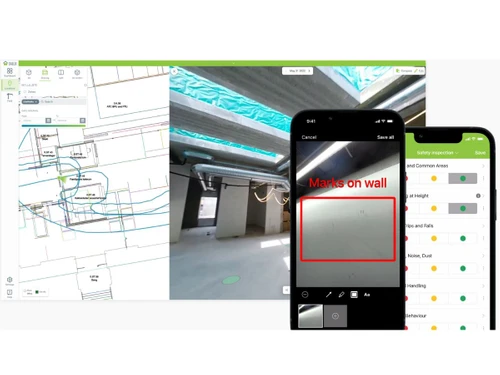
Dalux helps teams view large BIM models, manage tasks, track issues, and collaborate efficiently throughout construction projects.

See More

Have you used Dalux before?

Share your insights for better experience

Add a Review

Price Available on Request

Questions about pricing or customization? We’re here to help, just a click away.

100% Genuine
Products
Best Price
Guaranteed
Safe & Secure
Payment
  • Description

  • Pricing

  • Features

  • Specification

  • Review

  • Compare

  • Alternatives

  • FAQ

Dalux Software Overview

What is Dalux?

Dalux is a comprehensive, all-in-one BIM Software engineered to streamline construction and facility management processes. As a web-based platform, it provides a centralized hub for all project stakeholders, offering end-to-end solutions for businesses of all sizes, from startups and SMBs to large agencies. The software is designed with a simple, user-friendly interface that facilitates seamless collaboration and information sharing.

At its core, Dalux focuses on making complex BIM data accessible and actionable for everyone involved in a project, whether in the office or on the construction site. It excels in service coordination, real-time communication, and transforming 2D drawings into immersive 3D models instantly. By integrating project documents, models, and communication into a single cloud-based environment, Dalux helps reduce errors, improve efficiency, and enhance overall project outcomes.

Why Choose Dalux?

  • Unified Project Data: Dalux provides a Common Data Environment (CDE) that eliminates data silos. All drawings, BIM models, and documents are stored in one secure, shared location, ensuring every team member is working from a single source of truth.
  • Enhanced Field Productivity: By linking tasks, issues, and safety reports directly to locations on 2D drawings and 3D models, Dalux makes on-site management intuitive and efficient. This direct contextual link simplifies communication and accelerates problem resolution.
  • Real-Time Collaboration: The platform's cloud-based nature ensures that all updates, comments, and issue resolutions are synchronized in real-time. This immediate flow of information keeps all stakeholders aligned and reduces delays caused by miscommunication.
  • User-Centric Design: Despite its powerful capabilities, Dalux is built for ease of use. Its intuitive navigation and straightforward workflows mean that users with varying levels of technical expertise can quickly adopt the software and become productive.

Advanced Features of Dalux

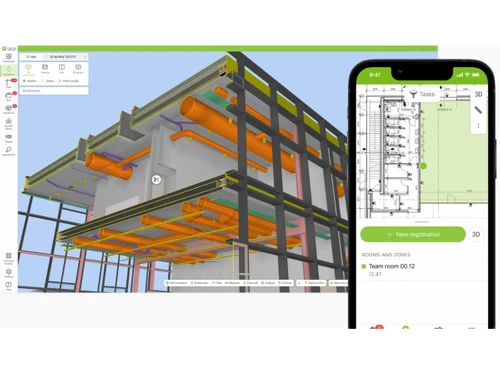
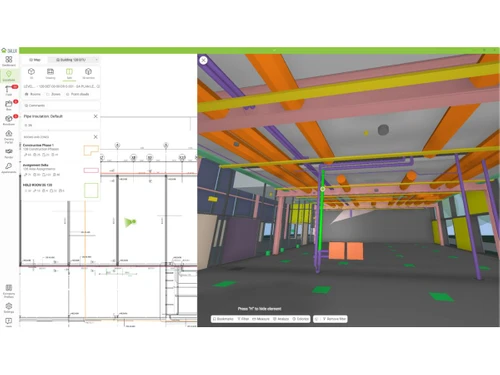
  • BIM Model Viewer: Experience exceptionally fast rendering of large, complex BIM models on any device, including smartphones and tablets. The viewer supports intuitive navigation, allowing users to easily explore and understand project designs on-site.
  • Common Data Environment (CDE): A secure, centralized platform to store, manage, and share all project-related information. It ensures version control and provides controlled access to drawings, models, and documents for all stakeholders.
  • Task Management: Create, delegate, and monitor quality assurance tasks, safety inspections, and snagging lists directly on project drawings and BIM models. This provides clear visual context for every task.
  • Issue Tracking Tools: Capture and document on-site issues with photos, comments, and precise locations linked to the model. Automated notifications ensure that the right people are informed instantly for swift resolution.
  • Health and Safety Management: Digitize and streamline safety protocols. Conduct safety inspections, report hazards, and manage safety documentation within the platform, ensuring compliance and a safer work environment.
  • 2D to 3D Conversion: Instantly overlay 2D drawings onto 3D models, providing a clear and combined view that enhances understanding and helps identify discrepancies between plans and models.

Key Capabilities of Dalux

  • Model & Document Coordination: Centralize all project data in a CDE, view federated models from various disciplines, and ensure all team members have access to the latest revisions of drawings and documents.
  • On-Site Execution & Field Management: Equip field teams with mobile access to BIM models and project data. Enable on-the-spot issue reporting, task management, and completion of digital checklists and forms.
  • Quality & Safety Assurance: Implement standardized workflows for quality control and safety management. Track non-conformities, manage snag lists, and conduct digital safety walks with all data linked to the BIM model.
  • Real-Time Communication & Reporting: Foster transparent communication with in-app commenting and notifications. Generate comprehensive reports on project progress, outstanding issues, and safety performance.

How to Use Dalux?

  1. Project Setup: Begin by creating a new project and uploading all relevant documents, including 2D drawings and 3D BIM models, into the Common Data Environment (CDE).
  2. User & Access Management: Invite all project stakeholdersfrom architects to subcontractorsand assign roles and permissions to control access to sensitive information.
  3. On-Site Data Access: Field teams download the Dalux mobile app to their smartphones or tablets, giving them full access to project models and drawings while on the move.
  4. Task & Issue Management: As work progresses, users can create tasks or report issues (e.g., snags, safety hazards) by dropping a pin on the exact location in the 2D plan or 3D model, adding photos and comments.
  5. Tracking & Collaboration: Assigned personnel receive instant notifications. Progress is tracked within the platform, and all communication is logged, creating a complete audit trail for review and reporting.

Dalux Pricing

Dalux pricing details are available on request on techjockey.com.

The pricing model is based on different parameters, including extra features, deployment type, and the total number of users. For further queries related to the product, you can contact our product team and learn more about the pricing and offers.

Read more

Dalux Copenhagen Company Details

Founded Year:  2005

Dalux is a worked to make the construction industry smarter and more efficient.

Director/Founders Dalux Copenhagen
Company Size 1-100 Employees

Dalux Pricing & Plans

Looking for The Right Pricing?

Share your requirements and get a plan built around your business.

  • Define your business needs
  • Get customised pricing
  • Choose features that fit your workflow

Price Available on Request

Get personalised Dalux pricing that fits your needs. Our team will connect with you.

Dalux Features

  • icon_check BIM Model Viewer
    View large BIM models smoothly on any device with fast rendering and intuitive navigation.
  • icon_check Common Data Environment (CDE)
    Centralize drawings, BIM models, and documents in a secure shared environment for all stakeholders.
  • icon_check Task Management
    Create, assign, and track quality, safety, and snagging tasks directly on drawings and BIM models.
  • icon_check Issue Tracking Tools
    Capture, assign, and resolve issues with photos, comments, and notifications linked to model locations.
  • icon_check Health and Safety Management
    Conduct safety inspections, record observations, and manage compliance with easy mobile workflows.
  • icon_check Document Management
    Upload, review, and version control project documents with approval workflows and access tracking.
  • icon_check Facility Management
    Manage assets, maintenance requests, and helpdesk operations with BIM-linked facility data.
  • icon_check Clash Management
    Import clash results from design tools and resolve them directly in the BIM model viewer.
  • icon_check Digital Handover
    Organize and deliver as-built documentation and project data for smooth construction-to-FM transition.
Dalux Demo Video play icon

Get Dalux Demo

Watch the demo video to explore key features, real workflows, and how the software fits your business needs.

Understand
Key Features
Personal
Demo Insights
Interactive
Demo Support

Dalux Specifications

Supported Platforms
Windows Windows iOS iOS Android Android MacOS MacOS
Devices
Desktop Desktop Mobile Mobile Tablet Tablet iPad iPad
Deployment
Cloud-Based Cloud-Based
Suitable For
Real Estate Architecture Construction
Business Specific
Real Estate Construction
Business Size
Individual Small Business Startups Medium Business Enterprises
Customer Support
Email Communities
Language
English
Training Resources
Videos

Explore the Best Alternative Solutions Similar to Your Business Size and Needs

Dalux Review

4.1

Out of 5

img

Overall Rating

Based on
5 Verified Ratings

Rating Breakdown

  • Features 4.2
  • Value for Money 4.2
  • Ease of Use 3.8
  • Customer Support 4.4

96% Recommend this Product

Add Review

Techjockey Trusted Reviews from Verified Users

No reviews are currently available for Dalux. Discover similar BIM Software reviews

  • CSI Etabs

    4.4

    Whats great - Etabs is the best software for Structural building design because We can design all building models with earthquake design. read more

  • EdiLus CONCRETE

    4.8

    Whats great - Not only does the site have links to demo videos, but I received a call very quickly and after a short interview I was emaile... read more

  • Autodesk Revit

    4.4

    Whats great - Autodesk Revit helps in creating accurate designs and provides document sheets with ease. read more

Compare Dalux With other BIM Software

Products
Ratings
Pricing
Device Supported
Deployment
Supported Platforms
  • img

    Dalux

  • 4.1

  • Price On Request

  • Desktop

    Mobile

  • Web based

    On Premises

  • Windows

    Mac OS

  • img

    Tekla Structures

  • 4.5

  • ₹ 95500

  • Desktop

    Mobile

  • Web based

    On Premises

  • Windows

    Mac OS

  • img

    Renga

  • 4.2

  • ₹ 99000

  • Desktop

    Mobile

  • Web based

    On Premises

  • Windows

    Mac OS

  • img

    StreamBIM

  • 4.1

  • Price On Request

  • Desktop

    Mobile

  • Web based

    On Premises

  • Windows

    Mac OS

  • img

    Catenda

  • 4.4

  • Price On Request

  • Desktop

    Mobile

  • Web based

    On Premises

  • Windows

    Mac OS

  • img

    EdiLus CONCRETE

  • 4.7

  • Price On Request

  • Desktop

    Mobile

  • Web based

    On Premises

  • Windows

    Mac OS

  • img

    CSI Etabs

  • 4.3

  • Price On Request

  • Desktop

    Mobile

  • Web based

    On Premises

  • Windows

    Mac OS

  • img

    BIMcloud

  • 4.3

  • Price On Request

  • Desktop

    Mobile

  • Web based

    On Premises

  • Windows

    Mac OS

  • img

    Solarius PV

  • 4.1

  • ₹ 2036

  • Desktop

    Mobile

  • Web based

    On Premises

  • Windows

    Mac OS

(0) Product(s) selected

Dalux Alternatives

See All Dalux Alternatives

Available

Price on Request

Available

Price on Request

Available

Price on Request

Starting Price:

€19 /Month

Available

Price on Request

Articles for Dalux

See All Related Articles

Which operating system does Dalux support?

Dalux BIM Software is compatible with Windows, IOS and Android operating systems.

Is there any Dalux app?

Dalux BIM Software app is available for and Mobile.

What is deployment type of Dalux?

Dalux BIM Software supports Web-Based.

Who are the potential users of Dalux?

Dalux BIM Software is typically used in Real Estate,Architecture and Construction.

Is there any Dalux demo or free trial?

Dalux demo is available for free at Techjockey. Please request a call back.

Is Dalux free?

Dalux BIM Software offers a free trial. However, the premium plan with advanced features available at Techjockey.

How can you download Dalux?

For Dalux installation, insert the given CD/USB flash storage in your system and open the Setup Wizard to get started. The web-based version can be accessed directly through Dalux portal.

How does Dalux work?

Dalux BIM Software helps with Service coordination,User Friendly,Cloud Based and Real Time Communication. It's a complete solution for User-friendly Navigation,2D to 3D in an instant and Plugins and Widgets.

Are there any hidden charges for Dalux updates?

Dalux regular updates are available free of cost. There are no hidden software update charges.

What is Dalux used for?

Dalux BIM Software used for Service coordination,User Friendly,Cloud Based and Real Time Communication.

How do I contact Dalux support?

You can directly visit Dalux portal and get in touch with Dalux customer support for any software-related query.

How to get Dalux lifetime deal?

Please contact our product experts to get Dalux lifetime deal with exclusive offers.

What is Dalux used for?

Dalux is an all-in-one BIM software used to view large models, centralize project documents in a Common Data Environment (CDE), and manage tasks related to quality, safety, and issue tracking.

How much does Dalux cost?

Dalux pricing details are available on request on techjockey.com.

Is Dalux a CDE?

Yes, Dalux includes a Common Data Environment (CDE) feature designed to centralize all project drawings, BIM models, and documents in a single secure, shared environment for all stakeholders.

Who can use Dalux?

Dalux is ideal for architects, engineers, contractors, construction managers, subcontractors, field workers, project owners, and developers involved in AEC projects.

How does Dalux handle large BIM models?

Dalux features a BIM Model Viewer with fast rendering and intuitive navigation, allowing users to view large and complex BIM models smoothly on any device.

Can you manage tasks directly on project models in Dalux?

Yes, the platform's task management tools allow users to create, assign, and track quality, safety, and snagging tasks directly on the locations of 2D drawings and BIM models.

How does issue tracking work in Dalux?

Dalux enables users to capture, assign, and resolve project issues by attaching photos, comments, and notifications directly to specific locations within the BIM model for clear communication.

Does Dalux support both 2D and 3D views?

Yes, Dalux provides user-friendly navigation that includes the ability to switch from 2D drawings to 3D models in an instant for better project visualization.

20,000+ Software Listed

Best Price Guranteed

Free Expert Consultation

2M+ Happy Customers

Terms and Condtions

close

Users with registered businesses can purchase goods from merchants on the platform to satisfy their business needs. Users are not permitted to utilize any products acquired through the platform for resale, advertising, business, or further distribution.

For each purchase made, users will receive a Tax Invoice (or 'GST invoice') that includes specific details such as:

  • the GSTIN of the user associated with their registered business, and

  • the specified Entity Name for their business.

It should be noted that not all products are eligible for GST Invoice. Only the products displayed by participating sellers with the 'GST-based Invoice Available' callout on the product description page would qualify.

Certain goods and services are not eligible to get a GST Invoice, including items with VAS, i.e., Value Added Services (e.g., Total Mobile Protection/Assured Buyback) and those involving an exchange offer at the time of purchase.

Users must ensure the accuracy of the GSTIN, and business entity name provided for the GST Invoice. Requests for corrections into GST Invoice would not be accommodated by Techjockey.com or any Seller, and any issues arising from user-provided information are the sole responsibility of users.

Techjockey.com is not liable for the GST Invoice or any associated input tax credit. To efficiently claim an input tax credit, users should select the registered place of business address as per the GST authority's data and follow the provisions of the GST Act and rules.

To claim an input tax credit, the delivery and billing addresses must match. Furthermore, input tax credits will not be granted if the delivery address and GSTIN on the invoice are from different states. In case of incorrect GST details provided during the order placement, the order will be canceled automatically.