 USA
USA UAE
UAESmall Business
Designed for startups and growing businesses

See More



Brand: Autodesk
Autodesk Maya is a 3D animation software designed by Autodesk. The software allows its users to create highly professional 3-Dimensional cinematic animations with ease. Maya is beneficial to those who are currently pursuing careers in 3D animation, character modeling, and visual effects. In the current scenario, Maya is widely being used in the film, gaming and car industries to produce realistic...
See MoreHave you used Autodesk Maya before?
Share your insights for better experience
View plans
 Save upto 18%, Get GST Invoice on your business purchase T&C Buy Now & Pay Later, Check offer on payment page.
 Brand: Autodesk
Founded Year: 1982
Autodesk makes software for people who make things. If you’ve ever driven a high-performance car, admired a towering skyscraper, used a smartphone, or watched a great film, chances are you’ve experienced what millions of Autodesk customers are doing with our software.
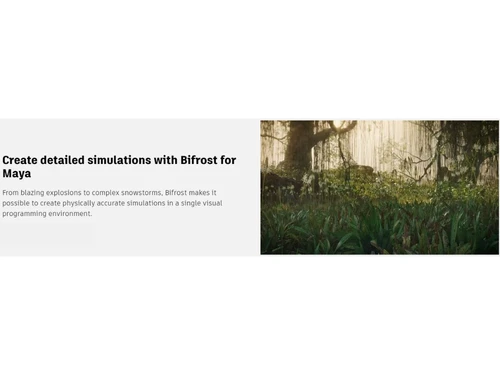
 Time Editing Animation Performance Colour Management Scripting & API Dynamics effect Animation & Motions 3D Rendering & Virtual Tours Create 3D Models Motion Graphics Pipeline Management Bifrost Visual Effects Time Editor Workspace Graph Editor Interface Polygon Modeling Tools Subdivision Surface Pro Rigging Toolset Library Cached Playback System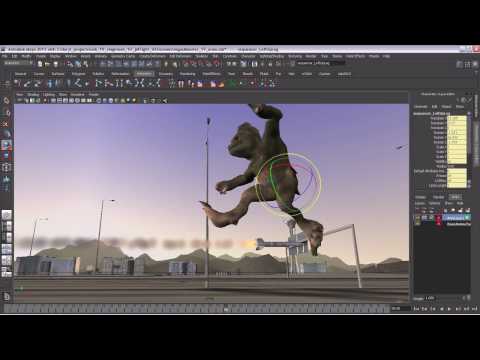

Watch the demo video to explore key features, real workflows, and how the software fits your business needs.
 Ubuntu
  Windows
  MacOS
MacOS  Linux
Linux  Desktop
  Tablet
  Cloud-Based
  Perpetual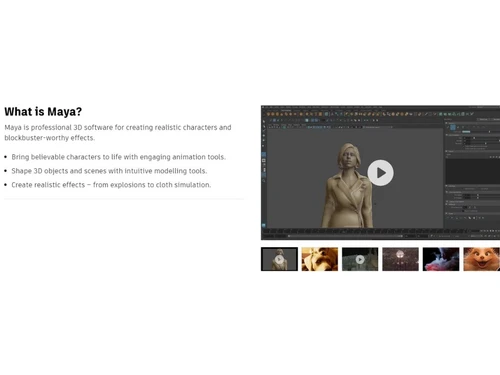

Small Business
Designed for startups and growing businesses
Medium Business
Built for business growth and flexibility
Enterprises
Designed for complex and large-scale business needs
4.7
Out of 5

Overall Rating
Based on
1 Verified Review
Rating Breakdown
80% Recommend this Product
Add Review
Jan 9, 2019
Techjockey Verified
“Best tool to convert ideas into reality”
Pros
Autodesk Maya is the best tool to convert your ideas into reality. You have a lot of possibilies with this software. If you want to model, to animate, to live integration, etc. The interface is easy when you learn the basics concepts. If you learn maya, is much easiest to lear any other 3D software.
Cons
NO CONS
Autodesk Maya
₹ 16520.00 excl. GST
Desktop
Mobile
Web based
On Premises
Windows
Mac OS

VideoScribe
Price On Request
Desktop
Mobile
Web based
On Premises
Windows
Mac OS

Autodraft
₹ 833
Desktop
Mobile
Web based
On Premises
Windows
Mac OS

Jitter
Price On Request
Desktop
Mobile
Web based
On Premises
Windows
Mac OS
LottieFiles
Price On Request
Desktop
Mobile
Web based
On Premises
Windows
Mac OS

Animation Desk
Price On Request
Desktop
Mobile
Web based
On Premises
Windows
Mac OS

Immersity AI
Price On Request
Desktop
Mobile
Web based
On Premises
Windows
Mac OS

Toonly
Price On Request
Desktop
Mobile
Web based
On Premises
Windows
Mac OS

ImagetoCartoon
Price On Request
Desktop
Mobile
Web based
On Premises
Windows
Mac OS

Explaindio
Price On Request
Desktop
Mobile
Web based
On Premises
Windows
Mac OS

Lordicon
Price On Request
Desktop
Mobile
Web based
On Premises
Windows
Mac OS
(2) Product(s) selected
Starting Price:
$240 /User/Year
Starting Price:
$5 /Month
Starting Price:
$6 /Month
Starting Price:
$16

Starting Price:
$15 /Month
Starting Price:
$69 /Quantity $99

Starting Price:
$96 /Year

Starting Price:
$11 /Month

Starting Price:
$10 /Month

Starting Price:
$80 /Year

Starting Price:
$70 /Licenses

The shape authorization tool enables the user to accomplish their shape deformation and reformation task easily. They are able to change the shape of any object into a target shape and correct deformations on a skinned character’s body.
Two types of scripting languages are supported in Autodesk Maya. One is MEL (Maya Embedded Language), which is a proprietary scripting language modelled after the Unix shell script. The second one is Python, which is a widely used modern programming language.
Arnold is integrated with Maya to help the users get a high-quality preview and initiate changes accordingly. It has a simple and artist-friendly UI that saves time for the users and even helps them manage complex characters, scenery and lighting.
With the scene management tool, users can organize objects into groups, sets, layers and partitions. You can annotate and measure the objects by adding notes, labels and measurements to them. The users can also manage complex scenes and optimize the scene size.
Time editor defines the timing operations of animations. The tool combines animation editing workflows from the existing editors and provides the users with an intuitive and clip-based workflow, making way for non-linear animation editing. Moreover, you can easily navigate between key level details and clip level views.
The Pricing of Autodesk Maya Software is available at INR 16520 per month/user at techjockey.com.
Autodesk Maya is one of the most preferred 3D animation and modeling software that has a steep learning curve. It is recommended that if you are an amateur 3D animator do not directly jump to Autodesk Maya; rather, choose a simpler platform like Blender and then proceed with Maya.
0 0
Disney uses Autodesk Maya for creating 2D animation, as it is both adaptive and can be used to create frame-by-frame animation.
0 2
You can increase efficiency with the Evaluation Manager by introducing an advanced tool to split work between available CPU and GPU resources to speed up performance.A scene profile for improving performance shows you how you can analyze animations to find bottlenecks and slowdowns.
0 0
$3 per day is the cost of one token. 100 tokens are worth $300, so 1 token is worth $3.
If you want to maintain a budget of 100 tokens per year, you can only choose 100 days per year.
0 0
Autodesk has launched Maya Creative. It is a cut-down version of Maya that has its modelling and animation capabilities but lacks simulation and the ability to load third-party plugins. Maya Creative aims to create indie 3D outfits that don't have the budget of a big studio.
0 0
20,000+ Software Listed
Best Price Guranteed
Free Expert Consultation
2M+ Happy Customers
Terms and Condtions

Users with registered businesses can purchase goods from merchants on the platform to satisfy their business needs. Users are not permitted to utilize any products acquired through the platform for resale, advertising, business, or further distribution.
For each purchase made, users will receive a Tax Invoice (or 'GST invoice') that includes specific details such as:
the GSTIN of the user associated with their registered business, and
the specified Entity Name for their business.
It should be noted that not all products are eligible for GST Invoice. Only the products displayed by participating sellers with the 'GST-based Invoice Available' callout on the product description page would qualify.
Certain goods and services are not eligible to get a GST Invoice, including items with VAS, i.e., Value Added Services (e.g., Total Mobile Protection/Assured Buyback) and those involving an exchange offer at the time of purchase.
Users must ensure the accuracy of the GSTIN, and business entity name provided for the GST Invoice. Requests for corrections into GST Invoice would not be accommodated by Techjockey.com or any Seller, and any issues arising from user-provided information are the sole responsibility of users.
Techjockey.com is not liable for the GST Invoice or any associated input tax credit. To efficiently claim an input tax credit, users should select the registered place of business address as per the GST authority's data and follow the provisions of the GST Act and rules.
To claim an input tax credit, the delivery and billing addresses must match. Furthermore, input tax credits will not be granted if the delivery address and GSTIN on the invoice are from different states. In case of incorrect GST details provided during the order placement, the order will be canceled automatically.



