linkedin
Avoma logo
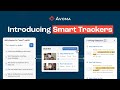
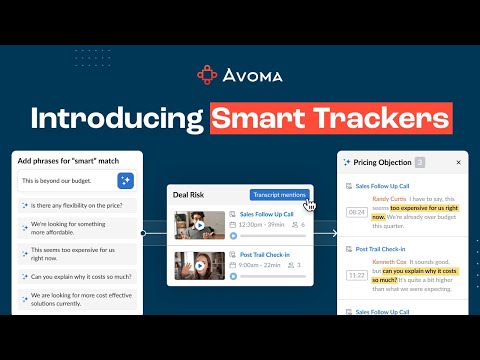
play Introducing Smart Trackers by Avoma
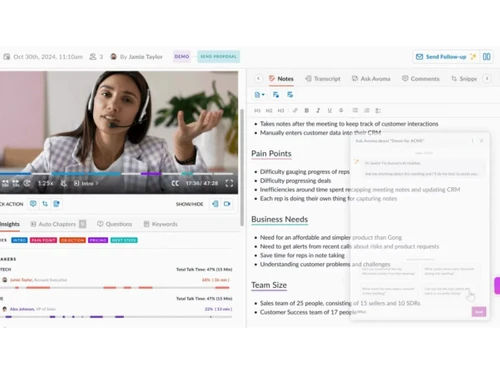
avoma-notes
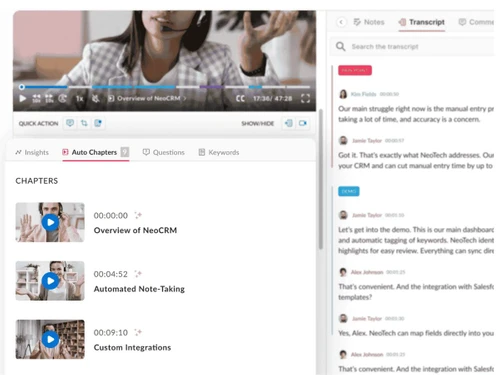
avoma-chapters

Avoma

Brand: Avoma

  • 4.0

  • 3 Ratings

A business software that enhances meetings using generative AI tools, offering features like transcription, note-taking, and scheduling.

See More

Have you used Avoma before?

Share your insights for better experience

Add a Review
Starting Price
$29

View plans

100% Genuine
Products
Best Price
Guaranteed
Safe & Secure
Payment
  • Description

  • Pricing

  • Features

  • Specification

  • Review

  • Compare

  • Alternatives

  • FAQ

Starting at $29

Avoma Software Overview

What is Avoma?

Avoma is an conversational AI platform designed to streamline the entire meeting lifecycle. From scheduling to post-meeting analysis, it automates tasks such as transcription, note generation, and CRM updates. This conversational AI platform is tailored for businesses aiming to improve productivity and collaboration.

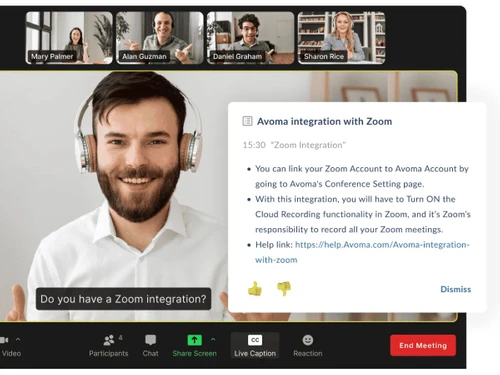
By integrating with tools like Zoom, Microsoft Teams, and various CRMs, Avoma ensures seamless workflows. Its capabilities extend beyond mere transcription, offering insights into conversation dynamics, participant engagement, and actionable takeaways. This makes it an invaluable asset for teams focused on sales, customer success, and internal collaboration.

Why Choose Avoma?

  • Comprehensive Meeting Management: Handles all aspects of meetings, from scheduling to post-meeting analysis, in one platform.
  • Enhanced Collaboration: Promotes team collaboration through shared notes, comments, and insights.
  • Time Efficiency: Reduces manual note-taking and follow-ups, allowing teams to focus on core tasks.
  • Accurate Documentation: Ensures precise records of meetings, minimizing misunderstandings and omissions.
  • Actionable Insights: Provides data-driven insights into conversation patterns, helping teams refine their communication strategies.
  • Seamless Integrations: Works effortlessly with popular tools like Zoom, Microsoft Teams, Salesforce, and HubSpot.
  • Customizable Templates: Allows users to tailor meeting templates to fit specific needs and preferences.
  • Real-Time Alerts: Notifies users of important mentions or topics during meetings, ensuring timely responses.
  • Data Security: Implements robust security measures to protect sensitive information.
  • Scalability: Adapts to businesses of all sizes, from startups to large enterprises.

Benefits of Avoma

  • Improved Productivity: Automates routine tasks, freeing up time for strategic activities.
  • Enhanced Communication: Facilitates clearer communication through accurate transcriptions and summaries.
  • Better Decision-Making: Provides insights that inform strategic decisions and actions.
  • Consistent Documentation: Ensures uniformity in meeting records, aiding in compliance and accountability.
  • Increased Engagement: Encourages active participation by reducing the burden of manual note-taking.
  • Streamlined Workflows: Integrates with existing tools, creating a cohesive work environment.
  • Cost Savings: Reduces the need for additional resources by consolidating multiple functions into one platform.
  • Real-Time Feedback: Offers immediate insights, allowing for quick adjustments and improvements.
  • Enhanced Training: Provides resources for training and development through recorded sessions and analytics.
  • Global Accessibility: Supports multiple languages, catering to diverse teams and clients.

Avoma Pricing

Avoma price starts at $29 at Techjockey.com. The pricing model is based on different parameters, including extra features, deployment type, and the total number of users. For further queries related to the product, you can contact our product team and learn more about the pricing and offers.

Read more

Avoma Company Details

Founded Year:  2017

Avoma is the only AI-first Growth Acceleration Platform designed for customer-facing teams at startups and scaleups.

Director/Founders Aditya Kothadiya, Devendra Laulkar, and Albert Lai
Company Size 101-500 Employees

Avoma Pricing & Plans

Startup
Starting at $29
    • Users (Recorder)

      Users (Recorder)
      Users (Recorder)
    • Monthly

      Monthly
      Monthly

Key Features

  • Up to 20 Paid Seats

  • Unlimited Free View-only Seats

  • Unlimited 1:1 Scheduling

  • Automatic Video Recording

  • Unlimited Real-time Transcription

  • Unlimited AI Summary Notes

Organization
Starting at $39
    • Users (Recorder)

      Users (Recorder)
      Users (Recorder)
    • Monthly

      Monthly
      Monthly

Key Features

  • Up to 75 Paid Seats

  • Everything in Startup, plus:

  • Custom AI Topics & Templates

  • Group and Round-robin Scheduling

  • Limited Conversation Intelligence

  • Smart Playlist & AI Automations

  • Translate Transcription & Notes

Enterprise
Starting at $39
    • Users (Recorder)

      Users (Recorder)
      Users (Recorder)
    • Monthly

      Monthly
      Monthly

Key Features

  • Minimum 20 Paid Seats

  • Everything in Organization, plus:

  • Designated Success Manager

  • Concierge Onboarding & Training

  • Quarterly Business Reviews

  • Unlimited Usage Intelligence

  • Team-Specific Access Controls

Avoma Features

  • icon_check AI Meeting Assistant
    Automatically records and transcribes meetings, providing real-time insights and summaries.
  • icon_check Automatic Transcription
    Converts spoken words into text in over 20 languages, ensuring accessibility and clarity.
  • icon_check AI Generated Notes
    Creates concise summaries, highlighting key points, action items, and decisions made during meetings.
  • icon_check Speaker Identification
    Differentiates between speakers, attributing statements accurately for better context.
  • icon_check Bookmarks
    Allows users to mark important moments during meetings
  • icon_check Keyword Tracking
    Track specific terms or topics across meetings.
  • icon_check Templates
    Offers customizable templates for various meeting types, ensuring consistency and efficiency.
  • icon_check Competitor Intelligence
    Identifies and highlights mentions of competitors during conversations, aiding in market analysis.
  • icon_check Scheduling
    Facilitates meeting scheduling with features like group scheduling and round-robin assignments.
Avoma Demo Video play icon

Get Avoma Demo

Watch the demo video to explore key features, real workflows, and how the software fits your business needs.

Understand
Key Features
Personal
Demo Insights
Interactive
Demo Support

Avoma Specification

Supported Platforms
Ubuntu Ubuntu Windows Windows iOS iOS Android Android MacOS MacOS Linux Linux
Devices
Desktop Desktop Mobile Mobile
Deployment
Web-Based Web-Based
Suitable For
All Industries
Business Specific
All Businesses
Business Size
Small Business Startups Medium Business Enterprises
Customer Support
Email Communities
Language
English
Integration
API Integration
Training Resources
Videos
AI Features
AI Integrated

Explore the Best Alternative Solutions Similar to Your Business Size and Needs

Small Business

Designed for startups and growing businesses
Apollo

4.2

Meeple AI

4.7

Clay

4.3

See More

Avoma Review

4.0

Out of 5

img

Overall Rating

Based on
3 Verified Ratings

Rating Breakdown

  • Features 4.3
  • Value for Money 4.1
  • Ease of Use 3.5
  • Customer Support 4.1

80% Recommend this Product

Add Review

Techjockey Trusted Reviews from Verified Users

No reviews are currently available for Avoma. Discover similar Sales Intelligence Software reviews

  • Salesken

    4.8

    Whats great - This is a great sales tool. It helps you gain insights into your sales interactions and helps you improve your calls. It is e... read more

  • Sellhack

    5.0

    Whats great - I appreciate how precise the email addresses are. Unlike other prospecting tools I've used, SellHack provides me with up-to-d... read more

  • Zintlr

    5.0

    Whats great - Excellent accuracy of prospects, Huge prospect list across geographies, beautiful and user friendly features, top notch suppo... read more

Compare Avoma With other Sales Intelligence Software

Products
Ratings
Pricing
Device Supported
Deployment
Supported Platforms
  • img

    Avoma

  • 4.0

  • Price On Request

  • Desktop

    Mobile

  • Web based

    On Premises

  • Windows

    Mac OS

  • img

    Salesken

  • 4.8

  • Price On Request

  • Desktop

    Mobile

  • Web based

    On Premises

  • Windows

    Mac OS

  • img

    Reverse Contact

  • 4.6

  • Price On Request

  • Desktop

    Mobile

  • Web based

    On Premises

  • Windows

    Mac OS

  • img

    Substrata

  • 4.2

  • Price On Request

  • Desktop

    Mobile

  • Web based

    On Premises

  • Windows

    Mac OS

  • img

    Clay

  • 4.3

  • Price On Request

  • Desktop

    Mobile

  • Web based

    On Premises

  • Windows

    Mac OS

  • img

    Clari Copilot

  • 4.5

  • Price On Request

  • Desktop

    Mobile

  • Web based

    On Premises

  • Windows

    Mac OS

  • img

    Modjo

  • 4.3

  • Price On Request

  • Desktop

    Mobile

  • Web based

    On Premises

  • Windows

    Mac OS

  • img

    Persana AI

  • 4.2

  • Price On Request

  • Desktop

    Mobile

  • Web based

    On Premises

  • Windows

    Mac OS

  • img

    Jiminny

  • 4.2

  • Price On Request

  • Desktop

    Mobile

  • Web based

    On Premises

  • Windows

    Mac OS

  • img

    SearchLeads

  • 4.4

  • Price On Request

  • Desktop

    Mobile

  • Web based

    On Premises

  • Windows

    Mac OS

  • img

    Salesbot

  • 4.2

  • Price On Request

  • Desktop

    Mobile

  • Web based

    On Premises

  • Windows

    Mac OS

(0) Product(s) selected

Avoma Alternatives

See All Avoma Alternatives

Starting Price:

$50 /User/Month

Available

Price on Request

Starting Price:

$85 /Month

Available

Price on Request

Starting Price:

$49 /Month

Available

Price on Request
Starting Price:

$2,700 /Month
Starting Price:

$588 /Year

How much does Avoma cost?

Avoma's pricing starts at $29 per user per month. For detailed pricing based on features and team size, please visit Techjockey.com.

How does Avoma work?

Avoma integrates with your meeting platforms to automatically record, transcribe, and analyze conversations, providing actionable insights and summaries.

Who uses Avoma?

Avoma is utilized by businesses of all sizes, including sales teams, customer success departments, and internal collaboration groups seeking to enhance meeting productivity.

Can Avoma integrate with my existing tools?

Yes, Avoma seamlessly integrates with platforms like Zoom, Microsoft Teams, Salesforce, HubSpot, and more.

Is there a free trial available?

Avoma offers a free trial, allowing users to explore its features before committing to a subscription.

Does Avoma support multiple languages?

Yes, Avoma provides transcription services in over 20 languages, catering to global teams.

How secure is my data with Avoma?

Avoma employs robust security protocols to ensure the confidentiality and integrity of your data.

Can I customize meeting templates in Avoma?

Absolutely, Avoma allows users to create and modify templates to suit various meeting types and preferences.

Does Avoma provide real-time alerts during meetings?

Yes, Avoma can notify users of specific keywords or topics mentioned during meetings, ensuring timely responses.

Is Avoma suitable for large enterprises?

Yes, Avoma scales to accommodate the needs of large organizations, offering features that support extensive teams and complex workflows.

20,000+ Software Listed

Best Price Guranteed

Free Expert Consultation

2M+ Happy Customers

Terms and Condtions

close

Users with registered businesses can purchase goods from merchants on the platform to satisfy their business needs. Users are not permitted to utilize any products acquired through the platform for resale, advertising, business, or further distribution.

For each purchase made, users will receive a Tax Invoice (or 'GST invoice') that includes specific details such as:

  • the GSTIN of the user associated with their registered business, and

  • the specified Entity Name for their business.

It should be noted that not all products are eligible for GST Invoice. Only the products displayed by participating sellers with the 'GST-based Invoice Available' callout on the product description page would qualify.

Certain goods and services are not eligible to get a GST Invoice, including items with VAS, i.e., Value Added Services (e.g., Total Mobile Protection/Assured Buyback) and those involving an exchange offer at the time of purchase.

Users must ensure the accuracy of the GSTIN, and business entity name provided for the GST Invoice. Requests for corrections into GST Invoice would not be accommodated by Techjockey.com or any Seller, and any issues arising from user-provided information are the sole responsibility of users.

Techjockey.com is not liable for the GST Invoice or any associated input tax credit. To efficiently claim an input tax credit, users should select the registered place of business address as per the GST authority's data and follow the provisions of the GST Act and rules.

To claim an input tax credit, the delivery and billing addresses must match. Furthermore, input tax credits will not be granted if the delivery address and GSTIN on the invoice are from different states. In case of incorrect GST details provided during the order placement, the order will be canceled automatically.