linkedin
Azuga logo
play Azuga Fleet Tracking Overview
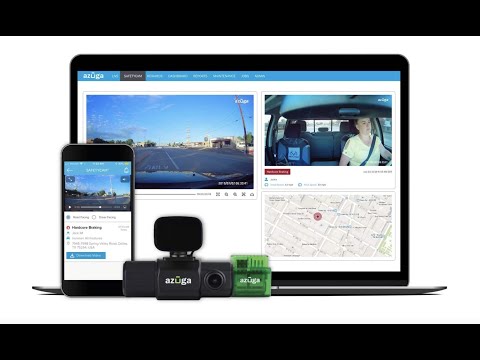
Azuga Dashboard
Azuga

Azuga

Brand: Azuga

  • 4.3

  • 4 Ratings & 1 Review

Azuga is fleet management software providing GPS tracking, driver safety tools, and analytics to optimize vehicle operations.

See More

Have you used Azuga before?

Share your insights for better experience

Add a Review

Price Available on Request

Questions about pricing or customization? We’re here to help, just a click away.

100% Genuine
Products
Best Price
Guaranteed
Safe & Secure
Payment
  • Description

  • Pricing

  • Features

  • Specification

  • Review

  • Compare

  • Alternatives

  • FAQ

Azuga Software Overview

What is Azuga?

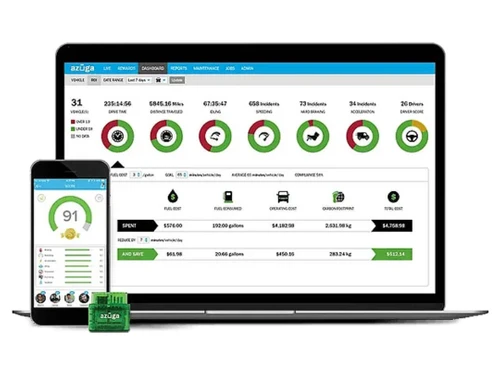
Azuga is fleet management software that uses GPS technology to provide end-to-end fleet tracking and management services. It helps companies track vehicles and improve driver safety. It uses GPS devices and cloud technology to monitor fleet location, driving behaviour, and vehicle health, giving real-time updates for better coordination and control.

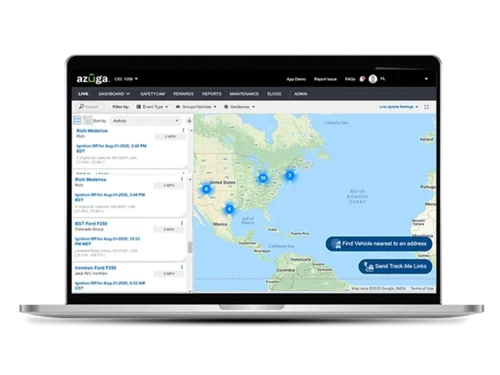
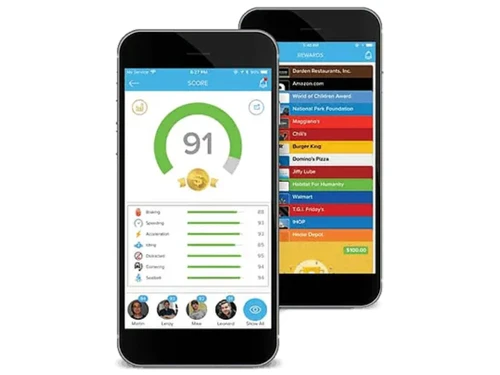
Azuga provides real-time monitoring of vehicle locations, displaying details on a map for easy location tracking. It uses AI-powered dashcams to record road and driver activity to improve safety, supporting video telematics. It generates driver scorecards that track and reward safe driving habits through gamification.

This Fleet Management Software provides automatic reminders for servicing to reduce breakdowns and costs, fuel monitoring for fuel usage and to cut waste, and route optimization to deliver on time and to reduce expenses. The software keeps eLogs for compliance, provides scheduling tools for better planning of delivery and services and a mobile app for usage flexibility.

Why Choose Azuga?

  • Fleet management: Helps companies monitor vehicles, schedule maintenance, and reduce downtime, ensuring smoother operations and improved overall efficiency.
  • Driver behaviour: Tracks speeding, harsh braking, and unsafe actions, encouraging safer habits through performance insights and reward-based gamification programs.
  • Route optimization: It provides suggestions for faster, cost-effective paths using real-time data, reducing travel time, fuel expenses, and improving delivery.
  • Live tracking: Provides managers with real-time vehicle locations, enhancing accountability, improving dispatch decisions, and ensuring timely service for clients.
  • Fuel management: Monitors consumption patterns, identifies waste, and supports strategies to lower costs while promoting eco-friendly fleet operations.

Benefits of Azuga Fleet Management Software

  • Better fleet management: Provides organized vehicle oversight, reducing downtime and improving operational efficiency across all fleets.
  • Real-time decision-making: This Fleet Management Software enables instant insights from live tracking, helping managers respond quickly to changing conditions effectively.
  • Cost reduction: Cuts expenses through optimized routes, improved driver behavior, and proactive maintenance scheduling for vehicles.
  • Waste reduction: Monitors fuel usage and driving patterns, minimizing unnecessary consumption and promoting eco-friendly operational practices.
  • Customer satisfaction: Azuga Fleet Management Software ensures timely deliveries and reliable service, building trust and enhancing overall client experience consistently.

Pricing of Azuga

Azuga details are available on request at techjockey.com.

Azuga may vary based on factors like customization, additional features required, number of users, and the deployment type. Please request a callback for subscription-related details and to avail offers on premium packages at techjockey.com.

Read more

Azuga Pricing & Plans

Looking for The Right Pricing?

Share your requirements and get a plan built around your business.

  • Define your business needs
  • Get customised pricing
  • Choose features that fit your workflow

Price Available on Request

Get personalised Azuga pricing that fits your needs. Our team will connect with you.

Azuga Features

  • icon_check Breadcrumb
    Visual breadcrumb trails track every vehicle’s path throughout the day, enabling playback and route reconstruction with
  • icon_check Geofence Duration
    Set geofence zones and monitor how long vehicles remain inside—automated alerts sent when crosses or lingers beyond set
  • icon_check Diagnostics
    Access real‑time OBD‑II data—engine faults, fuel levels, seatbelt usage, tire pressure—for proactive maintenance and
  • icon_check GPS Tracking
    Real‑time GPS tracking on live map shows vehicle locations, routes, statuses and sends updates to streamline dispatch and
  • icon_check Alerts
    Custom alerts notify on speeding, idling, low battery, hard braking, geofence, trip tags, and diagnostic codes via web, app, or
  • icon_check Driver History
    Maintain rich driver history—trip logs, safety scores, driving behaviors, and events—for coaching, compliance, and
  • icon_check Time Card
    Drivers log hours and trips via FleetMobile; system auto‑captures hours-of-service and provides summaries for payroll and
Azuga Demo Video play icon

Get Azuga Demo

Watch the demo video to explore key features, real workflows, and how the software fits your business needs.

Understand
Key Features
Personal
Demo Insights
Interactive
Demo Support

Azuga Specifications

Supported Platforms
Windows Windows
Devices
Desktop Desktop
Deployment
Cloud-Based Cloud-Based
Suitable For
Transportation
Business Specific
Transportation
Business Size
Small Business Startups Medium Business
Customer Support
Phone
Language
English
Training Resources
Documentation

Explore the Best Alternative Solutions Similar to Your Business Size and Needs

Azuga Review

4.3

Out of 5

img

Overall Rating

Based on
1 Verified Review

Rating Breakdown

  • Features 4.3
  • Value for Money 4
  • Ease of Use 4.5
  • Customer Support 4.5

82% Recommend this Product

Add Review

Azuga Video Review

youtubeVideoId

4.3

“Azuga Fleet Customer Success Story: Enviropest”

Review by: Kevin Lemasters

Compare Azuga With other Fleet Management Software

Products
Ratings
Pricing
Device Supported
Deployment
Supported Platforms
  • img

    Azuga

  • 4.3

  • Price On Request

  • Desktop

    Mobile

  • Web based

    On Premises

  • Windows

    Mac OS

  • img

    Truckers Abode

  • 4.5

  • Price On Request

  • Desktop

    Mobile

  • Web based

    On Premises

  • Windows

    Mac OS

  • img

    FleetAble FMS

  • 4.9

  • Price On Request

  • Desktop

    Mobile

  • Web based

    On Premises

  • Windows

    Mac OS

  • img

    Verizon Connect

  • 4.4

  • Price On Request

  • Desktop

    Mobile

  • Web based

    On Premises

  • Windows

    Mac OS

  • img

    Fleetx

  • 4.2

  • Price On Request

  • Desktop

    Mobile

  • Web based

    On Premises

  • Windows

    Mac OS

  • img

    Motive

  • 4.3

  • Price On Request

  • Desktop

    Mobile

  • Web based

    On Premises

  • Windows

    Mac OS

  • img

    Trakzee

  • 4.2

  • Price On Request

  • Desktop

    Mobile

  • Web based

    On Premises

  • Windows

    Mac OS

  • img

    Fleetio

  • 4.3

  • Price On Request

  • Desktop

    Mobile

  • Web based

    On Premises

  • Windows

    Mac OS

  • img

    Quartix

  • 4.4

  • Price On Request

  • Desktop

    Mobile

  • Web based

    On Premises

  • Windows

    Mac OS

  • img

    Samsara

  • 4.6

  • Price On Request

  • Desktop

    Mobile

  • Web based

    On Premises

  • Windows

    Mac OS

(0) Product(s) selected

Azuga Alternatives

See All Azuga Alternatives

Available

Price on Request

Starting Price:

$5

Starting Price:

$16 /Month

Available

Price on Request
Available

Price on Request

Available

Price on Request
Starting Price:

AED1,999 /License
Starting Price:

$6 /Month

How much does Azuga cost?

Azuga pricing details can be availed upon placing a request at techjockey.com.

Who uses Azuga Fleet Management Software?

Azuga is used by businesses, government agencies, and service providers for fleet tracking, driver safety, and operational efficiency.

How does Azuga Fleet Management Software work?

Azuga uses GPS devices and cloud software, monitoring vehicle location, driver behavior, and fleet performance in real time.

Which operating systems are compatible with Azuga Software?

Azuga runs smoothly on OS like Windows, macOS, Linux, iOS, and Android.

Is a free demo available for the Azuga software?

Yes, a free demo is available for the Azuga Fleet Management Software.

Does Azuga provide driver behavior monitoring?

Yes, Azuga tracks speeding, harsh braking, and unsafe actions, helping managers encourage safer driving habits through scorecards and rewards.

Can Azuga optimize routes for fleets?

Yes, Azuga offers route optimization tools that suggest faster, cost-effective paths to reduce travel time and expenses.

Does Azuga include fuel management features?

Yes, Azuga Fleet Management Software monitors fuel consumption patterns, identifies waste, and supports strategies to lower costs and improve fuel consumption.

20,000+ Software Listed

Best Price Guranteed

Free Expert Consultation

2M+ Happy Customers

Terms and Condtions

close

Users with registered businesses can purchase goods from merchants on the platform to satisfy their business needs. Users are not permitted to utilize any products acquired through the platform for resale, advertising, business, or further distribution.

For each purchase made, users will receive a Tax Invoice (or 'GST invoice') that includes specific details such as:

  • the GSTIN of the user associated with their registered business, and

  • the specified Entity Name for their business.

It should be noted that not all products are eligible for GST Invoice. Only the products displayed by participating sellers with the 'GST-based Invoice Available' callout on the product description page would qualify.

Certain goods and services are not eligible to get a GST Invoice, including items with VAS, i.e., Value Added Services (e.g., Total Mobile Protection/Assured Buyback) and those involving an exchange offer at the time of purchase.

Users must ensure the accuracy of the GSTIN, and business entity name provided for the GST Invoice. Requests for corrections into GST Invoice would not be accommodated by Techjockey.com or any Seller, and any issues arising from user-provided information are the sole responsibility of users.

Techjockey.com is not liable for the GST Invoice or any associated input tax credit. To efficiently claim an input tax credit, users should select the registered place of business address as per the GST authority's data and follow the provisions of the GST Act and rules.

To claim an input tax credit, the delivery and billing addresses must match. Furthermore, input tax credits will not be granted if the delivery address and GSTIN on the invoice are from different states. In case of incorrect GST details provided during the order placement, the order will be canceled automatically.