linkedin
Azure Virtual Network logo
play Azure Virtual Network Tutorial | Azure Virtual Network Explained | Azure Training | Simplilearn
Azure Virtual Network Dashboard
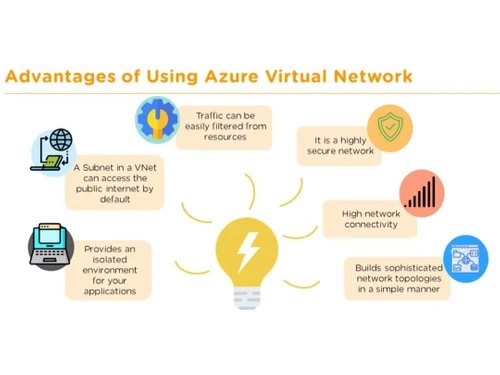
Azure Virtual Network Advantages

Azure Virtual Network

Brand: Microsoft Corporation

  • 4.0

  • 6 Ratings

Azure Virtual Network is a cloud networking service that enables organizations to create isolated virtual networks and connect cloud resources with on-premises environments.

See More

Have you used Azure Virtual Network before?

Share your insights for better experience

Add a Review

Price Available on Request

Questions about pricing or customization? We’re here to help, just a click away.

100% Genuine
Products
Best Price
Guaranteed
Safe & Secure
Payment
  • Description

  • Pricing

  • Features

  • Specification

  • Review

  • Compare

  • Alternatives

  • FAQ

Azure Virtual Network Software Overview

What is Azure Virtual Network?

Azure Virtual Network (Vnet) is the fundamental building block for your private network within the Microsoft Azure cloud. It provides a logically isolated section of the Azure cloud where you can launch Azure resources in a secure and controlled environment. Vnet enables you to provision and manage your own private network infrastructure, much like you would operate a traditional network in your own datacenter, but with the added benefits of Azure's infrastructure, including scalability, availability, and isolation.

With Azure Virtual Network, you can define your own IP address space, create subnets, and configure route tables and network security groups to control traffic flow. It serves as a secure boundary for your virtual machines (VMs), applications, and other cloud services, ensuring they can communicate with each other, the internet, and your on-premises networks according to your specific policies.

Why Choose Azure Virtual Network?

  • Enhanced Security and Isolation: Vnet allows you to run your applications and VMs in a highly secure and isolated environment. By using private IP addresses and defining granular access policies through Network Security Groups, you can protect your resources from unauthorized access and ensure that traffic flows only where you permit it.
  • Global Reach and Reliability: By default, traffic between Azure resources stays within Microsoft's global network rather than using the public internet. This can provide lower latency and higher reliability for communication between virtual machines, virtual networks, databases, and other Azure resources.
  • Sophisticated Network Topologies: Azure Vnet empowers you to build advanced network architectures. You can deploy virtual appliances like firewalls, WAN optimizers, and load balancers within your network and define custom traffic flows, giving you a high degree of control over your network topology.
  • Seamless Hybrid Connectivity: Extend your on-premises datacenter to the cloud with ease. Vnet supports secure connections to your local networks using IPsec VPN (Site-to-Site) or a private, dedicated connection with Azure ExpressRoute, creating a unified hybrid infrastructure that you control.
  • Full Control Over Your Network: You have complete authority over your network configuration. This includes the ability to bring your own IP addresses and DNS servers, allowing for a smooth integration with your existing network schemes and management tools.

Advanced Features of Azure Virtual Network

  • Virtual Network Peering: This feature allows you to seamlessly connect two or more Azure Virtual Networks. Once peered, the virtual networks appear as one for connectivity purposes, enabling resources in different Vnets to communicate with each other with low latency and high bandwidth over the Microsoft backbone network.
  • Azure NAT Gateway: Simplify outbound-only internet connectivity for your virtual networks. A NAT Gateway allows multiple private resources within a Vnet to access the internet through shared public IP addresses, without exposing them to inbound connections. It automatically scales the IP addresses needed for outbound connectivity.
  • Azure Route Server: This service simplifies dynamic routing between your network virtual appliances (NVAs) and your virtual network. It enables NVAs to exchange routing information with the Azure network fabric using Border Gateway Protocol (BGP), eliminating the need for manual route table configuration and maintenance.
  • Virtual Network Encryption: Enhance the default security controls by adding an extra layer of encryption for your data in transit. This feature encrypts traffic between VMs within the same Vnet and between peered Vnets, further protecting your sensitive data.
  • Granular Traffic Control: Define and enforce precise traffic rules between subnets, VMs, and the internet using Network Security Groups (NSGs) and Application Security Groups (ASGs). This gives you fine-grained control over your network security posture.

Modules of Azure Virtual Network

  • Azure Virtual Network: The core service for provisioning private, isolated networks in the cloud to host your VMs and applications.
  • Virtual Network Peering: A low-latency resource used to securely connect virtual networks within the same or different Azure regions.
  • Azure NAT Gateway: Simplify outbound-only internet connectivity for your virtual networks. A NAT Gateway allows multiple private resources within a Vnet to access the internet through shared public IP addresses, without exposing them to inbound connections. It automatically scales the IP addresses needed for outbound connectivity.
  • Azure Virtual Network Manager: A central management service that allows you to create, manage, and enforce policies across virtual networks at scale, spanning multiple subscriptions and regions.
  • Azure Route Server: A service that facilitates dynamic route exchange between network virtual appliances (NVAs) and the Azure virtual network, simplifying operations management.
  • Azure Virtual Network CNI: A specialized plug-in that enables containers and Kubernetes Pods to natively use virtual network capabilities, allowing them to connect directly to Vnet resources.

How to Use Azure Virtual Network?

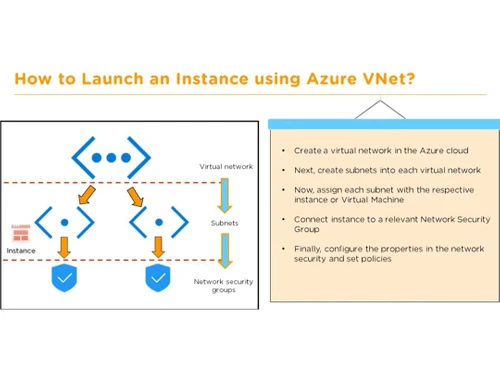
  1. Plan and Design: Begin by planning your network's IP address space, ensuring it doesn't overlap with your on-premises networks. Decide on the required subnets to segment your network for different tiers of your application (e.g., web, application, data).
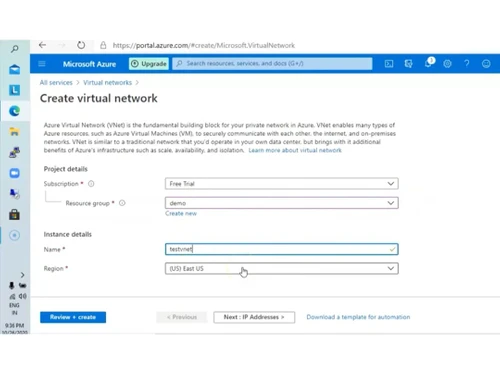
  2. Create the Virtual Network: In the Azure portal or using infrastructure-as-code tools, create a new Virtual Network resource, specifying its name, region, and the IP address space you planned.
  3. Define Subnets: Within your Vnet, create one or more subnets. Each subnet must have an address range that is a subset of the Vnet's main address space.
  4. Deploy Resources: Launch your Azure resources, such as Virtual Machines, App Services, or Databases, into the appropriate subnets within your Vnet.
  5. Configure Security: Create and associate Network Security Groups (NSGs) with your subnets or individual network interfaces to control inbound and outbound traffic using specific security rules.
  6. Establish Connectivity: If required, configure Vnet Peering to connect to other Vnets or set up a VPN Gateway or ExpressRoute circuit to establish a hybrid connection with your on-premises datacenter.

Azure Virtual Network Pricing

Azure Virtual Network pricing details are available on request on techjockey.com.

The pricing model is based on different parameters, including extra features, deployment type, and the total number of users. For further queries related to the product, you can contact our product team and learn more about the pricing and offers.

Read more

Microsoft Corporation Company Details

Founded Year:  1975

Microsoft Corporation is an American multinational technology company with headquarters in Redmond, Washington.

Director/Founders Paul Allen , Bill Gates
Company Size 1000+ Employees

Azure Virtual Network Pricing & Plans

Looking for The Right Pricing?

Share your requirements and get a plan built around your business.

  • Define your business needs
  • Get customised pricing
  • Choose features that fit your workflow

Price Available on Request

Get personalised Azure Virtual Network pricing that fits your needs. Our team will connect with you.

Azure Virtual Network Features

  • icon_check Enhance security & isolation
  • icon_check Rely on reach of Azure
  • icon_check Sophisticated network topologies
  • icon_check Extend datacenter to cloud
  • icon_check Flexibility for building apps
  • icon_check Manage virtual networks at scale
  • icon_check Azure services integration
  • icon_check Site-to-site VPN
  • icon_check Virtual network peering
  • icon_check Border gateway protocol (BGP) routes
Azure Virtual Network Demo Video play icon

Get Azure Virtual Network Demo

Watch the demo video to explore key features, real workflows, and how the software fits your business needs.

Understand
Key Features
Personal
Demo Insights
Interactive
Demo Support

Azure Virtual Network Specifications

Supported Platforms
Ubuntu Ubuntu Windows Windows MacOS MacOS Linux Linux
Devices
Desktop Desktop Mobile Mobile Tablet Tablet iPad iPad
Deployment
Cloud-Based Cloud-Based Perpetual Perpetual
Suitable For
All Industries
Business Specific
All Businesses
Business Size
Small Business Startups Medium Business Enterprises
Customer Support
Phone Email Live Chat Communities
Language
Nederlands English français Italiano 日本人 한국어 普通话 русский Español
Integration
API Integration
Training Resources
Documentation Videos

Explore the Best Alternative Solutions Similar to Your Business Size and Needs

Azure Virtual Network Review

4.0

Out of 5

img

Overall Rating

Based on
6 Verified Ratings

Rating Breakdown

  • Features 3.8
  • Value for Money 4.1
  • Ease of Use 4.2
  • Customer Support 4.0

95% Recommend this Product

Add Review

Be the First to Review

This product has no reviews yet. Be the first to leave your feedback.

Add Review

Compare Azure Virtual Network With other Virtual Private Cloud (VPC)

Products
Ratings
Pricing
Device Supported
Deployment
Supported Platforms
  • img

    Azure Virtual Network

  • 4.0

  • Price On Request

  • Desktop

    Mobile

  • Web based

    On Premises

  • Windows

    Mac OS

  • img

    DigitalOcean

  • 4.4

  • Price On Request

  • Desktop

    Mobile

  • Web based

    On Premises

  • Windows

    Mac OS

  • img

    Scaleway VPC

  • 4.4

  • Price On Request

  • Desktop

    Mobile

  • Web based

    On Premises

  • Windows

    Mac OS

  • img

    Alibaba VPC

  • 4.4

  • Price On Request

  • Desktop

    Mobile

  • Web based

    On Premises

  • Windows

    Mac OS

  • img

    Google VPC

  • 4.4

  • Price On Request

  • Desktop

    Mobile

  • Web based

    On Premises

  • Windows

    Mac OS

  • img

    Huawei VPC

  • 4.1

  • Price On Request

  • Desktop

    Mobile

  • Web based

    On Premises

  • Windows

    Mac OS

  • img

    Tencent VPC

  • 4.1

  • Price On Request

  • Desktop

    Mobile

  • Web based

    On Premises

  • Windows

    Mac OS

  • img

    Aruba VPC

  • 4.2

  • Price On Request

  • Desktop

    Mobile

  • Web based

    On Premises

  • Windows

    Mac OS

  • img

    AWS VPC

  • 4.1

  • Price On Request

  • Desktop

    Mobile

  • Web based

    On Premises

  • Windows

    Mac OS

(0) Product(s) selected

Azure Virtual Network Alternatives

See All Azure Virtual Network Alternatives

Available

Price on Request

What is Azure Virtual Network used for?

Azure Virtual Network is used to create your own private, isolated, and secure network infrastructure in the cloud, enabling you to run virtual machines and applications, and optionally connect to on-premises datacenters for hybrid environments. It allows you to build and manage a secure network infrastructure with granular control over traffic.

How do I connect to Azure Virtual Network?

You can connect to Azure Virtual Network by securing connections with an IPsec VPN or Azure ExpressRoute, which also allows for connecting to on-premises datacenters to create a hybrid infrastructure. You can also bring your own IP addresses and DNS servers.

What is vnet peering in Azure?

vnet peering in Azure is a low-latency resource that securely connects virtual networks, allowing them to seamlessly send traffic over the Microsoft network without needing the public internet, gateways, or encryption. It helps enforce privacy for global resources on virtual networks and can include on-premises networks using Azure high-speed networking.

What is the difference between vnet and subnet in Azure?

An Azure Virtual Network (vnet) is a private network infrastructure in the cloud that provides an isolated environment for VMs and applications, while subnets are logical divisions within a vnet that allow for granular control over traffic and access policies between different segments of your network. The vnet is the overarching private network, and subnets are segments within it.

Is Azure vnet a VPN?

Azure Virtual Network itself is not a VPN; rather, it is a private network infrastructure in the cloud that supports secure connections using technologies like IPsec VPN or Azure ExpressRoute. These VPN connections are used to extend your vnet to on-premises datacenters or other networks.

Who can use Azure Virtual Network?

Azure Virtual Network can be used by anyone needing to build and manage a secure, isolated, and private network infrastructure in the cloud to run virtual machines and applications, especially those looking to support business-critical workloads or create hybrid environments.

What is Azure NAT Gateway?

Azure NAT Gateway is a resource designed to simplify outbound internet connectivity for virtual networks by routing VM traffic to the internet while keeping the VMs and compute resources private. It automatically scales IP addresses for outbound connectivity and minimizes impact on network bandwidth.

How does Azure Virtual Network Manager help with network management?

Azure Virtual Network Manager helps by providing a centralized service to create and manage virtual networks across different regions and subscriptions from a single pane of glass. It allows users to segment virtual networks, define management scopes, build hub-and-spoke or mesh networks, and enforce security requirements.

Can Azure Virtual Network enhance security for my applications?

Yes, Azure Virtual Network significantly enhances security for applications by providing an isolated and highly secure environment where VMs and applications run using private IP addresses. It allows you to define subnets and policies to control access, and you can add encryption to default security controls to protect data in transit.

What is Azure Route Server used for?

Azure Route Server is a service for operations management of network virtual appliances, enabling them to dynamically exchange route information with virtual networks. It eliminates the need for manual configuration of network routes for network virtual appliances, Azure ExpressRoute, and VPN gateways in both existing and new deployments.

How much does Azure Virtual Network cost?

Azure Virtual Network pricing details are available on request on techjockey.com.

20,000+ Software Listed

Best Price Guranteed

Free Expert Consultation

2M+ Happy Customers

Terms and Condtions

close

Users with registered businesses can purchase goods from merchants on the platform to satisfy their business needs. Users are not permitted to utilize any products acquired through the platform for resale, advertising, business, or further distribution.

For each purchase made, users will receive a Tax Invoice (or 'GST invoice') that includes specific details such as:

  • the GSTIN of the user associated with their registered business, and

  • the specified Entity Name for their business.

It should be noted that not all products are eligible for GST Invoice. Only the products displayed by participating sellers with the 'GST-based Invoice Available' callout on the product description page would qualify.

Certain goods and services are not eligible to get a GST Invoice, including items with VAS, i.e., Value Added Services (e.g., Total Mobile Protection/Assured Buyback) and those involving an exchange offer at the time of purchase.

Users must ensure the accuracy of the GSTIN, and business entity name provided for the GST Invoice. Requests for corrections into GST Invoice would not be accommodated by Techjockey.com or any Seller, and any issues arising from user-provided information are the sole responsibility of users.

Techjockey.com is not liable for the GST Invoice or any associated input tax credit. To efficiently claim an input tax credit, users should select the registered place of business address as per the GST authority's data and follow the provisions of the GST Act and rules.

To claim an input tax credit, the delivery and billing addresses must match. Furthermore, input tax credits will not be granted if the delivery address and GSTIN on the invoice are from different states. In case of incorrect GST details provided during the order placement, the order will be canceled automatically.