linkedin
Bhindi AI logo
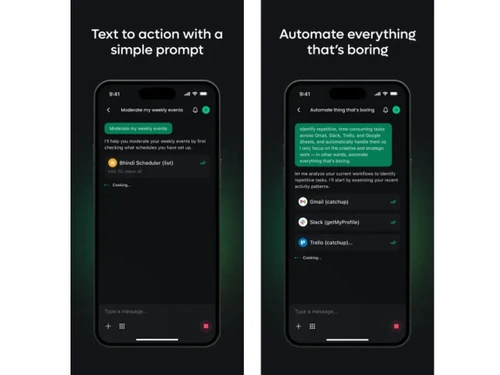
Bhindi AI-dashboard
Bhindi AI-prompt
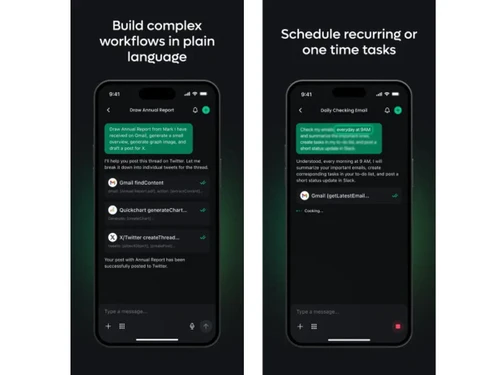
Bhindi AI-workflows

Bhindi AI

Brand: Bhindi

  • No Ratings & Reviews

An agentic AI tool that acts like a smart assistant that never sleeps. It links your tools and completes tasks without constant supervision.

See More

Have you used Bhindi AI before?

Share your insights for better experience

Add a Review

Price Available on Request

Questions about pricing or customization? We’re here to help, just a click away.

100% Genuine
Products
Best Price
Guaranteed
Safe & Secure
Payment
  • Description

  • Pricing

  • Features

  • Specification

  • Review

  • FAQ

Bhindi AI Software Overview

What is Bhindi AI Software?

Bhindi AI is an agentic AI tool that connects actions directly with user intent. It allows users to communicate tasks in plain language without technical complexity. The agentic AI system interprets those instructions and carries them out across connected digital environments. This certainly creates a more direct and efficient way to handle everyday digital work.

The platform is built around the idea of doing instead of just suggesting. It takes away the need to switch between multiple tools for simple operations. Users can rely on it to manage work in a structured and consistent way. It ultimately reshapes how digital tasks are handled in daily workflows.

Why Choose Bhindi AI Software?

  • Smooth Everyday Workflow: A single space keeps tasks organized across multiple connected tools. Less switching simply means work becomes steady and less tiring.
  • Better Time Control: Busy routines get easier to manage with fewer repeated steps. Time can be saved across small daily actions.
  • Central Work Hub: Different apps stay connected within one simple working environment. Everything feels closer and easier to access.
  • Reliable Task Output: Work is handled in a consistent and predictable manner every day. Fewer mistakes appear during routine processes.
  • Quiet Background Action: Tasks continue progressing even when attention shifts elsewhere. Work never pauses unnecessarily during breaks.
  • Simple Team Flow: Shared work becomes easier to follow and manage together. Coordination improves without any added complexity.

Benefits of Bhindi AI Software

  • Quicker Work Turnaround: Tasks are completed in less time without any unnecessary waiting. Daily output improves steadily with time.
  • Reduced Mental Stress: Work becomes less overwhelming during busy schedules. Minds stay calmer while handling tasks.
  • Higher Work Precision: Tasks show fewer mistakes during execution. Results appear more polished and accurate.
  • Smooth Data Movement: Information flows easily between connected systems. Work stays uninterrupted and consistent.
  • Adaptive Task Structure: Different workflows adjust easily without extra effort. Tasks remain flexible in changing needs.
  • Clear Task Tracking: Progress stays visible throughout the working process. Work becomes easier to monitor.
  • Controlled Work Process: Tasks follow a steady and clear execution path. Work becomes way more organized overall.

Bhindi AI Pricing

Bhindi AI price is available on request at techjockey.com. The pricing model is based on different parameters, including extra features, deployment type, and the total number of users. For further queries related to the product, you can contact our product team and learn more about the pricing and offers.

Read more

Bhindi Company Details

Founded Year:  2025

Bhindi is an AI platform that automates tasks across apps using natural language to boost productivity and streamline workflows.

Director/Founders Bhindi Labs Pte Ltd
Company Size 1-100 Employees

Bhindi AI Pricing & Plans

Looking for The Right Pricing?

Share your requirements and get a plan built around your business.

  • Define your business needs
  • Get customised pricing
  • Choose features that fit your workflow

Price Available on Request

Get personalised Bhindi AI pricing that fits your needs. Our team will connect with you.

Bhindi AI Features

  • icon_check Workflow Automation
    Automates multi-step tasks across apps by executing workflows based on user intent without manual steps.
  • icon_check AI Agents
    Uses intelligent AI agents that independently perform actions like sending emails, updating data, and more.
  • icon_check Natural Language Commands
    Allows users to describe tasks in plain English, which the system converts into executable workflows.
  • icon_check App Integrations
    Connects with tools like Gmail, Slack, Notion, and Google Workspace for seamless cross-platform automation.
  • icon_check Task Scheduling
    Enables automated scheduling of tasks, reminders, and follow-ups without requiring user intervention.
  • icon_check Email Automation
    Drafts, sends, and follows up on emails automatically based on triggers and contextual understanding.
  • icon_check Data Synchronization
    Syncs data between multiple applications, ensuring consistency and reducing manual data entry errors.
  • icon_check Multi-Step Execution
    Handles complex workflows involving multiple steps and tools, executing them in the correct sequence.
  • icon_check Background Processing
    Runs tasks in the background even when the user is offline, ensuring uninterrupted productivity.
  • icon_check Custom Workflows
    Allows users to create tailored workflows based on specific business needs and operational processes.
  • icon_check Team Collaboration
    Enables teams to share workflows, automate communication, and collaborate efficiently across tools.
  • icon_check Alerts & Notifications
    Sends real-time notifications and alerts for completed tasks, updates, and important workflow events.
  • icon_check Insights & Analytics
    Provides insights into workflow performance, task completion rates, and automation efficiency metrics.
  • icon_check Security & Permissions
    Offers role-based access control and secure integrations to protect sensitive data and workflows.
  • icon_check API Access
    Provides APIs for developers to integrate Bhindi capabilities into custom applications and systems.
  • icon_check Advanced Error Handling
    Detects workflow failures and retries or alerts users to ensure tasks are completed reliably.

Bhindi AI Specifications

Supported Platforms
Windows Windows iOS iOS MacOS MacOS
Devices
Desktop Desktop Mobile Mobile
Deployment
Cloud-Based Cloud-Based
Suitable For
All Industries
Business Specific
All Businesses
Business Size
Small Business Startups Medium Business Enterprises
Customer Support
Email Communities
Language
English
AI Features
AI Integrated

Bhindi AI Review

Be the First to Review

This product has no reviews yet. Be the first to leave your feedback.

Add Review

Articles for Bhindi AI

See All Related Articles

How much does Bhindi AI cost?

Pricing details are available on request at techjockey.com.

Who uses Bhindi AI Software?

It is predominantly used by professionals handling daily digital tasks and workflows. Teams and individuals both can benefit from its task execution approach.

Is there a mobile app available for Bhindi AI Software?

Yes, there is an official mobile app available for users. It supports automation, media creation, and voice-based task handling.

Which operating systems are compatible with Bhindi AI Software?

The software solution works on Windows and macOS systems through its web platform. It is also available on iOS devices through its mobile app.

Does Bhindi AI Software offer a free trial?

Yes, a free trial option is available for new (or interested) users. This allows users to explore the platform before making decisions.

How does Bhindi AI Software function?

The platform understands simple instructions given in natural language or vernacular. It then performs tasks across connected apps automatically.

20,000+ Software Listed

Best Price Guranteed

Free Expert Consultation

2M+ Happy Customers

Terms and Condtions

close

Users with registered businesses can purchase goods from merchants on the platform to satisfy their business needs. Users are not permitted to utilize any products acquired through the platform for resale, advertising, business, or further distribution.

For each purchase made, users will receive a Tax Invoice (or 'GST invoice') that includes specific details such as:

  • the GSTIN of the user associated with their registered business, and

  • the specified Entity Name for their business.

It should be noted that not all products are eligible for GST Invoice. Only the products displayed by participating sellers with the 'GST-based Invoice Available' callout on the product description page would qualify.

Certain goods and services are not eligible to get a GST Invoice, including items with VAS, i.e., Value Added Services (e.g., Total Mobile Protection/Assured Buyback) and those involving an exchange offer at the time of purchase.

Users must ensure the accuracy of the GSTIN, and business entity name provided for the GST Invoice. Requests for corrections into GST Invoice would not be accommodated by Techjockey.com or any Seller, and any issues arising from user-provided information are the sole responsibility of users.

Techjockey.com is not liable for the GST Invoice or any associated input tax credit. To efficiently claim an input tax credit, users should select the registered place of business address as per the GST authority's data and follow the provisions of the GST Act and rules.

To claim an input tax credit, the delivery and billing addresses must match. Furthermore, input tax credits will not be granted if the delivery address and GSTIN on the invoice are from different states. In case of incorrect GST details provided during the order placement, the order will be canceled automatically.