USA
USA UAE
UAESmall Business
Designed for startups and growing businesses


See More





Brand: Buildt
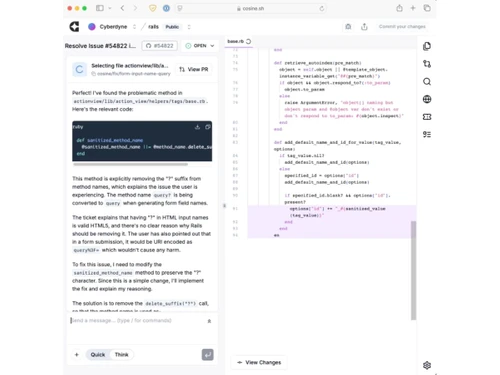
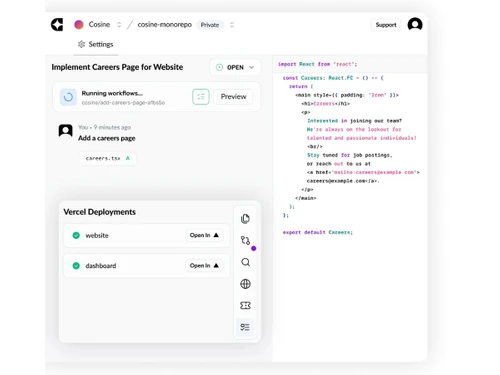
An agentic AI tool that connects with tools like GitHub and Jira to plan, write, test, and submit code independently.
See MoreHave you used Cosine AI before?
Share your insights for better experience
Brand: Buildt
Founded Year: 2022
Buildt is an AI tool to help developers quickly search and understand large codebases.
 Autonomous Execution Asynchronous Processing Codebase Handling Third Party Integration Multi-Agent Support Contextual Reasoning Pull Request Generation Requirement Validation Continuous Iteration Headless Operation Collaborative Editing Automated Planning Branch Configuration

Watch the demo video to explore key features, real workflows, and how the software fits your business needs.
 Ubuntu
  Windows
  MacOS
MacOS  Linux
Linux  Desktop
  Cloud-Based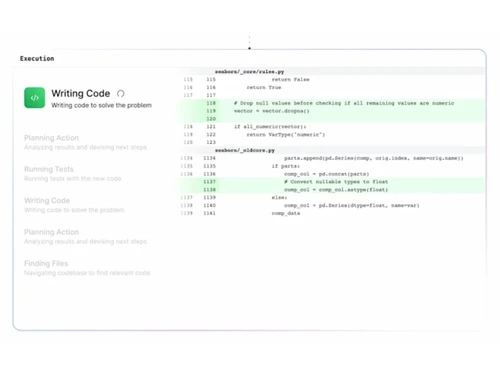
Small Business
Designed for startups and growing businesses
Medium Business
Built for business growth and flexibility
Enterprises
Designed for complex and large-scale business needs
4.2
Out of 5

Overall Rating
Based on
4 Verified Ratings
Rating Breakdown
80% Recommend this Product
Add ReviewThis product has no reviews yet. Be the first to leave your feedback.
Add Review
Cosine AI
Price On Request
Desktop
Mobile
Web based
On Premises
Windows
Mac OS

WiiZ
Price On Request
Desktop
Mobile
Web based
On Premises
Windows
Mac OS

MarketingBlocks
Price On Request
Desktop
Mobile
Web based
On Premises
Windows
Mac OS
Instabase
Price On Request
Desktop
Mobile
Web based
On Premises
Windows
Mac OS
Cogentiq
Price On Request
Desktop
Mobile
Web based
On Premises
Windows
Mac OS

Jeeva AI
Price On Request
Desktop
Mobile
Web based
On Premises
Windows
Mac OS

Yellow ai
Price On Request
Desktop
Mobile
Web based
On Premises
Windows
Mac OS

Karumi AI
Price On Request
Desktop
Mobile
Web based
On Premises
Windows
Mac OS

Automation Anywhere
Price On Request
Desktop
Mobile
Web based
On Premises
Windows
Mac OS

Moveworks
Price On Request
Desktop
Mobile
Web based
On Premises
Windows
Mac OS

Nintex
Price On Request
Desktop
Mobile
Web based
On Premises
Windows
Mac OS
(0) Product(s) selected
Available
Price on Request
Available
Price on Request
Available
Price on Request
Available
Price on Request
Available
Price on Request
Available
Price on Request

Available
Price on Request

Starting Price:
$99 /Month

Available
Price on Request
Available
Price on Request

Starting Price:
$4 /Month








Cosine AI is priced starting from USD 20, as listed on Techjockey.com.
Currently, Cosine AI does not offer a dedicated mobile app.
Cosine AI works on Ubuntu, Windows, MacOS and Linux.
Yes, Cosine AI provides a free trial for new users.
Cosine AI autonomously plans, writes, tests, and submits code using AI.
Software developers, engineering teams, and product managers use Cosine AI.
Yes, Cosine AI free demo can be requested via their official website.
Cosine AI is primarily a paid software, but trial/demo versions are available.
20,000+ Software Listed
Best Price Guranteed
Free Expert Consultation
2M+ Happy Customers
Terms and Condtions

Users with registered businesses can purchase goods from merchants on the platform to satisfy their business needs. Users are not permitted to utilize any products acquired through the platform for resale, advertising, business, or further distribution.
For each purchase made, users will receive a Tax Invoice (or 'GST invoice') that includes specific details such as:
the GSTIN of the user associated with their registered business, and
the specified Entity Name for their business.
It should be noted that not all products are eligible for GST Invoice. Only the products displayed by participating sellers with the 'GST-based Invoice Available' callout on the product description page would qualify.
Certain goods and services are not eligible to get a GST Invoice, including items with VAS, i.e., Value Added Services (e.g., Total Mobile Protection/Assured Buyback) and those involving an exchange offer at the time of purchase.
Users must ensure the accuracy of the GSTIN, and business entity name provided for the GST Invoice. Requests for corrections into GST Invoice would not be accommodated by Techjockey.com or any Seller, and any issues arising from user-provided information are the sole responsibility of users.
Techjockey.com is not liable for the GST Invoice or any associated input tax credit. To efficiently claim an input tax credit, users should select the registered place of business address as per the GST authority's data and follow the provisions of the GST Act and rules.
To claim an input tax credit, the delivery and billing addresses must match. Furthermore, input tax credits will not be granted if the delivery address and GSTIN on the invoice are from different states. In case of incorrect GST details provided during the order placement, the order will be canceled automatically.