linkedin
Captep logo
play Captep: Simplify, Automate, and Create | AI-Powered Productivity Tool
Captep-dashboard
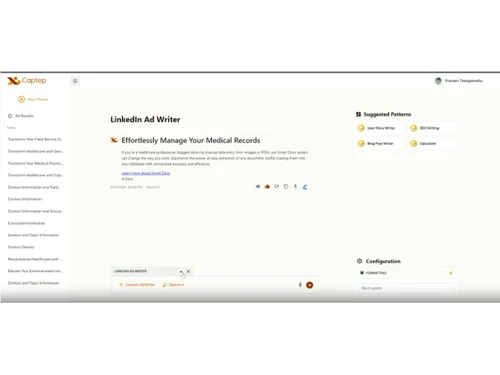
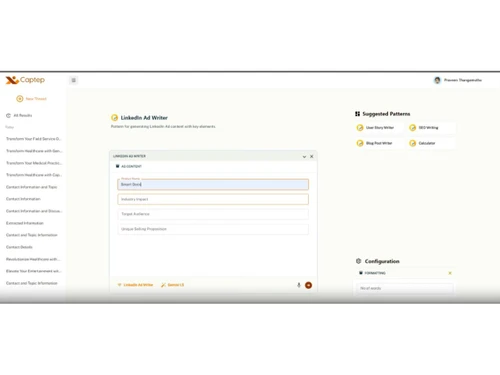
Captep-ad writer

Captep

Brand: captep

  • 4.3

  • 4 Ratings

Captep is a generative AI tool that is customizable for forms, patterns, collaboration, and multi-model integration.

See More

Have you used Captep before?

Share your insights for better experience

Add a Review

Price Available on Request

Questions about pricing or customization? We’re here to help, just a click away.

100% Genuine
Products
Best Price
Guaranteed
Safe & Secure
Payment
  • Description

  • Pricing

  • Features

  • Specification

  • Review

  • Compare

  • Alternatives

  • FAQ

Captep Software Overview

What is Captep?

Captep is a smart generative AI platform designed to manage workflows through dynamic forms, reusable patterns, and multi-AI integration. It helps users to create content faster using smart templates and AI support. The user fills simple forms for instructions, and it generates emails, reports, or documents instantly.

It helps teams build, manage, and automate processes using customizable templates, collaborative tools, and a centralised pattern library.

Captep enables users to create intelligent forms, fill data and generate AI supportive content. It also allows users to save favourite formats, share them with the team, and keep everything organized. It integrates multiple AI models, and collaborates in real time. The software supports custom fields, reusable prompt patterns, and flexible templates as per different needs.

Why Choose Captep?

  • Prompt Engineering: Helps to build and reuse prompt patterns for content generation giving consistent, and scalable AI interactions.
  • Dynamic Forms: Create intelligent, adaptable forms with conditional logic and real-time data capture, that can be used for automation
  • Multi-AI Integration: Connect and orchestrate multiple AI models for getting better automation and decision-making capabilities.
  • Team Collaboration: Helps to share, edit, and manage workflows together with role-based access and version control.
  • Custom Templates: Helps to speed up form creation and workflow setup with reusable, editable templates.
  • Pattern Library: Allows to centralize reusable prompts and workflows using pattern library for faster deployment and standardization.

Benefits of Captep

  • Customizable Workflows: Helps to customize forms, templates, and AI flows to match specific team or business needs.
  • Faster Deployment: Uses pre-built patterns and templates to launch workflows quickly and efficiently.
  • Improved Collaboration: Enables teams to co-create, review, and refine workflows giving better coordination with shared access and feedback tools.
  • Multi-AI Support: Allows to integrate various AI models for smarter automation and broader use cases.
  • Scalable Knowledge Capture: Helps to build structured forms and prompt libraries to retain and reuse institutional knowledge.
  • User-Friendly Interface: Supports easy navigation, drag-and-drop tools, and intuitive design for non-technical users.
  • Secure & Cloud-Based: It is hosted securely on cloud and provides role-based permissions for users and encrypted data handling.

Pricing of Captep

Captep details are available on request at techjockey.com.

Captep may vary based on factors like customization, additional features required, number of users, and the deployment type. Please request a callback for subscription-related details and to avail offers on premium packages.

Read more

Captep Pricing & Plans

Looking for The Right Pricing?

Share your requirements and get a plan built around your business.

  • Define your business needs
  • Get customised pricing
  • Choose features that fit your workflow

Price Available on Request

Get personalised Captep pricing that fits your needs. Our team will connect with you.

Captep Features

  • icon_check Prompt Patterns
    Create reusable prompt structures for consistent AI outputs across workflows and use cases.
  • icon_check Dynamic Forms
    Build intelligent forms with conditional logic, real-time inputs, and customizable field behaviour.
  • icon_check Multi-AI Integration
    Connect multiple AI models to automate tasks, enhance accuracy, and support diverse workflows.
  • icon_check Pattern Library
    Store and manage reusable prompt patterns for faster deployment and standardised operations.
  • icon_check Team Collaboration
    Collaborate in real time with shared editing, comments, and version control across teams.
  • icon_check Templates
    Use and customize pre-built templates to accelerate form creation and workflow setup.
  • icon_check Custom Fields
    Add custom fields to forms and workflows to capture specific data and support unique processes.
Captep Demo Video play icon

Get Captep Demo

Watch the demo video to explore key features, real workflows, and how the software fits your business needs.

Understand
Key Features
Personal
Demo Insights
Interactive
Demo Support

Captep Specifications

Supported Platforms
Windows Windows
Devices
Desktop Desktop
Deployment
Cloud-Based Cloud-Based
Suitable For
All Industries
Business Specific
All Businesses
Business Size
Small Business Startups Enterprises SMEs
Customer Support
Email Communities
Language
English
Training Resources
Videos
AI Features
AI Integrated

Explore the Best Alternative Solutions Similar to Your Business Size and Needs

Medium Business

Built for business growth and flexibility

Yellow ai

4.3

Qodo

4.3

Adept

4.0

See More

Captep Review

4.3

Out of 5

img

Overall Rating

Based on
4 Verified Ratings

Rating Breakdown

  • Features 4.3
  • Value for Money 4.1
  • Ease of Use 4.5
  • Customer Support 4.3

80% Recommend this Product

Add Review

Be the First to Review

This product has no reviews yet. Be the first to leave your feedback.

Add Review

Compare Captep With other Agentic AI Tools

Products
Ratings
Pricing
Device Supported
Deployment
Supported Platforms
  • img

    Captep

  • 4.3

  • Price On Request

  • Desktop

    Mobile

  • Web based

    On Premises

  • Windows

    Mac OS

  • img

    WiiZ

  • 3.9

  • Price On Request

  • Desktop

    Mobile

  • Web based

    On Premises

  • Windows

    Mac OS

  • img

    MarketingBlocks

  • 4.4

  • Price On Request

  • Desktop

    Mobile

  • Web based

    On Premises

  • Windows

    Mac OS

  • img

    Instabase

  • 4.5

  • Price On Request

  • Desktop

    Mobile

  • Web based

    On Premises

  • Windows

    Mac OS

  • img

    Cogentiq

  • 4.3

  • Price On Request

  • Desktop

    Mobile

  • Web based

    On Premises

  • Windows

    Mac OS

  • img

    Jeeva AI

  • 4.2

  • Price On Request

  • Desktop

    Mobile

  • Web based

    On Premises

  • Windows

    Mac OS

  • img

    Karumi AI

  • 4.2

  • Price On Request

  • Desktop

    Mobile

  • Web based

    On Premises

  • Windows

    Mac OS

  • img

    Yellow ai

  • 4.3

  • Price On Request

  • Desktop

    Mobile

  • Web based

    On Premises

  • Windows

    Mac OS

  • img

    Cosine AI

  • 4.2

  • Price On Request

  • Desktop

    Mobile

  • Web based

    On Premises

  • Windows

    Mac OS

  • img

    Moveworks

  • 4.1

  • Price On Request

  • Desktop

    Mobile

  • Web based

    On Premises

  • Windows

    Mac OS

(0) Product(s) selected

Captep Alternatives

See All Captep Alternatives

Available

Price on Request

Available

Price on Request

Available

Price on Request

Available

Price on Request

Available

Price on Request

Available

Price on Request

Starting Price:

$99 /Month

Available

Price on Request
Starting Price:

$4 /Month
Articles for Captep

See All Related Articles

How much does Captep cost?

Captep software pricing is available on request at techjockey.com.

Who uses Captep software?

Captep is used by product teams, developers, educators, and enterprises for AI workflow automation and collaboration.

How does Captep software work?

Captep is a workflow automation software and works by integrating AI models with dynamic forms and reusable patterns.

Which operating systems are compatible with Captep software?

Captep software runs smoothly on Windows and cloud-based platforms with browser access.

Is a free demo available for Captep software?

Yes, a free demo of Captep software is available through techjockey.com..

Can Captep integrate with multiple AI models?

Yes, Captep supports multi-AI integration, allowing users to connect and orchestrate various models in one workflow.

Does Captep support custom fields and templates?

Yes, Captep allows users to create custom fields and templates tailored to specific business processes.

Is Captep suitable for team collaboration and version control?

Yes, Captep includes real-time collaboration tools, shared editing, and version tracking for teamwork.

20,000+ Software Listed

Best Price Guranteed

Free Expert Consultation

2M+ Happy Customers

Terms and Condtions

close

Users with registered businesses can purchase goods from merchants on the platform to satisfy their business needs. Users are not permitted to utilize any products acquired through the platform for resale, advertising, business, or further distribution.

For each purchase made, users will receive a Tax Invoice (or 'GST invoice') that includes specific details such as:

  • the GSTIN of the user associated with their registered business, and

  • the specified Entity Name for their business.

It should be noted that not all products are eligible for GST Invoice. Only the products displayed by participating sellers with the 'GST-based Invoice Available' callout on the product description page would qualify.

Certain goods and services are not eligible to get a GST Invoice, including items with VAS, i.e., Value Added Services (e.g., Total Mobile Protection/Assured Buyback) and those involving an exchange offer at the time of purchase.

Users must ensure the accuracy of the GSTIN, and business entity name provided for the GST Invoice. Requests for corrections into GST Invoice would not be accommodated by Techjockey.com or any Seller, and any issues arising from user-provided information are the sole responsibility of users.

Techjockey.com is not liable for the GST Invoice or any associated input tax credit. To efficiently claim an input tax credit, users should select the registered place of business address as per the GST authority's data and follow the provisions of the GST Act and rules.

To claim an input tax credit, the delivery and billing addresses must match. Furthermore, input tax credits will not be granted if the delivery address and GSTIN on the invoice are from different states. In case of incorrect GST details provided during the order placement, the order will be canceled automatically.