Browserstack Software Pricing, Features & Reviews
What is Browserstack?
Browserstack is a comprehensive, cloud-based platform designed for software testing. It provides developers and quality assurance (QA) teams with instant access to a vast range of real mobile devices and desktop browsers for testing websites and mobile applications. The platform eliminates the need for maintaining expensive in-house device labs by offering a reliable and scalable infrastructure. As a web-based Software Testing Tool, it offers an end-to-end solution that helps organizations deliver high-quality digital experiences by ensuring their software functions flawlessly across different environments, browsers, and operating systems.
Why Choose Browserstack?
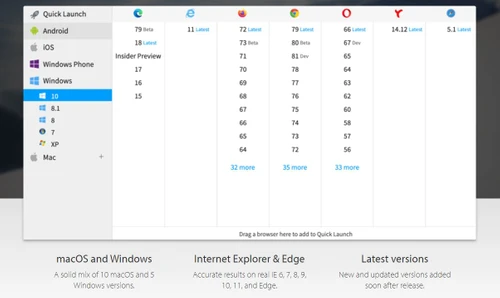
- Extensive Test Coverage: Gain access to over 3,000+ real desktop browsers and a cloud of more than 30,000 real iOS and Android devices. This allows teams to test for cross-browser, visual, and accessibility issues on a massive scale.
- AI-Powered Productivity: Browserstack integrates AI agents across the entire testing lifecycle. From test planning and low-code automation to visual reviews, these AI capabilities help boost team productivity by up to 4X.
- Accelerated Testing Cycles: The platform is built for speed and scale. By running automated tests in parallel on a reliable grid, teams can significantly reduce test execution times, from hours to minutes, enabling faster release cycles.
- Seamless Integration: Browserstack integrates effortlessly into existing CI/CD pipelines and development workflows. It supports popular frameworks and tools, ensuring a smooth transition and continuous testing process.
- Cost-Effective and Scalable: By providing a cloud-based infrastructure, Browserstack removes the high cost and maintenance overhead of physical device labs, offering a scalable solution that grows with your team's needs.
Advanced Features of Browserstack
- Real Device Cloud: Test on a massive range of physical iOS and Android devices for the most accurate manual and automated testing results.
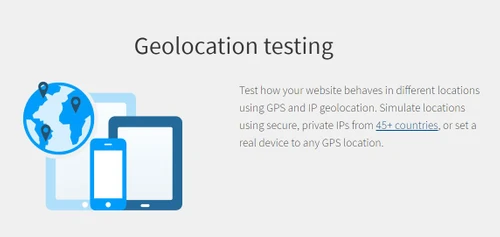
- Geolocation Testing: Simulate user locations from around the world to test location-specific features and content.
- Localhost Testing: Securely test development and staging websites on the Browserstack cloud before they go live, without requiring any complex setup.
- AI-Powered Visual Testing (Percy): Automatically detect visual bugs and UI inconsistencies. Percy uses AI to reduce noise and provide faster, more accurate visual reviews for both web and mobile apps.
- Accessibility Testing: Perform comprehensive WCAG and ADA compliance checks to ensure your digital products are accessible to all users.
- Low-Code Automation: Simplify test automation with an AI-driven, low-code solution that allows teams to create robust automated tests without extensive programming knowledge.
- Test Reporting & Analytics: Gain deep insights into all your tests with a centralized dashboard that helps monitor test health, identify flakes, and optimize your entire testing strategy.
Modules of Browserstack
- Web Testing:
- Live: Perform interactive, manual cross-browser testing on real desktop browsers.
- Automate: Run Selenium and Cypress tests at scale on a high-performance browser automation grid.
- Percy: Automate visual testing and review to catch UI bugs.
- Accessibility Testing: Ensure your website is compliant with WCAG standards.
- Mobile App Testing:
- App Live: Conduct interactive manual testing of your iOS and Android apps on real mobile devices.
- App Automate: Execute automated Appium, Espresso, and XCUITest scripts on a real device cloud.
- App Percy: Automate visual testing for native and hybrid mobile applications.
- Management & Optimization:
- Test Management: A unified platform to manage, track, and organize all manual and automated test cases.
- Test Observability: A central hub for debugging and analyzing test results to optimize performance.
How to Use Browserstack?
- Select a Product: Sign up and choose the module that fits your needs, such as 'Live' for manual testing or 'Automate' for automated tests.
- Choose an Environment: From the dashboard, select the desired combination of operating system, browser version, or real mobile device.
- Start a Test Session: For manual testing, simply enter the URL of your website to launch a live, interactive session. For mobile apps, upload your
.apk or .ipa file. - Run Automated Scripts: For automation, configure your existing test scripts with your Browserstack credentials to direct them to the cloud grid.
- Analyze and Debug: Use the comprehensive logs, video recordings, and developer tools provided in the dashboard to analyze test results and debug issues efficiently.
Browserstack Pricing
Browserstack price starts at USD 39 at techjockey.com.
The pricing model is based on different parameters, including extra features, deployment type, and the total number of users. For further queries related to the product, you can contact our product team and learn more about the pricing and offers.