linkedin
CardRecovery logo
cardrecovery-help
cardrecovery-letter
cardrecovery-registration

CardRecovery

Brand: WinRecovery

  • No Ratings & Reviews

CardRecovery is a photo recovery software that helps users recover deleted, lost, or corrupted photos and videos from memory cards and other storage devices.

See More

Have you used CardRecovery before?

Share your insights for better experience

Add a Review
Starting Price
₹4034

View plans

100% Genuine
Products
Best Price
Guaranteed
Safe & Secure
Payment
  • Description

  • Pricing

  • Features

  • Specification

  • Review

  • FAQ

Starting at ₹4,034

CardRecovery Software Overview

What is CardRecovery?

CardRecovery is a highly specialized data recovery software engineered specifically for digital media. Its primary function is to retrieve lost, deleted, formatted, or corrupted photos and video files from a wide array of memory cards and flash storage devices. Designed exclusively for Windows, it provides a focused solution for photographers, videographers, and anyone who uses a digital camera or smartphone. The software supports nearly all memory card formats, including popular types like SD Card, MicroSD, SDHC, CF (Compact Flash), xD Picture Card, and Memory Stick, making it a versatile tool for digital media restoration.

Why Choose CardRecovery?

In a market with numerous data recovery tools, CardRecovery distinguishes itself through its dedicated focus and robust technology. Its core strength lies in the proprietary SmartScan technology, an advanced algorithm that performs deep, sector-by-sector scans to locate and reconstruct files that other generic recovery utilities might miss. A key differentiator is its commitment to safety; the software operates in a strict READ-ONLY mode. This ensures that it never writes, deletes, or modifies data on the source memory card, eliminating the risk of causing further damage or overwriting the very files you intend to recover. This non-destructive approach, combined with its high success rate and user-friendly interface, makes it a reliable and risk-free choice for recovering precious memories.

Advanced Features of CardRecovery

  • Comprehensive RAW File Support: Beyond standard JPG and TIF files, the software excels at recovering a vast range of RAW image formats from leading camera manufacturers, including Nikon (NEF), Canon (CRW, CR2, CR3), Sony (SRF), Olympus (ORF), and many more.
  • SmartScan Technology: This exclusive feature is the engine behind CardRecovery's effectiveness. It intelligently identifies file fragments and pieces together recoverable photos and videos, even from heavily corrupted or formatted cards.
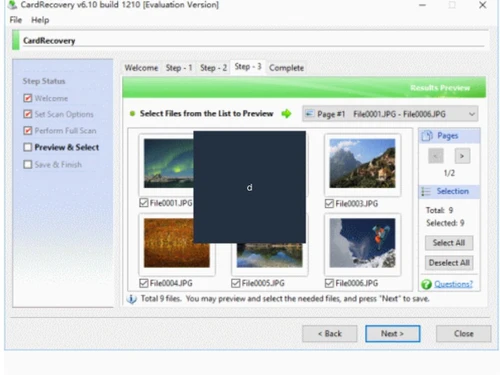
  • File Preview Before Recovery: To ensure you are recovering the correct files, the software provides a thumbnail preview of discoverable photos and videos. This allows you to verify the integrity and content of your files before committing to the recovery process.
  • Batch Recovery: For situations involving hundreds or thousands of lost files, the batch recovery function is a significant time-saver. Users can select all necessary files and restore them in a single, automated operation.
  • Video and Audio File Recovery: The software is not limited to still images. It effectively recovers common video formats (MP4, MOV, AVI, MTS) and audio files (WAV, MP3), making it a complete media recovery solution.

Key Capabilities of CardRecovery

  • Deleted File Recovery: Restores photos and videos that were accidentally or intentionally deleted from the memory card via a camera or computer.
  • Formatted Media Recovery: Successfully retrieves files from memory cards that have been subjected to a Format or Delete All operation.
  • Corrupted or Damaged Card Recovery: Addresses complex issues where the memory card has become unreadable, inaccessible, or displays an error message due to file system corruption or physical damage.
  • Lost File Recovery: Recovers files lost due to unforeseen events, such as turning off the camera during a write process, pulling the card out while the device is on, or data loss from using the card across different devices.

How to Use CardRecovery?

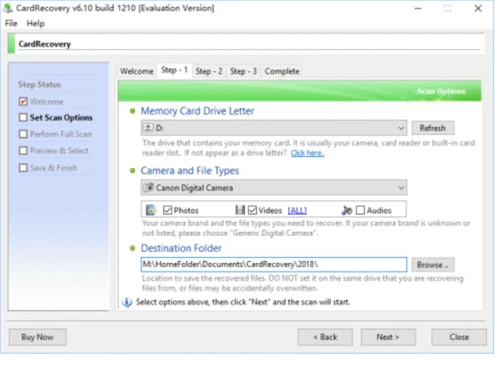
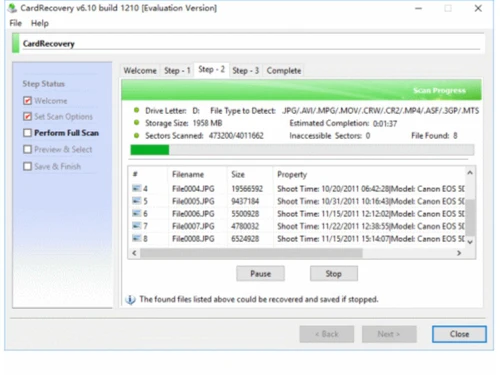
  1. Connect and Select: First, connect your memory card to your computer using a card reader. Launch CardRecovery and select the drive letter corresponding to your card, specify the camera brand and file types to search for, and choose a destination folder on your hard drive to save the recovered files.
  2. Scan the Card: Click the Next button to begin the scanning process. The SmartScan engine will thoroughly analyze the card for recoverable files.
  3. Preview and Recover: Once the scan is complete, the software will display a gallery of found photos and videos. You can preview the files, select the ones you wish to restore, and click Next to save them to your chosen destination.

CardRecovery Pricing

CardRecovery price starts from INR 4034 at techjockey.com.

The pricing model is based on different parameters, including extra features, deployment type, and the total number of users. For further queries related to the product, you can contact our product team and learn more about the pricing and offers.

Read more

CardRecovery Pricing & Plans

CardRecovery
Key Features
  • Formatted Drive Recovery
  • Deep Scan
  • Accidental File Recovery
  • Corrupted or Damaged File Recovery
  • RAW Partition Data Recovery
  • Deleted File Recovery
  • File Preview Before Recovery
Starting at ₹4034
    • Quantity

      Quantity
      Quantity

Key Features

  • Formatted Drive Recovery

  • Deep Scan

  • Accidental File Recovery

  • Corrupted or Damaged File Recovery

  • RAW Partition Data Recovery

  • Deleted File Recovery

  • File Preview Before Recovery

CardRecovery Features

Core Data Recovery

  • icon_check Formatted Drive Recovery
    Recovers photos from memory cards that have been accidentally or intentionally formatted.
  • icon_check Accidental File Recovery
    Restores images and videos deleted through camera menus or computer file explorers.
  • icon_check Corrupted or Damaged File Recovery
    Recovers data from memory cards that are corrupted, unreadable, or showing 'card error' messages.
  • icon_check RAW Partition Data Recovery
    Capable of extracting data from memory cards with RAW or unrecognized file systems.
  • icon_check Deleted File Recovery
    Specifically designed to find and restore deleted multimedia files from flash storage.
  • icon_check File Preview Before Recovery
    Allows users to view thumbnail previews of found photos to verify they are recoverable.
  • icon_check Recovery from External Devices
    Supports SD, microSD, CF, XD, and Memory Stick cards via a card reader or USB connection.
  • icon_check Batch Recovery
    Enables the selection and restoration of all found images in a single automated step.
  • icon_check Cloud Data Recovery
    Restore photos stored on cloud platforms like Google Photos, iCloud, or OneDrive.

Advanced Image Repair and Enhancement

  • icon_check RAW Image Recovery
    Supports recovery of professional RAW photo formats from Nikon, Canon, Sony, and more.
  • icon_check Metadata Recovery
    Recovers the original file, which typically includes embedded metadata like date and camera settings.
  • icon_check EXIF Data Restoration
    Restores the file data which inherently contains original EXIF information if not overwritten.
  • icon_check Corrupted Photo Repair
    Reconstruct and repair damaged or partially corrupted image files.
  • icon_check Color Correction and Restoration
    Fix color distortions in recovered images.
  • icon_check Batch Metadata Editing
    Edit metadata for multiple recovered files simultaneously.
  • icon_check Export to Photo Libraries
    Export recovered photos directly into management tools like Lightroom or Apple Photos.
  • icon_check Tagging and Categorization
    Organize recovered images by applying tags or categories.
  • icon_check Photo Recovery with Editing Tools
    Include basic editing tools to fix minor distortions in recovered images.

Scan and Detection Capabilities

  • icon_check Deep Scan
    Uses SmartScan technology to perform a sector-by-sector search for file signatures on the card.
  • icon_check Quick Scan
    The initial scan phase quickly identifies recently deleted items and basic file structures.
  • icon_check Advanced Scan Algorithms
    Uses proprietary 'SmartScan' algorithms to find files without relying on the file system.
  • icon_check Thumbnail Previews
    Displays small image previews during the scan process to identify specific pictures.
  • icon_check High-Speed Scanning
    Optimized for flash media to ensure rapid scanning and recovery of hundreds of files.
  • icon_check Filter by File Type
    Enable selective recovery of image files (JPEG, PNG, RAW, etc.).

Device and Platform Compatibility

  • icon_check Mobile Device Data Recovery
    Recovers data from microSD cards used in mobile phones (when connected via card reader).
  • icon_check Cross-Platform Data Recovery
    Supports various memory card file systems, including FAT12, FAT16, and FAT32.
  • icon_check Automatic Device Detection
    Automatically identifies and lists the drive letters of connected memory cards for scanning.
  • icon_check Rooting Error Recovery
    Helps recover photos lost during rooting or jailbreaking of mobile devices.

Security and Compliance

  • icon_check Secure Recovery Environment
    Operates in a read-only mode to ensure the original data on the card is never overwritten.
  • icon_check Encrypted Data Recovery
    Recover photos from encrypted drives or partitions.
  • icon_check Data Anonymization
    Option to remove personal information (metadata) from recovered photos.
  • icon_check Ransomware Protection
    Safeguard the recovery environment from malware or ransomware threats.
  • icon_check Secure Data Wiping
    Allows safe deletion of irrecoverable photos that may compromise privacy.
  • icon_check Data Compliance and Governance
    Ensure recovery processes meet legal and regulatory standards.
  • icon_check Hierarchy and Access Management
    Restrict access to sensitive data in enterprise environments.
  • icon_check Legal Data Recovery Reports
    Generate detailed logs for forensic or legal use.

Backup and Restoration

  • icon_check Backup and Restore Photos
    Integrate optional backup tools to prevent future photo loss.
  • icon_check Incremental Backups
    Save only newly added or changed photos during backups.
  • icon_check Factory Partition Backup
    Protect factory partitions containing important photo archives.

CardRecovery Specifications

Supported Platforms
Windows Windows
Devices
Desktop Desktop
Deployment
Perpetual Perpetual
Suitable For
All Industries
Business Specific
All Businesses
Customer Support
Email
Language
English
Training Resources
Videos

CardRecovery Review

Techjockey Trusted Reviews from Verified Users

No reviews are currently available for CardRecovery. Discover similar Photo Recovery Software reviews

  • Stellar Photo Recovery

    4.5

    Whats great - One of the best parts of this photograph recuperation programming is its usability. The establishment procedure was snappy an... read more

  • Recoverit

    4.9

    Whats great - the product is anything but difficult to utilize, it doesn't threaten even the most essential clients, and it is include rich... read more

  • 7 Data Recovery Software

    5.0

    Whats great - Best Software for use Data Recovery Software read more
Articles for CardRecovery

See All Related Articles

What is CardRecovery and what does it do?

CardRecovery is a leading photo recovery software specifically designed for memory cards used by digital cameras or phones. It can effectively recover lost, deleted, corrupted, or formatted photos and video files. It utilizes a unique and exclusive SmartScan technology to locate and restore files that other software might miss.

What types of memory cards and storage devices does CardRecovery support?

CardRecovery supports a wide range of memory cards including SD Card, MicroSD, SDHC, CF (Compact Flash) Card, xD Picture Card, Memory Stick, XQD Card, MultiMedia card, SmartMedia, and USB flash drives. It also supports recovery from cellular phone memory cards, including MicroSD or MicroSDHC cards used by Android smartphones.

What kinds of photo and video loss situations can CardRecovery handle?

CardRecovery can recover files lost due to accidental or intentional deletion, formatting, memory card errors or damage, corruption from critical areas (e.g., FAT, ROOT, BOOT), damage from improper card removal or camera shutdown during write/read processes, and data loss from using cards between different cameras/computers/devices.

What file formats can CardRecovery recover?

CardRecovery supports common picture formats like JPG, JPEG, TIF, and various RAW image formats from major camera brands (e.g., Nikon NEF, Canon CRW/CR2/CR3, Kodak DCR, Sony SRF). It also recovers common video formats such as MP4, MOV, AVI, MPG, MPEG, ASF, 3GP, MTS, and audio formats like WAV, MP3, AMR.

Is CardRecovery safe to use, and does it offer a free trial?

Yes, CardRecovery is safe and risk-free. The software performs READ-ONLY operations on your memory card, ensuring it doesn't move, delete, or modify the original data to avoid causing further damage or overwriting. A free trial version is available for download.

What operating systems is CardRecovery compatible with?

CardRecovery is designed for and compatible with Windows operating systems.

How much does CardRecovery cost?

CardRecovery price starts from INR 4034 at techjockey.com.

Does CardRecovery recover data from hard drives or cloud storage?

CardRecovery is specifically designed for memory cards and removable storage devices like flash drives and mobile phone memory cards. It does not recover lost photos from CDs/DVDs or hard drives.

Who can use CardRecovery?

CardRecovery is ideal for photographers, videographers, content creators, journalists, Android users, and anyone who needs to recover deleted or lost photos and videos from memory cards.

20,000+ Software Listed

Best Price Guranteed

Free Expert Consultation

2M+ Happy Customers

Terms and Condtions

close

Users with registered businesses can purchase goods from merchants on the platform to satisfy their business needs. Users are not permitted to utilize any products acquired through the platform for resale, advertising, business, or further distribution.

For each purchase made, users will receive a Tax Invoice (or 'GST invoice') that includes specific details such as:

  • the GSTIN of the user associated with their registered business, and

  • the specified Entity Name for their business.

It should be noted that not all products are eligible for GST Invoice. Only the products displayed by participating sellers with the 'GST-based Invoice Available' callout on the product description page would qualify.

Certain goods and services are not eligible to get a GST Invoice, including items with VAS, i.e., Value Added Services (e.g., Total Mobile Protection/Assured Buyback) and those involving an exchange offer at the time of purchase.

Users must ensure the accuracy of the GSTIN, and business entity name provided for the GST Invoice. Requests for corrections into GST Invoice would not be accommodated by Techjockey.com or any Seller, and any issues arising from user-provided information are the sole responsibility of users.

Techjockey.com is not liable for the GST Invoice or any associated input tax credit. To efficiently claim an input tax credit, users should select the registered place of business address as per the GST authority's data and follow the provisions of the GST Act and rules.

To claim an input tax credit, the delivery and billing addresses must match. Furthermore, input tax credits will not be granted if the delivery address and GSTIN on the invoice are from different states. In case of incorrect GST details provided during the order placement, the order will be canceled automatically.