linkedin
Checkov logo
checkov analysis
checkov platform
checkov code

Checkov

Brand: Palo Alto Networks

  • 4.3

  • 5 Ratings

Checkov is a powerful IaC tool that scans cloud infrastructure for misconfigurations using policy-as-code.

See More

Have you used Checkov before?

Share your insights for better experience

Add a Review

Free Forever

Get started immediately at no cost. Upgrade anytime if your business demand more.

100% Genuine
Products
Best Price
Guaranteed
Safe & Secure
Payment
  • Description

  • Pricing

  • Features

  • Specification

  • Review

  • Compare

  • Alternatives

  • FAQ

Checkov Software Overview

What is Checkov?

Checkov is an open-source IaC security tool that scans cloud infrastructure configurations to detect misconfigurations before deployment. It defines policies as a Python code comprising security and compliance rules. It then uses these policies to scan multiple frameworks and platforms for configuration issues. It has a command-line interface for analyzing scans and managing scans.

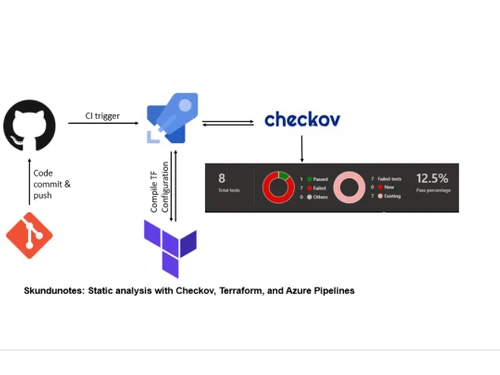
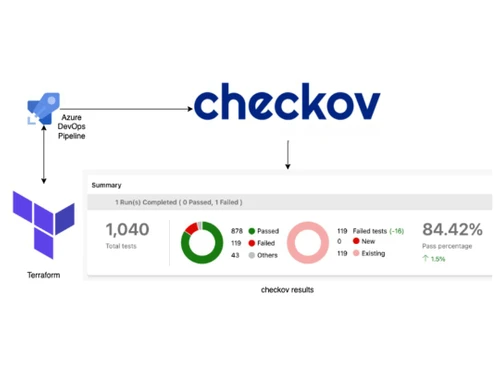
It provides attribute-based policies to prevent misconfigurations during build time. It supports real-time execution in the terminal and works on platforms like Terraform, CloudFormation, Helm, Kubernetes, etc. It can be integrated or embedded into CI/CD pipelines to catch issues early, making cloud infrastructure secure and compliant.

Why Choose Checkov Software?

  • Security: It scans Terraform and similar cloud platform configurations to identify security vulnerabilities and compliance issues before deployment.
  • Validation: Checks cloud templates for misconfigurations and policy violations, preventing risky or non-compliant resource provisioning.
  • Compliance: Analyzes cloud platforms for best practices and security policies to increase the security and reliability of containerized applications.
  • CI/CD Integration: It can integrate into the CI/CD pipelines for executing automated scans.
  • Collaborative Development: Allows the developers to collaborate on IaC templates while maintaining security.

Benefits of Checkov Platform

  • Early Detection: Helps to identify misconfigurations before deployment, preventing security issues and compliance violations in infrastructure.
  • Automation Integration: Easily integrates into CI/CD pipelines, automating infrastructure security checks and development workflows.
  • Multi-Platform Support: It works with frameworks like Terraform, CloudFormation, and Kubernetes, providing flexible configuration management.
  • Custom Policies: Allows custom security policies to be created using Python for specific organizational compliance requirements.
  • Real-Time Feedback: Provides immediate feedback on configuration issues during development, reducing the risk of deployment errors.

Pricing of Checkov

Checkov price details are available on request at techjockey.com.

Its price in India may vary based on factors like customization, additional features required, the number of users, and the deployment type. Please request a call back for subscription-related details and to avail of offers on premium packages.

Read more

Palo Alto Networks Company Details

Founded Year:  2005

Palo Alto Networks is a multinational cybersecurity company that offers cybersecurity solutions for organizations.

Director/Founders Dave Stevens, Fengmin Gong, Nir Zuk, Rajiv Batra, Yuming Mao
Company Size 1000+ Employees

Checkov Pricing & Plans

This Product is Available Free Forever.

Start instantly with no fees, no subscriptions, and no commitments.

  • Full access to basic version available
  • No credit card or sign-up required

Free Forever Plan

Get started immediately at no cost. Upgrade anytime if your business demand more.

Free Forever

Checkov Features

  • icon_check Static Code Analysis
    Scans infrastructure-as-code scripts for vulnerabilities and misconfigurations to improve security.
  • icon_check Attribute-Based Policies
    Allows defining policies based on specific resource attributes to make configurations per security and compliance standards.
  • icon_check YAML Policies
    Supports policies written in YAML for ease of use and integration with existing configuration management systems.
  • icon_check Live Terminal Execution
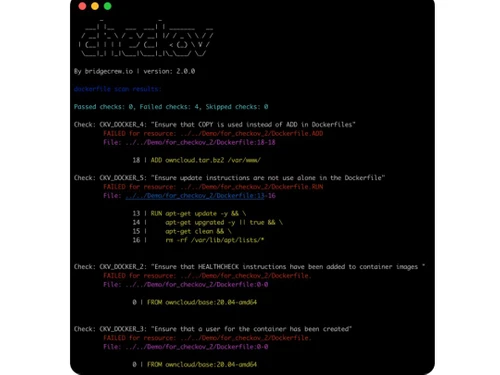
    Provides real-time feedback and results directly in the terminal for easy development and debugging.
  • icon_check Policy Management Interface
    Supports a user-friendly interface for managing and customizing policies.
  • icon_check Integration
    Integrates with CI/CD pipelines and other tools, automating security checks and enhancing workflow efficiency.
  • icon_check Common CLI Interface
    Uses a consistent command-line interface across different platforms and frameworks, simplifying usage.

Checkov Specifications

Supported Platforms
Windows Windows
Devices
Desktop Desktop
Deployment
Perpetual Perpetual
Suitable For
ITES
Business Specific
All Businesses
Business Size
Small Business Startups Medium Business Enterprises
Customer Support
Email Communities
Language
English
Training Resources
Documentation Videos

Explore the Best Alternative Solutions Similar to Your Business Size and Needs

Checkov Review

4.3

Out of 5

img

Overall Rating

Based on
5 Verified Ratings

Rating Breakdown

  • Features 4
  • Value for Money 4.4
  • Ease of Use 4.7
  • Customer Support 4.1

88% Recommend this Product

Add Review

Be the First to Review

This product has no reviews yet. Be the first to leave your feedback.

Add Review

Compare Checkov With other Infrastructure As Code Tools

Products
Ratings
Pricing
Device Supported
Deployment
Supported Platforms
  • img

    Checkov

  • 4.3

  • FREE

  • Desktop

    Mobile

  • Web based

    On Premises

  • Windows

    Mac OS

  • img

    Spacelift

  • 4.4

  • Price On Request

  • Desktop

    Mobile

  • Web based

    On Premises

  • Windows

    Mac OS

  • img

    Firefly AI

  • 4.4

  • Price On Request

  • Desktop

    Mobile

  • Web based

    On Premises

  • Windows

    Mac OS

  • img

    Pulumi

  • 4.1

  • Price On Request

  • Desktop

    Mobile

  • Web based

    On Premises

  • Windows

    Mac OS

  • img

    EnV0

  • 4.1

  • Price On Request

  • Desktop

    Mobile

  • Web based

    On Premises

  • Windows

    Mac OS

  • img

    OpenTofu

  • 4.2

  • Price On Request

  • Desktop

    Mobile

  • Web based

    On Premises

  • Windows

    Mac OS

  • img

    Vagrant

  • 4.0

  • Price On Request

  • Desktop

    Mobile

  • Web based

    On Premises

  • Windows

    Mac OS

  • img

    Terragrunt

  • 4

  • Price On Request

  • Desktop

    Mobile

  • Web based

    On Premises

  • Windows

    Mac OS

  • img

    AWS CloudFormation

  • 4.3

  • Price On Request

  • Desktop

    Mobile

  • Web based

    On Premises

  • Windows

    Mac OS

  • img

    SaltStack

  • 4.4

  • Price On Request

  • Desktop

    Mobile

  • Web based

    On Premises

  • Windows

    Mac OS

(0) Product(s) selected

Checkov Alternatives

See All Checkov Alternatives

Available

Price on Request

Available

Price on Request

How can I request a demo of Checkov?

You can get a free demo of Chekov at techjockey.com.

Which operating system is supported by Checkov?

Checkov is compatible with major operating systems, including Linux, macOS, and Windows.

What programming languages are used for policy definitions in Checkov?

Policies in Checkov can be defined using Python or YAML, depending on the preference and requirements.

Is there a free version available for Checkov?

An open-source version with basic features is available for Checkov; enterprise options offer advanced capabilities.

Can I write custom policies for Checkov?

Yes, you can create custom policies using Python.

Who can benefit from using Checkov?

DevOps engineers, security professionals, and cloud architects find Checkov valuable.

How often should I run Checkov scans?

It is ideally better to run scans regularly during development and before deploying infrastructure.

Is there a mobile app for Checkov?

No, Checkov is a command-line tool for infrastructure code analysis.

20,000+ Software Listed

Best Price Guranteed

Free Expert Consultation

2M+ Happy Customers

Terms and Condtions

close

Users with registered businesses can purchase goods from merchants on the platform to satisfy their business needs. Users are not permitted to utilize any products acquired through the platform for resale, advertising, business, or further distribution.

For each purchase made, users will receive a Tax Invoice (or 'GST invoice') that includes specific details such as:

  • the GSTIN of the user associated with their registered business, and

  • the specified Entity Name for their business.

It should be noted that not all products are eligible for GST Invoice. Only the products displayed by participating sellers with the 'GST-based Invoice Available' callout on the product description page would qualify.

Certain goods and services are not eligible to get a GST Invoice, including items with VAS, i.e., Value Added Services (e.g., Total Mobile Protection/Assured Buyback) and those involving an exchange offer at the time of purchase.

Users must ensure the accuracy of the GSTIN, and business entity name provided for the GST Invoice. Requests for corrections into GST Invoice would not be accommodated by Techjockey.com or any Seller, and any issues arising from user-provided information are the sole responsibility of users.

Techjockey.com is not liable for the GST Invoice or any associated input tax credit. To efficiently claim an input tax credit, users should select the registered place of business address as per the GST authority's data and follow the provisions of the GST Act and rules.

To claim an input tax credit, the delivery and billing addresses must match. Furthermore, input tax credits will not be granted if the delivery address and GSTIN on the invoice are from different states. In case of incorrect GST details provided during the order placement, the order will be canceled automatically.