linkedin
Azure Resource Manager logo
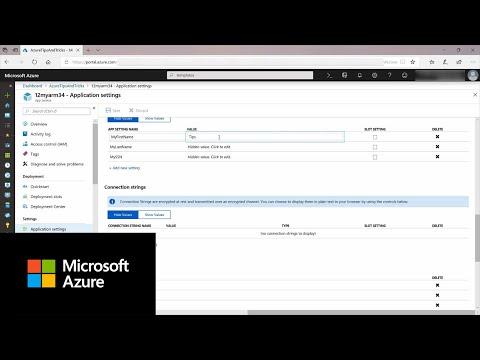
play How to use Azure Resource Manager | Azure Tips and Tricks
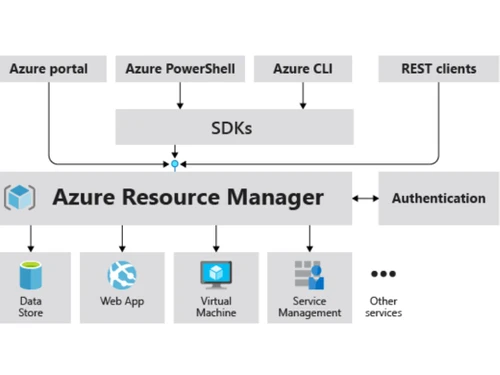
azure resource manager authentication
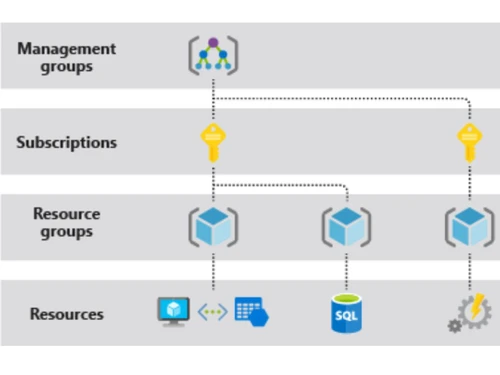
azure resource manager groups

Azure Resource Manager

Brand: Microsoft Corporation

  • 4.1

  • 5 Ratings

Azure Resource Manager is an infrastructure-as-a-coding platform for managing app resources deployment and organization in Azure cloud environments.

See More

Have you used Azure Resource Manager before?

Share your insights for better experience

Add a Review

Price Available on Request

Questions about pricing or customization? We’re here to help, just a click away.

100% Genuine
Products
Best Price
Guaranteed
Safe & Secure
Payment
  • Description

  • Pricing

  • Features

  • Specification

  • Review

  • Compare

  • Alternatives

  • FAQ

Azure Resource Manager Software Overview

What is Azure Resource Manager?

Azure Resource Manager (ARM) is Microsoft’s platform that helps create, deploy, and manage resources in the Azure cloud. Its interface acts like a management layer for deploying and managing resources through declarative templates rather than using scripts. The platform provides access control features, tagging resources for better organization and billing of resources, and locking resources for secure organization of resources.

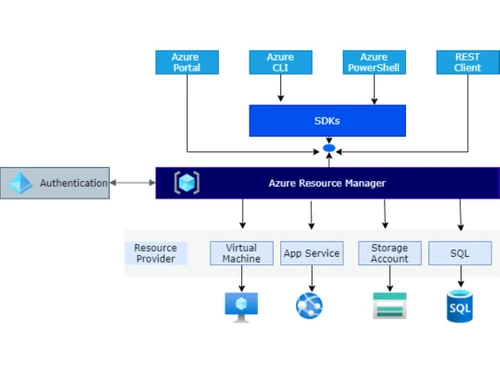
Azure Resource Manager handles requests through Azure APIs, SDKs, Azure Portal, and PowerShell and allows the simultaneous management of multiple resources. The requests are authenticated and authorized before they are sent to the Azure service. It provides four levels of management where users can apply management-level settings. It also provides a concurrent update resolution feature to resolve conflicts caused during concurrent resource updates.

Why choose Azure Resource Manager Software?

  • Infrastructure deployment: It is a simple-to-use platform for creating, deploying, managing, and organizing resources using templates across the Azure cloud.
  • Resource group management: Organizes resources into groups, tags them, monitors them, applies management-level settings, and thus makes administration easier.
  • Role-Based Access Control (RBAC): Provides secure user access control using Azure AD that assigns roles to users, groups, and applications for accessing resources.
  • Template-based deployment: It uses a template-based deployment method, which allows for quick resource deployment for better infrastructure management.
  • Continuous availability: It is distributed across multiple regions and is not dependent on a single container, making it always available in case of any failure of the center.
  • Concurrency control: Provides concurrency control during update operation by allowing only one update of the same resource during conflicts.

Benefits of Azure Resource Manager Platform

  • Secure interface: It uses access control, authentication, and authorization mechanisms for request processing to ensure secure access to resources by users and applications.
  • No scripts: Helps to manage cloud infrastructure and resources through declarative templates rather than scripts and scales them based on demands automatically.
  • Group management: Makes deployment, management, and monitoring of all resources as a group rather than handling each resource individually.
  • Consistency: Ensures consistent resource deployment and configuration, reducing errors thus giving a reliable infrastructure state.
  • Scalability: Easily scales resources up or down based on demand, optimizing resource usage and cost-effectiveness in dynamic environments.
  • Resolve update conflicts: Provides conflict resolution when two updates are carried out on the same resource by allowing only one operation at a time.

Pricing of Azure Resource Manager

Azure Resource Manager price details are available on request at techjockey.com. Its price in India may vary based on factors like customization, additional features required, the number of users, and the deployment type. Please request a call back for subscription-related details and to avail offers on premium packages.

Read more

Microsoft Corporation Company Details

Founded Year:  1975

Microsoft Corporation is an American multinational technology company with headquarters in Redmond, Washington.

Director/Founders Paul Allen , Bill Gates
Company Size 1000+ Employees

Azure Resource Manager Pricing & Plans

Looking for The Right Pricing?

Share your requirements and get a plan built around your business.

  • Define your business needs
  • Get customised pricing
  • Choose features that fit your workflow

Price Available on Request

Get personalised Azure Resource Manager pricing that fits your needs. Our team will connect with you.

Azure Resource Manager Features

  • icon_check Enterprise-grade access control
    Define roles and permissions for secure access and compliance using policies and regulations.
  • icon_check Single declarative template
    Makes infrastructure management and repeatable deployment easier and consistent with declarative templates.
  • icon_check Flexible template
    Provides a flexible template that scales the infrastructure as per the varying application needs.
  • icon_check Visualizations
    Provides clear insights into resource relationships and dependencies for better management and troubleshooting.
  • icon_check Resource group
    It groups related resources for unified management, updates, and deletions as a unit.
  • icon_check Resources tag
    Categorizes resources for better organization, cost allocation, and billing transparency, improving management.
  • icon_check Explicit lock
    Prevents accidental deletion or modification of critical resources, to ensure data integrity
  • icon_check Audit Logs
    Records all user actions for accountability and compliance purposes, enhancing security in workflows.
Azure Resource Manager Demo Video play icon

Get Azure Resource Manager Demo

Watch the demo video to explore key features, real workflows, and how the software fits your business needs.

Understand
Key Features
Personal
Demo Insights
Interactive
Demo Support

Azure Resource Manager Specifications

Supported Platforms
Ubuntu Ubuntu Windows Windows MacOS MacOS Linux Linux
Devices
Desktop Desktop Mobile Mobile Tablet Tablet iPad iPad
Deployment
Cloud-Based Cloud-Based
Suitable For
ITES
Business Specific
All Businesses
Business Size
Small Business Startups Medium Business Enterprises
Customer Support
Email Communities
Language
English
Training Resources
Documentation Videos

Explore the Best Alternative Solutions Similar to Your Business Size and Needs

Azure Resource Manager Review

4.1

Out of 5

img

Overall Rating

Based on
5 Verified Ratings

Rating Breakdown

  • Features 4.4
  • Value for Money 4.1
  • Ease of Use 4.2
  • Customer Support 4

88% Recommend this Product

Add Review

Be the First to Review

This product has no reviews yet. Be the first to leave your feedback.

Add Review

Compare Azure Resource Manager With other Infrastructure As Code Tools

Products
Ratings
Pricing
Device Supported
Deployment
Supported Platforms
  • img

    Azure Resource Manager

  • 4.1

  • Price On Request

  • Desktop

    Mobile

  • Web based

    On Premises

  • Windows

    Mac OS

  • img

    Spacelift

  • 4.4

  • Price On Request

  • Desktop

    Mobile

  • Web based

    On Premises

  • Windows

    Mac OS

  • img

    Firefly AI

  • 4.4

  • Price On Request

  • Desktop

    Mobile

  • Web based

    On Premises

  • Windows

    Mac OS

  • img

    Pulumi

  • 4.1

  • Price On Request

  • Desktop

    Mobile

  • Web based

    On Premises

  • Windows

    Mac OS

  • img

    EnV0

  • 4.1

  • Price On Request

  • Desktop

    Mobile

  • Web based

    On Premises

  • Windows

    Mac OS

  • img

    Checkov

  • 4.3

  • Price On Request

  • Desktop

    Mobile

  • Web based

    On Premises

  • Windows

    Mac OS

  • img

    OpenTofu

  • 4.2

  • Price On Request

  • Desktop

    Mobile

  • Web based

    On Premises

  • Windows

    Mac OS

  • img

    AWS CloudFormation

  • 4.3

  • Price On Request

  • Desktop

    Mobile

  • Web based

    On Premises

  • Windows

    Mac OS

  • img

    Vagrant

  • 4.0

  • Price On Request

  • Desktop

    Mobile

  • Web based

    On Premises

  • Windows

    Mac OS

  • img

    Terragrunt

  • 4

  • Price On Request

  • Desktop

    Mobile

  • Web based

    On Premises

  • Windows

    Mac OS

  • img

    SaltStack

  • 4.4

  • Price On Request

  • Desktop

    Mobile

  • Web based

    On Premises

  • Windows

    Mac OS

(0) Product(s) selected

Azure Resource Manager Alternatives

See All Azure Resource Manager Alternatives

Available

Price on Request

Available

Price on Request

What role does Azure Resource Manager play in cloud infrastructure management?

Azure Resource Manager helps in the deployment, management, organizing, and monitoring of resources on Azure cloud.

Which language is used to deploy Azure resources?

Azure Resource Manager uses JSON-based declarative language to define the infrastructure and configuration of the resources.

Who can use Azure Resource Manager?

Developers, IT professionals, and businesses looking for resource management on Azure cloud.

Does Azure Resource Manager provide integration with other software?

Yes, Azure Resource Manager provides API integration capabilities for connectivity with third-party applications.

Does Azure Resource Manager support concurrency control?

Yes, Azure Resource Manager provides concurrent resource management when the same resource has multiple update operations at the same time. It detects conflict and allows one update at a time.

Can I deploy resources across different Azure regions?

Yes, Azure Resource Manager allows Multi-Region Deployment making deployment of resources across different Azure regions.

What is the way to use Azure Resource Manager?

To use Azure Resource Manager, the user has to create an account, apply configuration settings according to resource needs, and use different management features.

Can I set the same settings to all resources at once in Azure Resource Manager?

Azure Resource Manager provides a resource grouping feature to set the same settings for resources. Once the resources are grouped, the same settings can be applied at the group level for all resources in the group.

20,000+ Software Listed

Best Price Guranteed

Free Expert Consultation

2M+ Happy Customers

Terms and Condtions

close

Users with registered businesses can purchase goods from merchants on the platform to satisfy their business needs. Users are not permitted to utilize any products acquired through the platform for resale, advertising, business, or further distribution.

For each purchase made, users will receive a Tax Invoice (or 'GST invoice') that includes specific details such as:

  • the GSTIN of the user associated with their registered business, and

  • the specified Entity Name for their business.

It should be noted that not all products are eligible for GST Invoice. Only the products displayed by participating sellers with the 'GST-based Invoice Available' callout on the product description page would qualify.

Certain goods and services are not eligible to get a GST Invoice, including items with VAS, i.e., Value Added Services (e.g., Total Mobile Protection/Assured Buyback) and those involving an exchange offer at the time of purchase.

Users must ensure the accuracy of the GSTIN, and business entity name provided for the GST Invoice. Requests for corrections into GST Invoice would not be accommodated by Techjockey.com or any Seller, and any issues arising from user-provided information are the sole responsibility of users.

Techjockey.com is not liable for the GST Invoice or any associated input tax credit. To efficiently claim an input tax credit, users should select the registered place of business address as per the GST authority's data and follow the provisions of the GST Act and rules.

To claim an input tax credit, the delivery and billing addresses must match. Furthermore, input tax credits will not be granted if the delivery address and GSTIN on the invoice are from different states. In case of incorrect GST details provided during the order placement, the order will be canceled automatically.